Picking the best mini PC for Home Assistant starts with a decision you make before reading any spec sheet. Do you want a sealed appliance that runs Home Assistant OS and nothing else, or a small x86 box running Proxmox VE with Home Assistant as one VM next to Frigate, Pi-hole or a media server? The appliance path costs about $219 and idles under 2W. The x86 path starts around $360 this month and climbs as you add cameras, containers and RAM.
We narrowed it to four picks, one per budget and workload, and put a linked comparison table near the top so you can jump straight from the verdict to a listing. All four are judged on the makers’ spec sheets, the current Amazon listings and Home Assistant’s documented hardware requirements, with idle power taken from the maker or from a named independent review. Prices and stock below were checked in October 2026, a few weeks before Black Friday.
Which mini PC should you buy for Home Assistant?
For most people the best mini PC for Home Assistant is the Beelink Mini S12 Pro. It is the cheapest x86 box here, its N100 comfortably exceeds what Home Assistant OS asks for, and it leaves you room for Proxmox and a few containers later. If Home Assistant is the only thing you’ll ever run, the official Home Assistant Green is cheaper, quieter and needs no setup at all. Spend more only when you can name the workload that needs it, because you pay for a 24/7 box’s idle watts every hour of the year.
Only Home Assistant, zero setup: Home Assistant Green
Home Assistant OS comes preinstalled, the box idles at about 1.7W, and you’re on the onboarding screen once Ethernet and power are plugged in. It is ARM, so Proxmox is off the table for good.
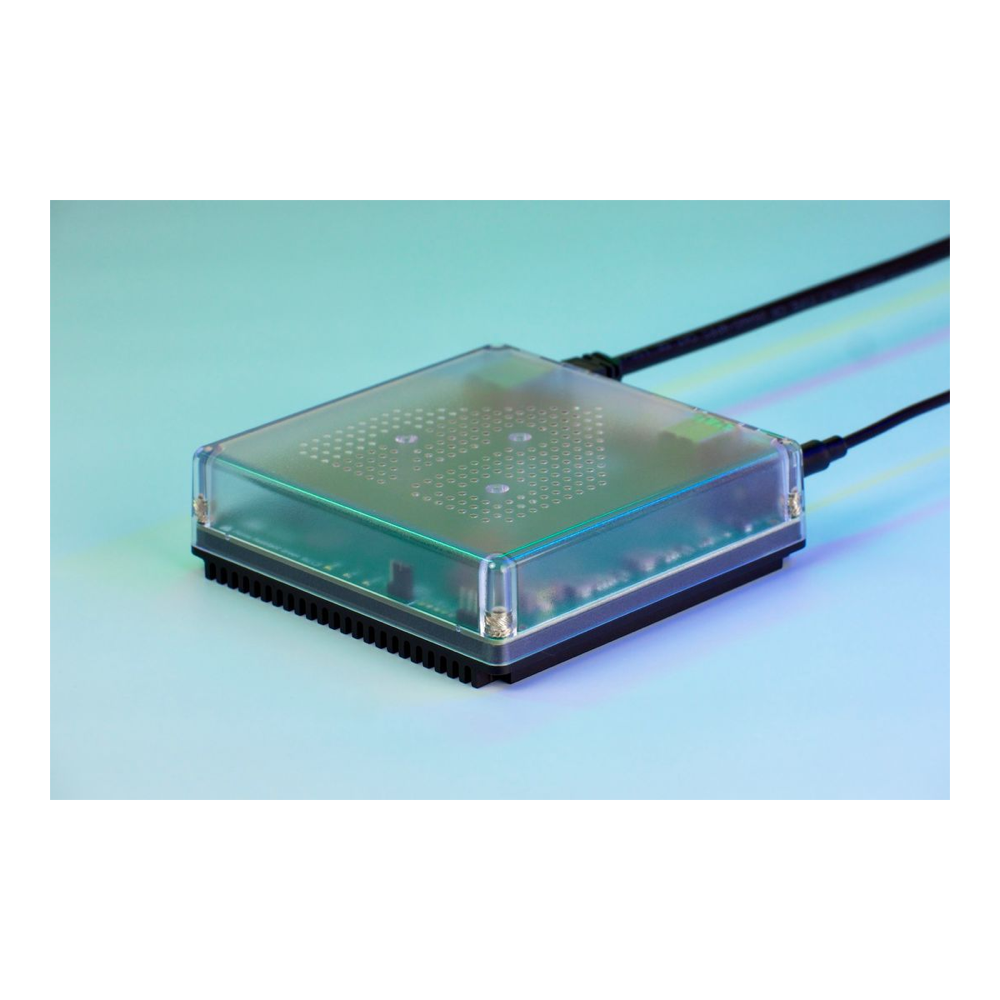
Price: approx $219. Check the live price on Amazon.
Cheapest x86 box for HAOS or Proxmox: Beelink Mini S12 Pro
An Intel N100 with 16GB of DDR4 and a 500GB SSD, enough for Home Assistant OS plus a handful of light containers. One gigabit port and a fan, which is what keeps the price down.
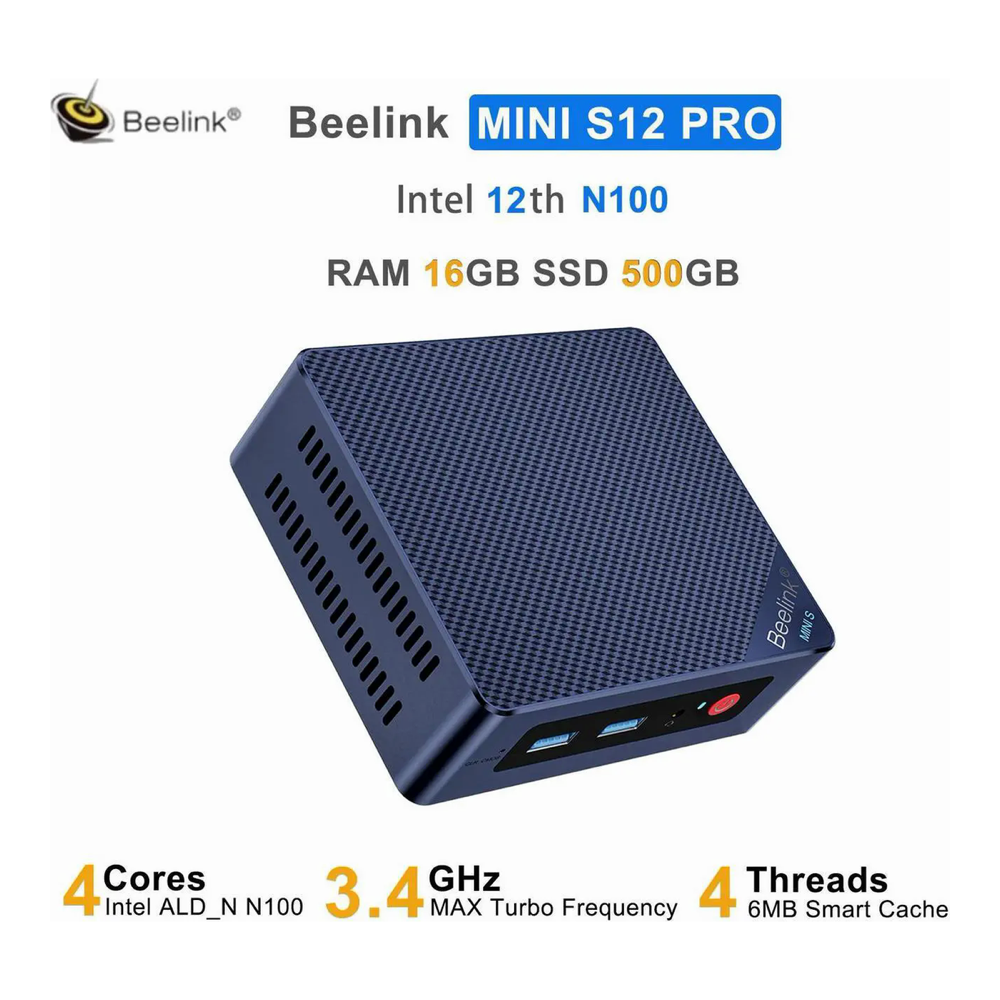
Price: approx $359 to $429, often discounted. Check the live price on Amazon.
Silent, with IoT VLANs: MeLE Quieter DL
Two Intel I226-V 2.5GbE ports and an Intel N150 in a fanless case. The network-first pick when you want IoT devices on their own interface and a hub you never hear.

Price: approx $500 to $550 for 16GB and 512GB. Check the live price on Amazon.
Proxmox, Frigate and local AI on one box: Beelink SER8
A Ryzen 7 8745HS with 32GB of DDR5, a 1TB PCIe 4.0 SSD, USB4 and Radeon 780M graphics. Buy it when Home Assistant is one VM among many, not the main job.
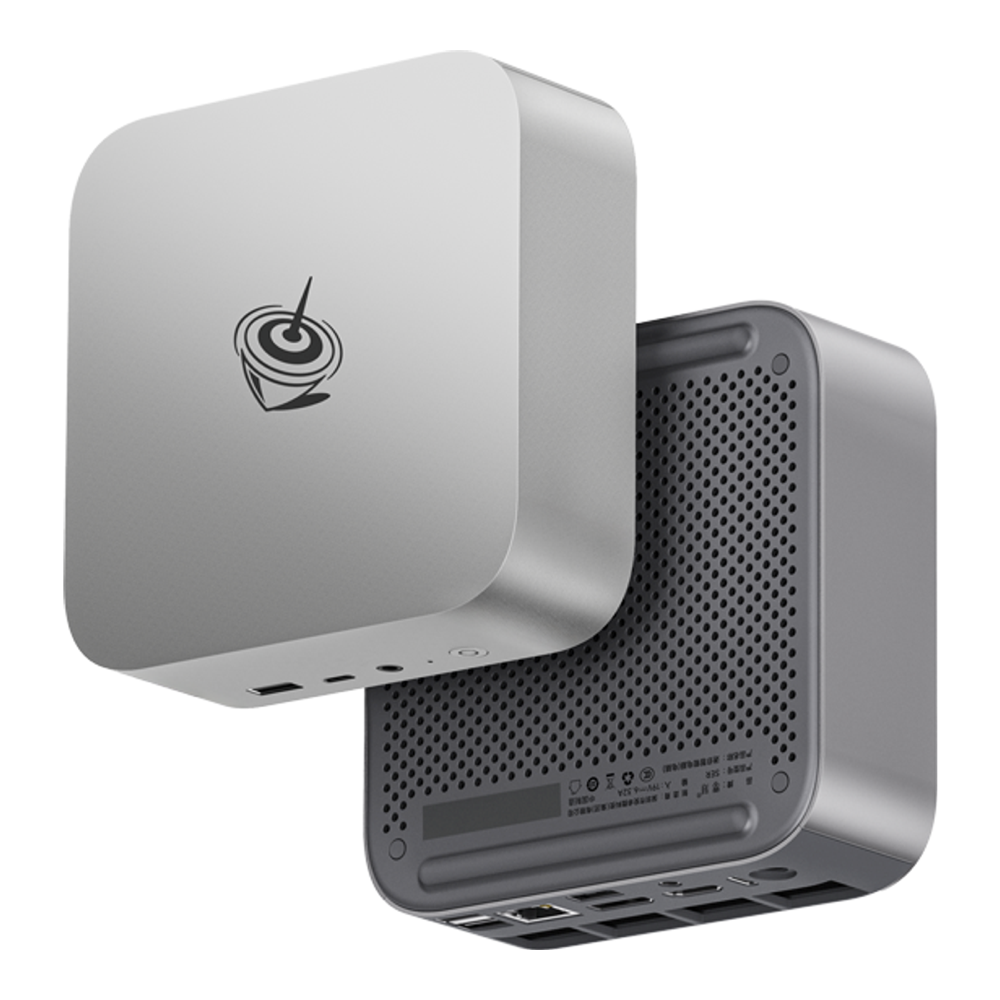
Price: approx $840 to $880, stock is thin. Check the live price on Amazon.
Home Assistant mini PC comparison table
Each pick name jumps to its full section, and each price opens the Amazon listing we checked. The idle column says where every figure comes from: the maker’s rating, a named independent review, or a TDP rating where nobody has published an idle reading.
| Pick | Best for | CPU | RAM / storage | LAN | Idle power | Price (approx) |
|---|---|---|---|---|---|---|
| Home Assistant Green | HAOS only, no setup | Rockchip RK3566, 4x Cortex-A55 | 4GB LPDDR4X / 32GB eMMC | 1x GbE | ~1.7W (Nabu Casa spec) | approx $219 on Amazon |
| Beelink Mini S12 Pro | Cheapest x86, HAOS or Proxmox | Intel N100, 4C/4T | 16GB DDR4 / 500GB M.2 SATA | 1x GbE | ~8.3 to 8.9W (Notebookcheck review) | approx $359 to $429 on Amazon |
| MeLE Quieter DL | Silent hub with IoT VLANs | Intel N150, 4C/4T | 16GB DDR4, fixed / 512GB NVMe | 2x 2.5GbE (Intel I226-V) | Not published (7W TDP rating) | approx $500 to $550 on Amazon |
| Beelink SER8 | Proxmox, Frigate, local AI | Ryzen 7 8745HS, 8C/16T | 32GB DDR5 / 1TB NVMe PCIe 4.0 | 1x 2.5GbE + USB4 | ~7 to 10W (ServeTheHome, 8845HS build) | approx $840 to $880 on Amazon |
Read the table by the column that matches your plan. If you will only ever run Home Assistant, idle power and price decide it and the Green wins both. Once Proxmox enters the picture, RAM is the column you should read first, since every VM and container reserves its own slice. The LAN column only matters if you want IoT devices on a separate network without leaning on a managed switch. The SER8 is the only row that changes what the box can do rather than how cheaply it does it: eight cores and 32GB of RAM leave room for Frigate, a media server and a local LLM at the same time.
Every spec in the table was checked against the maker’s page where one exists and the live Amazon listing (Beelink’s own S12 Pro page is gone, so its specs come from the listing). The S12 Pro idle figure is from Notebookcheck’s review of a 2023 unit running Windows, and the SER8 figure is from ServeTheHome’s SER8 review, which tested the 8845HS build of the same chassis, so read both as ballpark numbers rather than a Home Assistant OS reading. Choosing between Zigbee2MQTT and the built-in ZHA integration has its own ZHA vs Zigbee2MQTT comparison.
Home Assistant mini PC requirements
Home Assistant OS needs a 64-bit CPU that boots in UEFI mode with Secure Boot disabled, per the official x86-64 install guide, and the VM install guide sets the floor at 2GB of RAM and 2 vCPUs, with 32GB disks in its examples. That floor runs it, but it isn’t what we’d buy for a house that keeps adding devices, because the recorder database, Zigbee and Matter integrations and any apps (formerly add-ons) all grow from there:
- CPU: any Intel N100 or N150 handles a few hundred entities with ESPHome, Matter and Zigbee running. ARM works for HAOS alone, but only x86 runs Proxmox.
- RAM: 4GB is the comfortable floor for HAOS on its own. Plan on 16GB the moment Home Assistant becomes one VM among several containers.
- Storage: an SSD, not an SD card. The recorder writes sensor history all day and wears cheap flash out. One quirk from the install docs: HAOS can’t boot from a drive with native 4K sectors (4Kn), so check that before swapping in a spare drive.
- Network: one gigabit port covers most homes. A second port only earns its place when you want an isolated IoT VLAN.
- Radios: Zigbee and Z-Wave need a USB coordinator. Put it on a USB 2.0 port or a short extension cable, away from USB 3.x ports that spray 2.4GHz noise.
So 4GB and an SSD is the real minimum for a pleasant install, and 16GB is the target once Proxmox is in the plan. If the radio is still undecided, our guides to the best Zigbee coordinator and the best Z-Wave 800 stick cover the firmware and region traps.
1. Home Assistant Green: best plug-and-play hub
The Green wins when you want Home Assistant running tonight and never want to think about the hardware again. It ships with Home Assistant OS on 32GB of eMMC, so there’s no image to flash, no BIOS to configure and no Proxmox bridge to debug. You plug in the included 12V power supply and the Ethernet cable, open the app, and onboarding starts.
Inside is a Rockchip RK3566 with four Cortex-A55 cores at 1.8GHz, 4GB of LPDDR4X, a gigabit port and two USB 2.0 ports, which happen to be exactly where a Zigbee or Z-Wave stick should go. Nabu Casa rates it at about 1.7W idle and 3W under load. At 10 cents per kWh that idle figure works out to roughly $1.49 a year, and no x86 box here gets anywhere near it. The limit is the ARM chip: Proxmox doesn’t run on it, there’s no M.2 slot, and storage stays at the fixed 32GB eMMC unless you add a USB drive.
- Pick it if: Home Assistant is the only service you want on this box and you’d rather not configure Linux at all.
- Look elsewhere if: you plan to add Frigate, a media server or Docker containers later, since the Green can’t grow into that.
- Watch for: the eMMC is slower and less write-tolerant than NVMe, so keep the recorder’s history window sensible on a busy house.
Nabu Casa’s own MSRP is $199, while Amazon US lists it at about $219. The DRAM shortage has pushed every x86 pick past it, which makes the Green the cheapest ready-to-run Home Assistant hub you can buy this year. Check the Home Assistant Green on Amazon, approx $219. It’s the pick for anyone who wants the hub to be an appliance.
2. Beelink Mini S12 Pro: best cheap mini PC for Home Assistant
The S12 Pro is the cheapest way to run Home Assistant on real x86 hardware without giving up anything that matters for a smart home. Its four-core N100 and 16GB sit well above the Home Assistant OS floor of 2 vCPUs and 2GB, and that 16GB leaves room under Proxmox for Home Assistant plus a Pi-hole, an MQTT broker and Portainer. Notebookcheck measured the 2023 S12 Pro at 8.3 to 8.9W idle under Windows; that unit had a 512GB SSD, so treat the figure as a guide for the current SATA-SSD build.
Read the spec sheet carefully, because two details trip people up. The bundled 500GB drive is an M.2 SATA SSD rather than NVMe, which is plenty for Home Assistant’s database but slower for heavy VM storage, and there’s a 2.5-inch SATA bay if you want a second disk. The 16GB of DDR4 sits in a single SO-DIMM slot that the Amazon listing caps at 16GB, so this box doesn’t grow past where it starts. Its ports are four USB 3.2 Type-A, two HDMI 2.0 and one gigabit LAN, with Wake on LAN and auto power-on in the BIOS for unattended restarts after an outage.
- Pick it if: you want HAOS bare-metal or Proxmox with a few light containers for the least money on x86.
- Look elsewhere if: you want a second NIC for VLANs, or plan to stack Frigate and a local LLM on the same machine.
- Watch for: every USB port is USB 3.2, so give the Zigbee stick a short extension cable to keep it clear of the interference.
It also makes a safe first Proxmox box: flash it, break things, restore from a Home Assistant backup in minutes when you outgrow it. If you’d rather skip Proxmox entirely, Home Assistant in Docker Compose runs fine on the same hardware, minus the apps store. Check the Beelink Mini S12 Pro on Amazon, approx $359 to $429. For most first-time buyers, this is the one we’d order.
3. MeLE Quieter DL: best fanless mini PC with dual 2.5GbE
The Quieter DL wins on the two things the S12 Pro can’t do: it makes no noise, and it has two Intel I226-V 2.5GbE ports. With two NICs, one port carries your home LAN and the other an isolated IoT VLAN, and the Home Assistant VM reaches both through Proxmox bridges. On a single-NIC box that same layout needs a managed switch and tagged VLANs doing all the work.
Compute is close to the S12 Pro, so you are not paying for speed here. The N150 is a Twin Lake refresh of the N100 with four cores at up to 3.6GHz, and the listing we link pairs it with 16GB of DDR4 and a 512GB NVMe SSD. MeLE’s spec table rates this DDR4 build at a 7W TDP (the Amazon listing says 10W), and we did not measure one, so the idle figure in the table is the rating rather than a reading. Fanless has a cost you can feel: MeLE’s listing warns the case surface runs at 55 to 70°C under sustained load, which is normal for passive cooling, and under long all-core loads the chip can throttle where a fanned box would spin up. The I/O suits a hub: a dedicated USB 2.0 port for the Zigbee stick, plus USB 3.2 Gen 2, USB 3.2 Gen 1 and a full USB-C port.
- Pick it if: the box lives in a living room or office, and you want IoT traffic on its own NIC.
- Look elsewhere if: you only need one network port and don’t mind a quiet fan, since the S12 Pro does the same compute for less.
- Watch for: MeLE lists no memory slot on this model, so the RAM is fixed and you should buy the 16GB build up front. The 8GB version has the same chassis but leaves Proxmox short.
We switched the link to MeLE’s own 16GB and 512GB listing this month, because the ASIN we used before now opens a 4GB variant. Check the MeLE Quieter DL on Amazon, approx $500 to $550 with only a few units in stock. It’s the pick for a silent, network-first hub that stays on the shelf for years.
4. Beelink SER8: best for Proxmox, Frigate and local AI
The SER8 is a different class of machine, and it wins only when Home Assistant shares the box with heavy neighbours. Its Ryzen 7 8745HS has eight Zen 4 cores and sixteen threads at up to 4.9GHz, which is the 8845HS without the NPU and with a 4.9GHz rather than 5.1GHz boost, and nothing in a Home Assistant stack uses that NPU anyway. ServeTheHome reviewed the earlier 8845HS build of this chassis and measured 7 to 10W for the whole system at idle, with package power of only 3.5 to 4.7W, so the extra cores cost less at idle than the TDP suggests.
Headroom is the reason to pay for it. Eight cores and 32GB let a Frigate NVR, a media server and the Home Assistant VM run side by side without fighting over memory. The Radeon 780M adds hardware video decode and enough GPU to run small local models through Ollama or llama.cpp, which gives you a voice assistant that never leaves the house. The listing we link has 32GB of DDR5-5600, a 1TB PCIe 4.0 SSD, two M.2 slots and a 40Gbps USB4 port for fast external storage, but only one 2.5GbE port, so VLAN segmentation goes through a managed switch.
- Pick it if: one box will run Home Assistant, Frigate, a media server and maybe an LLM, and you’d rather not buy three machines.
- Look elsewhere if: Home Assistant and a couple of containers is the whole plan, because the S12 Pro does that for less than half the price.
- Watch for: the 8745HS is a 45W laptop chip, so the fan is audible under load and stock of this exact build is thin.
If you’re planning a bigger lab around it, our mini PCs for a Proxmox homelab roundup covers the next tier up, and the Home Assistant on Ubuntu guide fits if you’d rather keep a general-purpose OS on the metal. Check the Beelink SER8 on Amazon, approx $840 to $880. Buy it for the homelab, with Home Assistant along for the ride.
What to look for in a Home Assistant mini PC
Spec sheets for mini PCs read alike, so judge them on the few things that change how a 24/7 smart home hub behaves. These are the checks to make on any candidate:
- x86 or ARM: HAOS runs on both, but Proxmox is x86 only. Buying ARM is a permanent decision to keep the box single-purpose.
- Idle power: at 10 cents per kWh (scale up for your tariff), the Green’s 1.7W costs about $1.49 a year and the SER8’s roughly 10W about $8.76. Small numbers, but they’re the only cost that never stops.
- Memory you can live with: fixed RAM (MeLE) and a 16GB cap (S12 Pro) both mean the configuration you buy is the one you keep.
- Drive type: NVMe beats eMMC and SATA for a busy recorder database, though all three are fine for HAOS on its own.
- USB 2.0 for the radio: a free USB 2.0 port or an extension cable saves hours of chasing Zigbee dropouts.
- Restart behaviour: auto power-on after an outage is what brings your automations back without anyone pressing a button.
Proxmox overhead matters more than people expect. The host takes its own share of RAM, we would give the Home Assistant VM 4GB, and every extra VM or container reserves its own allocation. As a rule of thumb, a 16GB box comfortably holds HAOS plus three or four light services, and the 32GB SER8 is for heavier stacks. If you outgrow the network side later, a second NIC is far easier to buy now than to add to a mini PC afterwards.
Can you use a Raspberry Pi or a NUC instead?
Yes, with caveats. A Raspberry Pi 4 or 5 runs Home Assistant OS, and the official docs list 2GB of RAM as the minimum. Boot it from an NVMe HAT or a USB SSD rather than a microSD card, though, because the recorder wears SD cards out. Our Raspberry Pi 5 vs N150 mini PC comparison puts the two side by side, and the Pi is still ARM, so it can’t run Proxmox.
A NUC is a mini PC with a different badge. Intel handed the NUC line to ASUS in 2023. A current ASUS NUC with similar specs costs more than the Beelink and MeLE boxes here without doing anything extra for Home Assistant, so you are better off buying on specs and price than on the name.
Where each pick falls short
The Home Assistant Green is ARM and HAOS only: no Proxmox, no native Docker, storage fixed at 32GB of eMMC, and a gigabit port that is fine for a hub but nothing more. Its strength is also its ceiling, because the day you want Frigate you’re buying a second box.
The Mini S12 Pro has a single gigabit NIC, a SATA SSD rather than NVMe, a fan, and a 16GB memory cap. The N100 is a step behind the N150 in the MeLE, and the USB 3.2-only port layout means the Zigbee stick needs an extension cable. None of that hurts a Home Assistant box, but it is why the S12 Pro tops out as a starter Proxmox host.
The MeLE Quieter DL costs well over the S12 Pro for the same class of CPU, with no USB4 and fixed RAM. Frigate runs on N-series Intel graphics through OpenVINO, according to the Frigate hardware docs, but four cores and 16GB leave far less room than the SER8 for cameras, a media server and Home Assistant together, and sustained all-core work can throttle rather than ramping a fan.
The SER8 costs approx $840 to $880 and spends most of its life idling at around 7 to 10W (ServeTheHome’s figure for the 8845HS build) while Home Assistant uses a fraction of it. Under load the 45W chip gets loud enough to notice in a quiet room, and it has just one 2.5GbE port. Buying this much compute for HAOS alone is the same mistake as buying too little, in the other direction.
If you are still torn, match the box to the plan you would actually follow through on this year. Home Assistant alone: the Green. Home Assistant plus a few containers: the S12 Pro. A silent hub with IoT on its own network: the Quieter DL. A full homelab with cameras and local AI: the SER8. Whichever you choose, check the live price before ordering, since Black Friday will move all four.