A 64GB DDR5-6000 CL30 kit on two 32GB sticks cost about $1,200 at Amazon’s US buy box on October 20, 2026. The cheapest new 64GB desktop DDR5-6000 kit, with looser timings, sat just under $1,000. So the best DDR5 RAM for a homelab or workstation in 2026 is the kit that matches your board and workload on two sticks, at a price that is not a reseller markup.
You get seven kits here: desktop 32GB, 64GB and 96GB, a mini PC SO-DIMM kit, an ECC UDIMM and a registered RDIMM. Micron has shut down its Crucial consumer line, so the Crucial picks are gone. Every price and stock state below was pulled from Amazon’s catalog API on October 20, 2026, apart from the two listings marked unavailable on October 26, and every spec was checked against the maker’s spec page or datasheet that month.
Pick the best DDR5 RAM by job
Start from the board and the job, not from the fastest kit on the shelf. A desktop AM5 or Intel build takes UDIMMs, a mini PC takes SO-DIMMs, and a server or workstation board wants ECC UDIMMs or RDIMMs:
- Best overall: G.Skill Trident Z5 Neo 64GB DDR5-6000 CL30
- Cheapest 64GB: TEAMGROUP T-Force Vulcan 64GB DDR5-6000 CL38
- Best value 32GB: Patriot Viper Venom 32GB DDR5-6000 CL30
- Best 96GB: TEAMGROUP T-Create Expert 96GB DDR5-6400
- Mini PC: TEAMGROUP Elite DDR5 SO-DIMM 32GB DDR5-5600
- ECC on an AM5, Intel or NAS board: Kingston Server Premier 32GB ECC UDIMM (unavailable on Amazon as of October 26; see our ECC UDIMM kit picks for in-stock options)
- Threadripper: Kingston FURY Renegade Pro 32GB DDR5-6400 RDIMM
If you only read one line, most homelab hosts and workstations should land on the G.Skill 64GB kit. If $200 matters more to you than a few cycles of CAS latency, the T-Force Vulcan does the same job. The two Kingston modules cost $41 to $44 a gigabyte against $15 to $21 for the desktop picks, so buy them because your board and your data need them, not as an upgrade.
Check how the kits were picked
We did not benchmark memory kits against each other. At the same speed and timings, the gap between brands sits inside run-to-run noise. What we did is narrower and more useful when prices are this high:
- live price, stock and seller from Amazon’s Creators API
- speed, timings and voltage from the maker’s page or datasheet
- new condition only, never a used or renewed buy box
- no reseller listings priced far above the same kit elsewhere
- board checks with
dmidecodeon our two Proxmox nodes
The seller rule knocked out more kits than the spec checks did. Patriot’s Viper Venom RGB 64GB CL30 shows in stock at $2,176 from a third-party seller, almost twice what the same capacity costs from other brands. Kingston’s Server Premier RDIMM was the obvious registered pick, but its only Amazon buy box in our pull was a used module, so it was dropped too.
Crucial is the bigger case. Micron announced its exit from the Crucial consumer business on December 3, 2025, and said shipments through the consumer channel would continue only until the end of February 2026. Micron still provides warranty service, but whatever Crucial stock is left won’t be replenished. Most Crucial kits on Amazon now come from resellers, such as the 128GB (2x64GB) DDR5-5600 kit at $2,299.99. The 32GB DDR5-5600 SO-DIMM was still sold by Amazon at $584.98, which is $105 more than our SO-DIMM pick.
Compare the picks
The table puts the seven picks side by side, with the price per gigabyte from the October 20 pull. Prices move weekly, so treat the bands as a guide and check the live price on the listing:
| Kit | Capacity | Speed and latency | Module | ECC | Price band | Per GB |
|---|---|---|---|---|---|---|
| G.Skill Trident Z5 Neo | 64GB (2x32GB) | 6000, CL30 | UDIMM | On-die only | approx $1,150 to $1,250 | $18.75 |
| TEAMGROUP T-Force Vulcan | 64GB (2x32GB) | 6000, CL38 | UDIMM | On-die only | approx $950 to $1,050 | $15.47 |
| Patriot Viper Venom | 32GB (2x16GB) | 6000, CL30 | UDIMM | On-die only | approx $470 to $520 | $15.16 |
| TEAMGROUP T-Create Expert | 96GB (2x48GB) | 6400, CL32 | UDIMM | On-die only | approx $1,900 to $2,000 | $20.31 |
| TEAMGROUP Elite SO-DIMM | 32GB (2x16GB) | 5600, CL46 | SO-DIMM | On-die only | approx $460 to $520 | $15.00 |
| Kingston Server Premier ECC UDIMM | 32GB (1x32GB) | 5600, CL46 | ECC UDIMM (x72) | Sideband | approx $1,250 to $1,350 | $40.62 |
| Kingston FURY Renegade Pro RDIMM | 32GB (1x32GB) | 6400, CL32 (XMP/EXPO) | RDIMM (x80) | Sideband | approx $1,350 to $1,450 | $43.75 |
Read the last column before the first. Most desktop DDR5 in our pull landed between $15 and $21 a gigabyte, with a few kits above that band, such as Kingston’s Fury Beast 32GB at $24.69 after it climbed to $790 and G.Skill’s 128GB Flare X5 at $31.64. A cheaper kit is usually a slower bin or a smaller one, not a bargain. The two Kingston modules cost two to three times as much per gigabyte. They are also single modules, so a two-channel ECC build at 64GB means buying two.
Compare 64GB DDR5-6000 CL30 (2x32GB) kit prices
Most people who land on this page want one number: what does a 64GB DDR5-6000 CL30 2x32GB kit cost? On October 20, 2026, new kits from the major brands sat between $1,199.97 and $1,299.99 at the buy box. Dropping to CL38 or CL40 saved you about $200. These are the exact buy-box prices from that pull:
| 2x32GB DDR5-6000 kit | Latency | Buy-box price, Oct 20 2026 | Stock | Sold by |
|---|---|---|---|---|
| G.Skill Trident Z5 Neo (XMP and EXPO, 44mm) | CL30 | $1,199.99 | In stock | Third party |
| G.Skill Ripjaws S5 (XMP only, 33mm) | CL30 | $1,199.99 | In stock | Third party |
| Silicon Power Value Gaming | CL30 | $1,199.97 | Low stock | Silicon Power |
| Corsair Vengeance | CL30 | $1,277.19 | Unavailable by Oct 26 | Third party |
| Kingston Fury Beast | CL30 | $1,299.99 | Low stock | Amazon |
| G.Skill Flare X5 (XMP and EXPO, 33mm) | CL30 | $1,299.99 | In stock | Third party |
| TEAMGROUP T-Force Vulcan | CL38 | $989.99 | In stock | TEAMGROUP |
| Corsair Vengeance RGB RS | CL40 | $999.99 | In stock | Amazon |
| TEAMGROUP T-Create Expert | CL34 | $1,039.99 | In stock | TEAMGROUP |
The G.Skill Trident Z5 Neo kit has the cleanest price history we have, because we pull it on every refresh. It was $1,199.99 on September 6, again on October 19 and again on October 20. That flat line does not mean prices have peaked. TrendForce’s September 30 forecast puts conventional DRAM contract prices up 10 to 15% quarter on quarter in 4Q26, and retail kits follow contract prices with a lag. Our RAM price forecast for 2027 tracks those quarterly numbers if you are deciding whether to wait.
Two listings in the same search are worth skipping on purpose. The KLEVV CRAS V RGB CL30 kit showed $1,049.99 but was on backorder, and the Patriot Viper Venom RGB 64GB kit was $2,176 from a reseller. A price that looks too good or too bad on a 2x32GB kit usually tells you about the seller, not the memory.
1. G.Skill Trident Z5 Neo 64GB DDR5-6000 CL30
This is the kit most homelab hosts and workstations should buy. It is 64GB on two 32GB sticks, so a four-slot board keeps two slots free and the memory controller runs one DIMM per channel.
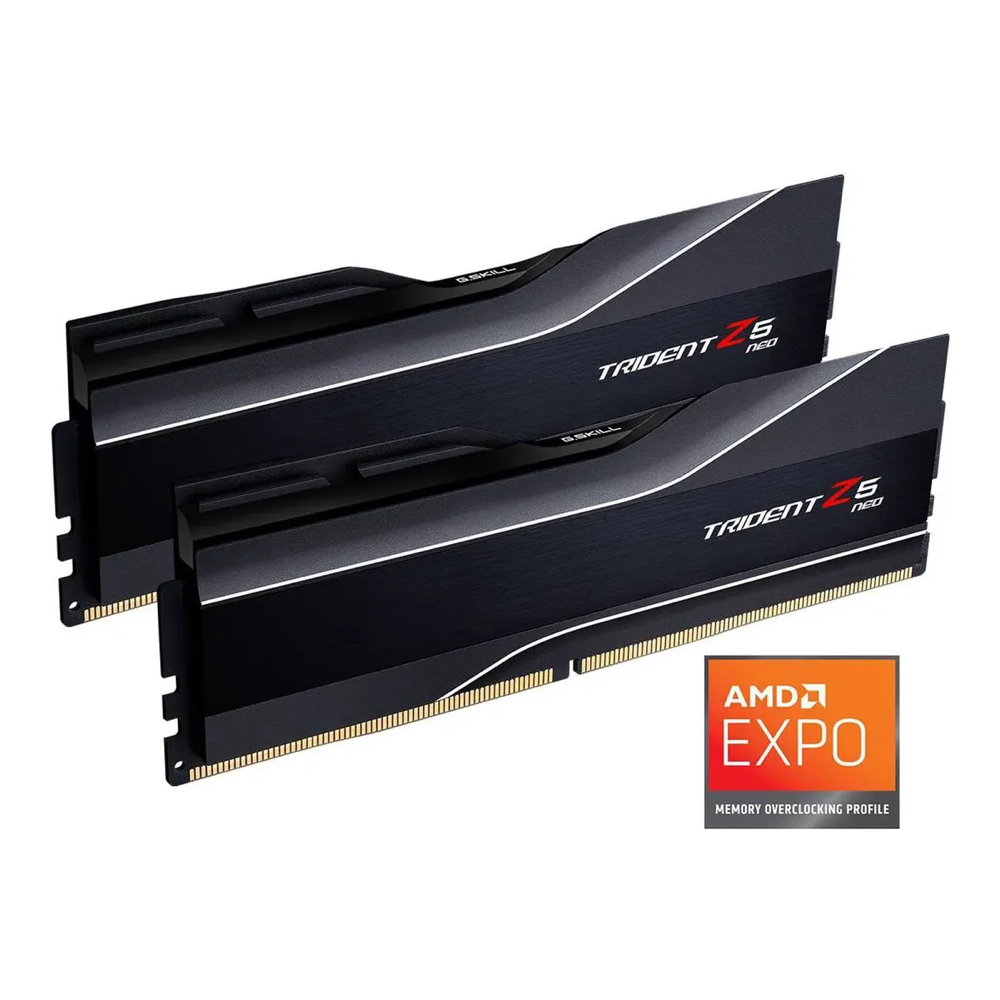
G.Skill rates part F5-6000J3040G32GX2-TZ5N at DDR5-6000 with CL30-40-40-96 timings at 1.40V. The kit carries both Intel XMP 3.0 and AMD EXPO profiles, so it suits AM5 and Intel boards alike, and until you enable one it boots at its 4800 MT/s SPD default. Check your cooler clearance before you order, because G.Skill lists the Trident Z5 Neo at 44mm tall.
If a big air cooler overhangs the slots, the 33mm Ripjaws S5 (F5-6000J3040G32GX2-RS5K) is the kit to get instead. It has the same CL30-40-40-96 timings at 1.40V and was the same $1,199.99, but it carries only an XMP profile. On AM5 with a tight cooler, the 33mm Flare X5 (F5-6000J3040G32GX2-FX5) has both profiles for $100 more.
Pass on it if 32GB covers your workload, because the Patriot kit below gives you the same speed and CAS latency for $715 less. Expect approx $1,150 to $1,250, and check the live price on the listing.
2. TEAMGROUP T-Force Vulcan 64GB DDR5-6000 CL38
The cheapest new 64GB DDR5-6000 kit in our pull, sold by TEAMGROUP’s own Amazon store. Buy it when capacity matters more to you than latency, because it’s $210 less than the G.Skill kit for the same 64GB at the same 6000 MT/s.

TEAMGROUP lists part FLBD564G6000HC38ADC01 at 6000 MT/s, CL38 and 1.35V, with XMP 3.0 and EXPO profiles and a lifetime warranty. It is validated on Intel 800/700 and AMD 800/600 series boards. CL38 against CL30 at the same speed works out to roughly 12.7 ns against 10 ns of first-word latency. A VM host, a build box or a ZFS server will not notice that, but a memory-bound benchmark will.
What you give up is timing, not build quality. If you tune memory by hand, spend the extra on CL30. If you would rather buy from Amazon directly, Corsair’s Vengeance RGB RS 64GB (CL40, $999.99, sold by Amazon) is the alternative. Expect approx $950 to $1,050, and check the live price.
3. Patriot Viper Venom 32GB DDR5-6000 CL30
The best-value 32GB kit, and the cheapest desktop kit per gigabyte in this guide. In September it was the budget pick behind Kingston’s Fury Beast 32GB. Since then the Fury Beast has climbed to $790 while the Patriot stayed under $500, so the two swapped places.

Part PVV532G600C30K is a non-RGB matte black kit at DDR5-6000 CL30 and 1.35V, with XMP and EXPO profiles. Patriot’s own store sells it on Amazon, which matters because the seller is who you deal with on a return. The store also kept the price steady across our pulls: $479.99 on September 6 and $484.99 on October 19 and 20. For a daily-driver workstation, a small Proxmox node or a desktop that compiles code, this is where your money goes furthest.
It stops making sense once you need 64GB. A second kit means four sticks, and the four-DIMM section below shows why one 64GB kit beats two 32GB kits. Expect approx $470 to $520, and check the live price.
4. TEAMGROUP T-Create Expert 96GB DDR5-6400 CL32
The 96GB pick. Two 48GB modules give a homelab host room for a dozen VMs or a local LLM’s CPU offload without going to four DIMMs.

TEAMGROUP specifies part CTCWD596G6400HC32ADC01 at 6400 MT/s, CL32 and 1.4V, validated on Intel 800/700 and AMD 800/600 series boards, with a lifetime warranty. Do not expect 6400 on every board, though. AMD rates two dual-rank DIMMs on a Ryzen 9 9950X at DDR5-5600, so 6400 is an EXPO overclock your board may or may not hold. Dropping to 6000 or 5600 costs a VM host very little.
Weigh the price before the capacity. At $1,949.99 it’s $20.31 a gigabyte, the most of any desktop pick here, and $750 more than the 64GB pick. If you can’t name what fills the extra 32GB, buy the 64GB kit now and upgrade when prices ease. Expect approx $1,900 to $2,000, and check the live price.
It is not the cheapest big kit per gigabyte, though. TEAMGROUP’s T-Create Expert 128GB (2x64GB) DDR5-6400 CL42 was $2,559.99 from TEAMGROUP’s store, which is $20.00 a gigabyte, so if your board takes 64GB modules the 128GB kit is the better buy per gigabyte. TEAMGROUP validates it only on Intel 800 series, AMD 800 series and Ryzen 9000, so check your board first. The other 128GB kits we found ran from $2,299.99 (a reseller’s leftover Crucial kit) to $4,049.99.
5. TEAMGROUP Elite DDR5 SO-DIMM 32GB DDR5-5600
Mini PCs and laptops with socketed DDR5 take 262-pin SO-DIMMs. Check that your box takes DDR5 first, because plenty of mini PCs, including the NUC 11 we run as pve02, still use DDR4. This kit is 32GB on two 16GB sticks at DDR5-5600 CL46 and 1.1V, a standard JEDEC speed, so it needs no XMP profile to reach its rating.

TEAMGROUP lists part TED532G5600C46ADC-S01 at 5600 MT/s, CL46 and 1.1V with a lifetime warranty, and TEAMGROUP’s own store sells it on Amazon. It runs at 5600 only if the CPU supports that speed. Intel lists the N100 at a 4800 MT/s maximum on a single memory channel, and many budget mini PCs cap DDR5 at 4800 or 5200, so the kit simply runs slower there. The N100 is also rated for 16GB on its one channel, and most N100 boxes have a single slot, so a two-stick 32GB kit is the wrong buy for one.
If this kit is gone, look at two others. G.Skill’s Ripjaws DDR5 SO-DIMM 32GB (F5-5600S4040A16GX2-RS) has tighter timings, and its SPD default is already 5600 CL40-40-40-89 at 1.10V, so it needs no XMP either. It was $529.99 from a third-party seller, $50 more than this kit. Crucial’s 32GB DDR5-5600 SO-DIMM was $584.98 from Amazon, $105 more, and that stock won’t be replenished.
It’s the wrong kit for a mini PC you’ll load with VMs, because 32GB fills quickly once three or four guests are running. The 64GB version of the same kit (TED564G5600C46ADC-S01) was on backorder at $1,049.99 on October 20, and PNY’s 64GB DDR5-5600 kit was $788.49 with low stock. Our best mini PC for a Proxmox homelab guide lists the RAM ceiling of each box. Expect approx $460 to $520 for this kit, and check the live price.
6. Kingston Server Premier 32GB DDR5-5600 ECC UDIMM
This is real sideband ECC for boards that take unbuffered ECC DIMMs: AM5 boards that support ECC, Intel boards whose chipset supports it, and many small NAS and homelab server boards. It is a single 32GB module, so buy two for dual channel.
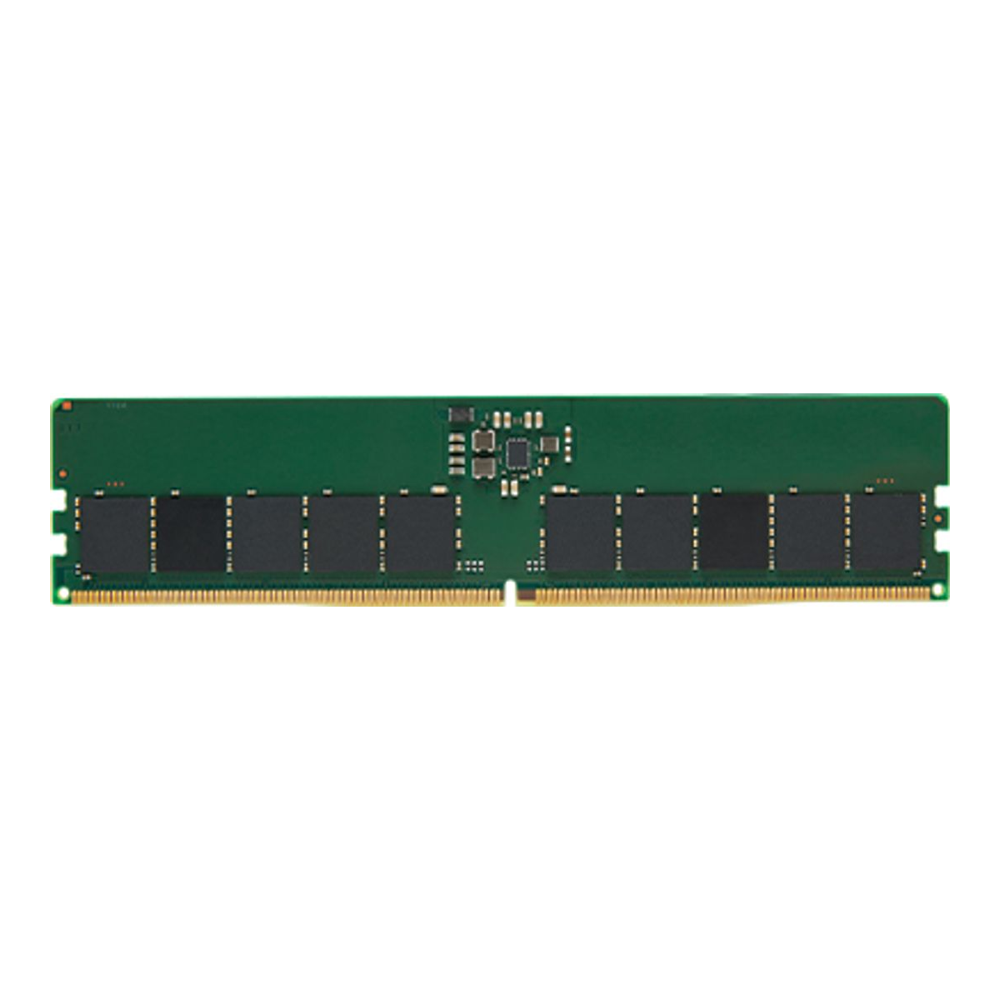
Kingston’s datasheet for part KSM56E46BD8KM-32HA describes a 4G x 72-bit module built from twenty 2G x 8 chips: SK hynix A-die, 2Rx8, DDR5-5600 CL46 at 1.1V. The 72 bits are the point. Each of the two DDR5 subchannels carries 32 data bits plus 4 check bits, so the memory controller can see and correct errors on the way to the CPU. On-die ECC can’t do that.
The catch is the board, not the module. AMD lists ECC support on the Ryzen 9 9950X as “Yes (Requires mobo support)”, and Intel’s spec page for the Core Ultra 9 285K says ECC needs both processor and chipset support. A consumer board without ECC support may boot this module and simply ignore the check bits, and then you’ve paid $41 a gigabyte for nothing. On October 20 the listing was low stock at $1,299.99 per module from a third-party seller. By October 26 Amazon showed it as currently unavailable, so the buy link is off until it returns. Expect approx $1,250 to $1,350 when it does. For more options, see our best ECC UDIMM kits guide.
7. Kingston FURY Renegade Pro 32GB DDR5-6400 RDIMM
Threadripper boards and most server platforms take registered DIMMs, and an RDIMM won’t work in a desktop or ECC UDIMM board. This is the module for a Threadripper workstation or homelab build.

Kingston’s datasheet for part KF564R32RBE2-32 lists a 4G x 80-bit registered EC8 module with twenty 2G x 8 chips. The SPD default is DDR5-4800 CL40-39-39 at 1.1V. The EXPO and XMP profiles add DDR5-6400 CL32-39-39 at 1.4V and DDR5-6000 CL32-38-38 at 1.35V. The 80 bits mean 8 check bits per subchannel, against 4 on the ECC UDIMM above.
Kingston sells it as an overclockable registered DIMM, which is exactly what AMD lists for its Threadripper platforms. AMD rates TRX50 at 4-channel memory up to 1TB and WRX90 at 8-channel up to 2TB, both on overclockable RDIMMs. No UDIMM board gets near that capacity.
Skip it unless you already own or are buying an RDIMM platform. It was $1,399.99 new and in stock from a third-party seller on October 20, and a TRX50 board wants four of them to fill its channels. On a board that doesn’t allow memory overclocking it runs at the JEDEC default of DDR5-4800, so the 6400 rating only pays on a board that exposes EXPO or XMP. Expect approx $1,350 to $1,450 per module, and check the live price.
Check what your board takes before you buy
On Linux, dmidecode reads the memory tables the firmware publishes. You can see the slot count, the module type and whether ECC is active without opening the case. We ran it as root on both of our Proxmox nodes on October 20, 2026; on a Proxmox host you’re already root, so drop the sudo. Start with the memory array, table type 16:
sudo dmidecode -t 16 | grep -E "Maximum Capacity|Number Of Devices|Error Correction Type"On pve01, an Intel Core i7-6700 on a small form factor board, it reports two slots, no ECC and a 32GB maximum:
	Error Correction Type: None
	Maximum Capacity: 32 GB
	Number Of Devices: 2
That maximum is wrong. The same box runs 64GB on two 32GB SO-DIMMs, so the number comes from an old firmware table, not from what the board can address. Never buy against the Maximum Capacity line alone; check the board maker’s spec page and the CPU’s limit. The per-module view, table type 17, tells you what’s installed:
sudo dmidecode -t 17 | grep -E "^\s+(Size|Form Factor|Type|Speed|Configured Memory Speed|Rank|Total Width|Data Width):"Here is pve02, an Intel NUC 11 (NUC11PABi7) with two mismatched 32GB SO-DIMMs:
	Total Width: 64 bits
	Data Width: 64 bits
	Size: 32 GB
	Form Factor: SODIMM
	Type: DDR4
	Speed: 3200 MT/s
	Rank: 2
	Configured Memory Speed: 2667 MT/s
	Total Width: 64 bits
	Data Width: 64 bits
	Size: 32 GB
	Form Factor: SODIMM
	Type: DDR4
	Speed: 2667 MT/s
	Rank: 2
	Configured Memory Speed: 2667 MT/s
Three lines in that output decide a purchase:
Form Factor: SODIMM, so desktop sticks won’t fitTotal Widthequal toData Width, so no check bits and no ECC- a 3200 MT/s stick configured at 2667 MT/s
The last one is the mixed-kit lesson. Both channels run at the speed of the slower module, so the faster stick paid for speed it never uses. These nodes are DDR4, but the fields read the same on a DDR5 machine, and the same thing happens when you add a second DDR5 kit. On an ECC module, the total width reads wider than the data width.
To confirm ECC is working rather than just installed, look for an EDAC memory controller:
ls /sys/devices/system/edac/mc/Both of our nodes list only the sysfs plumbing, with no mc0 entry:
power
subsystem
uevent
On a board with working ECC and the right EDAC driver loaded, an mc0 directory appears with corrected and uncorrected error counters. What a missing mc0 means depends on the platform. On AM5 the kernel’s amd64_edac driver covers Ryzen 7000 and 9000, so no mc0 there usually means ECC is off in firmware or the module didn’t load. A loaded driver logs a line like F19h_M61h detected in dmesg | grep -i edac; if there is none, running modprobe amd64_edac as root and getting No such device points to ECC being off in firmware. Intel client desktop chipsets have patchier EDAC support, so a missing mc0 on Intel proves less. Our ECC RAM for a homelab guide walks through querying those memory controllers and reading the counters.
Match the module type to the board
Four DDR5 module types cover the builds in this guide. CUDIMMs and CSODIMMs also exist: they add a clock driver to desktop and laptop modules for the higher speeds Intel’s Core Ultra 200S supports. SO-DIMMs are physically shorter than the rest, so nobody buys those by accident. The expensive mistakes are RDIMMs bought for a UDIMM board and ECC UDIMMs bought for a board that ignores ECC:
| Module | Pins | Width per module | Goes in | Pick in this guide |
|---|---|---|---|---|
| UDIMM | 288 | 64-bit | AM5 and Intel desktop boards | Picks 1 to 4 |
| SO-DIMM | 262 | 64-bit | Mini PCs, NUCs, laptops | Pick 5 |
| ECC UDIMM | 288 | 72-bit | AM5 and Intel boards with ECC support, many NAS and small server boards | Pick 6 |
| RDIMM | 288 | usually 80-bit, registered | Threadripper TRX50 and WRX90, most server platforms | Pick 7 |
On AM5, rank barely moves the rating. AMD gives the Ryzen 9 9950X the same DDR5-5600 ceiling for two single-rank or two dual-rank DIMMs, and the same DDR5-3600 for four of either, so the DIMM count sets the limit. Intel is different with four sticks, as the next section shows.
Run two sticks, not four
AMD’s spec sheet for the Ryzen 9 9950X rates two DIMMs at DDR5-5600 and four DIMMs at DDR5-3600, for single-rank and dual-rank modules alike. That is a 36% drop in rated bandwidth from filling the other two slots, before any EXPO profile enters the picture. Intel’s spec page for the Core Ultra 9 285K says up to DDR5-6400, but its datasheet (document 832586) shows that figure is for CUDIMMs. Standard UDIMMs are rated DDR5-5600 with one DIMM per channel, and the rating drops further with two DIMMs per channel, so check the board’s memory support list before filling all four slots.
So buy the full capacity as one two-stick kit:
- 32GB: one 2x16GB kit
- 64GB: one 2x32GB kit, not two 2x16GB kits
- 96GB: one 2x48GB kit
- 128GB: one 2x64GB kit, on a board that lists it
Four sticks only make sense on an AM5 or Intel desktop when you need more than two can hold and you accept the lower speed. That’s a fair trade on a VM host and a bad one on a rendering box.
Read on-die ECC for what it is
Every DDR5 module has on-die ECC, which the DDR5 standard builds into the DRAM chips to keep the denser cells reliable. DDR5 chips include it whether or not the box says so. It corrects single-bit errors inside each chip before the data leaves it. It does not report anything to the operating system, and it does not protect the data on its way from the module to the CPU. That’s why dmidecode on a gaming kit still shows Error Correction Type: None.
Sideband ECC, the kind on picks 6 and 7, adds extra chips you can count on the module (20 chips for 32GB, not 16). It lets the memory controller correct and log errors on the whole path. If you run ZFS, a database or a NAS holding data you can’t replace, that is the protection you want, and it only works with a CPU and board that support it. Our guide to ZFS RAID levels on Proxmox VE covers what ZFS checks on its own, and ECC protects the RAM that ZFS trusts.
Size the kit to the workload
Memory is the resource a homelab runs out of first, well before CPU. Size it from the guests and services you will run, plus headroom for the host. These are the sizes we would buy today:
- desktop, office or light dev work: 32GB
- workstation that compiles, edits video or runs containers: 64GB
- Proxmox or ESXi host with several VMs: 64GB to 96GB
- ZFS storage server: 32GB plus whatever its VMs need
- local LLM box offloading to CPU: 96GB or more, or an RDIMM platform
The usual advice is to buy a little more than you need. At $15 to $21 a gigabyte that advice costs real money, so buy what the workload needs now on a two-stick kit and add capacity once prices ease. If you are building a host from scratch, our Proxmox homelab server build prices the memory against the rest of the parts. The DDR4 reuse build shows how to keep the RAM you already own.
Buy now or wait for DDR5 prices to drop
If you need the machine now, buy now. Nothing in the published forecasts points to cheaper DDR5 within months: TrendForce expects contract prices to keep rising in the fourth quarter, and retail kits held flat at best across our September and October pulls. Waiting only pays when the build can slip by a year or more, and even then you are betting against the forecasts. Our explainer on why RAM and storage prices increased covers the supply side.
What you can control is how much you overpay:
- buy the capacity once, as a two-stick kit
- take a looser timing bin when the workload doesn’t care
- skip reseller listings priced far above the rest of the table
- don’t pay for ECC or RDIMMs your board can’t use
That alone separates a $990 64GB kit from a $2,176 one.