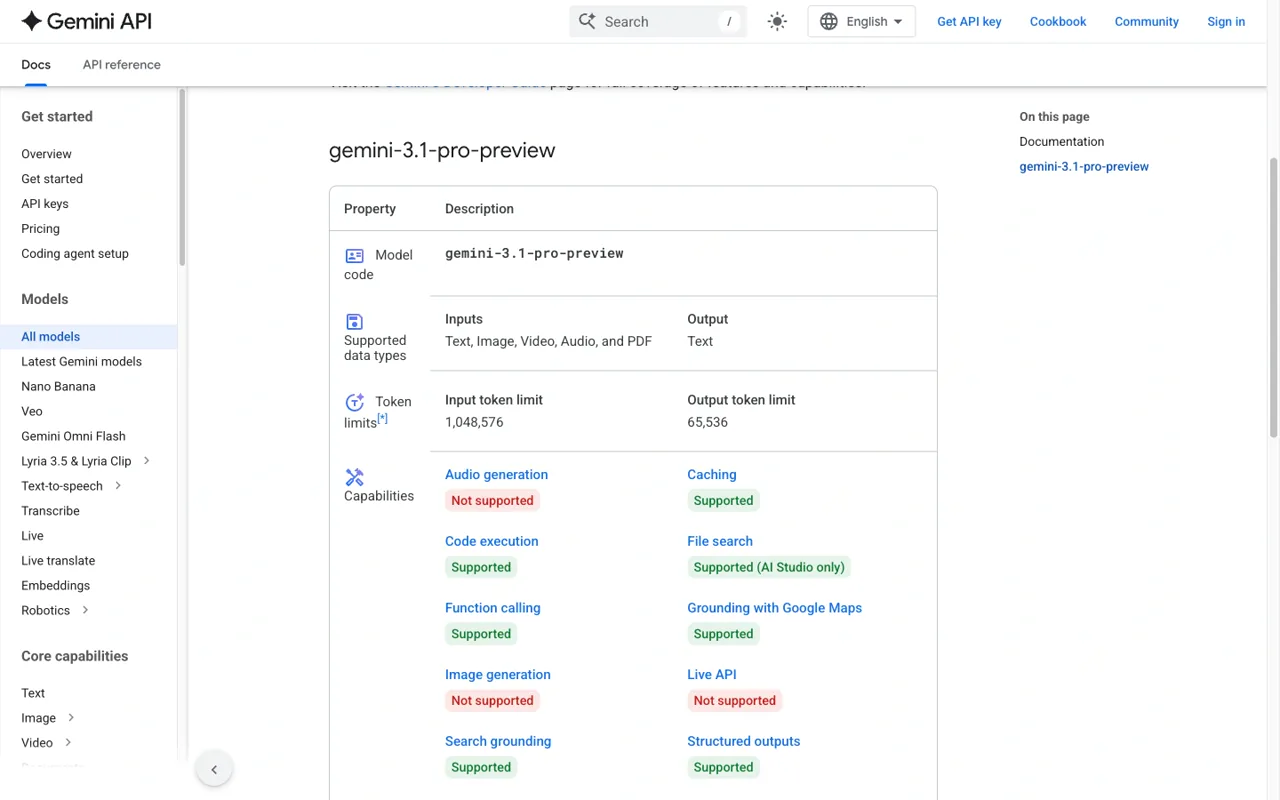
The clearest current number is the model context limit: Gemini 3.1 Pro Preview accepts up to 1,048,576 input tokens and returns up to 65,536 output tokens. That is not the same thing as an unlimited API account. Your project can still meet a rate limit, a quota, a billing-tier restriction, or a Google Gemini Apps usage cap.
This guide separates those layers and replaces the old “bypass” framing with practical fixes: identify the limit, shorten or batch the request, retry with backoff when it is a transport issue, and choose the right route for the job.
If you need to continue a long coding or research workflow while one route is throttled, GlobalGPT keeps Gemini 3.1 Pro alongside other models and AI functions in one workspace. Its API, CLI, MCP, and Yukie agent routes are useful when the task needs a repeatable handoff; they do not raise Google’s own quota.
What are the Gemini 3.1 Pro limits?
| Limit layer | Current evidence | What it controls |
|---|---|---|
| Model input context | 1,048,576 tokens | How much text, media, and conversation context one request can contain. |
| Model output | 65,536 tokens | How much text, including thinking tokens where applicable, one response can return. |
| API pricing boundary | 200,000 input tokens | Which input/output rates apply on the standard paid tier. |
| Project quota | Depends on Google Cloud / AI Studio billing and quotas | How many requests or tokens the project can send over a period. |
| Gemini Apps usage | Compute-based; refreshes every 5 hours until a weekly limit | Consumer-app access, features, and plan-specific usage. |
There is no single “Gemini 3.1 Pro limit” switch. A request can fit inside the context window and still receive a 429 because the project is sending too many requests, the account has exhausted a quota, or the service is temporarily busy.
Token and context limits
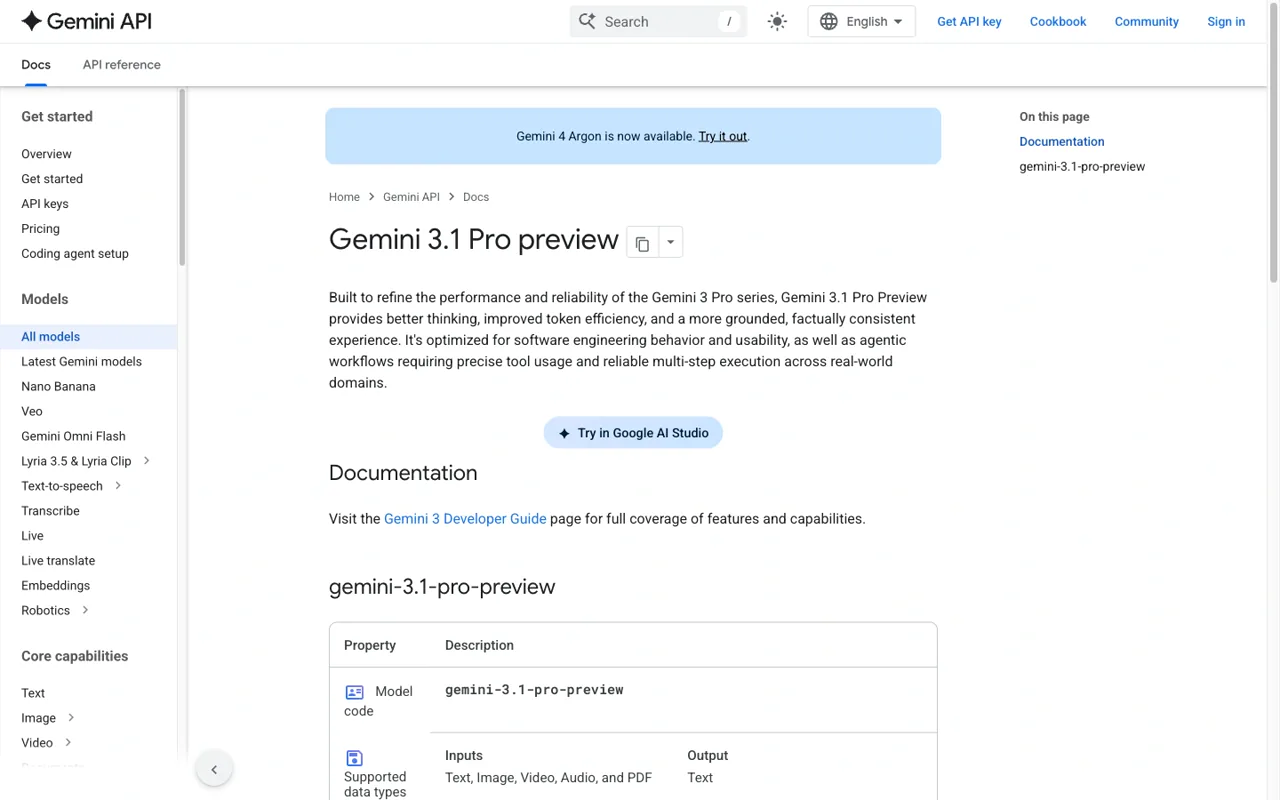
Google’s model page identifies the endpoint as gemini-3.1-pro-preview. It accepts text, images, video, audio, and PDF input and returns text. The page lists support for thinking, caching, code execution, function calling, Google Search and Maps grounding, URL context, structured output, Batch API, Flex, and Priority options.


API rate limits and quota layers
API limits are set at the project and billing layer, not only by the model name. Check the project’s quota page for requests per minute, tokens per minute, daily limits, and the active billing tier. Google can change the available values by region, account, and service tier, so an old blog number is not a safe current quota.
- RPM: requests per minute. Many small calls can hit this before token capacity.
- TPM: tokens per minute. A few large-context requests can consume it quickly.
- Daily or monthly quota: a longer-period allowance that can remain exhausted after a short retry.
- Billing state: a project may need billing enabled for higher limits or production access.
- Tool usage: Search grounding, Maps grounding, function calls, and other tools can add work and cost.
The 200k pricing threshold is a billing boundary, not a hard context limit. A 250k-token request can fit inside the 1M context window while being charged at the higher standard rates.
How to fix a Gemini 3.1 Pro 429 error

- Read the response details. Record the model ID, project, status code, retry-after value, and the quota name when the API returns one.
- Stop the burst. Do not fire the same request in a tight loop; that can extend the throttling window.
- Retry with exponential backoff. Use a small bounded number of retries and respect Retry-After when present.
- Reduce the request. Shorten the history, remove repeated files, lower the output budget, or split the work into stages.
- Check project quotas and billing. A retry cannot repair a quota that is already exhausted.
- Move the task deliberately. For a deadline-sensitive interactive job, continue the brief in another model or workspace rather than pretending the provider limit has disappeared.
These steps fix transport and workload problems. They do not bypass provider controls, and they should not be used to evade safety or account restrictions.
How to send long-context work without wasting the budget
Long context works best when the request has a clear job. Put the shared reference material in a stable prefix, ask for an index or extraction first, then send only the relevant sections to the next stage.
- Start with an outline or key-fact extraction instead of asking for a full rewrite immediately.
- Keep a stable project brief and pass a compact state summary between steps.
- Use caching when the same long prefix is sent repeatedly and the provider’s billing data confirms cache hits.
- Use Batch or Flex when the work is asynchronous and your service tier supports it.
- Keep output limits high enough for the job but low enough to prevent accidental giant responses.

When API, CLI, MCP, or a workspace route fits
Use the API when your application needs programmable calls, logs, and a provider bill. Use CLI when the model needs to work beside a terminal or repository. Use MCP when the task needs approved tools such as file search, code access, or internal services. Use a Yukie agent when the work spans planning, tool calls, and handoffs.

GlobalGPT is most useful here as a continuity layer: compare a response, continue drafting, hand the brief to code or creative tools, and keep the cost decision separate from a Google API quota. For the current pricing math, see the Gemini 3.1 Pro pricing guide.
FAQ
What is Gemini 3.1 Pro’s maximum input?
Google’s current model page lists 1,048,576 input tokens for gemini-3.1-pro-preview.
What is the maximum output?
The same page lists 65,536 output tokens. Output and thinking tokens should be included in planning and billing discussions.
Does a 1M context window mean unlimited use?
No. It describes the size of one request’s context. Project quotas, rate limits, billing, and app usage rules still apply.
How do I fix 429 Too Many Requests?
Read the response details, respect Retry-After, back off, reduce request size or frequency, and check project quotas and billing. A retry loop is not a quota increase.
Can GlobalGPT remove Gemini 3.1 Pro limits?
It cannot change Google’s limits. It can provide another model and workflow route when the job needs to continue.
Diagnose the layer first: context capacity, output budget, project quota, app usage, and temporary throttling need different fixes.