Google’s current Gemini 3.1 Pro API rate is $2 per million input tokens and $12 per million output tokens for prompts up to 200,000 tokens. Above the 200k input boundary, the published rates rise to $4 per million input tokens and $18 per million output tokens. Cached input is priced at $0.20/M or $0.40/M, plus $4.50 per million cached tokens per hour for storage.
The model page identifies the endpoint as gemini-3.1-pro-preview, with a 1,048,576-token input limit and a 65,536-token output limit. It supports thinking, function calling, search grounding, URL context, code execution, Batch API, Flex, and Priority options. Those capabilities explain why the bill needs more than one headline number.
If your work is interactive—researching a brief, comparing models, writing code, and then handing the result to an agent—GlobalGPT gives you a subscription workspace across models and AI functions. Developers can also look at the API, CLI, MCP, and Yukie agent routes when the work needs to move from a chat into a repeatable workflow. The API price below remains Google’s own metered price.
- What Gemini 3.1 Pro is and what the context limit means
- Gemini 3.1 Pro API pricing per million tokens
- Worked Gemini 3.1 Pro API cost examples
- How context caching changes the bill
- Consumer plans are different from API billing
- When API, CLI, MCP, or a multi-model workspace fits
- Consumer plans and API billing solve different jobs
- Turn the rate card into a real estimate
- What a large context changes in practice
- When a workspace is better than a token ledger
- FAQ
What Gemini 3.1 Pro is and what the context limit means
Google’s current model page calls Gemini 3.1 Pro Preview a model tuned for stronger reasoning, software engineering, precise tool use, and multi-step agent workflows. The model accepts text, images, video, audio, and PDF input, then returns text.
| Model detail | Published value | Why it matters for cost |
|---|---|---|
| Model ID | gemini-3.1-pro-preview | Use the exact ID when matching a bill or SDK configuration. |
| Input limit | 1,048,576 tokens | Large context is possible, but tokens still count as input. |
| Output limit | 65,536 tokens | Long outputs can become the larger part of a request’s bill. |
| Tools | Thinking, function calling, search grounding, URL context, code execution, caching | Tool use can add requests or token usage beyond a simple prompt. |
Gemini 3.1 Pro API pricing per million tokens
Google’s pricing page separates Standard, Batch, Flex, Priority, and Contributor modes. The table below uses the current standard paid tier shown for Gemini 3 Pro Preview, whose model link identifies gemini-3.1-pro-preview.
| Standard paid tier | Prompt ≤ 200k tokens | Prompt > 200k tokens |
|---|---|---|
| Input tokens | $2.00 / 1M | $4.00 / 1M |
| Output tokens, including thinking | $12.00 / 1M | $18.00 / 1M |
| Cached input | $0.20 / 1M | $0.40 / 1M |
| Cache storage | $4.50 / 1M tokens per hour | |
| Google Search grounding | 5,000 requests/month shared across Gemini 3 and newer models; then $14 per 1,000 requests | |
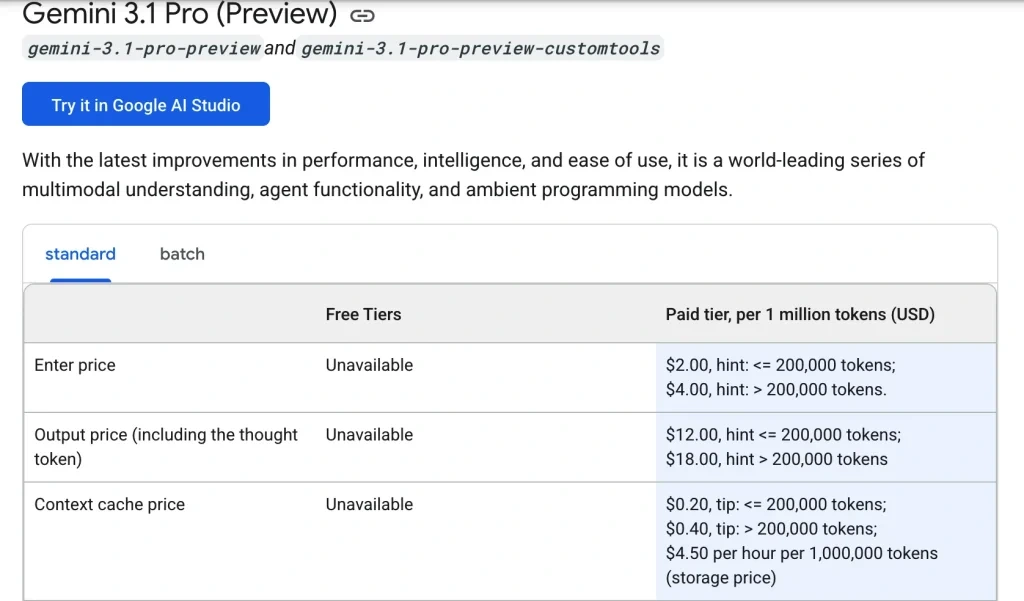
Two details are easy to miss. First, “output” includes thinking tokens in the published table. Second, a request that triggers Google Search grounding can incur search charges after the shared monthly allowance. A model answer alone is not a full invoice.
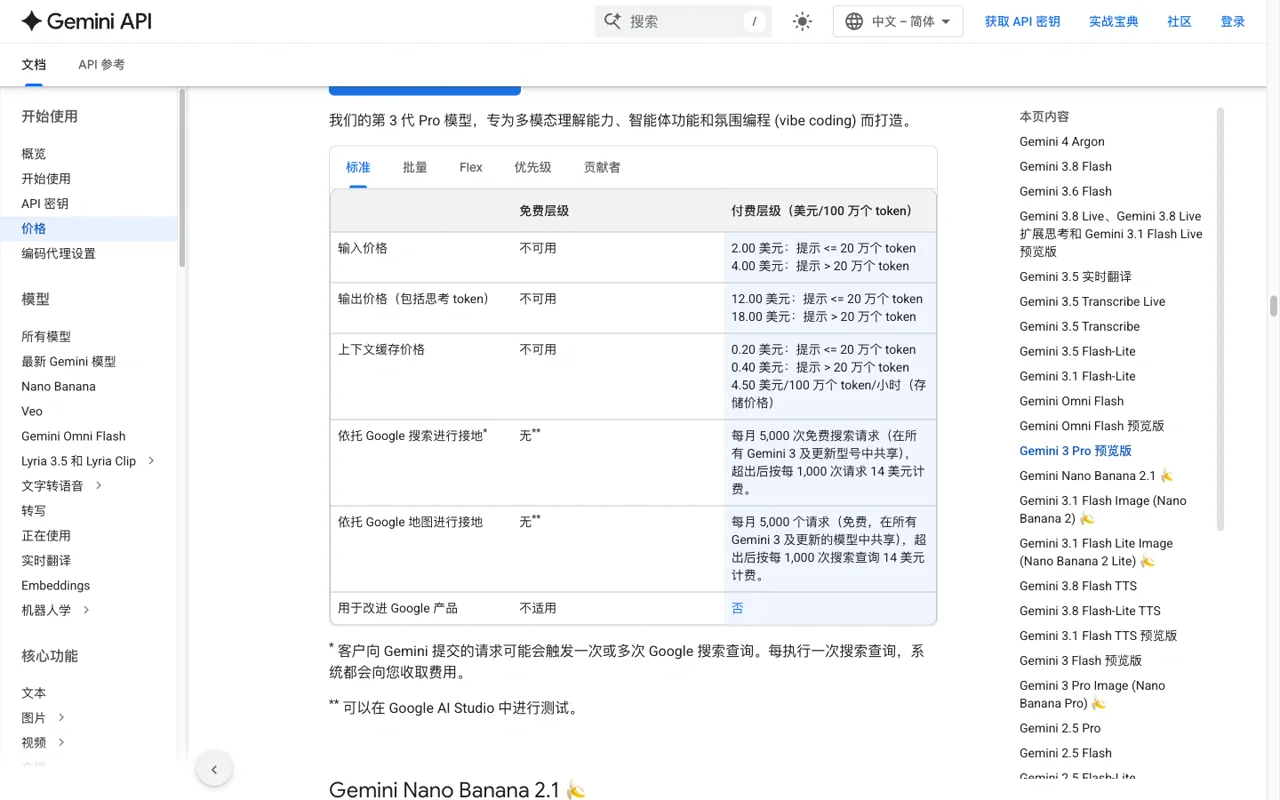
That boundary is what turns a token estimate into a different bill. If a request carries a large codebase or repeated context, count the prompt size before choosing the model or caching route.
Worked Gemini 3.1 Pro API cost examples
Use tokens ÷ 1,000,000 × the applicable rate. The examples below exclude taxes, credits, and tool-specific charges.
| Scenario | Input | Output | Estimated token cost |
|---|---|---|---|
| Short call | 50,000 × $2/M = $0.10 | 8,000 × $12/M = $0.096 | $0.196 |
| Long engineering prompt | 250,000 × $4/M = $1.00 | 20,000 × $18/M = $0.36 | $1.36 |
| 1M-token context, 50k output | 1,000,000 × $4/M = $4.00 | 50,000 × $18/M = $0.90 | $4.90 |
estimated cost = (input tokens ÷ 1,000,000 × input rate) + (output tokens ÷ 1,000,000 × output rate) + eligible tool/search charges
The 250k example crosses the 200k boundary, so the higher rates apply to the request. If the application sends a large repeated prefix, caching can change the input portion of the bill—but only for tokens that actually qualify as cached input.
How context caching changes the bill
Caching is useful when the same long instructions, codebase context, or reference material is sent repeatedly. For the standard tier shown above, cached input is $0.20/M below the 200k boundary and $0.40/M above it, while stored cached tokens cost $4.50/M tokens per hour.
That is a rate-card choice, not a guaranteed discount on every repeated request. Track cached-token usage in the provider’s billing data, and include storage time in the estimate.
Consumer plans are different from API billing
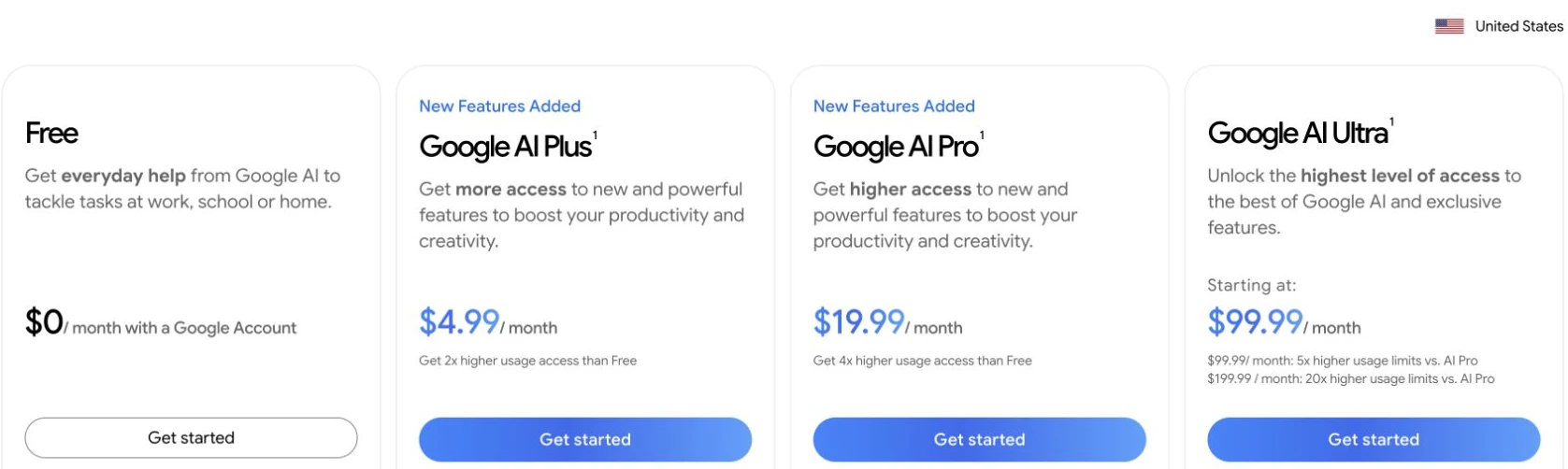
A Google AI Pro or Ultra subscription is a consumer plan with app features and access rules. Gemini API billing is metered by tokens and tools. A consumer subscription does not automatically turn into API credit, and an API project does not automatically include consumer-app benefits.
When API, CLI, MCP, or a multi-model workspace fits
Choose the API when your software needs predictable, metered calls, a provider key, and a bill you can calculate from token logs. Choose a CLI or MCP route when the model needs to work beside a terminal, repository, or existing tool server. A Yukie agent route is useful when the job is a multi-step task that needs planning and handoffs rather than one isolated completion.
GlobalGPT fits the interactive side of that decision: compare models, draft, inspect outputs, and move into coding or other AI functions in one dashboard. Its price and plan terms are a separate product decision; the Google rate card above remains the source for Gemini API cost.

Consumer plans and API billing solve different jobs
Gemini 3.1 Pro can appear in a consumer app plan and in a developer API workflow, but those are not the same invoice. A consumer plan buys access to an application and its included limits. The API charges tokens, cache storage, and any tool or grounding usage under a developer project.
| If you need… | Use the route that matches it | Budget around |
|---|---|---|
| Interactive app access | Consumer plan | Plan price, included access, and current usage limits. |
| A script or product integration | Gemini API | Input, output, cached input, storage, and tool charges. |
| Repository work beside a terminal | CLI or an API-connected tool | Model calls plus the workflow that invokes them. |
| A multi-step research-to-production flow | MCP or a Yukie agent | Model usage, approved tools, and the number of handoffs. |
Do not describe a consumer subscription as API credit, and do not use API token rates to promise access to an app feature.
Turn the rate card into a real estimate
Start with the prompt size, not the model name. Count the input tokens, identify whether the request crosses the 200,000-token boundary, estimate the output including thinking tokens when the rate card includes them, and add any search or grounding charges.
- Short request: input tokens ÷ 1,000,000 × the lower input rate.
- Long request: apply the higher input and output rates to the request that crosses the threshold.
- Repeated context: count only the tokens that qualify as cached input and include cache storage time.
- Search grounding: add the published per-request charge after the shared allowance when it applies.
- Production forecast: add retries and tool calls instead of multiplying only the first response.
A token calculator is useful when its inputs are visible. Keep the boundary, billing unit, and date next to the result so a future reader can tell what the number means.
What a large context changes in practice
A one-million-token input limit does not mean every request should carry the whole repository. Large prompts increase cost and can make it harder to identify the relevant file. Start with an index, send the smallest relevant slice, and add the next file only when the first answer shows that it is needed.
- Create a short repository map before sending source files.
- Separate stable instructions from changing task context.
- Cache a repeated prefix only when the usage report confirms a hit.
- Ask for file names and line references so the result can be checked.
- Use a second pass for tests or edge cases rather than asking for an unbounded rewrite.
This is where API, CLI, and MCP become useful: the model can work beside the project, while the workflow controls which context is sent and which tool is called.
When a workspace is better than a token ledger
Use the API when you need predictable application calls and token-level accounting. Use CLI when development happens in a terminal. Use MCP when the task needs approved external tools. Use a Yukie agent when the job spans planning, tool use, and handoffs.
For interactive discovery and mixed media work, GlobalGPT’s Gemini 3.1 Pro workspace gives you a place to compare a model, write code, and continue into image, video, audio, or agent steps. The budget advantage comes from covering more of the workflow under one subscription; the Google API rate remains a separate provider charge.
FAQ
How much does Gemini 3.1 Pro cost per million tokens?
For the standard paid tier, Google lists $2/M input and $12/M output when the prompt is at or below 200k tokens. Above 200k, the rates are $4/M input and $18/M output.
Is there a free Gemini 3.1 Pro API tier?
Google’s pricing page shows a free tier with access limited to specific models. Check the model’s current row before assuming Gemini 3.1 Pro has free API access.
Does the API charge for Google Search grounding?
The current pricing page lists 5,000 free search requests per month shared across Gemini 3 and newer models, then $14 per 1,000 requests. Each search query can be billed separately after the allowance.
Does a Google AI Pro subscription include API credit?
Do not assume so. Consumer plan pricing and API token billing are separate routes and should be checked in their respective official pages.
What is the cheapest way to use Gemini 3.1 Pro?
For programmable production calls, compare the token estimate, caching, and batch or Flex options you can actually use. For interactive work across several models and functions, compare a current workspace plan separately rather than treating it as API credit.
Use the rate card as a calculator, not a slogan: identify the exact model ID, check the 200k boundary, count output thinking tokens, and keep consumer plans separate from API spend.