



Going into episode 35 of One Shot Show, I hadn’t explored Claude Mods yet. I kept seeing people show off their terminals with a bunch of cool, nerdy setups, and I couldn’t figure out the real use case. Lately I’ve been using the Claude Code desktop app more than the terminal, so I assumed mods weren’t really for me.
Then Ilia Karelin shared his screen. Above his prompt box sat a band showing how many tokens Claude had just read, a countdown until his cache went cold, and two small rings for his five-hour and weekly usage. It looked like something Anthropic had shipped. But little did we know Ilia built it himself, and it was running inside the same desktop app I use.
Before continuing, allow me to introduce Ilia.

Ilia writes Prosper, a newsletter of practical AI workflows and guides, and he joined us earlier this year for an episode on Claude Skills. This time he walked us through the mods he’s been using and built a new one live.
If you want to learn what Ilia writes about, start with these posts:
So this post focuses on one capability: how a Claude mod can change what Claude Code shows you and how it behaves. You can even create your own just by describing it to Claude. You’ll see where a mod can show up, Ilia’s three mods, the sub-agent tracker he built on the show (bug included), and ideas you can try for yourself.
A Mod Is an Add-On for Claude Code

Ilia’s analogy about Claude Mods was World of Warcraft. If you played it, you probably remember add-ons, the extra features players installed to change how the inventory looked, redraw the health bar, or warn them right before a boss did something nasty.
Mods do that for Claude Code. Here are some layers you need to know:
Skills and prompts tell Claude how to behave.
Hooks lets Claude to react when something happens.
Mods sit on top of both, and they can change what you see, what’s allowed, and what happens in the app, including changing interface itself.
Here’s a map of how Claude Mods can change the way you interact with Claude:

A band above the prompt. This is where his cache timer lives.
A side pane beside the conversation. He uses it for a task timeline in the desktop app.
The status line below the prompt, mostly in the terminal.
Toasts, the little pop-up notifications.
A tool guard that stops Claude before it removes something and tells you. Ilia admitted this barely happens with Opus 5.5 anymore, but when Claude does something wild, a guard catches it.
Slash commands of your own.
Your prompt itself, rewritten before Claude sees it, if a cleaner version helps Claude understand what you want.
Rules added to the system prompt, a bit like a CLAUDE.md that lives inside the mod.
According to Anthropic’s mods documentation, there’s another thing a mod can do: restyle parts Claude Code already draws (we’ll get to that further down).
Despite all these capabilities, one thing that was bugging me earlier was whether mods can also run in Claude Code Desktop, or if it’s just a terminal-only feature. Turns out they work in both, which was awesome since I use the Claude Desktop app more often.

Under the hood, a mod is a small folder that mostly contains two files: plugin.json, which names the mod, and hooks.json, which points to the code that does the work. You don’t need to write either one. You describe what you want, and Claude writes the mod.
Now, let’s explore some of the use cases Ilia walks through in the demo.
Cache Timer Puts Usage Limits Above the Prompt
The cache timer is the mod Ilia finds most useful, and his reason is practical.
Every time you send a prompt, the AI reads your whole session from top to bottom. The prompt cache holds that session for a while, so the next prompt costs much less to read it again. Anthropic’s prompt caching docs say the default cache lasts five minutes and resets each time it’s used, with a one-hour option.
So that’s why Ilia built it so he knows time.
His cache timer shows three things after each prompt:
How many tokens Claude read, such as “85k read.” When the cache has expired, it says “rebuild” instead, meaning Claude had to rebuild the cache from scratch.
A countdown for the cache, five minutes or one hour depending on which one the session is using. It turns red in the last 10 to 15 seconds and says “cold” once the cache has expired.
Two usage rings on the right for his five-hour and seven-day limits.
The countdown is what changes his behavior. When it turns red and he’s still thinking about what to prompt, he sends something like “hi” to reset the timer. He says that habit, plus how efficient Opus 5.5 already is, lets him keep sessions going much longer before he hits his usage limits.
Without a mod like this, you’d need to track the cache timer yourself to save more tokens.
Task Timeline That Shows How The Model Acts On Any Requests
His second mod is a task timeline in the side pane. It breaks down what Claude is doing during a request: thinking, using tools, running commands, searching. When he typed “hi,” the only bar was thinking. When he asked Claude for the last post he wrote, the pane filled with each step as Claude searched his newsletter folder.
I think this is an interesting use case because you can see how the AI model responds to your request. You’ll have more visibility into whether it behaves correctly and how many tokens it spends on each action. By seeing every step, you can tell whether Claude went straight to the answer or wandered around first.
Claude Code Wrapped, Designed by Claude
His third mod works like Spotify Wrapped for your Claude usage, with your most active times and how many tokens you’ve spent. Ilia didn’t give Claude any direction on the visuals, so Claude chose the design itself.
Building A Sub-Agent Tracker Mods
Near the end of his slides, I asked Ilia to build a sub-agent tracker mods. I run sub-agents a lot. In the desktop app, they get tucked into background tasks, and I have to click around to see what each one is doing.
His prompt was close to this: build me a sub-agent tracker as a mod, I want to see all the sub-agents running live and what each one is doing, in the side pane. While Claude was building it, it asked whether to load the mod in the current session or start a new one. Ilia kept it in the same session.
To test it, Ilia asked Claude to spin up three sub-agents to research Claude Duet. The pane showed all three running, then a finished count. Each agent took a different angle: what Duet is, pricing, and real-world use. That was what I wanted from it: I can see whether sub-agents were triggered and what they’re working on without leaving my main session.
Now, let’s stop for a moment here, because what just happened was interesting. It means you can build your own features inside Claude. This is close to making a wish that instantly comes true. The only limit is our imagination.
20 Claude Mods Ideas You Can Explore
The useful mods from this episode came from small, specific annoyances. A good place to look for your first one is anything you keep clicking into, anything Claude hides from you, and anything you keep asking for by hand.
Here are some ideas you can explore:

A usage band like Ilia’s cache timer, if you keep checking the usage page in settings.
A sub-agent tracker, if you run parallel agents and lose track of them.
An agent to-do list. I’d like to see which agents are running, which one needs my input, and which are done, so I’m not clicking here and there to find the one waiting on me. Claude may build something like this into the app eventually, but you don’t have to wait.
A repurpose button. I asked whether a mod could show a button after Claude finishes a draft that sends it to LinkedIn or X in a new session. Dheeraj thought it’s possible, and said Claude Duet already works this way: it suggests a next step and gives him a yes or no button. That’s the interaction I want, because I don’t want to write a prompt every time. I want a suggested next step and a button.
A context meter that Dheeraj described. It tracks how full your session is, warns you, and offers to compact with a proper handoff at around 70%, earlier than Claude’s own automatic compaction kicks in. Anthropic’s
token-weathersample mod draws a forecast of your context window above the prompt, if you want something to start from.A color scheme per project. Dheeraj has seen people give each terminal its own colors so they can tell at a glance which project a window belongs to.
A session replay. Dheeraj saw someone build a visual replay of everything Claude did in a session, including each code change line by line. Anthropic’s
replay-theatersample is a smaller version: a/replaycommand that steps through the file edits from the last turn.
Other ideas to explore, from Anthropic’s docs and the sample mods in its claude-code-playground repository:
Restyle something Claude Code already draws. The example in Anthropic’s mods overview adds a running count of tool calls next to the spinner, so you see “Thinking · tool calls: 3” while Claude works. A tool call’s row and the dialog Claude uses to ask you questions can be restyled too.
Your current branch above the prompt, the example Anthropic uses in its guide to creating a mod. Handy if you switch branches often.
A hold on risky commands such as
rm -rfor a force push, showing what would change with buttons to proceed or cancel.
If you want to explore more use cases, try this: go through your memory or CLAUDE.md and ask Claude, based on what it knows about your work, which mods it can build for you.
How to Ask Claude for Your First Mod

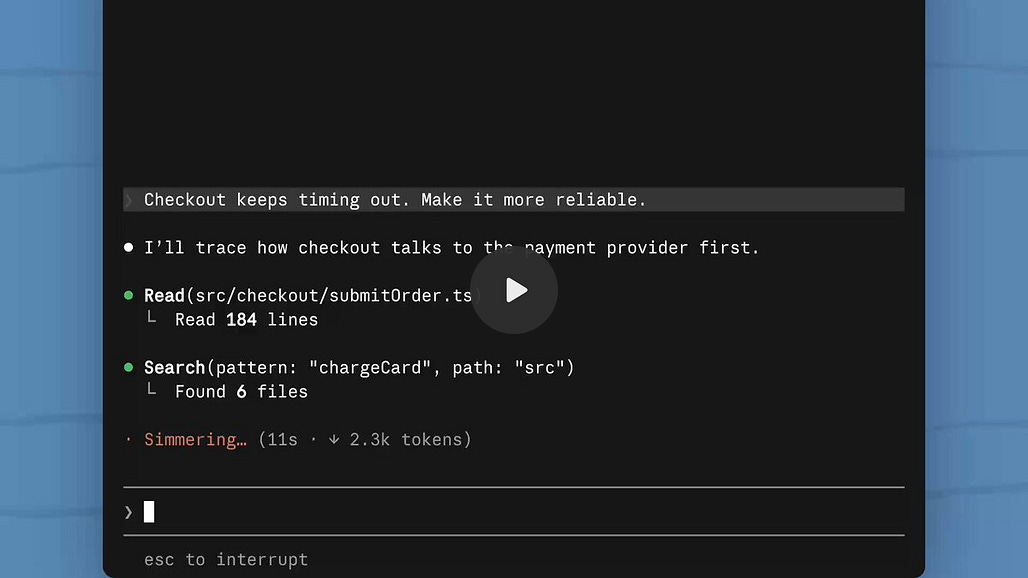
Before you build one, try one. You Should Know is a mod Anthropic built into Claude Codes. It gives a one-sentence heads-up about what Claude is about to do and what you might miss.
To build your own, open a session in Claude Code (the Code tab in the desktop app, or the terminal; regular Claude chat won’t work) and paste one of these. Claude asks you to approve the mod, and after that, any change you ask for shows up as soon as Claude finishes replying.
The prompt template you can start with and modify:
Build me a mod. I want to see [what you want to see] in [the band above the prompt / the side pane / the status line]. Update it [when]. Keep it simple: text only, no animation, no buttons for now.A first mod that only shows information:
Build me a mod that shows a one-line band above the prompt with my current git branch and the name of the project folder. Update it at the start of each turn.A usage band like Ilia’s cache timer:
Build me a mod that shows a one-line band above the prompt with how many tokens this session has read, how long until the prompt cache expires, and how much of my five-hour and weekly usage I've used. Update it after each turn.A sub-agent tracker, with what we learned on the show:
Build me a sub-agent tracker as a mod. I want to see every sub-agent running live in the side pane, what each one is working on, and whether it's running or done. Keep each agent collapsed by default so the list doesn't keep growing down the pane. No buttons for now.To identify mods using your instructions and memory of how you work with Claude:
Read my CLAUDE.md and my memory. Which of these instructions could work better as a mod? For each one, tell me what the mod would show or do, and whether I could remove the instruction afterward.This prompt will unlock more ideas for what mods to build next.
But in case you want to explore someone else’s mod, there’s one thing you need to know. A mod runs with your permissions and isn’t sandboxed, so it can read your files and the secrets in your settings, see your prompts, make network requests, and approve tool calls for you.
If you want to install someone else’s mods, ask Claude to review the mod’s files before you install anything you found on GitHub or X.
Something like:
Before I install this mod, read every file in [folder]. Tell me which events it listens to, whether it reads files or secrets, whether it makes network requests, and whether it approves any tool calls on its own. Flag anything that doesn't match what the mod says it does.You Don’t Have to Accept the Interface You’re Handed
Lastly, Dheeraj compared mods to Pi, which he described as the minimal open-source AI harness. Pi ships almost nothing by default and lets users build the features they need. In his view, mods are Anthropic’s more polished version of that idea, though Pi still lets you go further into the harness itself.
I think this ties closely to the lessons I took from the episode. A company doesn’t have to build every feature anymore, because users can build the ones they need, when they need them, simply by describing them. You’re also no longer stuck with whatever interface a tool shipped with. Ilia framed it in terms of skills: skills changed how we work with AI models, and mods are the next step, because now you can change the app you work in, too.
With this in mind, I’m excited to experiment more to improve my own experience using Claude Code.
Show Details
Show: One Shot Show
Episode: 35
Topic: Claude Mods, customizing Claude Code’s interface
Guest: Ilia Karelin
Hosts: Wyndo and Dheeraj
Ilia’s earlier episode on Claude Skills: The Claude Skills Playbook I Wish I Had on Day One
Timestamps
00:00 Intro
01:41 Episode 35: Claude Mods with Ilia
03:01 What Ilia will cover
04:16 The World of Warcraft add-on analogy
05:01 Skills, hooks, and where mods sit
06:47 Map of where a mod can change Claude Code
08:49 Wyndo asks whether mods work in the desktop app
09:14 plugin.json and hooks.json
09:31 Where to find mods: Anthropic’s You Should Know
10:34 Installing other people’s mods safely
11:37 How a mod fits into a turn
14:07 Demo: Ilia’s cache timer in the desktop app
14:42 Why the prompt cache matters
16:17 Five-hour and seven-day usage rings
17:01 Ilia and Wyndo: it looks native
18:11 The task timeline side pane
21:23 “Cold” and “rebuild” states
21:57 Dheeraj joins
22:59 The terminal version in the status line
24:30 The /plugin menu and three active mods
25:30 Claude Code Wrapped
28:13 Mod ideas: cache timer, task timeline, context meter, sub-agent tracker
28:49 Wyndo asks about a sub-agent tracker
30:23 Dheeraj: mods beyond the interface
31:42 A session replay mod
32:47 A context meter with an earlier handoff
33:55 Self-critique and review loops
34:26 Wyndo’s idea: a repurpose button after a draft
35:04 Dheeraj on Claude Duet’s yes or no buttons
37:23 Live build: a sub-agent tracker in the side pane
38:58 Hot reload or a new session
40:33 Ilia’s advice: keep visuals still
42:27 Dheeraj compares mods to Pi
43:52 Building the features you need yourself
45:29 Testing with three sub-agents researching Claude Duet
46:13 The Open transcript button doesn’t work
48:07 Wyndo on why seeing sub-agents matters
48:42 Claude’s fix and “no main window here”
50:44 A color scheme per terminal
51:11 Ilia: skills first, then mods
52:21 Wyndo: I thought mods were for the terminal
53:27 Dheeraj: baking workflow rules into mods
54:45 Wyndo: an agent to-do list
55:44 Dheeraj’s mod with no interface
58:29 Ilia: audit memory and CLAUDE.md for mod candidates
59:32 Where to find Ilia
1:00:49 Wrap-up
Resources Mentioned
Claude Mods: Plugins whose code runs inside Claude Code to draw panes, bands, and commands, restyle parts of the interface, or step into tool calls. They work in the terminal, the desktop app’s Code tab, and the VS Code extension.
plugin.json and hooks.json: The two files Ilia pointed to in every mod. One names it, the other points to its code.
plugin-authoring skill: The built-in skill Claude uses to write a mod when you ask for one. Not named on the show; from Anthropic’s docs.
You Should Know: A mod built into Claude Code. Ilia uses it on long tasks for a one-sentence heads-up about what Claude is about to do and what you might miss. Off until you turn it on.
Ilia’s mod map and ideas graphic: The slides Ilia showed of where a mod can act and what to build. Promised to viewers.
Ilia’s cache timer: His mod showing tokens read, a five-minute or one-hour cache countdown, and five-hour and seven-day usage rings.
Ilia’s task timeline: A side pane that shows each step Claude takes during a request.
Claude Code Wrapped: Ilia’s Spotify Wrapped-style mod for your most active times and tokens spent. Claude chose its design.
Sub-agent tracker: The mod Ilia built live. It showed sub-agents running and finished; its Open transcript button still didn’t work by the end of the show.
Claude Code desktop app and terminal: Ilia showed his mods in both. In the terminal, his timer lives in the status line.
/plugin menu: Where Ilia’s session showed “three mods active” and the built-in mods.
Prompt caching: Holds your session so the next prompt costs less to read. Five-minute default, one-hour option. On the API, cache hits on Opus 5.5 cost 5% of the base input price, per Anthropic’s docs as of October 2026. Ilia remembered it as about 90% off, the rate on most other Claude models.
Opus 5.5 and Haiku: Ilia credited Opus 5.5’s efficiency for making his sessions last, and mentioned spinning up Haiku agents for a quick test.
Claude Pro plan: Ilia’s plan, and why the cache timer matters to him.
Sub-agents and background tasks: Where the desktop app tucks running agents today.
Claude Duet: The topic of the sub-agent test. Dheeraj got access the day before and described its suggested next steps with yes or no buttons.
Pi and OpenClaw: Pi is the minimal open-source AI harness Dheeraj compared mods to. He described OpenClaw as built on it.
Other uses Dheeraj described: His idea for a mod that runs a whole content or video pipeline (brainstorm, hooks, plan, execution, some steps in parallel) from one prompt, and the self-critique loops he’s seen people build to review Claude’s work and steer it mid-session.
Dheeraj’s to-do mod: His mod with no interface that records the fixes he asks for as to-dos in his content pipeline, so the next run picks them up.
Dynamic workflows: Mentioned by Dheeraj as something you can ask Claude to create, and something a mod could do for you by default.
Hooks, skills, CLAUDE.md, and memory: The other ways to shape Claude’s behavior. Ilia suggested checking CLAUDE.md and memory for instructions that could become mods.
GitHub and X: Where people share mods. Check the files before installing.
TypeScript: Ilia believes his mods are written in TypeScript plus something else.
World of Warcraft add-ons and Spotify Wrapped: Ilia’s comparisons for mods and for his Wrapped mod.
LinkedIn, X, and Substack Notes: Channels in the repurpose button idea and Dheeraj’s Duet example.
Grok Bot: Mentioned when we talked about proactive agents.
Anthropic’s sample mods: token-weather, blast-radius, and replay-theater. Not mentioned on the show; added as ideas to explore.


