This blog is part of a multi-part blog series that shows how to run your applications on Kubernetes. It will use the Couchbase, an open source NoSQL distributed document database, as the Docker container.
- Part 1 explained how to start Kubernetes cluster using Vagrant – Kubernetes on Vagrant
- Part 2 did the same for Amazon Web Services – Kubernetes on Amazon Web Services
- Part 3 did the same for Google Cloud – Kubernetes on Google Cloud
This fourth part will show:
- How to setup and start the Kubernetes cluster on Azure
- Run Docker container in the Kubernetes cluster
- Expose Pod on Kubernetes as Service
- Shutdown the cluster
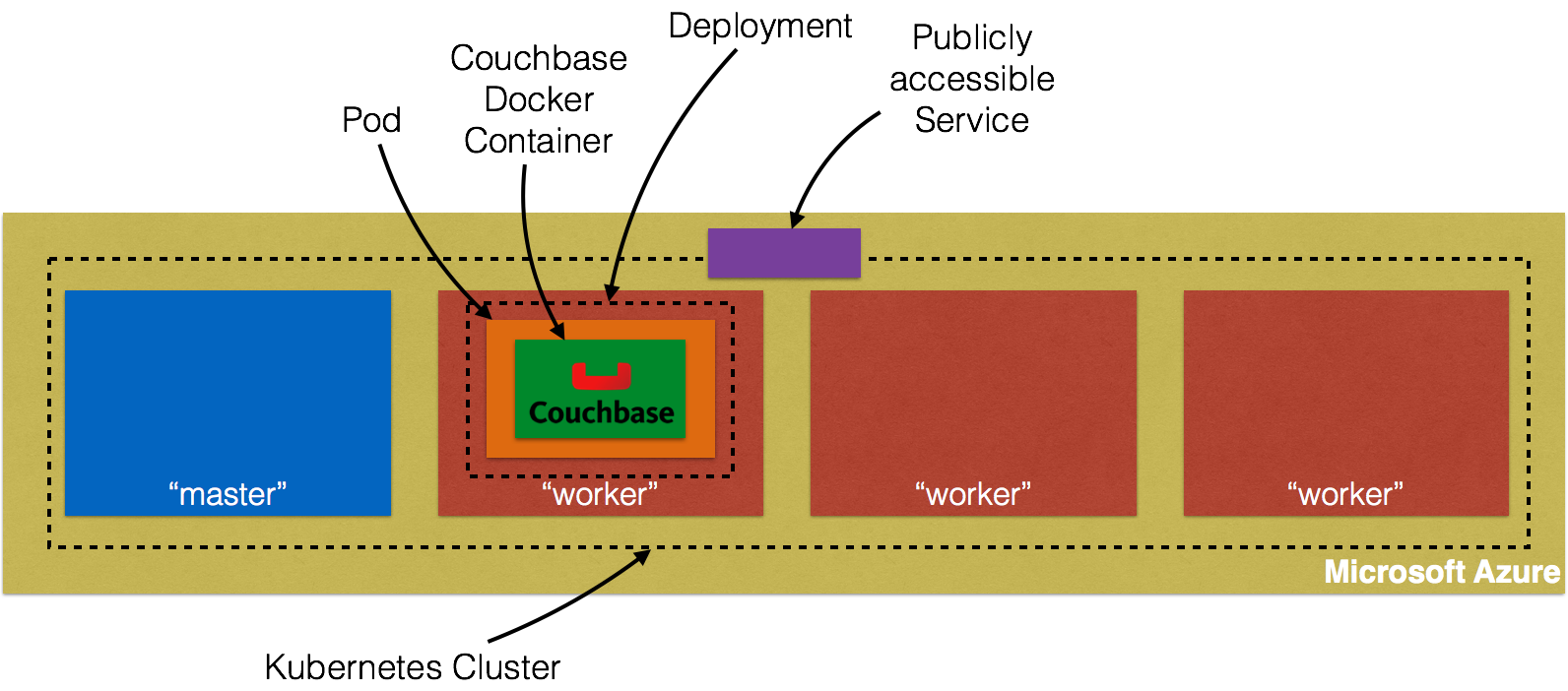
Many thanks to @colemickens for helping me through this recipe. This blog content is heavily based upon the instructions at colemickens.github.io/docs/getting-started-guides/azure/.
Install and Configure Azure CLI
Azure CLI is a command-line interface to develop, deploy and manage Azure applications. This is needed in order to install Kubernetes cluster on Azure.
- Install Node:
brew install node
==> Downloading https://homebrew.bintray.com/bottles/node-6.2.0.yosemite.bottle.tar.gz
######################################################################## 100.0%
==> Pouring node-6.2.0.yosemite.bottle.tar.gz
==> Caveats
Please note by default only English locale support is provided. If you need
full locale support you should either rebuild with full icu:
  `brew reinstall node --with-full-icu`
or add full icu data at runtime following:
  https://github.com/nodejs/node/wiki/Intl#using-and-customizing-the-small-icu-build

Bash completion has been installed to:
  /usr/local/etc/bash_completion.d
==> Summary
🍺  /usr/local/Cellar/node/6.2.0: 3,979 files, 40.4M
- Install Azure CLI:
npm install -g azure-cli
/usr/local/bin/azure -> /usr/local/lib/node_modules/azure-cli/bin/azure

> fibers@1.0.13 install /usr/local/lib/node_modules/azure-cli/node_modules/fibers
> node build.js || nodejs build.js

`darwin-x64-v8-5.0` exists; testing
Binary is fine; exiting
/usr/local/lib
└─┬ azure-cli@0.10.0
  ├─┬ adal-node@0.1.17
  │ ├── date-utils@1.2.21
  │ ├─┬ jws@3.1.3
  │ │ ├─┬ base64url@1.0.6
  │ │ │ └─┬ meow@2.0.0
  │ │ │   ├─┬ camelcase-keys@1.0.0
  │ │ │   │ ├── camelcase@1.2.1
  │ │ │   │ └── map-obj@1.0.1
  │ │ │   ├─┬ indent-string@1.2.2
  │ │ │   │ ├── get-stdin@4.0.1
  │ │ │   │ └─┬ repeating@1.1.3
  │ │ │   │   └── is-finite@1.0.1
  │ │ │   ├── minimist@1.2.0
  │ │ │   └── object-assign@1.0.0
  │ │ └─┬ jwa@1.1.3
  │ │   ├── buffer-equal-constant-time@1.0.1
  │ │   └─┬ ecdsa-sig-formatter@1.0.5
  │ │     └── base64-url@1.2.2
  │ ├── node-uuid@1.4.1
  │ ├── xmldom@0.1.22
  │ └── xpath.js@1.0.6
  ├── applicationinsights@0.15.12
  ├── async@1.4.2
  ├── azure-arm-authorization@2.0.0
  ├── azure-arm-batch@0.1.0
  ├── azure-arm-cdn@0.1.0-preview
  ├── azure-arm-commerce@0.1.1
  ├── azure-arm-compute@0.18.0
  ├── azure-arm-datalake-analytics@0.3.2
  ├── azure-arm-datalake-store@0.3.0
  ├── azure-arm-dns@0.10.1
  ├── azure-arm-hdinsight@0.2.0
  ├── azure-arm-hdinsight-jobs@0.1.0
  ├── azure-arm-insights@0.11.1
  ├── azure-arm-network@0.13.1
  ├── azure-arm-rediscache@0.2.1
  ├── azure-arm-resource@1.4.4-preview
  ├── azure-arm-storage@0.13.1-preview
  ├── azure-arm-trafficmanager@0.10.5
  ├─┬ azure-arm-website@0.10.0
  │ ├─┬ azure-common@0.9.12
  │ │ ├─┬ request@2.45.0
  │ │ │ ├── aws-sign2@0.5.0
  │ │ │ ├── bl@0.9.5
  │ │ │ ├── caseless@0.6.0
  │ │ │ ├── forever-agent@0.5.2
  │ │ │ ├─┬ form-data@0.1.4
  │ │ │ │ ├── async@0.9.2
  │ │ │ │ └─┬ combined-stream@0.0.7
  │ │ │ │   └── delayed-stream@0.0.5
  │ │ │ ├─┬ hawk@1.1.1
  │ │ │ │ ├── boom@0.4.2
  │ │ │ │ ├── cryptiles@0.2.2
  │ │ │ │ ├── hoek@0.9.1
  │ │ │ │ └── sntp@0.2.4
  │ │ │ ├─┬ http-signature@0.10.1
  │ │ │ │ ├── asn1@0.1.11
  │ │ │ │ └── assert-plus@0.1.5
  │ │ │ ├── mime-types@1.0.2
  │ │ │ ├── node-uuid@1.4.7
  │ │ │ ├── oauth-sign@0.4.0
  │ │ │ └── qs@1.2.2
  │ │ └── xml2js@0.2.7
  │ └── moment@2.6.0
  ├── azure-asm-compute@0.15.0
  ├── azure-asm-hdinsight@0.10.2
  ├── azure-asm-mgmt@0.10.1
  ├── azure-asm-network@0.11.0
  ├── azure-asm-sb@0.10.1
  ├── azure-asm-sql@0.10.1
  ├── azure-asm-storage@0.10.1
  ├── azure-asm-subscription@0.10.1
  ├── azure-asm-trafficmanager@0.10.3
  ├─┬ azure-asm-website@0.10.1
  │ └── moment@2.6.0
  ├── azure-batch@0.3.0
  ├─┬ azure-common@0.9.16
  │ ├── dateformat@1.0.2-1.2.3
  │ ├── duplexer@0.1.1
  │ ├── envconf@0.0.4
  │ ├─┬ request@2.45.0
  │ │ ├── aws-sign2@0.5.0
  │ │ ├── bl@0.9.5
  │ │ ├── caseless@0.6.0
  │ │ ├── forever-agent@0.5.2
  │ │ ├─┬ form-data@0.1.4
  │ │ │ ├── async@0.9.2
  │ │ │ ├─┬ combined-stream@0.0.7
  │ │ │ │ └── delayed-stream@0.0.5
  │ │ │ └── mime@1.2.11
  │ │ ├─┬ hawk@1.1.1
  │ │ │ ├── boom@0.4.2
  │ │ │ ├── cryptiles@0.2.2
  │ │ │ ├── hoek@0.9.1
  │ │ │ └── sntp@0.2.4
  │ │ ├─┬ http-signature@0.10.1
  │ │ │ ├── asn1@0.1.11
  │ │ │ ├── assert-plus@0.1.5
  │ │ │ └── ctype@0.5.3
  │ │ ├── mime-types@1.0.2
  │ │ ├── node-uuid@1.4.7
  │ │ ├── oauth-sign@0.4.0
  │ │ └── qs@1.2.2
  │ ├── validator@3.22.2
  │ └── xml2js@0.2.7
  ├── azure-gallery@2.0.0-pre.18
  ├── azure-graph@0.1.1
  ├─┬ azure-keyvault@0.10.1
  │ └── node-uuid@1.4.7
  ├─┬ azure-monitoring@0.10.2
  │ └── moment@2.6.0
  ├─┬ azure-storage@0.7.0
  │ ├── browserify-mime@1.2.9
  │ ├── extend@1.2.1
  │ ├── node-uuid@1.4.7
  │ ├─┬ readable-stream@2.0.6
  │ │ ├── isarray@1.0.0
  │ │ ├── process-nextick-args@1.0.7
  │ │ └── util-deprecate@1.0.2
  │ ├─┬ request@2.57.0
  │ │ ├── aws-sign2@0.5.0
  │ │ ├─┬ bl@0.9.5
  │ │ │ └─┬ readable-stream@1.0.34
  │ │ │   └── isarray@0.0.1
  │ │ ├── caseless@0.10.0
  │ │ ├─┬ form-data@0.2.0
  │ │ │ ├── async@0.9.2
  │ │ │ └─┬ combined-stream@0.0.7
  │ │ │   └── delayed-stream@0.0.5
  │ │ ├─┬ har-validator@1.8.0
  │ │ │ ├── bluebird@2.10.2
  │ │ │ └── commander@2.9.0
  │ │ ├── hawk@2.3.1
  │ │ ├─┬ http-signature@0.11.0
  │ │ │ ├── asn1@0.1.11
  │ │ │ └── assert-plus@0.1.5
  │ │ ├─┬ mime-types@2.0.14
  │ │ │ └── mime-db@1.12.0
  │ │ └── qs@3.1.0
  │ ├── validator@3.22.2
  │ └── xml2js@0.2.7
  ├─┬ caller-id@0.1.0
  │ └── stack-trace@0.0.9
  ├── colors@0.6.2
  ├─┬ commander@1.0.4
  │ └── keypress@0.1.0
  ├── easy-table@0.0.1
  ├─┬ event-stream@3.1.5
  │ ├── from@0.1.3
  │ ├── map-stream@0.1.0
  │ ├── pause-stream@0.0.11
  │ ├── split@0.2.10
  │ └── stream-combiner@0.0.4
  ├── eyes@0.1.8
  ├── fast-json-patch@0.5.6
  ├── github@0.1.6
  ├── js2xmlparser@1.0.0
  ├── jsrsasign@4.8.2
  ├─┬ kuduscript@1.0.6
  │ ├── commander@1.1.1
  │ └── streamline@0.4.11
  ├── moment@2.13.0
  ├── ms-rest@1.14.2
  ├─┬ ms-rest-azure@1.14.2
  │ ├── async@0.2.7
  │ └── uuid@2.0.1
  ├── node-forge@0.6.23
  ├── node-uuid@1.2.0
  ├── number-is-nan@1.0.0
  ├── omelette@0.1.0
  ├─┬ openssl-wrapper@0.2.1
  │ ├── debug@0.7.4
  │ └── q@0.9.7
  ├─┬ read@1.0.7
  │ └── mute-stream@0.0.6
  ├─┬ readable-stream@1.0.34
  │ ├── core-util-is@1.0.2
  │ ├── inherits@2.0.1
  │ ├── isarray@0.0.1
  │ └── string_decoder@0.10.31
  ├─┬ request@2.69.0
  │ ├── aws-sign2@0.6.0
  │ ├── aws4@1.4.1
  │ ├─┬ bl@1.0.3
  │ │ └─┬ readable-stream@2.0.6
  │ │   └── isarray@1.0.0
  │ ├── caseless@0.11.0
  │ ├─┬ combined-stream@1.0.5
  │ │ └── delayed-stream@1.0.0
  │ ├── extend@3.0.0
  │ ├── forever-agent@0.6.1
  │ ├─┬ form-data@1.0.0-rc4
  │ │ └── async@1.5.2
  │ ├─┬ har-validator@2.0.6
  │ │ ├─┬ chalk@1.1.3
  │ │ │ ├── ansi-styles@2.2.1
  │ │ │ ├── escape-string-regexp@1.0.5
  │ │ │ ├─┬ has-ansi@2.0.0
  │ │ │ │ └── ansi-regex@2.0.0
  │ │ │ ├── strip-ansi@3.0.1
  │ │ │ └── supports-color@2.0.0
  │ │ ├─┬ commander@2.9.0
  │ │ │ └── graceful-readlink@1.0.1
  │ │ ├─┬ is-my-json-valid@2.13.1
  │ │ │ ├── generate-function@2.0.0
  │ │ │ ├─┬ generate-object-property@1.2.0
  │ │ │ │ └── is-property@1.0.2
  │ │ │ ├── jsonpointer@2.0.0
  │ │ │ └── xtend@4.0.1
  │ │ └─┬ pinkie-promise@2.0.1
  │ │   └── pinkie@2.0.4
  │ ├─┬ hawk@3.1.3
  │ │ ├── boom@2.10.1
  │ │ ├── cryptiles@2.0.5
  │ │ ├── hoek@2.16.3
  │ │ └── sntp@1.0.9
  │ ├─┬ http-signature@1.1.1
  │ │ ├── assert-plus@0.2.0
  │ │ ├─┬ jsprim@1.2.2
  │ │ │ ├── extsprintf@1.0.2
  │ │ │ ├── json-schema@0.2.2
  │ │ │ └── verror@1.3.6
  │ │ └─┬ sshpk@1.8.3
  │ │   ├── asn1@0.2.3
  │ │   ├── assert-plus@1.0.0
  │ │   ├─┬ dashdash@1.13.1
  │ │   │ └── assert-plus@1.0.0
  │ │   ├── ecc-jsbn@0.1.1
  │ │   ├─┬ getpass@0.1.6
  │ │   │ └── assert-plus@1.0.0
  │ │   ├── jodid25519@1.0.2
  │ │   ├── jsbn@0.1.0
  │ │   └── tweetnacl@0.13.3
  │ ├── is-typedarray@1.0.0
  │ ├── isstream@0.1.2
  │ ├── json-stringify-safe@5.0.1
  │ ├─┬ mime-types@2.1.11
  │ │ └── mime-db@1.23.0
  │ ├── node-uuid@1.4.7
  │ ├── oauth-sign@0.8.2
  │ ├── qs@6.0.2
  │ ├── stringstream@0.0.5
  │ ├── tough-cookie@2.2.2
  │ └── tunnel-agent@0.4.3
  ├─┬ ssh-key-to-pem@0.11.0
  │ ├── asn1@0.1.11
  │ └── ctype@0.5.2
  ├─┬ streamline@0.10.17
  │ ├── fibers@1.0.13
  │ ├── galaxy@0.1.12
  │ └─┬ source-map@0.1.43
  │   └── amdefine@1.0.0
  ├── streamline-streams@0.1.5
  ├─┬ sync-request@3.0.0
  │ ├─┬ concat-stream@1.4.10
  │ │ ├── readable-stream@1.1.14
  │ │ └── typedarray@0.0.6
  │ ├── http-response-object@1.1.0
  │ └─┬ then-request@2.2.0
  │   ├── http-basic@2.5.1
  │   ├─┬ promise@7.1.1
  │   │ └── asap@2.0.4
  │   └── qs@6.2.0
  ├── through@2.3.4
  ├── tunnel@0.0.2
  ├── underscore@1.4.4
  ├── validator@3.1.0
  ├─┬ winston@0.6.2
  │ ├── async@0.1.22
  │ ├── cycle@1.0.3
  │ ├── pkginfo@0.2.3
  │ └── request@2.9.203
  ├── wordwrap@0.0.2
  ├─┬ xml2js@0.1.14
  │ └── sax@0.5.2
  └── xmlbuilder@0.4.3
- Sign up for free trial at https://azure.microsoft.com/en-us/free/.
- Login to Azure using the command
azure login:
azure login
info:    Executing command login
\info:    To sign in, use a web browser to open the page https://aka.ms/devicelogin. Enter the code BS5P64ANU to authenticate.
|info:    Added subscription Free Trial
info:    Setting subscription "Free Trial" as default
+
info:    login command OK
- Get account information using azure account show command:
azure account show
info:    Executing command account show
data:    Name                        : Free Trial
data:    ID                          : XXX
data:    State                       : Enabled
data:    Tenant ID                   : YYY
data:    Is Default                  : true
data:    Environment                 : AzureCloud
data:    Has Certificate             : No
data:    Has Access Token            : Yes
data:    User name                   : arun.gupta@gmail.com
data:
info:    account show command OK
Note the value shown instead of XXX and YYY. These will be used to configure the Kubernetes cluster.
Start Kubernetes Cluster
- Download Kubernetes 1.2.4 and extract it.
- Kubernetes cluster on Azure can be started as:
export KUBERNETES_PROVIDER=azure
export AZURE_SUBSCRIPTION_ID=XXX
export AZURE_TENANT_ID=YYY
./cluster/kube-up.sh
Make sure to specify the appropriate values for XXX and YYY from the previous command. AZURE_SUBSCRIPTION_ID andAZURE_TENANT_ID are specific to Azure.
These values can also be edited in cluster/azure/config-default.sh.
- Start Kubernetes cluster:
./kubernetes/cluster/kube-up.sh
... Starting cluster using provider: azure
... calling verify-prereqs
... calling kube-up
++> AZURE KUBE-UP STARTED: Tue May 31 16:15:26 PDT 2016
This will be interactive. (export AZURE_AUTH_METHOD=client_secret to avoid the prompt)
hyperkube-amd64:v1.2.4 was found in the gcr.io/google_containers repository
Flag --tenant-id has been deprecated, tenant-id is deprecated. it is now determined automatically from the subscription id
WARN[0000] --resource-group is unset. Derived one from --deployment-name: "kube-20160531-161525"
WARN[0000] --master-fqdn is unset. Derived one from input: "kube-20160531-161525.westus.cloudapp.azure.com".
To sign in, use a web browser to open the page https://aka.ms/devicelogin. Enter the code BPRLH2ARJ to authenticate.
INFO[0034] Starting ARM Deployment. This will take some time. deployment="kube-20160531-161525-1464736561"
INFO[0279] Finished ARM Deployment. deployment="kube-20160531-161525-1464736561"
INFO[0279] Validating Kubernetes cluster.
WARN[0279] Failed to validate components: Get https://kube-20160531-161525.westus.cloudapp.azure.com:6443/api/v1/componentstatuses: dial tcp 23.99.60.138:6443: getsockopt: connection refused
INFO[0294] Validating Kubernetes cluster.
WARN[0294] Failed to validate components: Get https://kube-20160531-161525.westus.cloudapp.azure.com:6443/api/v1/componentstatuses: dial tcp 23.99.60.138:6443: getsockopt: connection refused
INFO[0309] Validating Kubernetes cluster.
WARN[0309] Failed to validate components: Get https://kube-20160531-161525.westus.cloudapp.azure.com:6443/api/v1/componentstatuses: dial tcp 23.99.60.138:6443: getsockopt: connection refused
INFO[0324] Validating Kubernetes cluster.
WARN[0347] validate: incorrect healthy count. expected=3 actual=4
INFO[0347] Deployment Complete!
INFO[0347] master: "https://kube-20160531-161525.westus.cloudapp.azure.com:6443"
INFO[0347] output: "/opt/azkube/_deployments/kube-20160531-161525"
cluster "kube-20160531-161525" set.
user "kube-20160531-161525_user" set.
context "kube-20160531-161525" set.
switched to context "kube-20160531-161525".
++> AZURE KUBE-UP FINISHED: Tue May 31 16:21:15 PDT 2016 (duration: -349 seconds)
... calling validate-cluster
Detected 4 ready nodes, found 4 nodes out of expected 3. Found more nodes than expected, your cluster may not behave correctly.
Found 4 node(s).
NAME                             STATUS                     AGE
kube-20160531-161525-vm-master   Ready,SchedulingDisabled   21s
kube-20160531-161525-vm-node-0   Ready                      18s
kube-20160531-161525-vm-node-1   Ready                      19s
kube-20160531-161525-vm-node-2   Ready                      19s
Flag --api-version has been deprecated, flag is no longer respected and will be deleted in the next release
Validate output:
NAME                 STATUS    MESSAGE              ERROR
scheduler            Healthy   ok
controller-manager   Healthy   ok
etcd-1               Healthy   {"health": "true"}
etcd-0               Healthy   {"health": "true"}
Cluster validation succeeded
Done, listing cluster services:

Kubernetes master is running at https://kube-20160531-161525.westus.cloudapp.azure.com:6443
It starts four nodes of Standard_A1 size. Each node gives you 1 core, 1.75 GB RAM, and 40GB HDD.
Run Docker Container in Kubernetes Cluster on Azure
Now that the cluster is up and running, get a list of all the nodes:
./kubernetes/cluster/kubectl.sh get no
NAME                             STATUS                     AGE
kube-20160531-161525-vm-master   Ready,SchedulingDisabled   3m
kube-20160531-161525-vm-node-0   Ready                      3m
kube-20160531-161525-vm-node-1   Ready                      3m
kube-20160531-161525-vm-node-2   Ready                      3m
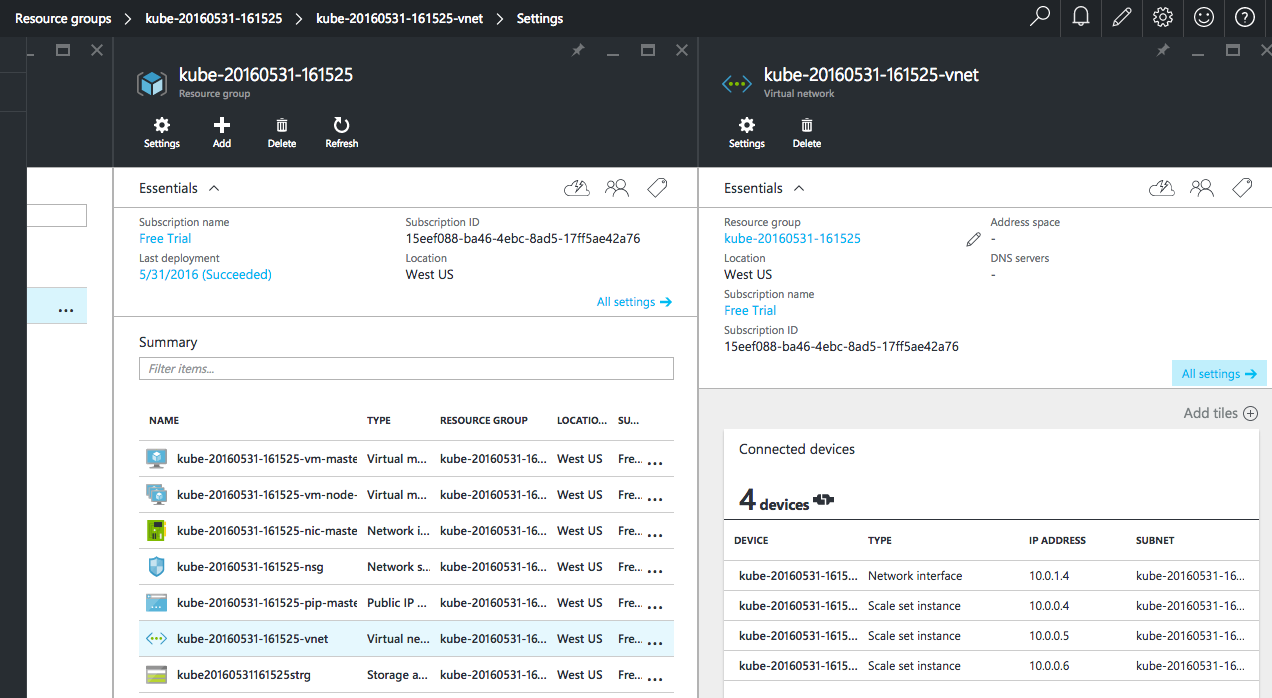
Four instances are created as shown – one for master node and three for worker nodes.
Azure Portal shows all the created artifacts in the Resource Group:
Four instances are created as shown – one for master node and three for worker nodes.
Azure Portal shows all the created artifacts in the Resource Group:

More details about the created nodes is available:
Create a Couchbase pod:
./kubernetes/cluster/kubectl.sh run couchbase --image=arungupta/couchbase
deployment "couchbase" created
Notice, how the image name can be specified on the CLI. Kubernetes pre-1.2 versions created a Replication Controller with this command. This is explained in Kubernetes on Amazon Web Services or Kubernetes on Google Cloud. Kubernetes 1.2 introduced Deployments and so this creates a Deployment instead. This enables simplified application deployment and management including versioning, multiple simultaneous rollouts, aggregating status across all pods, maintaining application availability and rollback.
The pod uses arungupta/couchbase Docker image that provides a pre-configured Couchbase server. Any Docker image can be specified here.
Status of the pod can be watched:
./kubernetes/cluster/kubectl.sh get -w po
NAME                         READY     STATUS              RESTARTS   AGE
couchbase-2830197765-f0s9c   0/1       ContainerCreating   0          5s
NAME                         READY     STATUS    RESTARTS   AGE
couchbase-2830197765-f0s9c   1/1       Running   0          1m
Get more details about the pod:
./kubernetes/cluster/kubectl.sh describe po couchbase-2830197765-f0s9c
Name:        couchbase-2830197765-f0s9c
Namespace:    default
Node:        kube-20160531-161525-vm-node-2/10.0.0.6
Start Time:    Tue, 31 May 2016 16:28:02 -0700
Labels:        pod-template-hash=2830197765,run=couchbase
Status:        Running
IP:        10.2.74.2
Controllers:    ReplicaSet/couchbase-2830197765
Containers:
  couchbase:
    Container ID:    docker://eba043085c95645cf650206469be5c7e2d6c7395883a053d197446a14e757440
    Image:        arungupta/couchbase
    Image ID:        docker://sha256:f6b013d9694354148ace6804127dadee01c733151b5ff5e169f7c3b0e4faf321
    Port:
    QoS Tier:
      cpu:        BestEffort
      memory:        BestEffort
    State:        Running
      Started:        Tue, 31 May 2016 16:29:04 -0700
    Ready:        True
    Restart Count:    0
    Environment Variables:
Conditions:
  Type        Status
  Ready     True
Volumes:
  default-token-ylszs:
    Type:    Secret (a volume populated by a Secret)
    SecretName:    default-token-ylszs
Events:
  FirstSeen    LastSeen    Count    From                        SubobjectPath            Type        Reason        Message
  ---------    --------    -----    ----                        -------------            --------    ------        -------
  7m        7m        1    {default-scheduler }                                Normal        Scheduled    Successfully assigned couchbase-2830197765-f0s9c to kube-20160531-161525-vm-node-2
  7m        7m        1    {kubelet kube-20160531-161525-vm-node-2}    spec.containers{couchbase}    Normal        Pulling        pulling image "arungupta/couchbase"
  6m        6m        1    {kubelet kube-20160531-161525-vm-node-2}    spec.containers{couchbase}    Normal        Pulled        Successfully pulled image "arungupta/couchbase"
  6m        6m        1    {kubelet kube-20160531-161525-vm-node-2}    spec.containers{couchbase}    Normal        Created        Created container with docker id eba043085c95
  6m        6m        1    {kubelet kube-20160531-161525-vm-node-2}    spec.containers{couchbase}    Normal        Started        Started container with docker id eba043085c95
Expose Pod on Kubernetes as Service
Now that our pod is running, how do I access the Couchbase server? You need to expose the Deployment as a Service outside the Kubernetes cluster.
Typically, this will be exposed using the command:
./kubernetes/cluster/kubectl.sh expose deployment couchbase --target-port=8091 --port=8091 --type=LoadBalancer
But Azure does not support --type=LoadBalancer at this time. This feature is being worked upon and will hopefully be available in the near future. So in the meanwhile, we’ll expose the Service as:
./kubernetes/cluster/kubectl.sh expose deployment couchbase --target-port=8091 --port=8091
service "couchbase" exposed
Now proxy to this Service using kubectl proxy command:
./kubernetes/cluster/kubectl.sh proxy --address='0.0.0.0' --port=9999 --accept-hosts='.*'
Starting to serve on [::]:9999
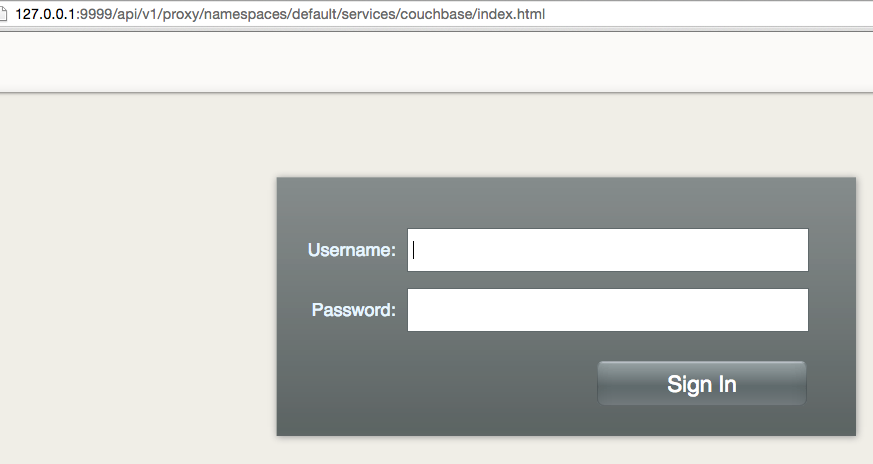
And now this exposed Service is accessible at http://127.0.0.1:9999/api/v1/proxy/namespaces/default/services/couchbase/index.html. This shows the login screen of Couchbase Web Console:
Shutdown Kubernetes Cluster
Finally, shutdown the cluster using cluster/kube-down.sh script.
./kubernetes/cluster/kube-down.sh
Bringing down cluster using provider: azure
Bringing down cluster

You must do this manually (for now)!
This can be done with:
./kubernetes/cluster/../cluster/../cluster/azure/util.sh: line 246: AZ_RESOURCE_GROUP: unbound variable
This script shuts down the cluster but the Azure resource group need to be explicitly removed. This can be done by selecting the Resource Group from portal.azure.com:

This is filed as #26601.
Enjoy!
| Reference: | Kubernetes Cluster on Azure and Expose Couchbase Service from our JCG partner Arun Gupta at the Miles to go 3.0 … blog. |