

Modules in TypeScript allow you to organize code into separate files and reuse functionality through export and import.
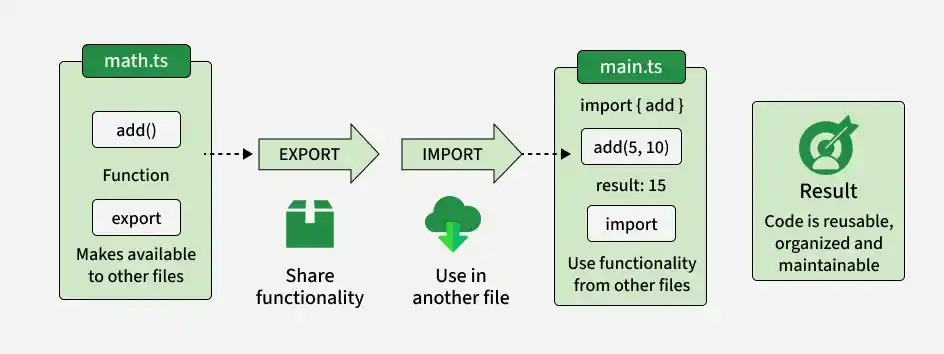
- Organize code into separate, manageable files.
- Encapsulate functionality and avoid global namespace pollution.
- Reuse functions, classes, interfaces, and other declarations.
- Manage dependencies explicitly through imports and exports.
Basic Module Example
math.ts :
export function add(a: number, b: number): number {
    return a + b;
}
main.ts (Importing Module):
import { add } from "./math";

const result = add(5, 10);

console.log(result);
Output:
15- math.ts exports the add function.
- main.ts imports and uses the function.
- export makes declarations available to other modules.
- import allows declarations to be used in another module.
Types of Modules in TypeScript
1. ES Modules
ES modules use the standard JavaScript import and export syntax to share functionality between files.
mathUtils.ts
export function add(a: number, b: number): number {
    return a + b;
}

export function subtract(a: number, b: number): number {
    return a - b;
}
app.ts
import { add, subtract } from "./mathUtils";

const sum = add(5, 3);
const difference = subtract(5, 3);

console.log(`Sum: ${sum}`);
console.log(`Difference: ${difference}`);
Output:
Sum: 8
Difference: 2
- mathUtils.ts exports multiple functions.
- app.ts imports the required functions.
- Each file has its own module scope.
2. Default Exports
A module can have one default export, which can be imported without using braces.
greet.ts
export default function greet(name: string): string {
    return `Hello, ${name}!`;
}
app.ts
import greet from "./greet";

console.log(greet("Alen"));
Output:
Hello, Alen!- export default defines the module's default export.
- The imported name can be chosen by the importing file.
3. Namespaces
Namespaces provide a way to group related declarations under a single name. They are different from ES modules and are mainly useful for organizing code within a global scope or legacy TypeScript code.
namespace MathUtils {
    export function add(a: number, b: number): number {
        return a + b;
    }
}

console.log(MathUtils.add(5, 3));
Output:
8- MathUtils groups related functionality.
- export makes add accessible outside the namespace.
- For new projects, ES modules are generally preferred over namespaces.
Best Practices for Using Modules in TypeScript
- Prefer ES Modules: Use import and export for modern TypeScript applications.
- Keep Modules Focused: Organize related functionality into separate files.
- Use Named Exports: Prefer named exports when a module provides multiple related declarations.
- Use Default Exports Carefully: Use them when a module has one primary exported value.
- Use Barrel Files When Helpful: An index.ts file can re-export declarations from multiple modules to simplify imports.
