

Generic object types allow you to create reusable object definitions that can work with different data types while maintaining type safety.
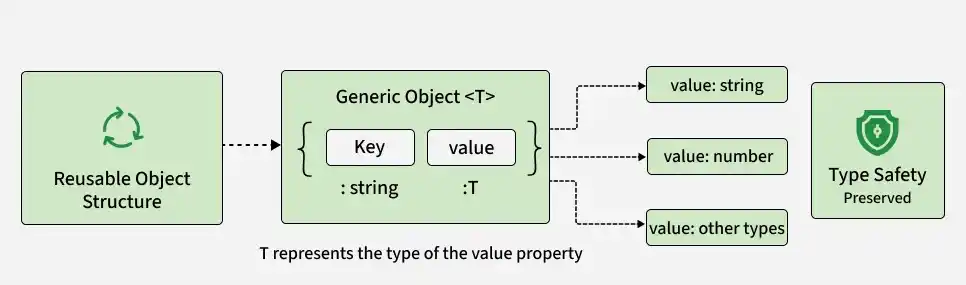
- Create reusable object structures.
- Support different data types using generic parameters.
- Preserve type information for object properties.
- Improve code flexibility and maintainability.
Syntax
type GenericObject<T> = {
    key: string;
    value: T;
};
- T: A type parameter representing the type of value.
- key: A string property shared by the object.
- value: T: A property whose type is determined when the generic type is used.
Examples of Generic Object Types in TypeScript
The following examples demonstrate how generic object types can represent different data while maintaining type safety.
Example 1: Key-Value Pairs
A generic object type can represent key-value pairs where the value can have different types.
type KeyValuePair<T> = {
    key: string;
    value: T;
};

const stringPair: KeyValuePair<string> = {
    key: "name",
    value: "John"
};

const numberPair: KeyValuePair<number> = {
    key: "age",
    value: 30
};

console.log(stringPair);
console.log(numberPair);
Output :
{ key: 'name', value: 'John' }
{ key: 'age', value: 30 }
- KeyValuePair<T> uses T to define the type of value.
- stringPair uses string as its value type.
- numberPair uses number as its value type.
Example 2: Generic Data Container
A generic object type can store data of different types while preserving the type of the stored value.
type DataContainer<T> = {
    data: T;
};

const numericData: DataContainer<number> = {
    data: 25
};

const stringData: DataContainer<string> = {
    data: "TypeScript"
};

console.log(numericData.data);
console.log(stringData.data);
Output:
25
TypeScript
- DataContainer<T> defines the type of the data property.
- Each object can specify a different type for T.
- TypeScript ensures that the assigned data matches the specified type.
