

Generic classes allow you to create reusable class blueprints that work with different data types while maintaining type safety.
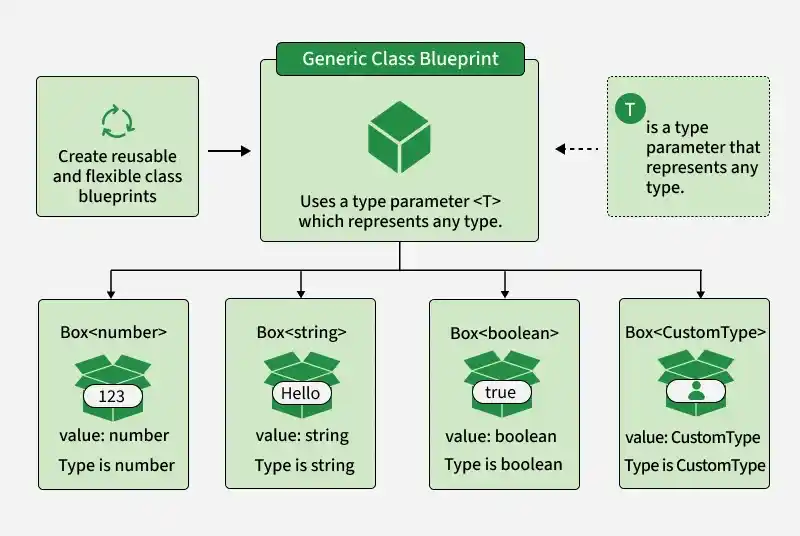
- Create reusable and flexible classes.
- Work with different data types without duplicating class logic.
- Preserve type information throughout the class.
- Support constraints, multiple type parameters, and default types.
Syntax:
class GenericClass<T> {
    constructor(private value: T) {}

    getValue(): T {
        return this.value;
    }
}
- T: A type parameter that represents the type used by the class.
- constructor: Initializes the class with a value of type T.
- getValue(): Returns the stored value while preserving its type.
Examples of Generic Classes in TypeScript
The following examples demonstrate how generic classes can work with different types and constraints.
Example 1: Basic Generic Class
A generic class can store and retrieve values of different types while maintaining type safety.
class Box<T> {
    private content: T;

    constructor(content: T) {
        this.content = content;
    }

    getContent(): T {
        return this.content;
    }
}

const numBox = new Box<number>(100);
const strBox = new Box<string>("Hello, TypeScript!");

console.log("Number Content:", numBox.getContent());
console.log("String Content:", strBox.getContent());
Output:
Number Content: 100
String Content: Hello, TypeScript!
- Box<T> uses T to represent the type of its content.
- Different instances can use different types.
- The type remains consistent throughout the class.
Example 2: Generic Class with Constraints
Generic constraints restrict the types that can be used with a class.
class Box<T extends number> {
    private value: T;

    constructor(value: T) {
        this.value = value;
    }

    double(): number {
        return this.value * 2;
    }
}

const numBox = new Box<number>(10);

console.log("Double Value:", numBox.double());
Output:
Double Value: 20- T extends number allows only numeric types.
- Passing a non-number value results in a compile-time error.
Example 3: Multiple Type Parameters
A generic class can use multiple type parameters to work with different types simultaneously.
class Pair<K, V> {
    constructor(
        private key: K,
        private value: V
    ) {}

    getKey(): K {
        return this.key;
    }

    getValue(): V {
        return this.value;
    }
}

const userPair = new Pair<number, string>(1, "John Doe");

console.log("Key:", userPair.getKey());
console.log("Value:", userPair.getValue());
Output:
Key: 1
Value: John Doe
- K represents the key type.
- V represents the value type.
- Different types can be used together in the same class.
Example 4: Generic Class with Default Type
A generic class can provide a default type when no type argument is specified.
class Container<T = string> {
    constructor(private item: T) {}

    getItem(): T {
        return this.item;
    }
}

const defaultContainer = new Container("Hello");
const numberContainer = new Container<number>(100);

console.log(defaultContainer.getItem());
console.log(numberContainer.getItem());
Output:
Hello
100
- T = string makes string the default type.
- A different type can still be specified explicitly.
Example 5: Generic Class with Static Members
Generic classes can contain static members, but static members cannot directly use the class's type parameter.
class Counter<T> {
    private value: T;
    static count = 0;

    constructor(value: T) {
        this.value = value;
        Counter.count++;
    }

    static getCount(): number {
        return Counter.count;
    }
}

const obj1 = new Counter<number>(10);
const obj2 = new Counter<string>("Hello");

console.log("Total Instances Created:", Counter.getCount());
Output:
Total Instances Created: 2- Counter<T> can work with different types.
- count is shared by all instances.
- count cannot be declared as type T because static members belong to the class itself, not an individual instance.
