

In TypeScript, access modifiers control the visibility and accessibility of class members, such as properties and methods. They support encapsulation by controlling how class members can be accessed from outside the class and its subclasses.
TypeScript provides three main access modifiers:
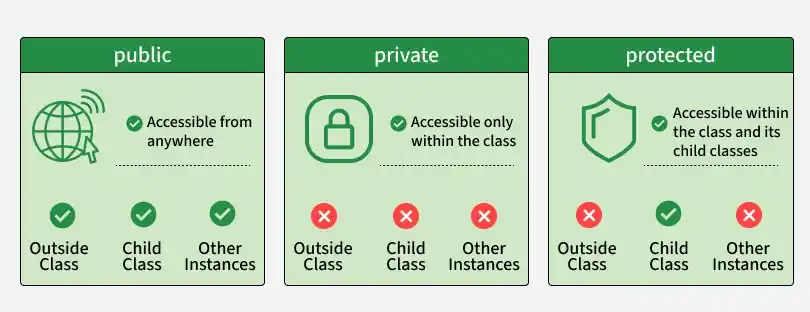
- public: Members can be accessed from anywhere. It is the default modifier.
- private: Members can be accessed only within the class where they are defined.
- protected: Members can be accessed within the class and its subclasses.
class Animal {
  public name: string;
  private age: number;
  protected species: string;

  constructor(name: string, age: number, species: string) {
    this.name = name;
    this.age = age;
    this.species = species;
  }

  public getInfo(): string {
    return `${this.name} is a ${this.species}.`;
  }

  public getAge(): number {
    return this.age;
  }
}

class Dog extends Animal {
  constructor(name: string, age: number) {
    super(name, age, "Dog");
  }

  public getDetails(): string {
    return `${this.name} is a ${this.species} and is ${this.getAge()} years old.`;
  }
}

const myDog = new Dog("Buddy", 3);

console.log(myDog.name);
console.log(myDog.getInfo());
console.log(myDog.getDetails());
Output:
Buddy
Buddy is a Dog.
Buddy is a Dog and is 3 years old.
- name is public, so it can be accessed directly from outside the class.
- age is private, so it can only be accessed inside Animal. The getAge() method provides controlled access to it.
- species is protected, so it can be accessed inside Animal and its subclass Dog.
Types of Access Modifiers
1. Public Access Modifier
The public modifier allows a class member to be accessed from anywhere. It is also the default modifier when no access modifier is specified.
class Animal {
  public name: string;

  constructor(name: string) {
    this.name = name;
  }

  public makeSound(): void {
    console.log(`${this.name} makes a sound.`);
  }
}

const dog = new Animal("Dog");

console.log(dog.name);
dog.makeSound();
Output:
Dog
Dog makes a sound.
Both name and makeSound() are accessible from outside the class.
2. Private Access Modifier
The private modifier restricts access to the class where the member is defined. It is useful for hiding internal implementation details.
class Person {
  private ssn: string;

  constructor(ssn: string) {
    this.ssn = ssn;
  }

  public getSSN(): string {
    return this.ssn;
  }
}

const person = new Person("123-45-6789");

console.log(person.getSSN());
// console.log(person.ssn); // Error: 'ssn' is private
Output:
123-45-6789Here, ssn cannot be accessed directly from outside the Person class. The getSSN() method provides controlled access to its value.
3. Protected Access Modifier
The protected modifier allows a member to be accessed within the class where it is defined and within its subclasses. It cannot be accessed directly from outside the class hierarchy.
class User {
  protected age: number;

  constructor(age: number) {
    this.age = age;
  }
}

class Employee extends User {
  public getRetirementAge(): number {
    return this.age + 65;
  }
}

const employee = new Employee(30);

console.log(employee.getRetirementAge());
// console.log(employee.age); // Error: 'age' is protected
Output:
95Here, age is accessible inside User and Employee, but not directly through the employee object.
readonly Modifier in TypeScript
The readonly modifier is different from access modifiers. It prevents a property from being reassigned after it has been initialized.
A readonly property can still be accessed according to its access modifier, but its value cannot be changed after initialization.
Example 1: Readonly Property
class User {
  readonly id: number;

  constructor(id: number) {
    this.id = id;
  }
}

const user = new User(101);

console.log(user.id);
// user.id = 102; // Error: Cannot assign to 'id' because it is read-only
Output:
101Here, id is initialized through the constructor and cannot be reassigned afterward.
Example 2: Readonly with Public Modifier
TypeScript also allows readonly to be combined with an access modifier.
class Product {
  constructor(public readonly name: string) {}
}

const product = new Product("Laptop");

console.log(product.name);
// product.name = "Tablet"; // Error: Cannot assign to 'name'
Output:
Laptop Here, name is both public and readonly. It can be accessed from outside the class but cannot be reassigned.
