

Software testing is the process of evaluating a software application to verify that it works as intended and meets specified requirements. It helps identify defects, improve quality, and ensure the software is reliable before it is released to users.
- Verifies that the software functions according to requirements.
- Identifies defects, errors, and inconsistencies in the application.
- Improves software quality, reliability, and performance while reducing deployment risks.
1. What do you understand by the term SDLC in Software Engineering?
SDLC (Software Development Life Cycle) is a structured process used to plan, design, develop, test, deploy, and maintain software applications. It provides a systematic approach to software development, ensuring high quality, timely delivery, and efficient project management.
- Defines the stages involved in software development from requirement gathering to maintenance.
- Helps improve software quality and reduce development risks.
- Ensures better planning, control, and management of the project lifecycle.
2. What do you mean by Defect Cascading?
Defect Cascading is a situation where a defect in one module or component causes defects in other related modules, leading to a chain reaction of errors throughout the system. This usually occurs when an existing defect is not identified and fixed at an earlier stage of development.
- A defect in one component triggers defects in other dependent components.
- Occurs when defects are not detected and resolved early.
- Makes debugging and root cause analysis more difficult.
3. What is STLC and What are the different phases of STLC?
STLC (Software Testing Life Cycle) is a systematic process that defines the various stages involved in software testing. It ensures that testing activities are performed in a structured manner to improve software quality and identify defects before release.
There are the six major phases of the Software Testing Life Cycle (STLC) in which we are discussing here in detail:
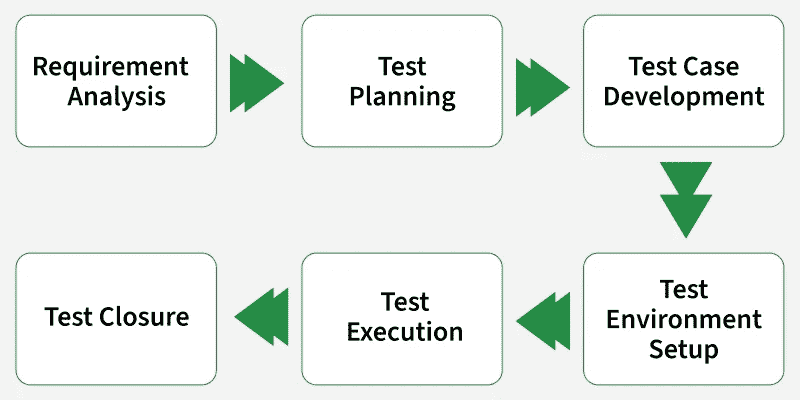
- Requirement Analysis: Analyze requirements to identify testable aspects and understand testing needs.
- Test Planning: Define the testing strategy, scope, resources, schedule, and testing objectives.
- Test Case Development: Create test cases, test scripts, and prepare test data based on requirements.
- Test Environment Setup: Configure the hardware, software, and network required for testing.
- Test Execution: Execute test cases, record results, and identify defects.
- Test Closure: Evaluate test completion criteria, prepare test reports, and document lessons learned.
4. What are the Different Levels of Testing?
Levels of Testing refer to the different stages at which software is tested during the development lifecycle. Each level focuses on a specific part of the application to ensure quality and identify defects early.
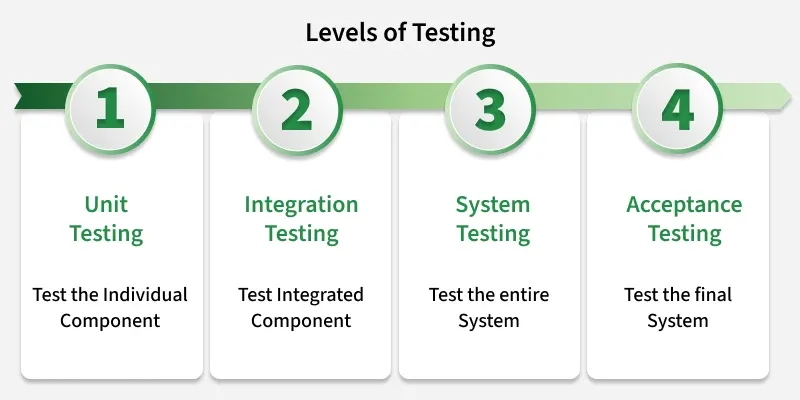
- Unit Testing: Testing individual components or modules independently to verify they work correctly.
- Integration Testing: Testing interactions between integrated modules to ensure they function together properly.
- System Testing: Testing the complete integrated system to validate that it meets specified requirements.
- User Acceptance Testing (UAT): Testing performed by end users or clients to confirm the software meets business needs and is ready for release.
5. What is a Bug in Software Testing?
A bug is a defect in software that causes its actual behavior or output to differ from the expected behavior or specified requirements. It may originate from coding, design, or requirement-related issues.
- Can cause functional errors, unexpected behavior, or system failures.
- Is identified, analyzed, and tracked during testing.
- Fixing bugs improves software quality, reliability, and user experience.
6. Why is software testing important?
Software testing is important because it helps identify defects and verify that an application meets its requirements before release. It improves software quality and reduces the risk of failures in production.
- Helps find issues early and reduces the cost of fixing them.
- Verifies functionality, reliability, security, and performance.
- Helps prevent production failures and improves user confidence.
7. What is a Test Case?
A Test Case is a documented set of preconditions, test steps, inputs, and expected results used to verify a specific requirement or functionality of a software application.
- Defines the conditions and actions required for test execution.
- Provides expected results for evaluating the actual outcome.
- Supports consistent, repeatable, and traceable testing.
8. What is a Test Plan, and What Does It Include?
A Test Plan is a document that outlines the testing strategy, objectives, scope, resources, schedule, and approach for a software testing project. It serves as a roadmap to ensure testing activities are planned and executed effectively.
- Defines the scope and objectives of testing.
- Describes the testing strategy and approach.
- Identifies resources, roles, and responsibilities.
9. What is Quality Assurance(QA)?
Quality Assurance (QA) is a systematic approach to improving software quality by establishing and monitoring processes, standards, and practices throughout the Software Development Life Cycle (SDLC).
- Focuses on defect prevention through process improvement.
- Ensures development activities follow defined quality standards.
- Promotes consistent and reliable software delivery.
10. What is a Traceability Matrix?
A Traceability Matrix (usually called Requirement Traceability Matrix – RTM) is a document used in software testing to map and track requirements with corresponding test cases. It ensures that all requirements are covered and tested properly.
- Links requirements with test cases to ensure complete coverage.
- Helps track whether all requirements are tested or not.
- Ensures no functionality is missed during testing.
11. What is the Severity and Priority in Software Testing?
Severity and Priority are two important terms used in defect (bug) management to classify and handle issues effectively during software testing.
- Severity: Severity refers to the impact of the defect on the application’s functionality. It indicates how serious the bug is from a technical point of view.
- Priority: Priority refers to the urgency of fixing the defect. It indicates how quickly the bug should be resolved based on business needs.
12. Explain the Waterfall and Agile Models.
The Waterfall and Agile models are two common approaches used in software development. Waterfall follows a sequential process, while Agile uses an iterative and flexible approach.
- Waterfall Model: Development progresses through fixed phases, such as requirements, design, development, testing, and deployment. Each phase is generally completed before the next begins.
- Agile Model: Development is divided into small iterations, allowing teams to deliver software incrementally and adapt to changing requirements.
Software Testing Interview Questions for Intermediate
Below are software testing questions designed for intermediate candidates.
13. What is a User Story?
A User Story is a simple, short description of a software feature written from the end user’s perspective. It explains what the user wants to achieve and why they need it, helping the development team understand the requirement clearly.
- Describes a feature from the user’s point of view.
- Follows a simple format like: As a user, I want ___ so that ___.
- Focuses on what needs to be done, not how to do it.
14. What is a Test Environment?
The test environment is the hardware and software set up for the testing teams to run test cases. This test environment setup varies from product to product and its configuration completely depends on the application under test requirement. The easiest way to organize a test environment is through automation.
- The test environment is used by the testing teams to test the software, identify the bugs, and find a possible fix for the bugs.
- A test environment is used to check the quality of the software and the impact of the application before release.
15. What is Cookie Testing?
Cookie Testing is a type of software testing used to verify that cookies in a web application are created, stored, updated, and deleted correctly. It ensures that cookies function properly and securely to maintain user sessions and preferences.
- Checks whether cookies are stored correctly in the browser.
- Verifies session management and user authentication using cookies.
- Ensures cookies are updated and deleted properly when needed.
16. What is Bottom-up Testing?
Bottom-Up Testing is an integration testing approach in which lower-level modules are tested first and then gradually integrated with higher-level modules. Driver programs are used to simulate higher-level modules that are not yet developed.
- Testing starts with the lowest-level modules.
- Lower-level modules are integrated and tested before higher-level modules.
- Drivers are used to simulate missing higher-level modules
17. What is Dynamic Testing?
Dynamic testing is a software testing technique in which the application is executed to verify its behavior, functionality, and performance. It helps identify defects that occur when the software is running.
- Validates the application's actual behavior during execution.
- Detects functional defects, runtime errors, and performance issues.
- Can be performed using both manual and automated testing.
18. What is Risk-Based Testing?
Risk-Based Testing (RBT) is a testing approach that prioritizes test activities according to the likelihood and impact of potential failures. High-risk features receive greater testing attention to reduce critical business and technical risks.
- Prioritizes test cases based on risk severity and probability.
- Focuses testing effort on high-impact functionality.
- Optimizes testing resources and overall test coverage.
19. What is Fuzz Testing?
Fuzz Testing is a software testing technique that automatically provides invalid, unexpected, malformed, or random inputs to an application to identify abnormal behavior, crashes, and vulnerabilities.
- Detects security flaws, input-handling issues, and unexpected failures.
- Identifies defects that may not be revealed through normal test data.
- Helps assess application robustness against unexpected inputs.
20. What is a Test Harness?
A Test Harness is a collection of tools, test data, drivers, stubs, and scripts used to execute test cases and evaluate the results automatically. It provides a controlled environment for testing software components and verifying their behavior.
- Consists of test scripts, test data, drivers, and stubs.
- Helps automate the execution of test cases.
- Provides a controlled environment for testing.
21. What is Concurrency Testing?
Concurrency Testing verifies how an application behaves when multiple users or processes perform operations simultaneously. It helps identify issues caused by concurrent access to shared resources.
- Detects problems such as deadlocks, race conditions, and locking issues.
- Verifies that the system maintains data consistency and correct behavior during simultaneous operations.
22. What is Defect Age?
Defect Age is the time elapsed from when a defect is identified until it is resolved and closed. For an open defect, it is measured from the detection date to the current date.
- Open Defect Age: Time between defect detection and the current date.
- Resolved Defect Age: Time between defect detection and its resolution or closure.
23. What is Un-Installation Testing?
Un-Installation Testing verifies that a software application can be removed completely without leaving residual components or causing unintended changes to the system.
- Verifies successful removal of application components and dependencies.
- Checks for residual files, folders, registry entries, and configuration data.
- Ensures relevant system settings and associations are restored correctly.
24. What is Equivalence Class Partitioning (ECP)?
Equivalence Class Partitioning (ECP) is a black-box testing technique that divides input data into groups whose values are expected to produce similar behavior. Test cases are selected from each class to reduce unnecessary testing.
- Classifies inputs into valid and invalid equivalence classes.
- Selects representative values from each class for testing.
- Reduces the number of test cases while maintaining effective coverage.
25. What is Software Configuration Management?
Software Configuration Management (SCM) is a process to manage, organize, and control the changes in the code, document, and other entities during the Software Development Life Cycle (SDLC).
- It is commonly used in software development groups in which several developers are concurrently working on a common set of files.
- SCM is designed to avoid the problem of sharing files in a multiuser environment.
26. What is a Test Script?
A Test Script is a set of instructions or code used to automate test execution by defining the actions, input data, and expected results.
- Contains steps for executing a test.
- Primarily used in automation testing.
- Compares actual results with expected results.
27. What is Test Bed?
A Test Bed is a testing environment that includes the hardware, software, network configurations, test data, and tools required to execute test cases.
- Provides a controlled setup for software testing.
- Helps simulate real-world operating conditions.
28. What is Sanity Testing?
Sanity Testing is a type of software testing performed to verify that specific code changes or fixes work correctly without affecting related functionality.
- Performed on a stable build after minor changes or bug fixes.
- It is a subset of Regression Testing.
- Usually performed after Smoke Testing.
29. What is Test Closure?
Test Closure is the final phase of the Software Testing Life Cycle (STLC) in which all testing activities are completed, evaluated, and documented. The testing team reviews the test results, ensures that testing objectives have been met, and prepares final reports for stakeholders.
- Marks the completion of all testing activities.
- Evaluates whether testing goals and exit criteria have been achieved.
- Documents test results, defects, and lessons learned.
30. What is a Stub?
A Stub is a temporary component used to simulate the behavior of lower-level modules that are unavailable during testing.
- Commonly used in Top-Down Integration Testing.
- Returns predefined responses to the calling module.
- Allows higher-level modules to be tested independently.
31. What is a Driver?
A Driver is a temporary component used in integration testing to control and invoke lower-level modules when higher-level modules are unavailable. It provides the required inputs to execute and verify their functionality.
- Commonly used in Bottom-Up Integration Testing.
- Passes test data to lower-level modules.
- Supports testing before higher-level modules are available.
32. What is a Cause-effect Graph?
A Cause-Effect Graph is a black-box testing technique that graphically represents logical relationships between input conditions and their resulting actions. It helps derive test cases from complex requirements.
- Uses logical operators such as AND, OR, and NOT.
- Helps identify effective test cases for different input combinations.
- Simplifies analysis of complex requirements.
33. What is Test Strategy?
A Test Strategy is a high-level document that defines the overall approach, objectives, testing methods, tools, and guidelines for a software testing project. It provides a framework for planning and executing testing activities effectively.
- Defines the overall testing approach and objectives.
- Specifies the types of testing to be performed.
- Identifies testing tools, techniques, and resources.
34. What is Test Scenario?
Test Scenario is a high-level description of a functionality or situation that needs to be tested. It defines what to test without specifying the detailed steps for testing it.
- Represents a possible user action or system functionality.
- Helps ensure important features and requirements are covered.
35. What is Code Coverage?
Code Coverage s a software testing metric that measures the percentage of source code executed during testing. It helps determine how much of the application's code has been tested and identifies areas that may require additional test cases.
- Measures how much code is executed during testing.
- Helps identify untested code sections.
- Improves the effectiveness and quality of testing.
Software Testing Interview Questions for Experienced
Below are advanced software testing interview questions designed for experienced professionals.
36. Explain the Role of Testing in Software Development
Software testing plays an important role in the Software Development Life Cycle (SDLC) by ensuring that software meets requirements and works as expected. It helps identify defects and improve overall software quality.
- Validates that the software meets specified requirements.
- Identifies defects before release.
- Verifies that changes do not negatively affect existing functionality.
- Evaluates quality attributes such as reliability, security, and performance.
- Reduces the risk of failures in production.
37. What is a bug report?
A Bug Report is a structured record used to document a software defect with sufficient evidence and context for analysis, reproduction, and resolution. It provides a traceable reference throughout the defect lifecycle.
- Records details such as environment, severity, priority, reproduction steps, and actual versus expected results.
- Includes supporting evidence such as screenshots, logs, or error messages when required.
- Enables effective defect triage, assignment, tracking, verification, and closure.
38. What is the purpose of risk-based testing?
Risk-based testing involves accessing the risk based on the software complexity, frequency of use, and many other factors. It prioritizes testing of the functionality and features of the system which are more impactful and are likely to have defects. The purpose of risk-based testing is to
- Identify risks to system quality.
- Use the knowledge of risk to guide testing planning, specification, preparation, and execution.
- It involves both mitigation and contingency. Mitigation here means to test the reduce the
39. What are the different Types of Testing Metrics?
Testing Metrics are quantitative measures used to evaluate the quality, progress, effectiveness, and efficiency of the software testing process.
- Test Case Metrics: Measure test cases designed, executed, passed, failed, blocked, and pending.
- Defect Metrics: Track defects based on count, severity, density, and resolution status.
- Coverage Metrics: Measure the extent of requirements, features, or code covered by testing.
- Test Progress Metrics: Track testing progress against planned schedules and completion goals.
- Productivity Metrics: Measure testing efficiency, such as test cases created or executed within a specific period.
- Quality Metrics: Assess software quality using measures such as defect leakage and customer-reported defects.
- Performance Metrics: Measure response time, throughput, and resource utilization.
40. What are the different Types of Software Testing?
Software testing can be classified into different categories based on its objective, execution method, testing level, and testing approach.
1. Functional Testing
Verifies whether the software functions according to specified requirements.
2. Non-Functional Testing
Evaluates quality attributes such as performance, security, usability, and reliability.
3. Testing Levels
Defines the stages at which testing is performed during software development.
Performance Testing can further include Load, Stress, Spike, Endurance, Volume, and Scalability Testing.
4. Based on Testing Approach
Classifies testing according to the tester's knowledge of the application's internal structure.
5. Based on Execution Method
Classifies testing based on whether test cases are executed manually or using automation tools.
6.Change-Related Testing
Verifies the application after modifications or defect fixes.
7. Specialized Testing
Focuses on specific components, technologies, or deployment scenarios.
- API Testing
- Database Testing
- Installation Testing
- Recovery Testing
- Localization Testing
- Internationalization Testing
41. What is Test-Driven Development (TDD)?
Test-Driven Development (TDD) is a software development methodology in which developers write automated test cases before writing the actual application code. The objective is to ensure that every feature is validated through tests from the beginning, resulting in higher code quality, better design, and fewer defects.
TDD follows a simple Red-Green-Refactor cycle:
- Red: Write a test case that fails because the functionality does not exist.
- Green: Write the minimum code required to make the test pass.
- Refactor: Improve the code without changing its functionality while ensuring all tests continue to pass.
42. What is the difference between verification and validation in Testing?
Verification and validation are both quality assurance activities but serve different purposes. Verification checks development artifacts against specifications, while validation checks the software through execution to ensure it satisfies user requirements.
| Verification | Validation |
|---|---|
| Evaluates requirements, designs, and other development documents. | Evaluates the actual working software. |
| Does not require executing the application. | Requires executing the application. |
| Includes reviews, inspections, and walkthroughs. | Includes different levels and types of software testing. |
| Identifies issues early in the development process. | Confirms that the final product meets its intended use. |
43. What is the difference between Bug, Defect, Error, Fault, and Failure?
These terms describe different stages or perspectives of a problem in software development, from a human mistake to an observable system malfunction.
- Error: A human mistake made during requirements, design, coding, or testing.
- Fault: An incorrect condition in the software introduced because of an error.
- Defect: A flaw or deviation in the software from specified requirements or expected behavior.
- Bug: A commonly used informal term for a defect or fault in software.
- Failure: The inability of the software to perform its required function during execution.
44. What do you verify in white-box testing?
White-box testing verifies the internal structure and logic of an application by examining its source code. It focuses on whether different parts of the code execute correctly.
- Statements and branches to ensure different execution paths are tested.
- Conditions and loops to verify logical decisions and repeated operations.
- Code paths to identify possible execution flows and unreachable code.
- Internal logic and data flow to ensure the program processes data correctly.
45. What is the difference between Functional and Non-functional testing?
Functional testing checks whether an application performs its intended functions correctly. Non-functional testing evaluates quality attributes such as performance, security, usability, and reliability
| Functional Testing | Non-functional Testing |
|---|---|
| Verifies what the application does. | Evaluates how well the application works. |
| Focuses on features and business requirements. | Focuses on quality attributes and system behavior. |
| Examples: Login, registration, and payment testing. | Examples: Performance, security, and usability testing. |
| Checks whether expected outputs are produced. | Checks speed, stability, scalability, and user experience. |
46. What is the difference between Data-Driven Testing and Re-testing?
Data-driven testing executes the same test case multiple times using different sets of input data. Re-testing verifies whether a previously identified defect has been successfully fixed.
| Data-Driven Testing | Re-testing |
|---|---|
| Uses multiple sets of test data to execute the same test scenario. | Re-executes a failed test case after a defect is fixed. |
| Focuses on validating application behavior with different inputs. | Focuses on verifying a specific defect fix. |
| Test data can come from files, databases, or spreadsheets. | Uses the same conditions and data that originally exposed the defect. |
| Commonly used in automation testing. | Can be performed manually or through automation. |
47. Why should developers not test the software that they build?
Developers should not be the only people testing their own software because they may overlook defects due to familiarity with the code. Independent testers provide an unbiased view and are more likely to identify issues from an end-user's perspective.
- Developers may miss defects because they know how the code is expected to work.
- Testers evaluate the application from the user's perspective.
- Independent testing provides an unbiased assessment of software quality.
- Testers focus on finding defects that developers may overlook.
- Separate testing helps improve software quality before release.
48. What qualities should a Software Developer Possess?
A good software developer should combine strong technical knowledge with problem-solving, communication, and collaboration skills to build reliable and maintainable software.
- Problem-solving skills to analyze issues and develop effective solutions.
- Programming knowledge to write clean, efficient, and maintainable code.
- Attention to detail to identify errors and ensure software quality.
49. What are the benefits of Acceptance Testing?
Acceptance testing helps confirm that the software meets business requirements and is ready for delivery or release. It is typically performed from the user's or customer's perspective.
- Ensures the software meets specified business and user requirements.
- Identifies issues that may have been missed during earlier testing stages.
- Validates that the application works correctly in realistic usage scenarios.
- Reduces the risk of delivering a product that does not meet customer expectations.
50. Explain the Bug Life Cycle.
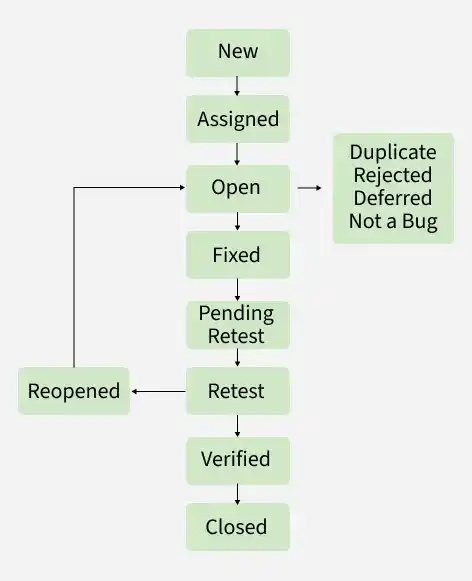
The Bug Life Cycle (Defect Life Cycle) is the process through which a defect goes from identification to closure. It defines the various stages of a bug and helps track its status until it is resolved.
- New: The tester identifies and reports a new defect.
- Assigned: The defect is assigned to a developer for investigation and fixing.
- Open: The developer analyzes the defect and starts working on it.
- Fixed: The developer fixes the defect and marks it as fixed.
- Retest: The tester retests the application to verify the fix.
- Verified: The tester confirms that the defect has been fixed successfully.
- Closed: The defect is closed after successful verification.
51. What is the role of Usability Testing?
Usability testing means determining the ease with which an end-user can easily access the application with or without programming language knowledge. It is also known as User Experience testing which is recommended during the initial design phase of SDLC. It is done to serve the following purpose:
- To identify the usability errors in the system early in the development cycle.
- It minimizes the risk of product failure.
- Usability testing increases the likelihood of usage and repeat usage.
