

Shift Right Testing is a software testing approach in which testing activities continue after an application is deployed to the production environment. It focuses on validating software under real-world conditions by monitoring application behavior, user interactions, and system performance.
- Performed after the software is released to production.
- Uses production monitoring and real user data to validate software quality.
- Supports continuous improvement through ongoing feedback and optimization.
Why Shift Right Testing is Important
Shift Right Testing enables organizations to evaluate application performance and reliability in live environments where actual users interact with the software. It helps identify production issues that may not be detected during pre-release testing and supports continuous software improvement.
- Detects production issues that are difficult to identify during testing.
- Improves application reliability, performance, and user experience.
- Enables data-driven decisions through continuous monitoring and feedback.
Shift Right Testing Architecture
The Shift Right Testing architecture illustrates how production data is collected, analyzed, and used to continuously monitor application health, detect issues, and improve software quality after deployment.
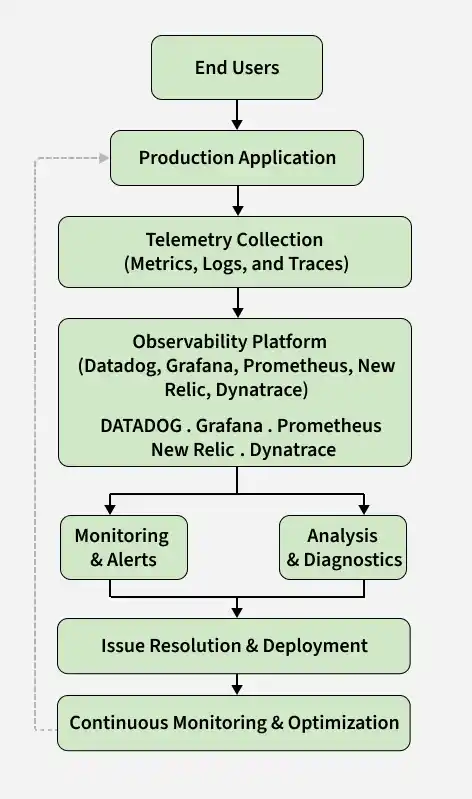
Explanation
- End Users: Real users interact with the application in the production environment.
- Production Application: The live application processes user requests and generates telemetry data.
- Telemetry Collection: Metrics, logs, and traces are collected to monitor performance, detect errors, and track request execution.
- Observability Platform: Tools such as Datadog, Grafana, Prometheus, New Relic, and Dynatrace collect, visualize, and analyze production telemetry.
- Monitoring & Alerts: Continuously monitors application health and automatically generates alerts when performance issues or failures are detected.
- Analysis & Diagnostics: Analyzes metrics, logs, and traces to determine the root cause of production issues.
- Issue Resolution & Deployment: Teams resolve identified issues, deploy updates, and verify that the fixes are successful.
- Continuous Monitoring & Optimization: Applications are continuously monitored and optimized to improve performance, reliability, and user experience.
Shift Right Testing Procedure
Shift Right Testing follows a structured workflow to monitor production applications, identify issues, implement fixes, and continuously optimize software based on production insights.
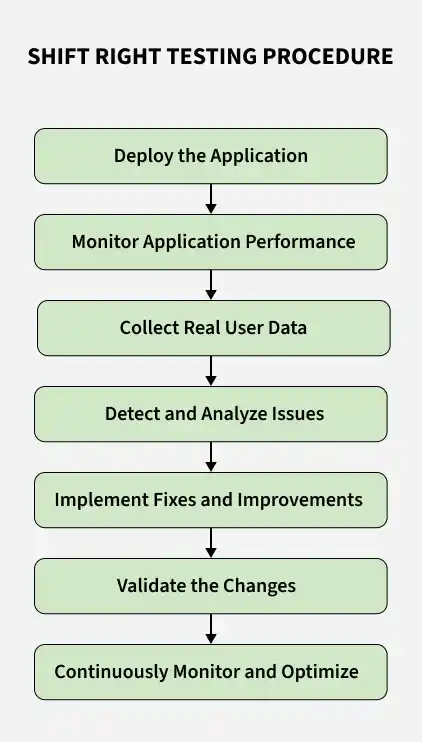
- Deploy the Application: Release the application to the production environment or to a limited group of users.
- Monitor Application Performance: Track application health, response times, availability, resource utilization, and error rates.
- Collect Real User Data: Gather user behavior, performance metrics, feedback, and error reports.
- Detect and Analyze Issues: Identify bugs, crashes, failures, and performance bottlenecks using production data.
- Implement Fixes and Improvements: Resolve issues, optimize performance, and deploy updates.
- Validate the Changes: Verify that implemented fixes resolve the identified issues without introducing new defects.
- Continuously Monitor and Optimize: Continue monitoring production to improve reliability, performance, and user experience.
Shift Right Testing Techniques
Shift Right Testing uses several techniques to monitor production systems, validate software behavior, and improve application quality after deployment
- Production Monitoring: Continuously monitors application health, availability, and performance in production.
- Real User Monitoring (RUM): Collects performance data and user interactions from actual users.
- Synthetic Monitoring: Simulates user activities to verify application availability and performance.
- Canary Testing: Releases new versions to a small group of users before full deployment.
- A/B Testing: Compares multiple application versions to determine the best user experience.
- Feature Flag Testing: Enables or disables features for selected users without redeploying the application.
- Chaos Testing: Introduces controlled failures to evaluate application resilience and fault tolerance.
Key Metrics Monitored
Shift Right Testing continuously tracks production metrics to evaluate application health, reliability, and user experience.
- Response Time: Measures how quickly the application responds to requests.
- Error Rate: Tracks the percentage of failed requests or application errors.
- Application Availability (Uptime): Measures how long the application remains accessible.
- CPU and Memory Usage: Monitors resource utilization to detect performance bottlenecks.
- Crash Rate: Measures the frequency of application crashes.
- Transaction Success Rate: Tracks successful business transactions such as logins and payments.
- Page Load Time: Measures how quickly web pages load for users.
- User Satisfaction: Evaluates user experience through feedback and behavioral insights.
Tools for Shift Right Testing
Shift Right Testing relies on observability, monitoring, logging, and feature management tools to collect production insights and improve software reliability.
- Datadog: Cloud-based observability platform for monitoring applications, infrastructure, logs, and security.
- New Relic: Application Performance Monitoring (APM) platform providing real user monitoring and distributed tracing.
- Dynatrace: AI-powered observability platform for monitoring applications and cloud infrastructure.
- Grafana: Open-source visualization platform for creating dashboards and monitoring metrics.
- Prometheus: Open-source monitoring and alerting toolkit for collecting time-series metrics.
Advantages of Shift Right Testing
Shift Right Testing provides several advantages that help improve application reliability, performance, and user experience after deployment.
- Detects production issues that may not appear during pre-release testing.
- Improves application performance and reliability using production insights.
- Enhances user experience through real user monitoring.
- Enables faster issue detection and resolution.
- Supports continuous software improvement through real-time feedback.
- Reduces downtime by identifying issues before they become critical.
Limitations of Shift Right Testing
Shift Right Testing helps improve software quality after deployment, but it also has certain limitations. Organizations should understand these limitations when implementing production testing practices.
- Production issues can directly impact real users.
- Cannot replace pre-release testing such as unit, integration, and system testing.
- Requires advanced monitoring and observability tools.
- Managing large volumes of production data can be challenging.
- Continuous monitoring increases operational and infrastructure costs.
- Security and privacy of production data must be carefully protected.
Monitoring vs Logging vs Tracing
Monitoring, logging, and tracing are core observability practices that help teams understand application health, troubleshoot issues, and analyze request execution in production.
| Aspect | Monitoring | Logging | Tracing |
|---|---|---|---|
| Purpose | Tracks application health and performance | Records application events and errors | Follows a request across multiple services |
| Focus | Metrics and alerts | Events and log records | End-to-end request flow |
| Data Collected | CPU, memory, response time, uptime | Logs, exceptions, warnings | Request path and latency |
| Primary Use | Detect issues proactively | Troubleshoot application errors | Identify bottlenecks in distributed systems |
| Output | Dashboards and alerts | Log files | Request traces |
| Example Tools | Prometheus, Grafana, Datadog | Splunk, ELK Stack | Jaeger, Zipkin, OpenTelemetry |
