

A REST API (Representational State Transfer Application Programming Interface) is an API designed according to the constraints of REST architecture. It allows applications to communicate with resources over HTTP using standard HTTP methods.
CRUD operations are commonly mapped to HTTP methods as follows:
- Create: Add a new resource using POST
- Read: Retrieve resources using GET
- Update: Replace or modify a resource using PUT/PATCH
- Delete: Remove a resource using DELETE
For example, an API for managing items can use the following endpoints:
Operation | HTTP Method | Endpoint |
|---|---|---|
Create an item | POST | /items |
Get all items | GET | /items |
Get one item | GET | /items/:id |
Update an item | PUT | /items/:id |
Partially update an item | PATCH | /items/:id |
Delete an item | DELETE | /items/:id |
Implementing CRUD Operations in Express.js
Create an Express.js REST API and implement CRUD operations using HTTP methods.
Install Express
Create a Node.js project and install Express:
npm init -y
npm install express
Express provides the functionality required to create the server and define routes.
Set Up the Express Server
Create a file named app.js:
const express = require('express');

const app = express();
const PORT = 3000;

app.use(express.json());

let items = [
    { id: 1, name: 'Item 1' },
    { id: 2, name: 'Item 2' }
];

let nextId = 3;

app.get('/', (req, res) => {
    res.send('Welcome to the REST API!');
});

app.listen(PORT, () => {
    console.log(`Server running on http://localhost:${PORT}`);
});
- express() creates an Express application.
- express.json() parses incoming JSON request bodies.
- items is an in-memory array used to simulate stored resources.
- nextId keeps track of the ID for the next item.
- app.get('/') defines a GET route for the root URL.
- res.send() sends a response to the client.
- app.listen() starts the server on port 3000.
The server is available at:
http://localhost:3000/Note: In this example, the items are stored in an in-memory array. They are not stored in a permanent database and will be lost when the server restarts.
Now, we can implement the CRUD operations.
1. Create: POST
The POST method can be used to add a new resource.
Add the following route to app.js:
app.post('/items', (req, res) => {
    const { name } = req.body;

    const newItem = {
        id: nextId++,
        name
    };

    items.push(newItem);

    res.status(201).json(newItem);
});
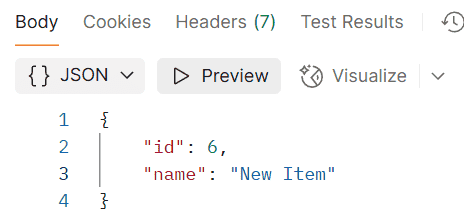
The new item name: New Item has been added in the database.
2. Read: GET
The GET method can be used to retrieve all resources or a specific resource.
Get All Items
app.get('/items', (req, res) => {
    res.json(items);
});
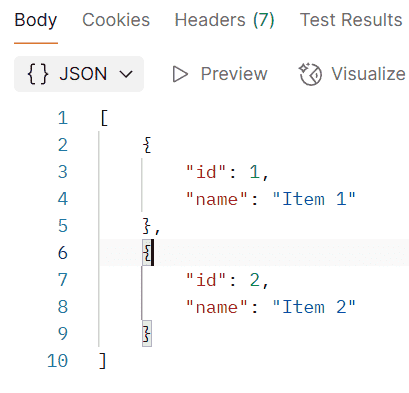
When the client sends:
http://localhost:3000/itemsthe server returns all items:
Output:
Get an Item by ID
To retrieve a specific item, use a URL parameter:
app.get('/items/:id', (req, res) => {
    const id = Number(req.params.id);
    const item = items.find(item => item.id === id);

    if (!item) {
        return res.status(404).json({
            message: 'Item not found'
        });
    }

    res.json(item);
});
Here, :id is a route parameter. Its value can be accessed using req.params.id.
For example:
GET http://localhost:3000/items/2Output:
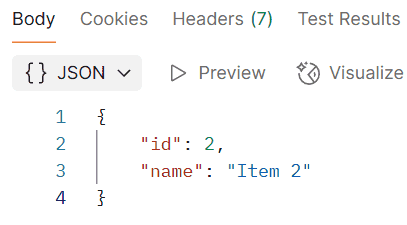
If an item with the specified ID does not exist, the server returns a 404 Not Found response.
3. Update: PUT
The PUT method can be used to replace an existing resource.
app.put('/items/:id', (req, res) => {
    const id = Number(req.params.id);
    const item = items.find(item => item.id === id);

    if (!item) {
        return res.status(404).json({
            message: 'Item not found'
        });
    }

    const { name } = req.body;

    item.name = name;

    res.json(item);
});
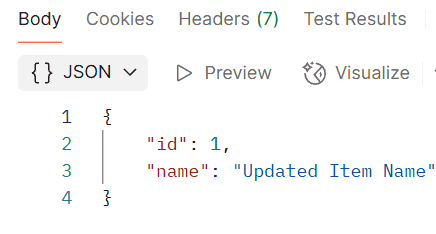
For example, a client can send a PUT request to:
PUT http://localhost:3000/items/1with:
{
    "name": "Updated Item"
}
Output:
4. Delete: DELETE
The DELETE method is used to remove a resource.
app.delete('/items/:id', (req, res) => {
    const id = Number(req.params.id);
    const itemIndex = items.findIndex(item => item.id === id);

    if (itemIndex === -1) {
        return res.status(404).json({
            message: 'Item not found'
        });
    }

    const deletedItem = items.splice(itemIndex, 1)[0];

    res.json(deletedItem);
});
For example:
DELETE http://localhost:3000/items/1
