

Web applications have become the primary target for cyberattacks due to their internet exposure and frequent security misconfigurations. Kali Linux includes a comprehensive collection of web penetration testing tools that help security professionals identify
- Vulnerabilities across every stage of a web application assessment.
- Reconnaissance, vulnerability discovery, authentication testing, proxy-based analysis, exploitation, API testing and web server auditing.
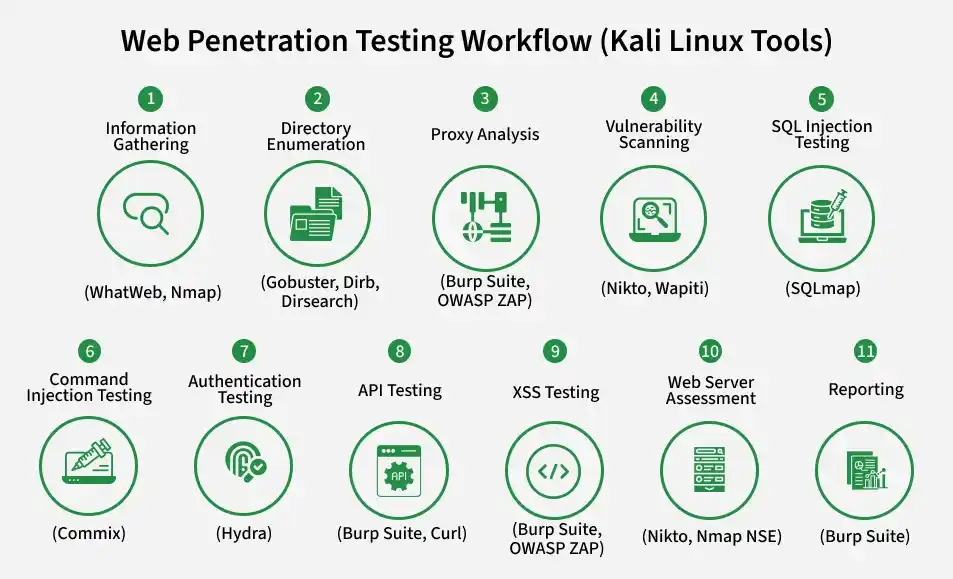
Web Penetration Testing Workflow
- Information Gathering (WhatWeb, Nmap): Discover web technologies, server information, open ports, services and application components.
- Directory Enumeration (Gobuster, Dirb, Dirsearch): Discover hidden directories, files, backup files and administrative endpoints on the web server.
- Proxy Analysis (Burp Suite, OWASP ZAP): Intercept, inspect and modify HTTP/HTTPS requests and responses for manual security testing.
- Vulnerability Scanning (Nikto, Wapiti): Detect known web application vulnerabilities, insecure configurations and outdated software.
- SQL Injection Testing (SQLmap): Detect and validate SQL injection vulnerabilities in database-driven applications.
- Command Injection Testing (Commix): Identify and verify operating system command injection vulnerabilities in web applications.
- Authentication Testing (Hydra): Evaluate the strength of authentication mechanisms and identify weak or guessable credentials.
- API Testing (Burp Suite, Curl): Assess REST and GraphQL APIs for authentication, authorization, input validation and security flaws.
- XSS Testing (Burp Suite, OWASP ZAP): Identify reflected, stored and DOM-based Cross-Site Scripting (XSS) vulnerabilities.
- Web Server Assessment (Nikto, Nmap NSE): Detect web server misconfigurations, insecure HTTP methods, default files and outdated server components.
- Reporting (Burp Suite): Generate detailed reports documenting identified vulnerabilities, affected endpoints, severity levels, proof of concept and remediation recommendations.
Common Web Penetration Testing Tools
- Burp Suite: Burp Suite is the most widely used web application penetration testing platform. It acts as an intercepting proxy between the browser and target application.
- OWASP ZAP: OWASP ZAP (Zed Attack Proxy) is an open-source web security testing framework suitable for beginners and professionals. Features: Automated scanning, Passive scanning etc.
- Nikto: Nikto scans web servers for dangerous files, outdated software, insecure configurations and known vulnerabilities. Detects: Default files, Backup files, Dangerous scripts etc.
- Gobuster: Gobuster performs brute-force discovery of hidden resources. It can enumerate: Directories, Files, Virtual hosts, DNS subdomains.
- Dirb: Dirb discovers hidden directories and files using predefined wordlists. Features: Recursive scanning, Extension discovery, Custom wordlists, Fast directory enumeration.
- Dirsearch: Dirsearch is a Python-based content discovery tool with improved performance and filtering options. Features: Recursive enumeration, Multi-threading, Extension support etc.
- WhatWeb: WhatWeb identifies technologies used by websites. It can detect: CMS, Web servers, JavaScript frameworks, Programming languages, Analytics tools, Security headers.
- SQLmap: SQLmap automates SQL Injection detection and verification. Capabilities: Database fingerprinting, Database enumeration, Data extraction, Password hash dumping, etc.
- Commix: Commix specializes in detecting and validating command injection vulnerabilities. Supports: GET requests, POST requests, Cookies, HTTP headers.
- Hydra: Hydra performs authentication security testing against web login portals. Supported authentication methods include: HTTP Basic, HTTP Forms, HTTPS Forms, FTP, SSH, RDP, SMB.
Best Practices
- Obtain proper authorization before testing any web application.
- Begin with passive reconnaissance before performing active scans.
- Validate automated findings through manual verification to reduce false positives.
- Use updated wordlists and keep Kali Linux tools current.
- Test authentication, session management, input validation, file uploads and APIs in addition to automated scans.
- Document findings with evidence, affected endpoints, risk ratings and remediation recommendations.
