

A Web Crawler is a program that automatically visits web pages, downloads their content, and extracts useful information from them. Search engines use web crawlers to discover and index web pages so that relevant results can be provided to users.
- It automatically discovers and visits web pages by following links.
- It can use Breadth-First Search to systematically crawl connected web pages.
Web Crawler as a Graph
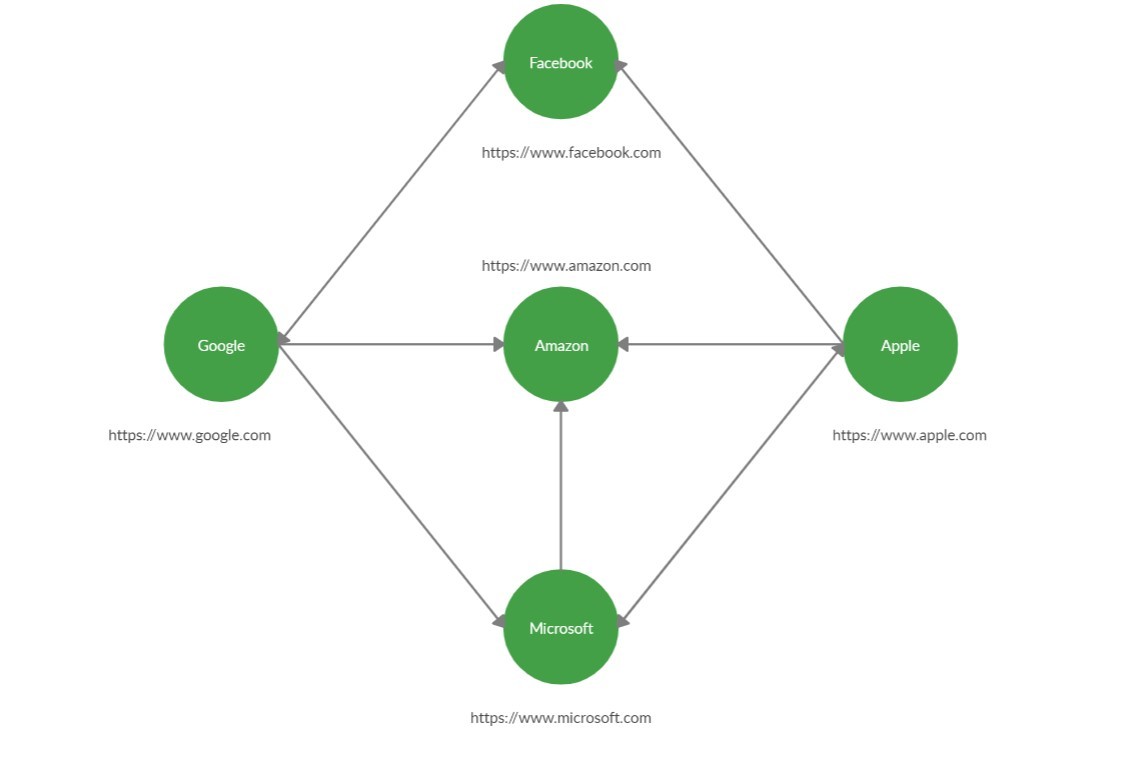
Web crawling can be represented using a directed graph, where:
- Vertices: Represent web pages or URLs.
- Edges: Represent links or connections between web pages.
For example, if one web page contains a link to another web page, an edge is created between the two corresponding vertices.
A web crawler can traverse this graph using Breadth-First Search (BFS), starting from a given URL and visiting the connected pages level by level.
Example:
Approach
The basic idea is to use a queue to crawl URLs in BFS order.
- Start with a given URL and add it to the queue.
- Maintain a set of visited URLs to avoid processing the same URL multiple times.
- Remove a URL from the front of the queue.
- Download and parse the HTML content of the page.
- Extract the URLs present in the HTML content.
- Add the newly discovered URLs to the queue if they have not been visited.
- Repeat the process until the queue becomes empty or the required crawling limit is reached.
import java.io.BufferedReader;
import java.io.InputStreamReader;
import java.net.URL;
import java.util.HashSet;
import java.util.LinkedList;
import java.util.List;
import java.util.Queue;
import java.util.regex.Matcher;
import java.util.regex.Pattern;

// Class Contains the functions
// required for WebCrowler
class WebCrowler {

    // To store the URLs in the
    / /FIFO order required for BFS
    private Queue<String> queue;

    // To store visited URls
    private HashSet<String>
        discovered_websites;

    // Constructor for initializing the
    // required variables
    public WebCrowler()
    {
        this.queue
            = new LinkedList<>();

        this.discovered_websites
            = new HashSet<>();
    }

    // Function to start the BFS and
    // discover all URLs
    public void discover(String root)
    {
        // Storing the root URL to
        // initiate BFS.
        this.queue.add(root);
        this.discovered_websites.add(root);

        // It will loop until queue is empty
        while (!queue.isEmpty()) {

            // To store the URL present in
            // the front of the queue
            String v = queue.remove();

            // To store the raw HTML of
            // the website
            String raw = readUrl(v);

            // Regular expression for a URL
            String regex
                = "https://(\\w+\\.)*(\\w+)";

            // To store the pattern of the
            // URL formed by regex
            Pattern pattern
                = Pattern.compile(regex);

            // To extract all the URL that
            // matches the pattern in raw
            Matcher matcher
                = pattern.matcher(raw);

            // It will loop until all the URLs
            // in the current website get stored
            // in the queue
            while (matcher.find()) {

                // To store the next URL in raw
                String actual = matcher.group();

                // It will check whether this URL is
                // visited or not
                if (!discovered_websites
                         .contains(actual)) {

                    // If not visited it will add
                    // this URL in queue, print it
                    // and mark it as visited
                    discovered_websites
                        .add(actual);
                    System.out.println(
                        "Website found: "
                        + actual);

                    queue.add(actual);
                }
            }
        }
    }

    // Function to return the raw HTML
    // of the current website
    public String readUrl(String v)
    {

        // Initializing empty string
        String raw = "";

        // Use try-catch block to handle
        // any exceptions given by this code
        try {
            // Convert the string in URL
            URL url = new URL(v);

            // Read the HTML from website
            BufferedReader br
                = new BufferedReader(
                    new InputStreamReader(
                        url.openStream()));

            // To store the input
            // from the website
            String input = "";

            // Read the HTML line by line
            // and append it to raw
            while ((input
                    = br.readLine())
                   != null) {
                raw += input;
            }

            // Close BufferedReader
            br.close();
        }

        catch (Exception ex) {
            ex.printStackTrace();
        }

        return raw;
    }
}

// Driver code
public class Main {

    // Driver Code
    public static void main(String[] args)
    {
        // Creating Object of WebCrawler
        WebCrowler web_crowler
            = new WebCrowler();

        // Given URL
        String root
            = "https:// www.google.com";

        // Method call
        web_crowler.discover(root);
    }
}
Output:
Website found: https://www.google.com/
Website found: https://www.facebook.com/
Website found: https://www.amazon.com/
Website found: https://www.microsoft.com/en-us/
Website found: https://www.apple.com/
Problems Caused by Web Crawlers
Web crawlers can generate a large number of requests while visiting web pages. If requests are sent too frequently, they can increase the load on web servers and affect their performance.
To prevent this, web crawlers follow politeness policies that control how frequently and when web pages should be crawled. Two important factors considered in crawling are Freshness and Age.
Freshness
Web pages are frequently updated or modified, so crawlers need to revisit them periodically to obtain the latest content. The HEAD HTTP request can be used to retrieve metadata about a resource without downloading its complete content. Information such as the Last-Modified header can help a crawler determine whether a web page has been modified since the previous crawl.
Age
The age of a web page represents the amount of time that has passed since it was last crawled. As the age of a page increases, the information stored by the crawler may become outdated. Therefore, crawlers use age along with other factors, such as the importance and update frequency of a page, to determine which pages should be crawled again.
Applications of Web Crawlers
Web crawlers are used in various applications, including:
- Search Engines: Discover and index web pages to provide relevant search results.
- Web Data Collection: Collect information from websites for analysis and research.
- Social Network Analysis: Analyze relationships and connections between users or websites.
- Popularity Analysis: Identify frequently visited or highly connected websites.
- Network Analysis: Identify important or influential nodes in a network.
- Information Monitoring: Track changes and updates on web pages.
- Recommendation Systems: Collect web data that can be used to identify relevant content.
