Repository navigation
Bug: HASS.Agent crashes under Server 2016 #113

Description

Updated to 2022.12, and whenever I start up HASS.Agent I get a message saying it has stopped working and crashes.
Application: HASS.Agent.exe
CoreCLR Version: 6.0.322.12309
.NET Version: 6.0.3
Description: The process was terminated due to an unhandled exception.
Exception Info: System.TypeInitializationException: The type initializer for 'WinRT.ActivationFactory`1' threw an exception.
 ---> System.Runtime.InteropServices.COMException (0x80040154): ClassFactory cannot supply requested class

   at WinRT.BaseActivationFactory..ctor(String typeNamespace, String typeFullName)
   at WinRT.ActivationFactory`1..ctor()
   at WinRT.ActivationFactory`1..cctor()
   --- End of inner exception stack trace ---
   at WinRT.ActivationFactory`1.As(Guid iid)
   at Windows.Media.Control.GlobalSystemMediaTransportControlsSessionManager.Make___objRef_global__Windows_Media_Control_IGlobalSystemMediaTransportControlsSessionManagerStatics()
   at Windows.Media.Control.GlobalSystemMediaTransportControlsSessionManager.get__objRef_global__Windows_Media_Control_IGlobalSystemMediaTransportControlsSessionManagerStatics()
   at HASS.Agent.Media.MediaManager.MediaMonitor()
   at System.Threading.Tasks.Task.<>c.<ThrowAsync>b__128_1(Object state)
   at System.Threading.QueueUserWorkItemCallback.<>c.<.cctor>b__6_0(QueueUserWorkItemCallback quwi)
   at System.Threading.ExecutionContext.RunForThreadPoolUnsafe[TState](ExecutionContext executionContext, Action`1 callback, TState& state)
   at System.Threading.QueueUserWorkItemCallback.Execute()
   at System.Threading.ThreadPoolWorkQueue.Dispatch()
   at System.Threading.PortableThreadPool.WorkerThread.WorkerThreadStart()
   at System.Threading.Thread.StartCallback()
Faulting application name: HASS.Agent.exe, version: 2022.12.0.0, time stamp: 0x6283e0e1
Faulting module name: KERNELBASE.dll, version: 10.0.14393.5125, time stamp: 0x626ca997
Exception code: 0xe0434352
Fault offset: 0x0000000000034f08
Faulting process id: 0x1aa4
Faulting application start time: 0x01d8922a71a79c06
Faulting application path: C:\Users\Stuke00\AppData\Roaming\LAB02 Research\HASS.Agent\HASS.Agent.exe
Faulting module path: C:\Windows\System32\KERNELBASE.dll
Report Id: 5f2eb168-9d03-49de-b7ad-eee06894c52a
Faulting package full name:
Faulting package-relative application ID:

Activity
LAB02-Admin commentedon Jul 7, 2022
Can you run
winver.exeand post a screenshot of its inforstuke82 commentedon Jul 7, 2022
I've been using this for several months but after I updated, it stopped.
LAB02-Admin commentedon Jul 8, 2022
Hm, looks like it's fully up-to-date, so it should work since Server 2016 uses the same code base as Windows 10. Give me some time to setup a Server 2016 environment to test and see if I can get it working. In the meantime, you can uninstall the current version (no settings will get lost) and temporarily install the previous version.
[-]HASS.Agent has stopped working[/-][+]Bug: HASS.Agent crashes under Server 2016[/+]RafaelEstevamReis commentedon Jul 8, 2022
MediaManager is a new adition (seems to be added with commit b348431 in this release
As MediaMonitor() is started as a "free" Task, any exceptions crash the entire application
HASS.Agent/src/HASS.Agent/Media/MediaManager.cs
Line 40 in fd496dd
Two optons are
Eckart0 commentedon Jul 17, 2022
I have the same Problem with Windows Server 2012R2 (Version 6.3, Build 9600, NET Framework 4.8)
I can install HASS.agent, but can't call the program window to configure it.
Greetings, Eckart
LAB02-Admin commentedon Jul 18, 2022
I'm currently on vacation, when I get back (end of the week) I'll work on it
LAB02-Admin commentedon Aug 3, 2022
@RafaelEstevamReis suggested workaround is effective, just tested on a W7 environment. Will be rolling out in the next beta.
Thanks!
LAB02-Admin commentedon Aug 12, 2022
Implemented in the latest beta, let me know how it goes: https://github.com/LAB02-Research/HASS.Agent/releases/tag/2022.13.0-beta2
rstuke82 commentedon Aug 28, 2022
Sorry for the delay, I finally got around to installing the new beta2 and it no longer crashes. However, it no longer reports storage capacity.
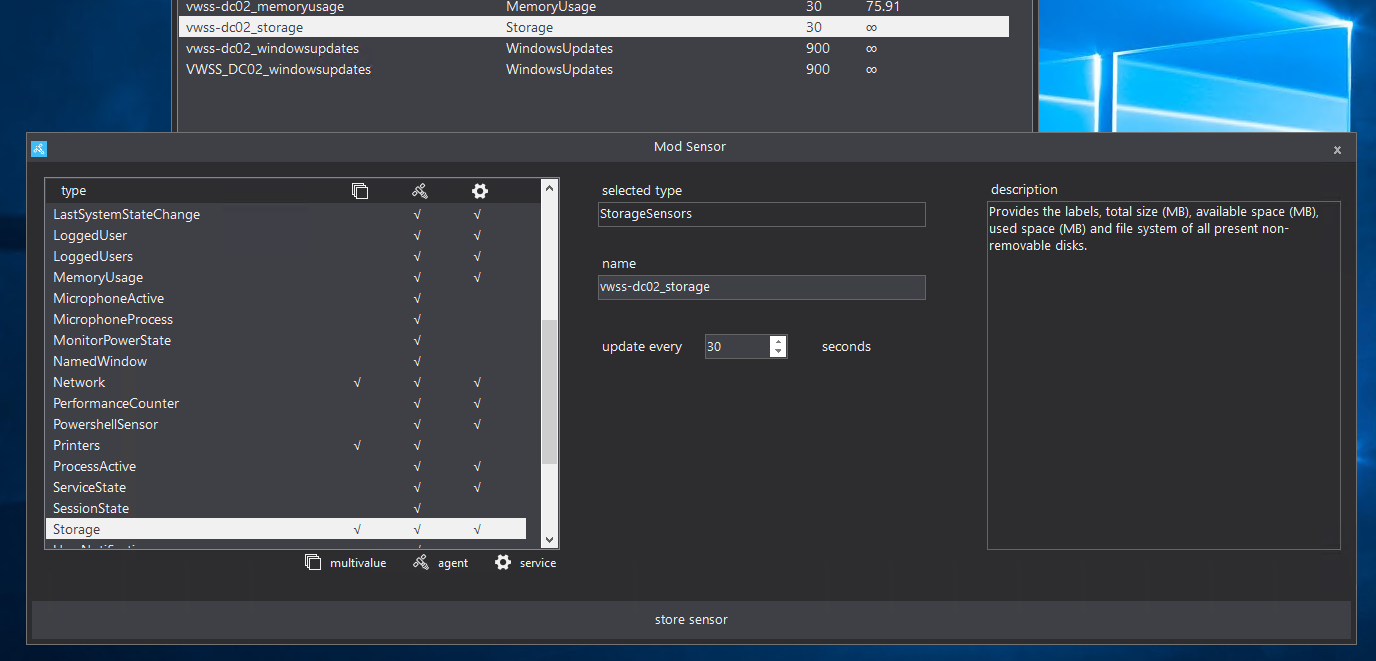

It only now shows the storage label and the number of disks.
LAB02-Admin commentedon Sep 22, 2022
Most multivalue sensors now use attributes:
rstuke82 commentedon Sep 22, 2022
LAB02-Admin commentedon Sep 22, 2022
You can use template sensors to convert any of them into regular ones.
rstuke82 commentedon Sep 22, 2022
LAB02-Admin commentedon Sep 22, 2022
I took the liberty of writing an example for you:
Make sure to change
sensor.hass_agent_storage_cto the drive's sensor, andAvailableSpaceMBto the attribute you want to use. The| float(0)part converts it to a number-based value, you can drop that if you want text.Reboot HA, and it'll show up as
sensor.storage_capacity_c.rstuke82 commentedon Sep 25, 2022