You signed in with another tab or window. Reload to refresh your session.You signed out in another tab or window. Reload to refresh your session.You switched accounts on another tab or window. Reload to refresh your session.Dismiss alert
{{ message }}
Repository navigation
[Feature request] Switching between 2 modes with hotkey(s) #5
I released a new version of Auto-Night Mode. Version 2.0 introduces fast theme switching with the program Jump-List. So you can pin the program to your start screen or to the taskbar, and then right click on it to switch the theme.
This solution is much easier & resource-saving than a global hotkey. I hope you like it!
Another solution is to define a shortcut to the AutoDarkMode.exe with a command line argument of "/dark" or "/light". Then define a global keyboard shortcut to launch this shortcut.
Here's an example shortcut:
It'd be nice if there was a "/toggle" command line argument so I can define only one shortcut instead of two. Here's the code to add to App.xaml.cs:
                    else if(value == "/toggle")
                    {
                        RegEditHandler regEditHandler = new RegEditHandler();
                        if (regEditHandler.SystemUsesLightTheme())
                            regEditHandler.ThemeToDark();
                        else
                            regEditHandler.ThemeToLight();
                    }
Reacted by Armin Osaj, Daniel Malik and Tomas Fiers
I released a new version of Auto-Night Mode. Version 2.0 introduces fast theme switching with the program Jump-List. So you can pin the program to your start screen or to the taskbar, and then right click on it to switch the theme.
This solution is much easier & resource-saving than a global hotkey. I hope you like it!
This seems to be the best solution so far. I've pinned it to my Start menu and it works. But I still wish to have this keyboard shortcut as well, hopefully at some point. There ARE already apps that can help with this but I don't want to install two different apps for achieving one goal.
Thank you ✨.
Hello,
I released a new version of Auto-Night Mode. Version 2.0 introduces fast theme switching with the program Jump-List. So you can pin the program to your start screen or to the taskbar, and then right click on it to switch the theme.
This solution is much easier & resource-saving than a global hotkey. I hope you like it! Click here to download the new version
This seems to be the best solution so far. I've pinned it to my Start menu and it works. But I still wish to have this keyboard shortcut as well, hopefully at some point. There ARE already apps that can help with this but I don't want to install two different apps for achieving one goal. Thank you ✨.
Global hotkeys are very high on our priority list.
The next major feature release will not launch before this has been implemented.


Activity
Armin2208 commentedon Dec 4, 2018
I also had the nice idea. But the App would need a background task to do so.
Armin2208 commentedon Jan 2, 2019
Hello,
I released a new version of Auto-Night Mode. Version 2.0 introduces fast theme switching with the program Jump-List. So you can pin the program to your start screen or to the taskbar, and then right click on it to switch the theme.
This solution is much easier & resource-saving than a global hotkey. I hope you like it!
Click here to download the new version
rquellet commentedon May 27, 2019
Another solution is to define a shortcut to the AutoDarkMode.exe with a command line argument of "/dark" or "/light". Then define a global keyboard shortcut to launch this shortcut.
Here's an example shortcut:
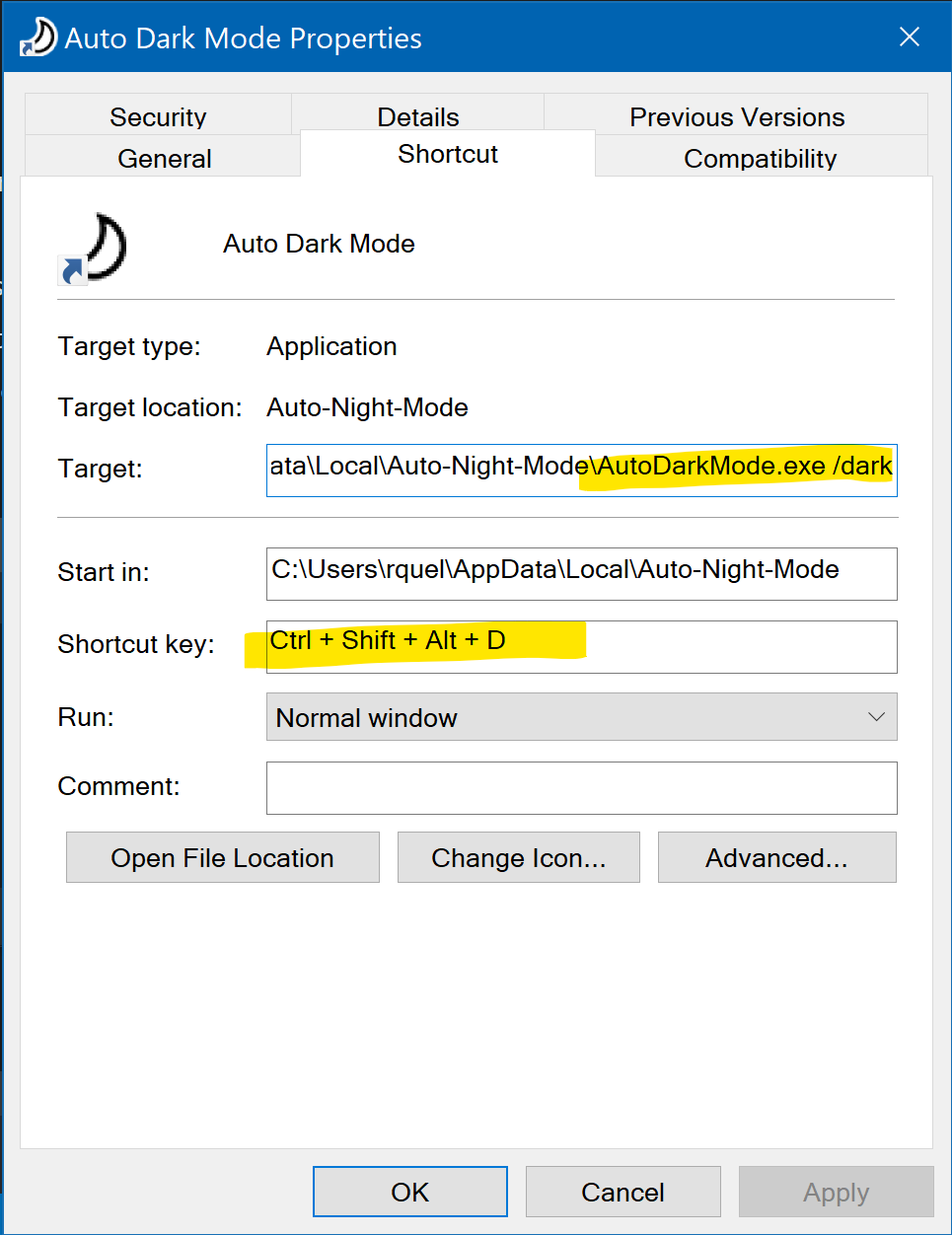
It'd be nice if there was a "/toggle" command line argument so I can define only one shortcut instead of two. Here's the code to add to App.xaml.cs:
aderchox commentedon Oct 30, 2021
This seems to be the best solution so far. I've pinned it to my Start menu and it works. But I still wish to have this keyboard shortcut as well, hopefully at some point. There ARE already apps that can help with this but I don't want to install two different apps for achieving one goal.
Thank you ✨.
Spiritreader commentedon Nov 6, 2021
Global hotkeys are very high on our priority list.
The next major feature release will not launch before this has been implemented.
add backend support for #5, also fixes #357
Spiritreader commentedon Nov 7, 2021
It's done.
frontend support for #5