Repository navigation
Studio export to csv/Excel truncates String values longer than 30 characters #721

Description

ArcadeDB Version: v22.11.1
JDK Version: openjdk 11.0.12 2021-07-20 LTS
OpenJDK Runtime Environment Corretto-11.0.12.7.1 (build 11.0.12+7-LTS)
OpenJDK 64-Bit Server VM Corretto-11.0.12.7.1 (build 11.0.12+7-LTS, mixed mode)
OS: CentOS release 6.9 (Final)
Expected behavior
The export to csv/Excel generates a file which include the same values stored in the database
Actual behavior
the csv/Excel export includes ellipsis for values longer than 30 characters.
This does not seem to be linked to the browser and screen settings, because if I open a side window (e.g. developer tools), all the table columns shrink but the amount of text displayed stays the same, it just wraps around.
The attached screenshot "Studio table view" shows that the Studio table view shows the value "CS_OPER_AUX_WNDCHE_00000000T00..." for the "name" property
The attached screenshot "json table view" shows that the actual value of the name property for that record is "CS_OPER_AUX_WNDCHE_00000000T000000_99999999T999999_0001.DBL"
Steps to reproduce
- Create a type
- create a property "name" of type String
- insert a value longer than 30 characters for the "name" property, e.g. 'property_name_longer_than_30_ch', which is 31 characters long.
- issue a select query for the type
- verify that the table view shows ellipsis "..." at the end of the value, e.g. 'property_name_longer_than_30_c...'
- click the json view and verify that the name property has value = property_name_longer_than_30_ch
- export to csv or Excel
- open the file and verify that the value is truncated and it contains ellipsis and the end, e.g. "property_name_longer_than_30_c..."


Activity
lvca commentedon Dec 30, 2022
Find the issue:
arcadedb/server/src/main/resources/static/js/studio-table.js
Line 63 in 31ec156
Any column longer than 30 chars is truncated. Since the table doesn't scroll on the right (overflow) like OrientDB Studio, it's challenging to keep long values. Any advice?
WDYT?
lvca commentedon Dec 30, 2022
I moved ahead and implemented both as new options in the "Settings" menu under Table:
Now you can select:
Also these settings are saved in the browser's storage, together with the database name, so once you change your settings they are persistent (unless you clear web browser's local storage)
new: studio render result in table now with 2 options (truncate long …
lvca commentedon Dec 30, 2022
@vic0824 you can try now to remove "Truncate long values" and export in CSV/Excel.
vic0824 commentedon Dec 31, 2022
Excellent, thanks.
We could go one step further and set "table-layout: auto" + "word-break:break-all" when "Fit table in page" mode is selected. If necessary, min-width could be specified for the @Rid, it's probably the only column we don't want to ever wrap around.
The rationale is that the contents of some of the columns is often going to be shorter than others, e.g. the @Rid and @type columns take up too much space and they are not the most important information.
Other, more aggressive, optimizations, could be:
lvca commentedon Dec 31, 2022
Hey @vic0824, could you please send a PR about the first part once you tested and work better?
About the more aggressive optimizations, you can always reduce the font by zooming in and out with your browser if you need it. The main menu on the top is an option, especially because we don't have so many options to justify a vertical tab.
About the removal of
@typeis not a good idea, because you could do aselect from Customerand the resultset not only has Customer but also all the instances from sub-classes: types are polymorphic.vic0824 commentedon Jan 1, 2023
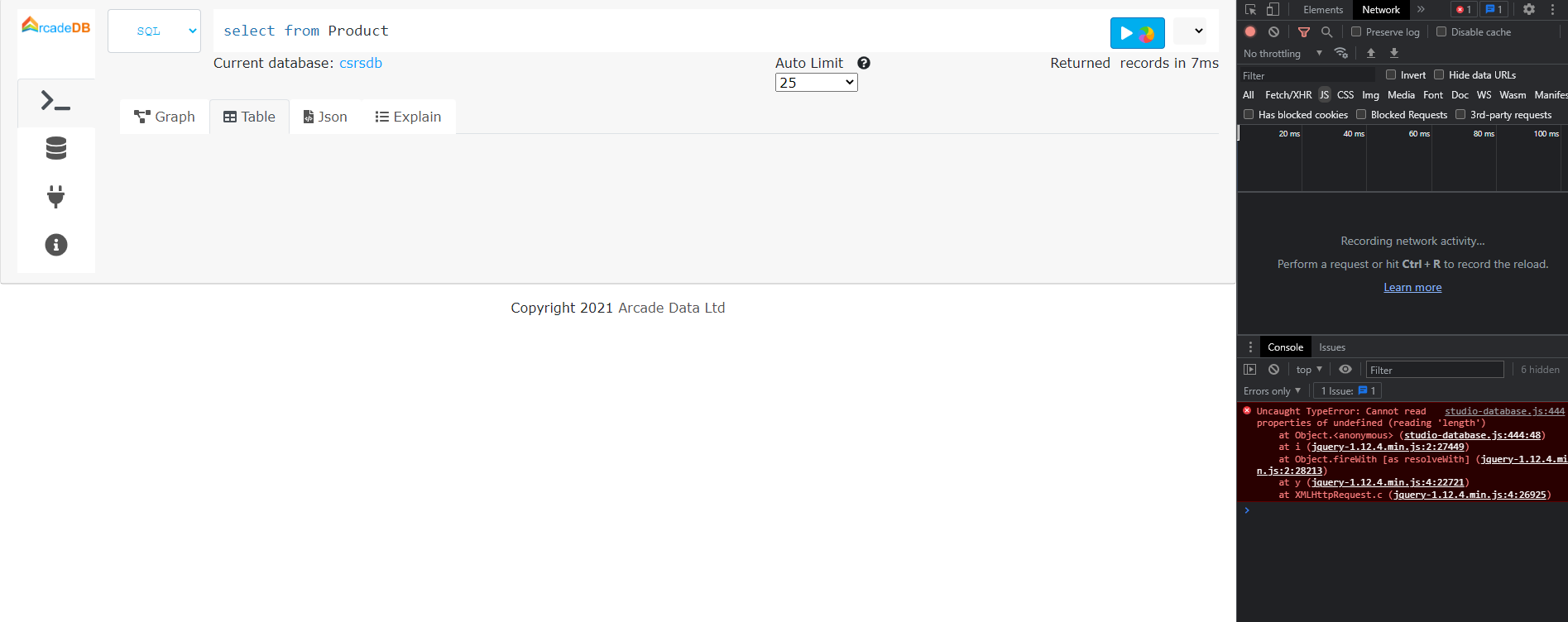
I have downloaded the entire content of the "static" folder (from the main branch) and patched the server jar, but it does not seem to work for me. When I execute a query, it hangs and the browser console displays a js error message (see attached screenshot). What am I doing wrong?
lvca commentedon Jan 1, 2023
Hard to tell. If you forked the project, could you please create a PR of your changes so I can see them?
vic0824 commentedon Jan 2, 2023
Tested it with v23.1.1-SNAPSHOT (build 1b37118/1672647527307/main).
It works, more or less.
The functionality is there (see attached "fit table in page" screenshot and "Studio export" csv file, and I have verified it also for Excel, PDF, copy and print), but the checkboxes do not behave correctly:
By clicking around I've managed to select only "Fit table in page".
I have then refreshed the browser, logged in again and verified that "Fit table in page was selected".
This makes me think that the code sets the checkbox status based only on the value in the local storage, and if it doesn't find any (because it is the first time that page is displayed by that browser or because the cache has been cleared), then it does not select any.
I suggest to modify the javascript code so that if it doesn't find a value in the local storage, it selects the "Fit table in page" checkbox, which would then be consistent with the default behavior, i.e. to fit the table in the page.
Studio export.csv
vic0824 commentedon Jan 2, 2023
Hold on, there are more behaviors, probably because it is possible to select both options and deselect both options, but depending on the order in which they are applied, they produce different results.
The "default behavior" (when no option is selected) seems to be: values are not truncated and the column widths adjust to the content, corresponding to "table-layout: auto"
I think the default behavior make the best use of the space, by using table-layout: auto, so I propose that, apart from fixing the problems with the selection, both options use "table-layout: auto" instead of "table-layout: fixed"

3 remaining items
lvca commentedon Jan 2, 2023
Too early. The saved values are not correct, and as you noticed, clicking on the actual checkbox doesn't work.
fix: studio management of table setting now consistent after restart
lvca commentedon Jan 2, 2023
Ok, I hope this is the good one. Checkboxes now work and the settings are correctly saved and displayed at the opening. Please confirm when you can, in case there is still an issue, we can reopen this issue. Thanks in advance.
vic0824 commentedon Jan 3, 2023
Tested it with v23.1.1-SNAPSHOT (build 8c8df17/1672742152255/main).
Clicking on the checkbox now works, but maybe I misunderstood the design: did you intend for the two checkboxes to be mutually exclusive or not?
If not, then it works as expected.
Screenshots:
Anyway, I think it's good enough, it's not worth spending more time on it.
lvca commentedon Jan 3, 2023
They are not mutually exclusive, one is to truncate values no matter the layout. If you have any suggestions to make it better don't hesitate to comment here.
lvca commentedon Jan 6, 2023
@vic0824 I think I finally understood what you mean. Just fixed. Not if "Fit In Page" is not selected, the table scrolls to display all the columns.
fix: studio not fit in page for table now works as expected
vic0824 commentedon Jan 13, 2023
Great, thanks!
new: studio render result in table now with 2 options (truncate long …
fix: studio default settings for table are now displayed correctly
fix: studio management of table setting now consistent after restart
fix: studio not fit in page for table now works as expected
chore(deps): bump actions/setup-go from 5.5.0 to 6.5.0 [skip ci]