Most gift guides for programmers assume the person you’re buying for needs more things on the desk: a mug with a semicolon joke, an RGB keyboard, a rubber duck. Engineers already own the tools they care about, and they are fussy about them, so those gifts tend to end up in a drawer. The gifts for programmers, sysadmins and homelabbers that do get used are the ones they keep meaning to buy for themselves and never do.
This year adds a complication. Memory makers are selling their fab capacity to the AI build-out first, so anything with a lot of RAM inside costs far more than it did a year ago. We picked 11 gifts from about $25 to $700, flagged the ones the shortage reached, and named who should skip each one. Prices and stock were read from Amazon’s catalog on October 15, 2026, and specs were checked against each maker’s spec page or datasheet wherever one exists.
Best gifts for programmers and sysadmins: quick picks
| Award | Gift | Price (check live) | Why it wins |
|---|---|---|---|
| Best under $30 | Yubico Security Key C NFC | about $29 | The backup key almost nobody buys for themselves, and it holds SSH keys as well as passkeys |
| Best for homelabbers | P3 Kill A Watt P4400 | about $30 | Puts a real number on what the lab draws at the wall |
| Best for hardware tinkerers | iFixit Mako Driver Kit | about $40 | 64 bits including the security heads cheap kits skip, with a lifetime guarantee |
| Best book | Designing Data-Intensive Applications, 2nd Ed | about $57 | Published March 2026, so fans of the first edition probably don’t own it yet |
| Best big homelab gift | CyberPower CP1500PFCLCD | about $240 | Sine wave output and USB shutdown, at a price the memory shortage hasn’t touched |
| Best for a developer’s desk | BenQ RD280UG | about $700 | A 3:2 panel with 400 more pixel rows than a 16:9 4K screen |
Every price above is a band from Amazon’s catalog on the day of writing. Anything with memory inside has been repriced more than once this year, so check the live listing and the seller name before you check out. If the gift has to arrive by a date, buy early.
Why memory-heavy gifts cost more in 2026
Anything built around a lot of DRAM got more expensive this year, and gifts with little or no memory in them did not. Raspberry Pi blamed its own price rises on competition for memory fab capacity from the AI roll-out. In its April announcement it said the LPDDR4 it buys had risen seven-fold in a year, and it passed part of that on to the 8GB Pi 5 in three steps:
- December 1, 2025: from $80 to $95, the first memory-driven rise.
- February 2, 2026: another $30, taking it to $125.
- April 1, 2026: another $50, taking it to $175.
That is more than double the pre-shortage price, for the same board. We have also been logging Amazon prices for the listings in our buyer guides while keeping them current, and the same split shows up there:
| Gift | Earlier price | October 15, 2026 | Memory inside |
|---|---|---|---|
| Raspberry Pi 5 8GB board (list price) | $80 (before Dec 2025) | $175 | 8GB LPDDR4X |
| Beelink Mini S12 Pro, 16GB/500GB | $369 (Aug 10) | $429 | 16GB DDR4 + SSD |
| CanaKit Pi 5 8GB Essentials kit | $219.99 (Aug 10) | $229.99 | 8GB LPDDR4X |
| Yubico Security Key C NFC | $29 MSRP (Jul 5) | $29.00 | None to speak of |
| TP-Link TL-SG108E switch | $27.99 (Sep 29) | $24.99 | None to speak of |
| P3 Kill A Watt P4400 | $31.39 (Sep 28) | $29.98 | None |
| CyberPower CP1500PFCLCD UPS | $239.95 (Sep 28) | $239.95 | None |
The pattern matters more than any one row. Our Amazon logs only go back a few months, so they show the direction rather than the whole rise. The direction is the same everywhere, though: boxes whose cost is mostly memory keep climbing, while keys, switches, meters and UPS units sit at or below where we logged them. A mini PC buys less computer than it would have last Christmas, so the tools and accessories end of this list is where a gift budget goes furthest. Our explainer on why RAM and storage prices jumped covers what drove it.
How we picked these gifts
We did not buy and unwrap these for this guide. Seven picks come from our own buyer guides, where each one was chosen against its alternatives, and the other four were sourced fresh for this list. For every pick we read the maker’s spec page or datasheet where there is one, Amazon’s live listing for the exact model, and our own earlier guide or a third-party review where one covers it. Then we wrote down the trade-off that should stop some people buying it. Three rules decided what made the cut:
- Nothing that depends on taste: keyboards, mice and headphones are out, because the person you’re buying for has opinions you can’t see. The one monitor stays in with a warning attached.
- Sold by Amazon or the maker: ten of the 11 ship from Amazon.com or a storefront carrying the maker’s name. The Kill A Watt is the exception, and its pick says so.
- In stock on October 15, 2026: every listing showed a working add-to-cart from a New York delivery address, and thin stock is flagged where we saw it.
Gift ideas for programmers and IT pros compared
| Gift | Price (check live) | Best for | Hit by the memory shortage | Sold by |
|---|---|---|---|---|
| Yubico Security Key C NFC | about $29 | Anyone with a GitHub or cloud account | No | Yubico |
| P3 Kill A Watt P4400 | about $30 | Homelabbers in North America | No | Timers Plus (third party) |
| iFixit Mako Driver Kit | about $40 | Anyone who opens hardware | No | iFixit |
| TP-Link TL-SG108E | about $25 | Learning VLANs | No | Amazon.com |
| Klein Tools LAN Scout Jr. 2 | about $60 | Network engineers, cable crimpers | No | Amazon.com |
| Brother P-touch PT-D410 | about $68 to $70 | Racks and cable runs | No | Amazon.com |
| Designing Data-Intensive Applications, 2nd Ed | about $57 | Backend and platform engineers | No | Amazon.com |
| CanaKit Raspberry Pi 5 8GB kit | about $230 | Tinkerers starting a project | Yes | CanaKit |
| CyberPower CP1500PFCLCD | about $240 | Anyone with a NAS or server | No | Amazon.com |
| Beelink MINI S13 | about $339 | A first Proxmox node | Yes | Beelink |
| BenQ RD280UG | about $700 | A developer whose setup you know | No | BenQ INFTY Lab |
1. Yubico Security Key C NFC: best under $30
A second hardware key is the gift that people who already use one would rarely buy themselves. It is also the one that saves them when the first key goes through the wash. The Security Key C NFC is Yubico’s FIDO-only model, so it handles passkeys, WebAuthn logins and SSH keys that live on the hardware, which covers what most developers want a key for. At about $29 it is cheap enough to give as a pair.
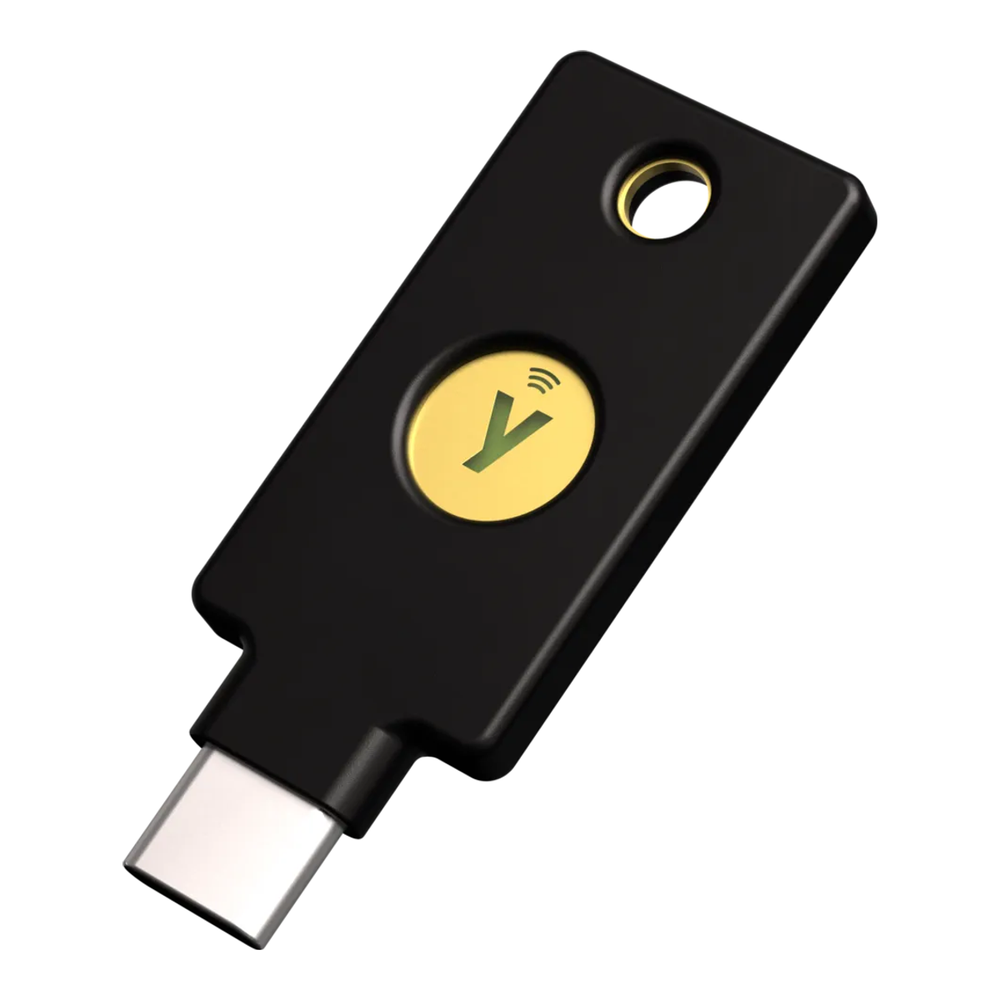
It plugs in over USB-C and taps against a phone over NFC, and Yubico rates it IP68 and crush resistant, with no battery to die. For SSH, the ed25519-sk key type needs OpenSSH 8.2 or newer and key firmware 5.2.3 or later, which current keys are well past. Our YubiKey SSH guide covers generating a resident key and carrying it to a new laptop. Amazon lists it at about $29, sold by Yubico itself.
Skip it if they sign Git commits with GPG or use a smart-card login at work. The Security Key series is FIDO only, so it cannot hold OpenPGP or PIV credentials. For those you want the YubiKey 5C NFC at about $58. Check which port their laptop and phone use as well, because this one is USB-C only.
2. P3 Kill A Watt P4400: best for homelabbers
Every homelab conversation turns into an argument about idle watts sooner or later. This meter settles it with a number instead of a spec sheet. You plug it into the wall and plug the server, or the whole power strip, into it. It then shows watts, volts, amps, power factor and the kilowatt-hours used since you plugged it in. Leave it on a NAS for a week and you have the real running cost, the figure that usually decides whether an old tower stays.

P3 rates it at 0.2% accuracy on 115 V outlets, up to 15 A and 1,875 VA, which covers anything that plugs into an ordinary wall socket. The same reading is where our UPS sizing guide starts, because a runtime chart means nothing until you know the real load. Amazon lists it at about $30.
Pass on it if they live outside North America. The P4400 has a US plug and is built for North American 120 V circuits, so on 230 V mains you need a local plug-in meter. On Amazon it’s sold by a third-party seller, Timers Plus, rather than by Amazon or P3, so check the return terms before you buy it as a gift.
3. iFixit Mako Driver Kit: best for tinkerers
Cheap precision screwdriver sets are built around ordinary Phillips and flat heads. The first time someone opens a game console or a laptop held together with tri-point or Pentalobe screws, they find out what the kit is missing. The Mako carries 64 bits in 4 mm S2 steel, including Torx and those security heads. Its aluminium driver has a magnetic socket and a swivel top, and the kit adds a flexible extension for screws in awkward places.

The bits sit in foam inside a magnetic case, and the inside of the lid doubles as a sorting tray. That matters more than it sounds when a laptop uses screws of three different lengths. iFixit backs its tools with a lifetime guarantee, and the Amazon listing, sold by iFixit at about $40, carries more than 21,000 reviews.
Not the right gift if the job is rack hardware. These are 4 mm precision bits for electronics, so server rails and cage-nut screws need a full-size driver, and iFixit’s Mahi kit uses 1/4 inch bits for that kind of work, including the tri-wing heads the Mako leaves out. It’s also wasted on someone who already owns a Mako, because the bits rarely wear out.
4. TP-Link TL-SG108E: best for learning VLANs
Reading about VLANs and building one are different skills, and an unmanaged switch can’t teach the second. The TL-SG108E is an 8-port gigabit Easy Smart switch with 802.1Q tagging and up to 32 VLANs, set up from a web page. That is enough to split a lab into management, server and guest networks on one desk. At about $25 it is the cheapest gift here, and the one most likely to change how someone wires their next network.

Our roundup of cheap VLAN switches compares it with TP-Link’s Omada ES208G and Netgear’s GS308E. The TL-SG108E has the web interface and the VLAN table but none of the extras. There is no HTTPS on the management page, no dedicated management VLAN and no controller support. Amazon sells it directly at about $25.
Look elsewhere if their lab already runs at 2.5GbE or faster, because every port here is gigabit. If they manage their network from an Omada controller, the ES208G from the same roundup joins it, and this one never will.
5. Klein Tools LAN Scout Jr. 2: best for network engineers
Anyone who crimps their own cables has made a run that links at 100 Mb/s instead of a gigabit, or not at all. Staring at the pin order rarely finds the fault, but this tester does. Plug one end into the tester and the other into its remote, and the backlit screen shows the pin-to-pin wiremap with opens, shorts, miswires, split pairs and the shield. It also checks for voltage before every test and won’t run if the port is carrying any, such as PoE, which protects the tester; Klein still says to use it only on unpowered cabling.

Klein’s manual rates it for Cat-3 through Cat-7 cable, shielded or not, on runs up to 2,000 feet. The remote docks in the tester’s body, so it doesn’t get lost in a toolbox. The tone generator can help trace a cable through a wall, but the probe for that is sold separately. Amazon sells it at about $60.
It’s overkill if they only use factory-made patch cables, which rarely fail in the ways this tester finds. It maps wiring. It does not measure length or certify a run for 10 Gb/s, which is a job for a certification tester and a much bigger budget.
6. Brother P-touch PT-D410: best for a tidy rack
A rack of identical black cables is fine until something fails late at night. Then the label is the difference between pulling the right patch lead and guessing. The PT-D410 prints on Brother’s TZe tapes up to 18 mm wide, including the Flexible ID tape made for wrapping round cables, so labels stay on curved surfaces instead of peeling. Quick labels come from its keyboard and two-line screen, and a USB link to Brother’s P-touch Editor on a PC or Mac handles barcodes, QR codes and batches.

It runs from the included AC adapter or six AA batteries and carries a two-year limited warranty. Amazon lists it at about $68 to $70, and it was down to its last two units when we checked, so stock may move before the holidays. Add a cassette of Flexible ID tape to the order, because the sample tape in the box is a standard laminated one.
Choose another model if they’d rather print from a phone. The PT-D410 has no mobile app support, so Brother’s Bluetooth PT-D610BT at about $115 is the model for that.
7. Designing Data-Intensive Applications: best book
Designing Data-Intensive Applications has been the book senior engineers hand to juniors for most of a decade. O’Reilly published the second edition on March 24, 2026, so even people who own the first one probably haven’t bought it yet. Martin Kleppmann wrote this edition with Chris Riccomini, and it is still about the ideas in its subtitle: what makes data systems reliable, scalable and maintainable. It reads well away from a keyboard, which is exactly what makes it a good gift.

The paperback runs 670 pages, and Amazon sells it at about $57. For someone earlier in their career, The Pragmatic Programmer in its 20th anniversary edition is the other book we’d wrap, at about $46. Our programming books guide covers both, along with the best pick for each language.
Leave it on the shelf if they read O’Reilly books online through a subscription, since a printed copy would duplicate what they already have. A book on a language they use every day is the better choice there.
8. CanaKit Raspberry Pi 5 kit: best starter project
A Raspberry Pi is still the gift that turns into a project: a Pi-hole, a Home Assistant box or a first Kubernetes node. CanaKit’s Essentials kit is the version you can hand over without a follow-up trip to the shop. It bundles the 8GB Pi 5 with a 32GB microSD card preloaded with 64-bit Raspberry Pi OS, a USB card reader and the black Turbine case. A 45W USB-C power supply made for the Pi 5 and a display cable complete it, so a screen and a keyboard are all that’s missing.

This is also the pick the memory shortage hit hardest. The 8GB board alone now lists at $175, and the kit sits at about $230 on Amazon, up from $219.99 when we checked in August. If they want a home server rather than a project, read our Raspberry Pi 5 vs N150 comparison first. It found that a Pi built out with NVMe storage costs more than a ready-made N150 mini PC. Other kits are in our Pi 5 kits guide.
Think twice if they already have a Pi 4 or 5 in a drawer, which plenty of homelabbers do. The kit’s value is in the bundle, so a second board with no project planned is a weaker gift than anything else here.
9. CyberPower CP1500PFCLCD: best big homelab gift
A UPS is the homelab purchase people put off until the first power cut takes the lab down mid-write. That makes it the gift most likely to get a “how did you know” reaction. Our UPS guide picks the CP1500PFCLCD first for a tower NAS or a small stack of mini PCs. It is a 1500VA/1000W line-interactive unit with the sine wave output that active-PFC power supplies expect, and its USB port tells the server to shut down cleanly before the battery runs out.
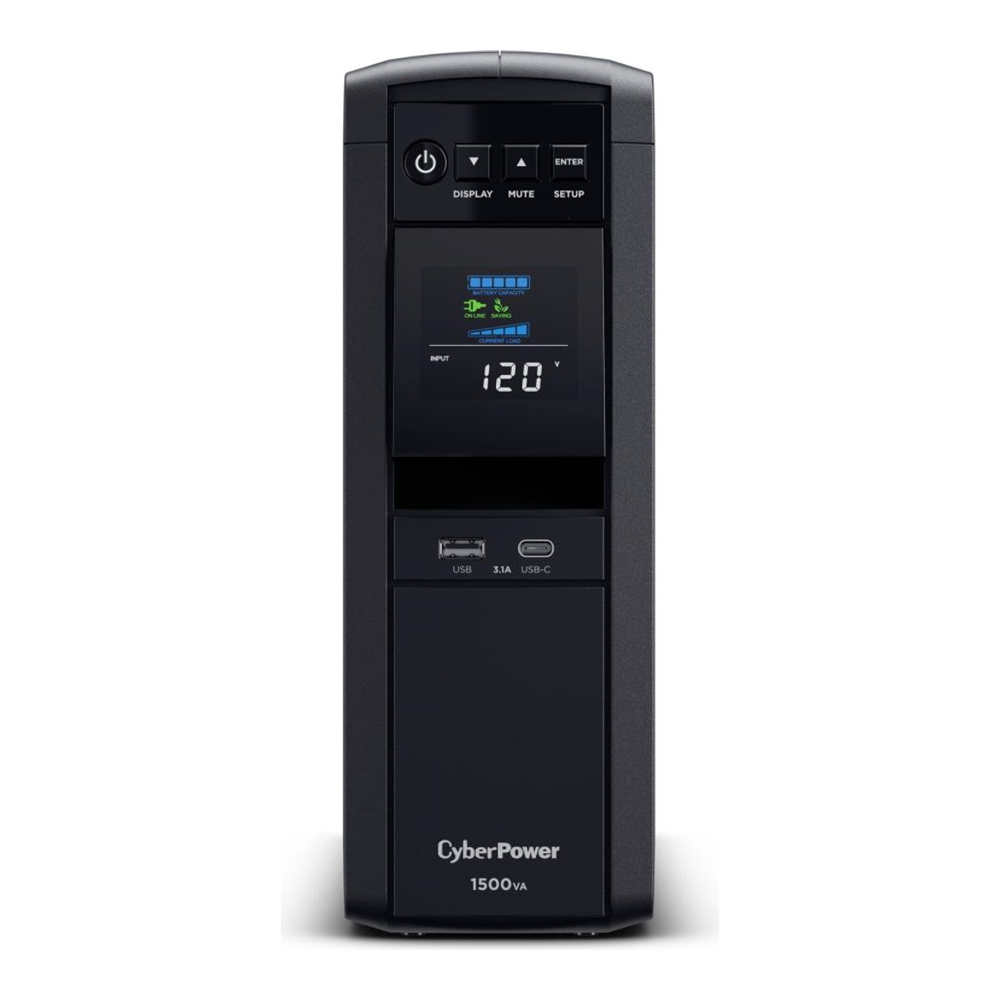
CyberPower rates it at about 10 minutes at half load and 2.5 minutes at its full 1000W. It has 12 outlets, six of them on battery, and a three-year warranty that covers the batteries. On Linux, NUT talks to it through the standard usbhid-ups driver, and our guide covers the shutdown setup. Amazon sells it at about $240, under its $274.95 list price, and its price has not moved since we logged it in September.
Wrong model if they’re outside North America or their gear lives in a rack. This model has US outlets for 120 V, and the rackmount CP1500PFCRM2U, about $360, fits a 19 inch rack in two units.
10. Beelink MINI S13: best first homelab server
If someone has talked about Proxmox for a year without running it, a small N150 box gets them started. The MINI S13 uses Intel’s N150, a four-core chip rated at 6 W base power, with VT-x and VT-d for virtualization and Quick Sync for media transcoding. Beelink pairs it with 12GB of LPDDR5, a 500GB SATA SSD and a 2.5GbE port. That’s enough for a first node running Pi-hole, Home Assistant and a few containers, on a box small enough for a bookshelf.

A second M.2 slot, PCIe 3.0 x1, takes an NVMe drive up to 4TB, and there are two HDMI ports and Wi-Fi 6. Beelink covers it with a three-year warranty and sells it on Amazon through its own store at about $339. It ships with Windows 11 Home, so the first afternoon goes on wiping it and installing Proxmox. Our mini PC guide for Proxmox explains what to expect after that.
Too small if they want to run more than a handful of VMs. The 12GB is soldered LPDDR5, and Intel caps the N150 at 16GB on one memory channel anyway, so there’s no upgrade path. Beelink also publishes no product page for the S13, so the specs above come from its Amazon listing and Intel’s own N150 data.
11. BenQ RD280UG: best for a developer’s desk
This is the riskiest gift on the list, because monitors are personal, but it’s also the one that changes a programmer’s working day the most. The RD280UG is a 28.2 inch 3:2 IPS panel at 3840×2560. That gives 400 more rows of pixels than a 16:9 4K screen, so more of a file fits without scrolling. At 164 PPI, text stays sharp at the font sizes people actually code in.

It refreshes at 120 Hz and has a matte coating. One USB-C cable carries video, data and 90 W of charging to a laptop, and a built-in KVM switch handles a second machine. BenQ adds coding colour modes and a rear light it calls MoonHalo for late sessions. It’s the first pick in our programming monitor guide, and Amazon sells it through BenQ’s own storefront at about $700.
Hold off if you don’t know their setup. Some people never get used to a 3:2 screen, and 90 W over USB-C won’t keep every workstation laptop charged under load. The listing also has only 24 reviews, which is thin evidence for a $700 purchase, so if you buy it anyway, ask for a gift receipt.
What makes a tech gift land
The gifts that get used share three traits: they solve a problem the person already has, they don’t depend on taste, and they’re things people hesitate to buy for themselves. That last one is the real filter. A sysadmin knows they should own a second security key or a UPS and keeps putting it off, so that gift lands. A keyboard is something they have probably researched for weeks, so yours is likely to be the wrong one. Before you buy, try to answer these:
- What do they run at home? A homelab or a NAS points at the UPS, the Kill A Watt and the switch. A developer who only works on a laptop gets more from the key, the book or the monitor.
- Which ports and which mains voltage? USB-C or USB-A matters for the key, and the Kill A Watt and the CyberPower UPS are both built for 120 V US outlets.
- Do they already own one? A homelabber may well have a Pi board or a driver kit already, so a quiet word with a partner or a colleague saves a duplicate.
If you can’t answer those, buy the security key or the book. Neither depends on their hardware. A second key is useful even when they already have one, because a single key is exactly what locks people out when it’s lost.
Gift ideas that sound right but usually miss
A mechanical keyboard looks like the obvious gift for a programmer and is the most likely to be wrong. Layout, switch type, size and keycap profile are all personal. Someone who cares about keyboards has firm opinions on all four, and someone who doesn’t care won’t give up the laptop keyboard. If you’re set on it, our keyboard and mouse guide explains the choices, but a gift card for the one they pick is the safer version.
A RAM or SSD upgrade is the other classic, and this year it is a poor deal. You need the exact module type the machine takes, which is hard to check without opening it. Memory and flash are also the parts whose prices have risen most, so the same money buys more as a UPS or a set of tools. The 8GB Pi 5 doubling in price is a small version of what happened to DDR5 kits and SSDs.
Novelty mugs and coding-joke shirts fill most of the lists that rank for this search. They’re fine as a stocking filler next to something useful, but on their own they say more about the gift list than about the person you’re buying for.