

2025 has undeniably been the year of AI agents. Coming into the year, it was nearly impossible to tune into any conversation in the tech ecosystem without hearing the agent buzzword thrown around. In an attempt to gain my own understanding of this new space, I started reading up on AI, machine learning, and agents. This led me to Mastra, an open-source framework for building AI agents. The best part was that it’s built in my go-to language, TypeScript.

Not long after I started reading through the Mastra documentation, the creators announced mastra.build, an AI hackathon focused on creating pre-built Mastra projects to be used as a starting point for common agentic use cases. Perfect timing, honestly.
So, I registered for the hackathon to put myself to the test. The result? An AI agent that lets you ask questions about a collection of video transcripts in natural language — and it even ended up winning a raffle prize too. Here’s what the final project looks like:
Initially, I wasn’t sure about what I wanted to build. The judges had explained the rules: we had two weeks to build a template. Prize winners were judged in different categories, including “Best use of Tools”, “Best use of Auth” etc. There were also categories tailored to the individual judges, e.g. “Shane’s favorite” judged by Shane, Chief Product Officer at Mastra.
In several Mastra YouTube livestreams leading up to the hackathon, Shane mentioned wanting a tool to streamline his video production: an AI agent he could chat with in natural language to analyze video transcripts from the Mastra channel and answer questions about their content.
For example, if you had a collection of Joe Rogan’s podcast transcripts, you could ask the agent questions like “What did Elon Musk say is the meaning behind his son’s name?”, and the agent would be able to quickly scan your transcript database and provide relevant answers without having you manually review hours of footage.
I picked up on his pain point and began building. I particularly liked this project idea because it leans heavily on a fundamental AI engineering concept called Retrieval-Augmented Generation (RAG).
Unsurprisingly, I wasn’t the only dev who caught up on this, and another developer ended up building the same project and won an award for some clever use of MCP tools — more on that soon. Let’s now get familiar with this project. You can also find the agent’s source code here.
Mastra, founded in 2024 by Sam Bhagwat (CEO), Abhi Aiyer (CTO), and Shane is an open-source TypeScript framework for building AI agents and automation tooling.
Before Mastra, Python was seen as the go-to for building AI apps, especially with frameworks like LangChain. TypeScript agentic frameworks only started to gain traction after the Vercel AI SDK launched. Mastra helped push that momentum forward by building on top of it and adding more advanced capabilities.
Mastra provides the fundamental AI primitives you would need to build modern AI applications. This includes: Agents, Tools, Workflows, Memory, RAG components, Agent networks, and more.
Before we look at some code, let’s first take a deeper look at the RAG technique since that is the core of this app.
RAG is an AI engineering technique that extends a model’s ability to retrieve information from data sources outside its training data. This technique is the backbone behind most AI chatbots you use today. Even older models use this technique to stay up to date by pulling information from external sources across the internet like Reddit, X, and more:
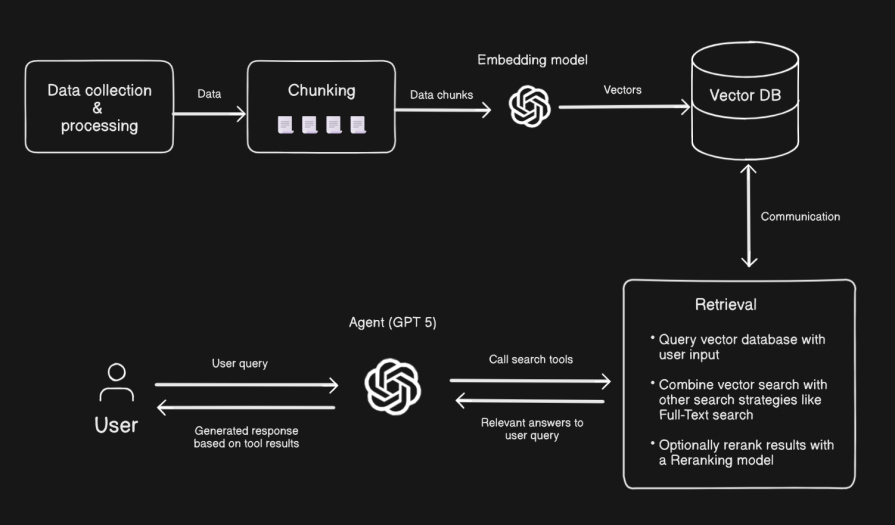
Let’s unpack how RAG works with this diagram above:
And that’s the anatomy of a basic RAG pipeline! If you‘re feeling adventurous and want to try out more sophisticated retrieval techniques, I’d encourage you to take a look at this repository.
I wanted this agent to do more than just answer questions related to the transcripts. I also wanted it to cite its sources and show exactly which transcript segment its responses came from.
To make that possible, the agent was equipped with:
searchEpisodeByTitle, searchEpisodeBySpeakers and getChannelStats. These two strategies share similarities we’ll discuss later on.Let me now explain how the transcript data is collected and processed in this application.
What’s that saying again: an AI/ML engineer spends 80% of their time on data? That’s so true! There are several ways you could choose to grab transcript data from YouTube videos. For instance, the other developer I mentioned earlier used ytdl-core to download the video’s audio file and Deepgram AI to transcribe the audio to get the transcript text.
When building at first, I used youtube.is to fetch the transcript data. However, like the Deepgram method above, the structure of the transcript output returns the transcript without the corresponding time stamp for each text. This wasn’t enough.
I wanted the agent to be able to give timestamped responses; for whatever question you asked it, it should be able to provide a relevant timestamp in the video pointing to where it got the context for its response from. That required further data cleaning and prompting (see project README.md) to identify the speakers at any point in the transcript text. This was the resulting output structure:
{
  "metadata": {
    "speakers": ["Joe Rogan", "Elon Musk"],
    "episode_title": "Joe Rogan Experience #1470 - Elon Musk",
    "source": "https://youtu.be/RcYjXbSJBN8?si=K9LDvmksA16vmbAe"
  },
  "transcript": [
    {
      "timestamp": "00:10",
      "speaker": "Joe Rogan",
      "text": "when you think about when your child is born you will know for the rest"
    },
    {
      "timestamp": "00:12",
      "speaker": "Joe Rogan",
      "text": "of this child's life you were born"
    },
    {
      "timestamp": "00:15",
      "speaker": "Joe Rogan",
      "text": "during a weird time"
    },
    {
      "timestamp": "00:18",
      "speaker": "Elon Musk",
      "text": "that's for sure"
    },
...
I’ll admit, relying solely on prompts to clean the data has its flaws, especially with transcripts longer than an hour. The conversation flow on paper rarely aligns with how it sounds in the video. I also noticed LLMs often misconstrued filler words like “uhm” or “yea” in some scenarios as speaker changes, so I had to manually clean those up afterward.
If you don’t particularly care about distinguishing speakers, you can skip this process and use the getYouTubeTranscript from the repo to fetch the plain transcript in your workflow. Let’s now move on to chunking.
Chunking is one of the most critical stages in a RAG pipeline. It determines how your source data is broken down, stored, and retrieved later for context during a query. In this project, I didn’t just want to split transcripts into arbitrary chunks. I wanted each chunk to be traceable to its original video, including who was speaking and at what time. This is important because of the agent requirements we mentioned earlier, but also so that any chunk isn’t lost in a sea of transcript chunks from other videos.
To achieve this, I used this chunkSingleTranscript utility. The idea was to uniquely tag every line of transcript entry (like [[0]], [[1]], etc.) before chunking so that after the chunking step, I could still map each sentence back to its original speaker and timestamp.
Here’s what happens under the hood:
1. Tag each transcript line: Every transcript entry gets wrapped with a [[lineId]] marker:
[[0]] Hi Elon, how are you?
[[1]] I’m doing well, thanks Joe.
[[2]] Great, let’s talk about Neuralink.
2. Combine and chunk: All tagged lines are joined into a single transcript string, then converted into a Mastra MDocument, the main primitive for handling RAG inputs. We then chunk the transcript with the chunk method, using the “sentence” strategy with maxSize: 600 and overlap: 60. This ensures chunks are contextually coherent while keeping them small enough for embedding:
import { MDocument } from '@mastra/rag'

const doc = new MDocument({
    docs: [
      {
        text: fullTranscriptText,
        metadata: {
          episode_title: transcriptData.metadata.episode_title,
          speakers: transcriptData.metadata.speakers,
          source: transcriptData.metadata.source,
        },
      },
    ],
    type: 'transcript',
  })

  // chunk document
  const chunks = await doc.chunk({
    strategy: 'sentence',
    maxSize: 600,
    overlap: 60,
  })
3. Map chunks back to entries: After chunking, the utility scans each chunk for markers like [[0]], [[1]], etc. and looks up the corresponding transcript entries. From this mapping, it derives the speaker(s), timestamps, and number of entries that make up that chunk.
4. Enrich each chunk with metadata: The final output doesn’t just contain the text; it includes detailed metadata about the chunk’s origin, allowing the RAG agent to:
{
  text: "well for version one of the device it  would be  it basically implanted in your skull ...",
  metadata: {
    episode_title: "Joe Rogan Experience #1470 - Elon Musk",
    speakers: ["Alice", "Bob"],
    source: "https://youtu.be/RcYjXbSJBN8?si=K9LDvmksA16vmbAe",
    source_type: "transcript",
    timestamp_start: "00:17:58",
    timestamp_end: "00:18:36",
    speakers_in_chunk: [ "Joe Rogan", "Elon Musk" ],
  }
}
This level of enrichment ensures that when the agent performs retrieval, it not only fetches relevant information but also cites the exact moment and speaker in the video where that information appears.
Here’s a recap of the process: Transcript Entries → Chunk by sentence → Identify tags in each chunk → Map tags to original → Retrieve original metadata → Return enriched chunks ready for embedding & retrieval.
After chunking, each enriched transcript segment is embedded and indexed for retrieval. This is where we start to consider what text embedding model to use.
A text embedding model converts text into a numerical vector representation. These models are trained on a large amount of text data to efficiently group semantically similar words close together in a multi-dimensional vector space. I’m using OpenAI’s text-embedding-3-small in this project. But there are even better open source embedding models with smaller dimensions and larger context windows.
Semantic search, via vector embeddings, allows the agent to find conceptually similar chunks, even when the user’s question doesn’t share exact words with the transcript. This helps the agent handle paraphrased or abstract queries. For instance, a user could ask, “What did she say about her morning routine on the show?”, and the semantic search could return a part of the transcript where the speaker said, “I usually start my day with a quick workout and some coffee”, even though the transcripts didn’t use the exact “morning routine” phrase.
As explained in the agent retrieval strategy, I combined semantic search with PostgreSQL full-text search (FTS) to improve precision. Full-text search provides keyword matching and ranking. It’s great for direct lookups where phrasing matters. A query for “morning routine” here will only return results with an exact keyword overlap.
Here is the embedding process from the embedTranscript step in the transcript processing workflow:
import { createStep } from '@mastra/core/workflows'

const embedTranscriptChunks = createStep({
  id: 'embed-transcript-chunks',
  description: 'Embed transcript chunks with their metadata',
  inputSchema: z.object({
    chunks: chunksWithMetadataSchema.array(),
  }),
  outputSchema: embeddingResultSchema,
  async execute({ inputData, mastra }) {
    const chunks = inputData.chunks
    if (chunks.length === 0) {
      console.log('No chunks to embed')
      return {
        success: true,
        totalChunks: 0,
      }
    }
    const { embeddings } = await embedMany({
      model: openai.embedding('text-embedding-3-small'),
      values: chunks.map((chunk) => chunk.text),
    })
    const vectorStore = mastra.getVector('pg')
    // check if index exists, if not create it
    try {
      await vectorStore.createIndex({
        indexName: 'transcript_embeddings',
        dimension: 1536, // text-embedding-3-small dimensions
      })
      console.log('Created new _embeddings index')
    } catch (error) {
      console.log('Using existing transcripts index')
    }
    // upsert embedded vectors with full metadata including text
    await vectorStore.upsert({
      indexName: 'transcript_embeddings',
      vectors: embeddings,
      metadata: chunks.map((chunk) => ({
        ...chunk.metadata,
        text: chunk.text,
      })),
    })
    console.log(`Successfully embedded ${chunks.length} chunks with metadata`)
    return {
      success: true,
      totalChunks: chunks.length,
    }
  },
})
And here is the semantic search tool and one of four FTS tools the agent makes use of:
// semantic search on transcript text
import { openai } from '@ai-sdk/openai'
import { createTool } from '@mastra/core/tools'
import { z } from 'zod'

export const transcriptSearchTool = createTool({
  id: 'transcript-search',
  description:
    'Search through a collection of video transcripts for relevant information. Returns text content with metadata including speaker names and timestamps.',
  inputSchema: z.object({
    query: z
      .string()
      .describe('The search query to find relevant transcript content'),
  }),
  execute: async ({ context, mastra }) => {
    if (!mastra) throw new Error('Mastra instance not available')
    const vectorStore = mastra.getVector('pg')
    // create embedding for user query
    const embeddingResult = await openai
      .embedding('text-embedding-3-small')
      .doEmbed({ values: [context.query] })
    // search for relevant content
    const results = await vectorStore.query({
      indexName: 'transcript_embeddings',
      queryVector: embeddingResult.embeddings[0],
      topK: 12,
      includeVector: false,
    })
    // format results with metadata
    const formattedResults = results.map((result) => ({
      text: result.metadata?.text || '',
      score: result.score,
      ...result.metadata
    }))
    return {
      query: context.query,
      relevantContext: formattedResults.map((r) => r.text).join('\n\n'),
      sources: formattedResults,
    }
  },
})

// Full text search tool to find episode by title
export const searchEpisodesByTitle = createTool({
  id: 'search-transcript-by-title',
  description:
    'Full text search for transcript episodes by title or keywords in the title. Useful for finding specific episodes or topics.',
  inputSchema: z.object({
    query: z
      .string()
      .describe('User query to find relevant transcript content'),
  }),
  outputSchema: episodeQuerySchema,
  execute: async ({ context, mastra }) => {
    const query = context.query
    try {
      // clean up user query
      const searchQuery = query
        .trim()
        .replace(/[^\w\s]/g, '')
        .split(/\s+/)
        .join(' & ')
      // search and rank episodes relevant to user's query
      const results = await db
        .select({
          id: transcripts.id,
          episode_title: transcripts.episode_title,
          summary: transcripts.summary,
          speakers: transcripts.speakers,
          source: transcripts.source,
          relevanceScore: sql<number>`ts_rank(search_vector, websearch_to_tsquery('english', ${searchQuery}))`,
        })
        .from(transcripts)
        .where(
          sql`search_vector @@ websearch_to_tsquery('english', ${searchQuery})`
        )
        .orderBy(
          desc(
            sql`ts_rank(search_vector, websearch_to_tsquery('english', ${searchQuery}))`
          )
        )
      return {
        results,
        query: searchQuery as string,
        count: results.length,
        message: `Found ${results.length} episodes matching "${query}"`,
      }
    } catch (error) {
      return {
        results: null,
        query: query as string,
        count: 0,
        message: `Unknown error executing query: "${query}"`,
      }
    }
  },
})
This two-way approach significantly improved retrieval accuracy and produced faster results for queries that didn’t need to be slowed with matrix computations from semantic search.
Personally, I think FTS can act as a soft landing if you’re just learning about vector embeddings. At their core, both PostgreSQL’s full-text search (FTS) and vector embeddings aim to make text searchable, but they achieve that through fundamentally different strategies.
Full-text search transforms text into a linguistic map of keywords known as lexemes. These lexemes are normalized word forms stored in a tsvector, which PostgreSQL can efficiently query with boolean operators. For example:
SELECT to_tsvector('english', 'The quick brown fox jumps over the lazy dog');
This returns:
'brown':3 'dog':9 'fox':4 'jump':5 'lazi':8 'quick':2
Each token corresponds to a root word and its position in the text. Also notice how the English lexem automatically filters stop words like “the,” “a,” “an,” “is,” to produce better results. This representation allows Postgres to index and match phrases precisely. You could even add ranking by setting weights on relevant columns like episode, title, and speakers:
UPDATE transcripts
SET search_vector =
  setweight(to_tsvector('english', coalesce(episode, '')), 'A') ||
  setweight(to_tsvector('english', coalesce(title, '')), 'B') ||
  setweight(to_tsvector('english', coalesce(speakers, '')), 'C');
Vector embeddings represent text as numerical arrays that capture meaning rather than literal word matches. Semantic search shines in advanced search products like recommendation engines, where exact search alone won’t cut it.
Using the PgVector, you might store an embedding like this:
INSERT INTO docs (content, embedding)
VALUES (
  'The quick brown fox jumps over the lazy dog',
  '[0.12, -0.04, 0.33, 0.78, -0.15, 0.23, 0.12, -0.09, 0.70]'
);
These numbers encode semantic relationships. Notice how the numerical representation of “fox” and “dog” in this example are numerically close in the vector space (0.78, 0.70). This makes them likely to show up in related searches like “animals”. Under the hood, semantic search relies on distance metrics like cosine similarity or Euclidean distance instead of keyword overlap.
Writing clear prompts played a crucial role in shaping how the agent interacts with users and produces its responses. I carefully designed system instructions prompts to guide the model’s behavior — like defining what format to respond in, and deciding when to use specific tools.
At first, I thought the feature that lets the agent cite the exact timestamp its response is coming from was going to be a tool call. But it was all system instructions. Definitely read further into prompt/context engineering to learn how to get your models to do what you want.
Building this agent was an exciting project. It involved learning about agents, the concept behind RAG, and how to put an AI application together. If you’re a developer curious about AI agents, I highly recommend experimenting with your own designs and retrieval strategies. You could also check the Mastra CEO’s book, Principles of Building AI Agents, for a more detailed explanation of Mastra.

Learn how to use browser AI APIs for summarization, translation, and language detection with practical examples and implementation tips.

Build a live task board with Topcoat and Rust, using reactive signals, server-rendered search, and WebSocket updates.
Learn how to build and install three Claude Code mods to monitor usage, protect secrets, and track changes.

I tested Jev against popular LLMs to compare speed, cost, and accuracy on real bank support messages.
Hey there, want to help make our blog better?
Join LogRocket’s Content Advisory Board. You’ll help inform the type of content we create and get access to exclusive meetups, social accreditation, and swag.
Sign up now

 Learn more →