

In workplaces, time is always at a premium. Things move fast, and customers don’t like waiting for new features or fixes. Suitably then, much time and mental power are dedicated to producing high-quality apps that look and feel great. The actual code demands so much attention that sometimes, thinking about how we actually get that code into different environments like testing or production can take a back seat.
Instead of dealing with it, we keep zipping up the new releases and sending them on for deployment, unknowingly perpetuating a cycle where we just repeat the same process, over and over again. All told, we’ll waste hours in this endeavor, and we’ll only wind up ultimately costing reliability.
Here’s what this looks like: I’m just trying to fix a simple issue involving a database connection. I think I’ve got it sorted, so I review my changes, check them in to source control, and my app gets deployed.
And then, the app becomes unresponsive. Fortunately, this is only in a test environment, and twice as fortunately, adopting CI/CD means that rolling back is a breeze. Without it? A much, much bigger mess.
Normally, at my big, important, fancy day job as a Senior Software Developer, there are a bunch of checks and balances that go into the code that I publish. People look at what I write and grimace (They don’t think it’s bad — they’re just thinking — or so they tell me). Then people test it, it gets release approval, and then it finally gets deployed.
But, in my cute little side projects, I don’t have a team of people to do that for me. So I have to do it. Normally, I’m not good at it, so I sometimes publish updates that are wrong or cause issues.
Even in simple deployments, there are multiple steps to follow. Back up the existing database, back up the existing app, stop everything, install the update, upgrade the database, start everything up again, and make sure that everything works correctly. Forget a step, and you’re kind of stuck in an unrecoverable mess.
For example, when deploying the app, how are you getting files from the development server into the hosting environment? Typically, you would build the project, zip it up, send it to the server, and extract it over what was already there. But even that has risks, as wrong zip files are sent, and all too often we wind up with files like “release-deployment-PATCHED-1708-USE-THIS-ONE.zip.tar” as part of our deployments.
Software is notoriously fickle. Extract the wrong version, and it won’t work. Mismatch the database and the software version, and it won’t work. Everything has to be correct; otherwise, the lights turn off, and the ice cream melts.
So what do we do instead?
You might see the acronym CI/CD thrown around a lot. For those that don’t know, it means Continuous Integration and Continuous Deployment. And it can sound like a bit of a complex topic — something that maybe you would want to learn about “later” while you focus on coding your app.
But to make the case for it, we have to first explore what deployment looks like without it. You may find parallels in the anecdotes below.
For a long time, I didn’t care about CI/CD or want to learn about it. Not that I didn’t like it. It’s just that the world of software development is huge and varied. If you went down every rabbit hole in the field, you could spend your entire life learning lots and shipping nothing.
I would essentially just implement my fixes or new feature, and then just copy my build directory to the server, and I would be done.
It’s simple. But very soon, the cracks begin to show. I always have to remember not to copy the application configuration file, for instance, as the values in development would differ from those in the test setup.
Sometimes, I would have a problem with a build because of a temporary issue. So I would output my builds to a different location for testing. And then, when the time came to deploy my build to the server, I would have to remember what folder to deploy.
In my day job as a developer (admittedly close to a decade ago – please don’t think this is a recent example 😅), this would rapidly become worse when deployment time came around. I would produce a build, compress the folders, and send the package in for deployment. At the same time, I would produce a 500-page essay on how to deploy the thing. I would put the files and the instructions together and submit them for deployment.
It’s almost impressive just how many ways we found to mess this up. Routinely, I would send the wrong files. At this point, you might pause and think, “wait, who wrote this article?”. And LinkedIn would tell you that I’m a Senior Developer.
But (and let me restate, this is some time ago!) built files don’t do anything. You build them and they sit there. They only blow up once they are copied somewhere and executed. You only have build-time failures and runtime failures. There are no files-sitting-on-the-disk failures. They don’t exist.
So I would only know that what I had submitted was bunk when the deployment team would come back to me and tell me that I had submitted rubbish.
The majority of the time, I’d submit the right files (having learnt from prior experience). And then the deployment team would deploy the wrong version, read the documentation wrong, or find some other way to flub the deployment.
I probably spent more time trying to solve the human errors than I did the actual program errors. And when you’re trying to fix problems, you’re not moving the solution forward.
You already use source control. Well, I mean, I hope you do. If you don’t, then you should learn about that first, definitely. But you’re likely already submitting changes and pushing them to something like GitHub/Azure DevOps/BitBucket/etc. When you do that, each commit winds up with an individual “commit hash”. It’s the thumbprint of that particular check-in.
For these examples, we’ll use GitHub to demonstrate, but other providers should be more or less the same. Also of note: there are many more evolved/proper ways to achieve this. But again, you have to strike a balance. If you get too engrossed in how this works, you’ll be amazing at deployment but will have no time to actually develop an app that needs deploying 🤣. Onwards!:
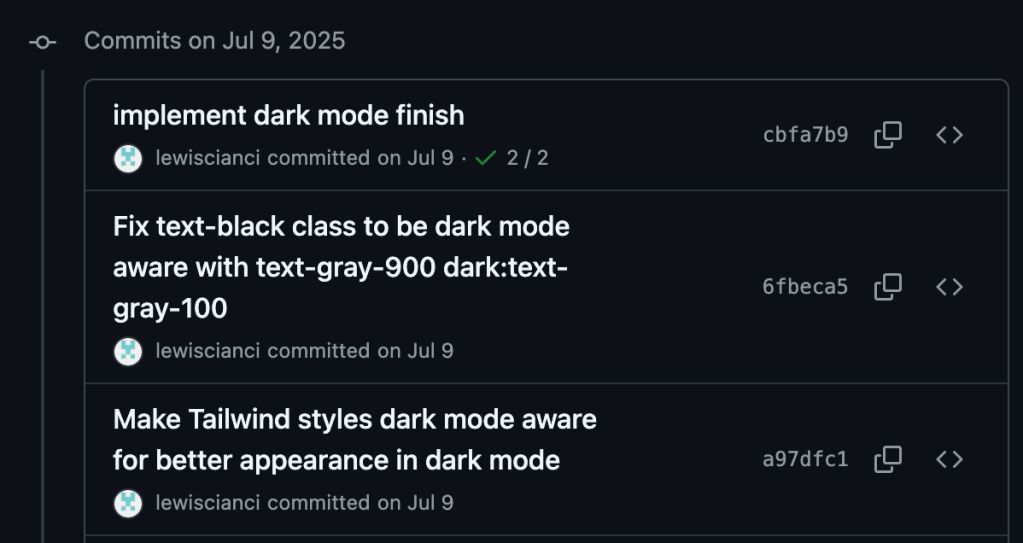
Okay, so that’s fairly unremarkable. But within my repository, there are actions that run every time new code is checked in against a branch. GitHub sees that the commit has occurred, and automatically executes an “action” based on this commit occurring: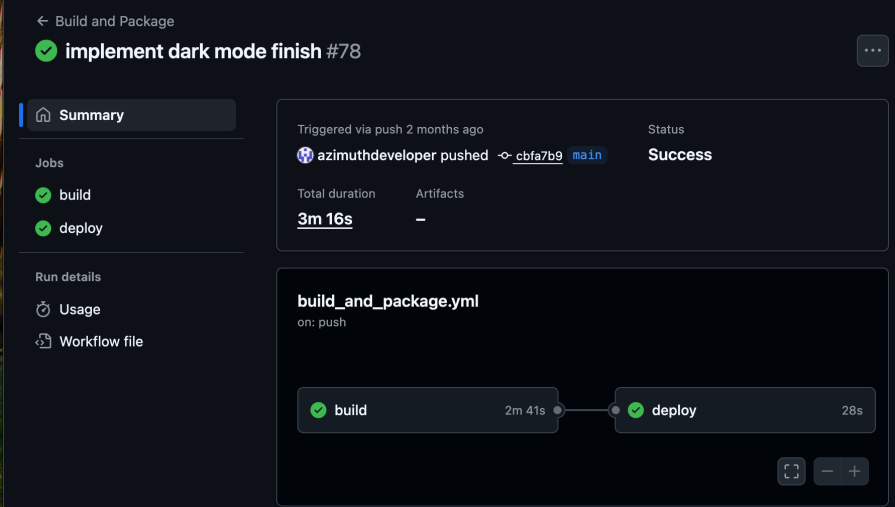
Every time I commit to the build branch, this action will run. So I can branch off build and work on something new and exciting. When I’m happy with it, I just merge it into the build branch, push it, and this action will run.
You may notice that there are two steps: the first is build, and the second is deploy. The reason for this is that you could probably build your app anywhere in the world, but you need to run it somewhere specific. For me, that means I can have my application build on the GitHub agents for free, and when it is successful, start a job on the hosting server to then deploy the app.
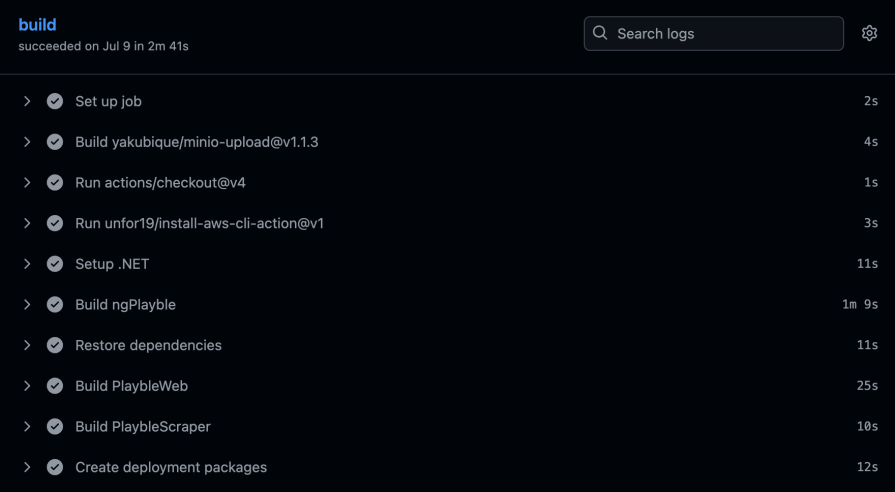
Without building our app, we’d have nothing to deploy! The build job carries out the task of building the application. It does this by bringing in all the dependencies, carrying out the build, and then creating packages for deployment.
In my case, I have three things to build. An Angular client app (ngPlayble), the .NET backend (PlaybleWeb), and a console app that executes every so often to collect details (PlaybleScraper):
And then the deploy job picks up these produced files and deploys them to the server:
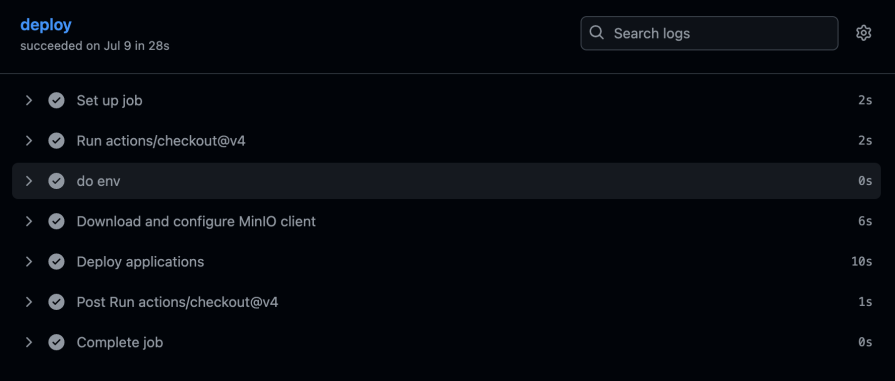
So, right now, I have a build job that runs, and then a deployment job. Most consequentially, this particular build is tied back to a specific commit hash.
When I had to build my applications locally and then create a deployment package, I was introducing a problem I didn’t know about. This is why.
Considering multiple commits each day, how would I know exactly which commit had been deployed into production? Would I instead try to fix the problem within the codebase (as it was on Friday) and then push that into production, causing another problem?
With CI/CD, the product of the build is always attached to a specific commit hash. So you know exactly which version of your code had the bug. This eliminates hours of trying to find this in the first place and possibly creating more problems along the way.
Eventually, I retrieve this commit hash from Git during the build process and embed it into the build in a visible place (usually in the login screen). This way, we don’t have to guess what we’ve deployed.
A lot of companies do this. Even the software that my car runs has a commit hash at the end of the software version. Crazy to think that a Tesla engineer could look at this hash and refer back to their source control to know exactly what software my car is running:
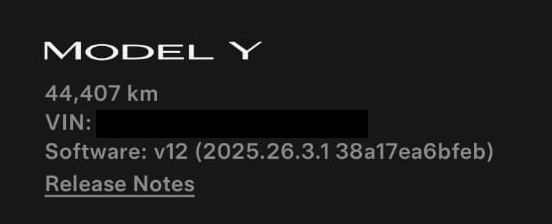
The final realization of this, and what I do in my apps, is I expose the Git commit hash via an API action, and then embed the commit hash into the client app. That way, the client app can check that the server commit hash matches. If the server or client doesn’t deploy properly for whatever reason, I know before I hit weird problems with my app.
In earlier days of CI/CD, we had visual designers who could use to describe how the software should be built. These were quite easy to use. But the problem is, over time, it would be difficult to see how our build pipelines changed as they were represented visually.
This led to a gradual change to most build and deployment pipelines being controlled through YAML. I will admit, I am not a fan of YAML: I think the tab spacing thing is needless and leads to a lot of easy-to-avoid problems. But fortunately, you will not spend much time writing YAML, but instead writing scripts to control your build.
What’s the reason for this? Various CI/CD providers provide all these amazing actions to automatically install tools, do your builds, run the tests, and so on. And it certainly makes life a lot easier.
And we want life to be easier! We don’t want to fiddle about with this stuff forever. But the problem is, you actually want to keep the use of these tools to a minimum. The actions that install tools for your build, you should use. But the actual build of your application should be controlled by a shell script (or equivalent).
Why? When tools are installed into your environment, they will frequently use the cache of the provider to speed up subsequent builds. Tool installation is something that will probably exist on any CI/CD provider, so we can be sure they will be available no matter where we are.
However, using the built-in tools needlessly locks us into a specific CI/CD provider. In my case, I use Azure DevOps for work, and GitHub for my personal projects. Wrapping my build script into a monolothic build.sh or build.ps1 works best for me, because it will work between CI/CD providers without much fussing about.
Here’s the tool setup:
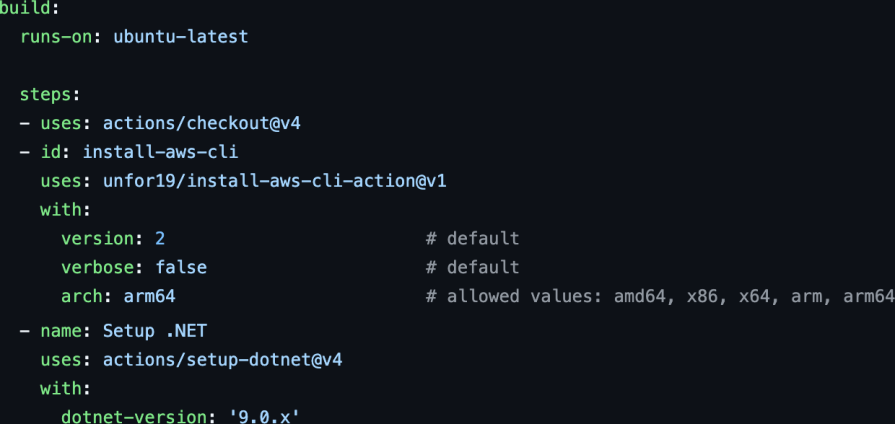
And the actual build process (as this is a side project, I’ve been lazy and have inlined the build script where I should have had it as a separate file, but I can always circle back to that later):
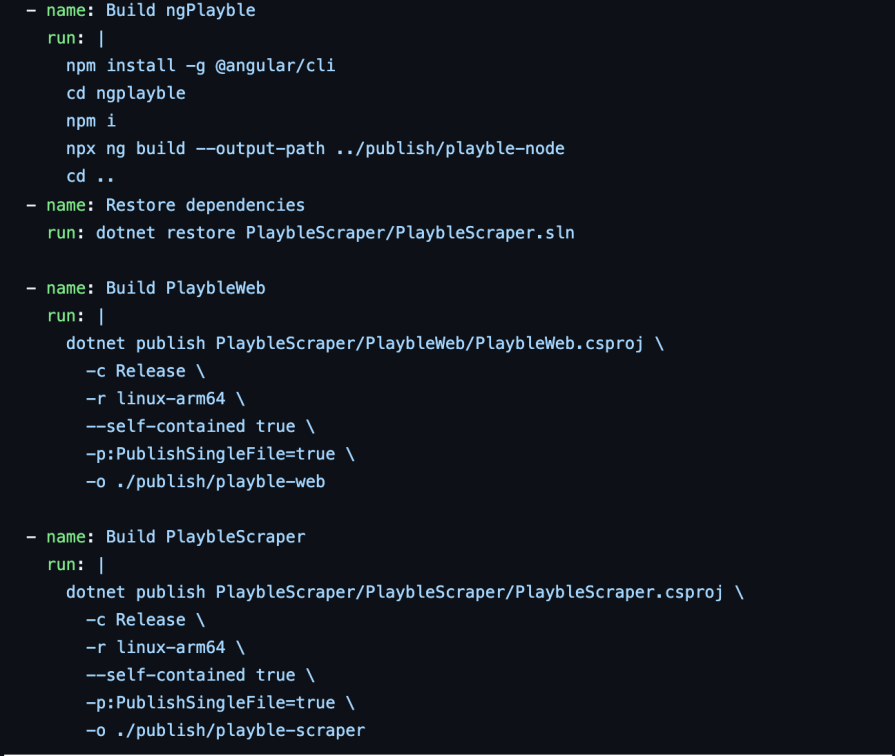
Because my build scripts are checked in alongside my code, I can easily see how these deployments have changed over time.
Originally, I would have to build my application, and then copy the resultant files to the server. This is all well and good on my computer at home, but as the parent of a very active toddler, I’m frequently away from home. Trying to remember where to connect to — and where to copy things to — can become a bit of a burden.
With my CI/CD setup, I can work on my application anywhere, and then just merge my changes into my build branch and push. After this, the build runs, and then the deployment runs shortly after.
The benefits of this are obvious, but there have also been a couple of times I have pushed code and started a build, only to realize half an hour later that I had introduced a problem. On my phone, I’ve edited the build process and then recommitted to the build branch. The build runs again, and the issue is resolved.
We all think that every development shop already has simpler concepts like CI/CD down pat, but the fact is, a lot of places are still compressing their packages and sending them for deployment manually. Maybe the investment in adopting CI/CD is seen as too great, or maybe it’s hard to get all the required teams on board with it.
Here’s how you can do your best to adopt it into your deployment workflow:
It could even make sense to land the first three steps first, and then wait a bit before trying to connect the deployments the whole way through. Give the value in the automated builds some time to be evident, and use that to help the automated release rationale.
It’s easy to think that all software development companies already have these concepts down pat, but the stark reality is, a lot of them simply don’t. It’s hard to invest the time and effort into new things in the software development space. But passing up the benefits of CI/CD is leaving your organization open to unnecessary instability and possibly even downtime.
How has CI/CD helped you in your projects? Be sure to let us know in the comments below.

Learn how to use browser AI APIs for summarization, translation, and language detection with practical examples and implementation tips.

Build a live task board with Topcoat and Rust, using reactive signals, server-rendered search, and WebSocket updates.
Learn how to build and install three Claude Code mods to monitor usage, protect secrets, and track changes.

I tested Jev against popular LLMs to compare speed, cost, and accuracy on real bank support messages.
Hey there, want to help make our blog better?
Join LogRocket’s Content Advisory Board. You’ll help inform the type of content we create and get access to exclusive meetups, social accreditation, and swag.
Sign up now

 Learn more →