

In this detailed (and explanatory) guide, I’ll discuss how to build strongly typed polymorphic React components with TypeScript. We’ll cover the following sections:

as attributesAs you can see, this is quite long, so feel free to skip around. If you’d like to follow along, star the official code repository on my GitHub for reference.
There’s a nonzero chance you’ve already used a polymorphic component. Open source component libraries typically implement some sort of polymorphic component.
Let’s consider some you may be familiar with: the Chakra UI as prop and MUI component prop.
as prop
How does Chakra UI implement polymorphic props? The answer is by exposing an as prop. The as prop is passed to a component to determine what container element it should eventually render.

All you need to do to use the as prop is pass it to the component, which in this case is Box:
<Box as='button' borderRadius='md' bg='tomato' color='white' px={4} h={8}>
  Button
</Box>
Now, the component will render a button element.
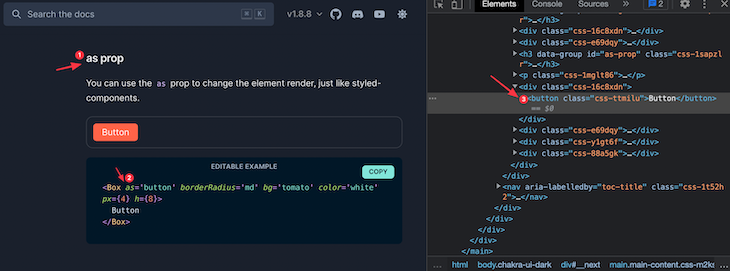
If you changed the as prop to a h1:
<Box as="h1"> Hello </Box>
Now, the Box component renders a h1:
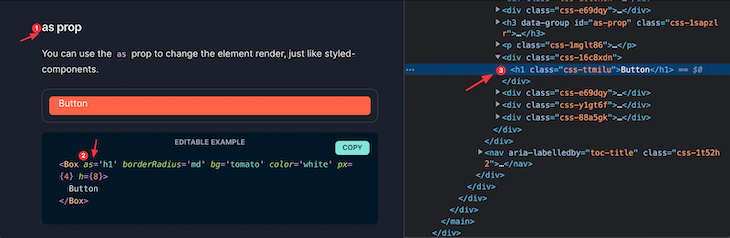
That’s a polymorphic component at work! It can be rendered to entirely unique elements, all by passing down a single prop.
component prop
Similar to Chakra UI, MUI allows for a polymorphic prop called component, which is implemented similarly: you pass it to a component and state the element or custom component you’d like to render.
Here’s an example from the official docs:

<List component="nav">
  <ListItem button>
    <ListItemText primary="Trash" />
  </ListItem>
</List>
List is passed a component prop of nav; when this is rendered, it’ll render a nav container element.
Another user may use the same component, but not for navigation; instead, they may want to render a to-do list:
<List component="ol">
  ...
</List>
And in this case, List will render an ordered list ol element.
Talk about flexibility! See a summary of the use cases for polymorphic components.
As you’ll come to see in the following sections of this article, polymorphic components are powerful. Apart from just accepting a prop of an element type, they can also accept custom components as props.
This will be discussed in a coming section of this article. For now, let’s get building our first polymorphic component!
Contrary to what you may think, building your first polymorphic component is quite straightforward. Here’s a basic implementation:
const MyComponent = ({ as, children }) => {
  const Component = as || "span";

  return <Component>{children}</Component>;
};
Note here that the polymorphic prop as is similar to Chakra UI’s. This is the prop we expose to control the render element of the polymorphic component.
Secondly, note that the as prop isn’t rendered directly. The following would be wrong:
const MyComponent = ({ as, children }) => {
  // wrong render below 👇
  return <as>{children}</as>;
};
When rendering an element type at runtime, you must first assign it to a capitalized variable, and then render the capitalized variable.
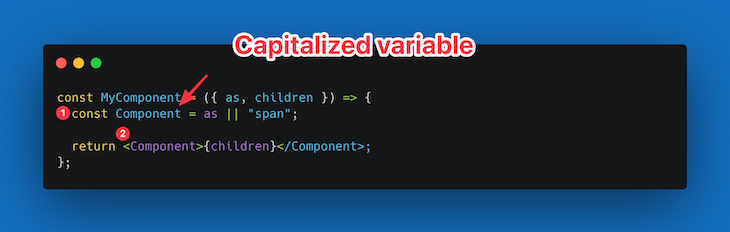
Now you can go ahead and use this component as follows:
<MyComponent as="button">Hello Polymorphic!<MyComponent>
<MyComponent as="div">Hello Polymorphic!</MyComponent>
<MyComponent as="span">Hello Polymorphic!</MyComponent>
<MyComponent as="em">Hello Polymorphic!</MyComponent>
Note that the different as prop is passed to the rendered components above.

The implementation in the previous section, while quite standard, has many demerits. Let’s explore some of these.
as prop can receive invalid HTML elementsPresently, it is possible for a user to write the following:
<MyComponent as="emmanuel">Hello Wrong Element</MyComponent>
The as prop passed here is emmanuel. Emmanuel is obviously a wrong HTML element, but the browser also tries to render this element.
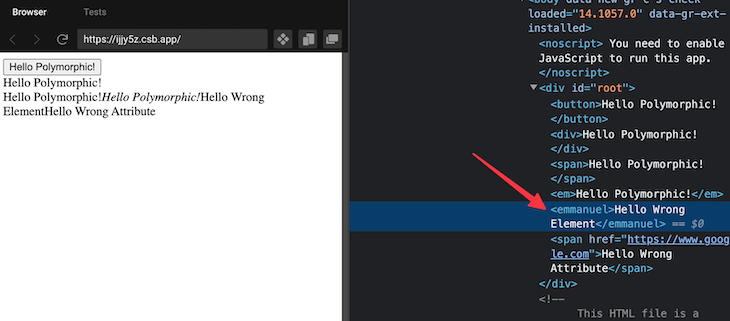
An ideal development experience is to show some kind of error during development. For example, a user may make a simple typo — divv instead of div — and would get no indication of what’s wrong.
Consider the following component usage:
<MyComponent as="span" href="https://www.google.com">
   Hello Wrong Attribute
</MyComponent>
A consumer can pass a span element to the as prop, and an href prop as well.
This is technically invalid. A span element does not (and should not) take in an href attribute. That is invalid HTML syntax. However, a consumer of the component we’ve built could still go ahead to write this and get no errors during development.
Consider the simple implementation again:
const MyComponent = ({ as, children }) => {
  const Component = as || "span";

  return <Component>{children}</Component>;
};
The only props this component accepts are as and children, nothing else. There’s no attribute support for even valid as element props, i.e., if as were an anchor element a, we should also support passing an href to the component.
<MyComponent as="a" href="...">A link </MyComponent>
Even though href is passed in the example above, the component implementation receives no other props. Only as and children are deconstructed.
Your initial thoughts may be to go ahead and spread every other prop passed to the component as follows:
const MyComponent = ({ as, children, ...rest }) => {
  const Component = as || "span";

  return <Component {...rest}>{children}</Component>;
};
This seems like a decent solution, but now it highlights the second problem mentioned above. Wrong attributes will now be passed down to the component as well.
Consider the following:
<MyComponent as="span" href="https://www.google.com">
   Hello Wrong Attribute
</MyComponent>
And note the eventual rendered markup:
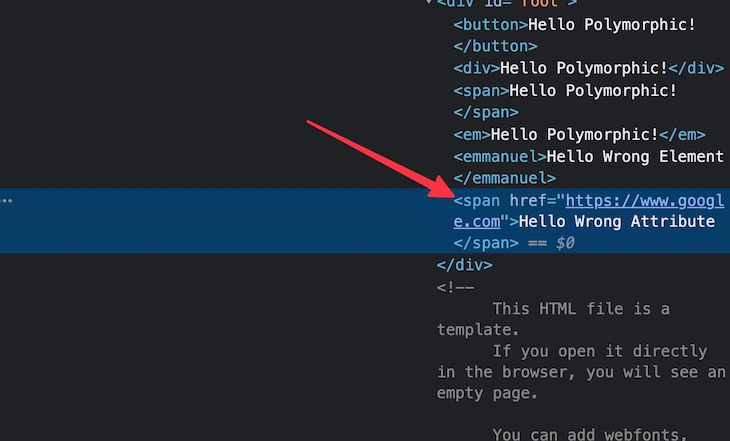
A span with an href is invalid HTML.
To recap, the current issues with our simple implementation is subpar because:
How do we resolve these concerns? To be clear, there’s no magic wand to wave here. However, we’re going to leverage TypeScript to ensure you build strongly typed polymorphic components.
Upon completion, developers using your components will avoid the runtime errors above and instead catch them during development or build time — all thanks to TypeScript.
If you’re reading this, a prerequisite is that you already know some TypeScript — at least the basics. If you have no clue what TypeScript is, I strongly recommend giving this document a read first.
In this section, we will use TypeScript to solve the aforementioned concerns and build strongly typed polymorphic components.
The first two requirements we will start off with include:
as prop should not receive invalid HTML element stringsIn the following section, we will introduce TypeScript generics to make our solution more robust, developer-friendly, and production-worthy.
as prop only receives valid HTML element stringsHere’s our current solution:
const MyComponent = ({ as, children }) => {
  const Component = as || "span";

  return <Component>{children}</Component>;
};
To make the next sections of this guide practical, we’ll change the name of the component from MyComponent to Text and assume we’re building a polymorphic Text component.
const Text = ({ as, children }) => {
  const Component = as || "span";

  return <Component>{children}</Component>;
};
Now, with your knowledge of generics, it becomes obvious that we’re better off representing as with a generic type, i.e., a variable type based on whatever the user passes in.
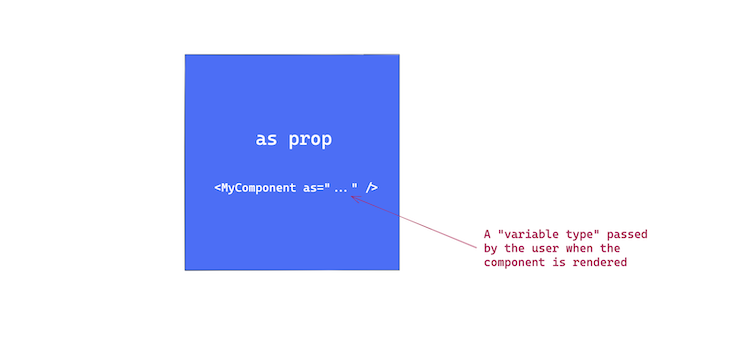
Let’s go ahead and take the first step as follows:
export const Text = <C>({
  as,
  children,
}: {
  as?: C;
  children: React.ReactNode;
}) => {
  const Component = as || "span";

  return <Component>{children}</Component>;
};
Note how the generic C is defined and then passed on in the type definition for the prop as.
However, if you wrote this seemingly perfect code, you’ll have TypeScript yelling out numerous errors with more squiggly red lines than you’d like 🤷♀️
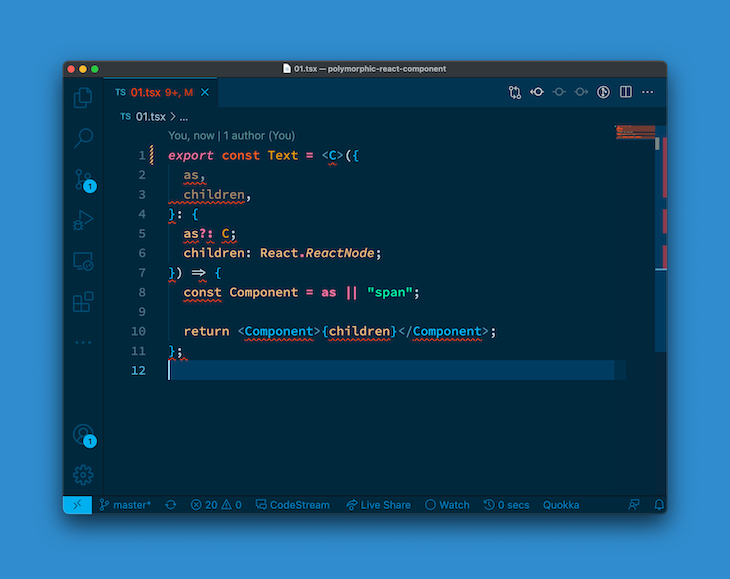
What’s going on here is a flaw in the syntax for generics in .tsx files. There are two ways to solve this.
This is the syntax for declaring multiple generics. Once you do this, the TypeScript compiler clearly understands your intent and the errors are banished.
// note the comma after "C" below 👇
export const Text = <C,>({
  as,
  children,
}: {
  as?: C;
  children: React.ReactNode;
}) => {
  const Component = as || "span";

  return <Component>{children}</Component>;
};
The second option is to constrain the generic as you see fit. For starters, you can just use the unknown type as follows:
// note the extends keyword below 👇
export const Text = <C extends unknown>({
  as,
  children,
}: {
  as?: C;
  children: React.ReactNode;
}) => {
  const Component = as || "span";

  return <Component>{children}</Component>;
};
For now, I’ll stick to the second solution because it’s closer to our final solution. In most cases, though, I use the multiple generic syntax and just add a comma.
However, with our current solution, we get another TypeScript error:
JSX element type ‘Component’ does not have any construct or call signatures. ts(2604)
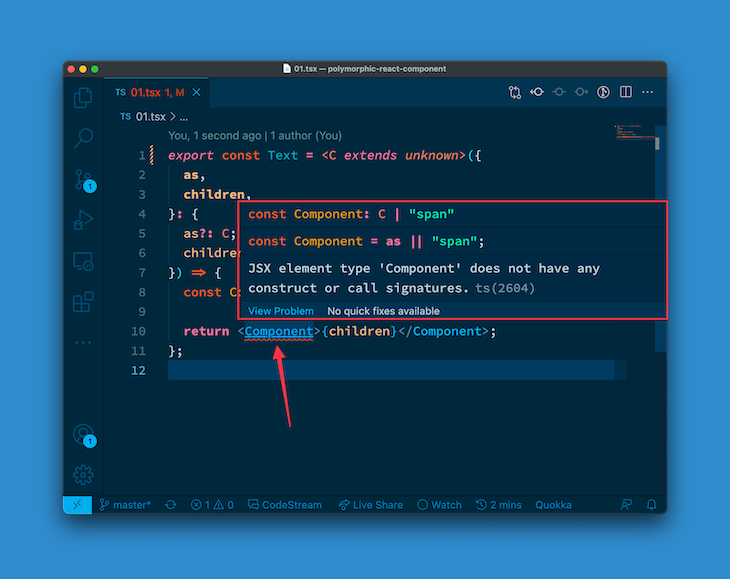
This is similar to the error we had when we worked with the echoLength function. Just like accessing the length property of an unknown variable type, the same may be said here: trying to render any generic type as a valid React component doesn’t make sense.
We need to constrain the generic only to fit the mold of a valid React element type.
To achieve this, we’ll leverage the internal React type: React.ElementType, and make sure the generic is constrained to fit that type:
// look just after the extends keyword 👇
export const Text = <C extends React.ElementType>({
  as,
  children,
}: {
  as?: C;
  children: React.ReactNode;
}) => {
  const Component = as || "span";

  return <Component>{children}</Component>;
};
Note that if you’re using an older version of React, you may have to import a newer React version as follows:
import React from 'react'
With this, we have no more errors!
Now, if you go ahead and use this component as follows, it’ll work just fine:
<Text as="div">Hello Text world</Text>
However, if you pass an invalid as prop, you’ll now get an appropriate TypeScript error. Consider the example below:
<Text as="emmanuel">Hello Text world</Text>
And the error thrown:
Type ‘”emmanuel”‘ is not assignable to type ‘ElementType | undefined’.

This is excellent! We now have a solution that doesn’t accept gibberish for the as prop and will also prevent against nasty typos, e.g., divv instead of div.
This is a much better developer experience!
In solving this second use case, you’ll come to appreciate how powerful generics truly are. First, let’s understand what we’re trying to accomplish here.
Once we receive a generic as type, we want to make sure that the remaining props passed to our component are relevant, based on the as prop.
So, for example, if a user passed in an as prop of img, we’d want href to equally be a valid prop!
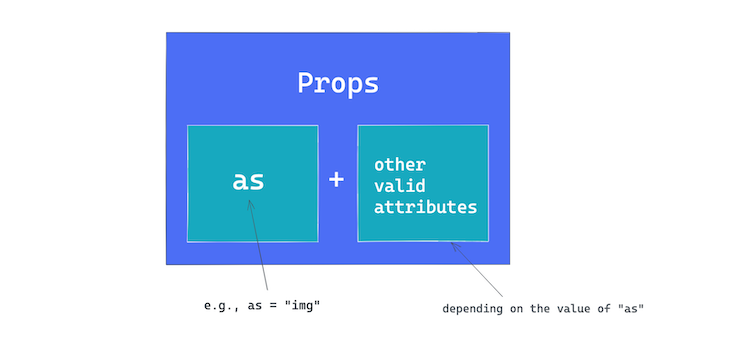
To give you a sense of how we’d accomplish this, take a look at the current state of our solution:
export const Text = <C extends React.ElementType>({
  as,
  children,
}: {
  as?: C;
  children: React.ReactNode;
}) => {
  const Component = as || "span";

  return <Component>{children}</Component>;
};
The prop of this component is now represented by the object type:
{
  as?: C;
  children: React.ReactNode;
}
In pseudocode, what we’d like would be the following:
{
  as?: C;
  children: React.ReactNode;
} & {
  ...otherValidPropsBasedOnTheValueOfAs
}
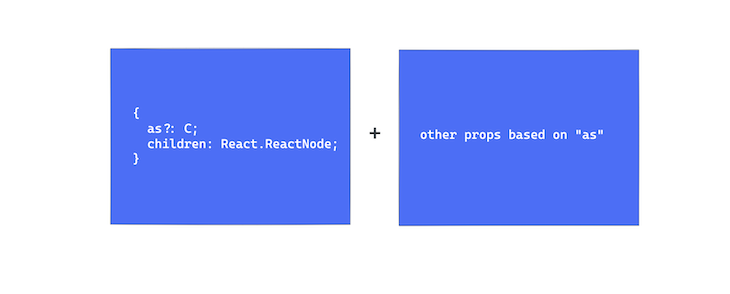
This requirement is enough to leave one grasping at straws. We can’t possibly write a function that determines appropriate types based on the value of as, and it’s not smart to list out a union type manually.
Well, what if there was a provided type from React that acted as a “function” that’ll return valid element types based on what you pass it?
Before introducing the solution, let’s have a bit of a refactor. Let’s pull out the props of the component into a separate type:
// 👇 See TextProps pulled out below
type TextProps<C extends React.ElementType> = {
  as?: C;
  children: React.ReactNode;
}

export const Text = <C extends React.ElementType>({
  as,
  children,
}: TextProps<C>) => { // 👈 see TextProps used
  const Component = as || "span";
  return <Component>{children}</Component>;
};
What’s important here is to note how the generic is passed on to TextProps<C>. Similar to a function call in JavaScript — but with angle braces.
The magic wand here is to leverage the React.ComponentPropsWithoutRef type as shown below:
type TextProps<C extends React.ElementType> = {
  as?: C;
  children: React.ReactNode;
} & React.ComponentPropsWithoutRef<C>; // 👈 look here

export const Text = <C extends React.ElementType>({
  as,
  children,
}: TextProps<C>) => {
  const Component = as || "span";
  return <Component>{children}</Component>;
};
Note that we’re introducing an intersection here. Essentially, we’re saying, the type of TextProps is an object type containing as, children, and some other types represented by React.ComponentPropsWithoutRef.
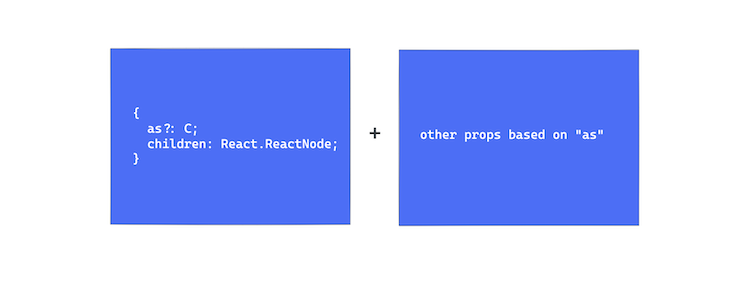
If you read the code, it perhaps becomes apparent what’s going on here.
Based on the type of as, represented by the generic C, React.componentPropsWithoutRef will return valid component props that correlate with the string attribute passed to the as prop.
There’s one more significant point to note.
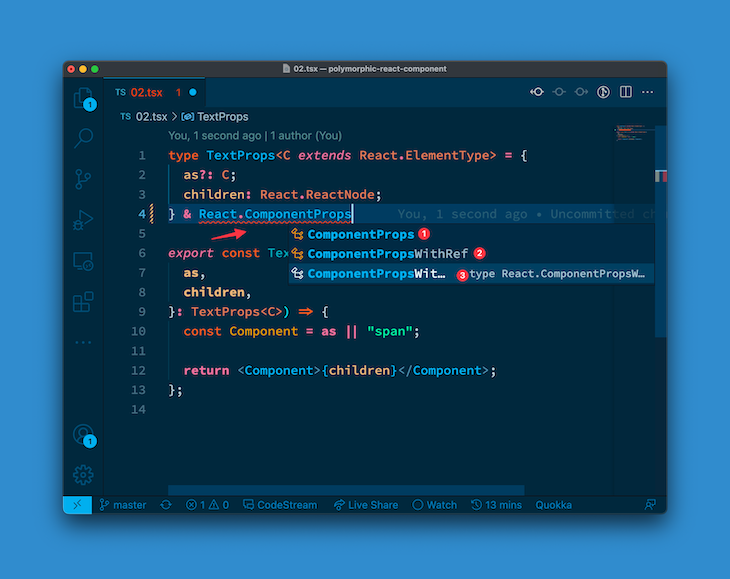
If you just started typing and rely on IntelliSense from your editor, you’d realize there are three variants of the React.ComponentProps... type:
React.ComponentPropsReact.ComponentPropsWithRefReact.ComponentPropsWithoutRefIf you attempted to use the first, ComponentProps, you’d see a relevant note that reads:
Prefer
ComponentPropsWithRef, if therefis forwarded, orComponentPropsWithoutRefwhen refs are not supported.
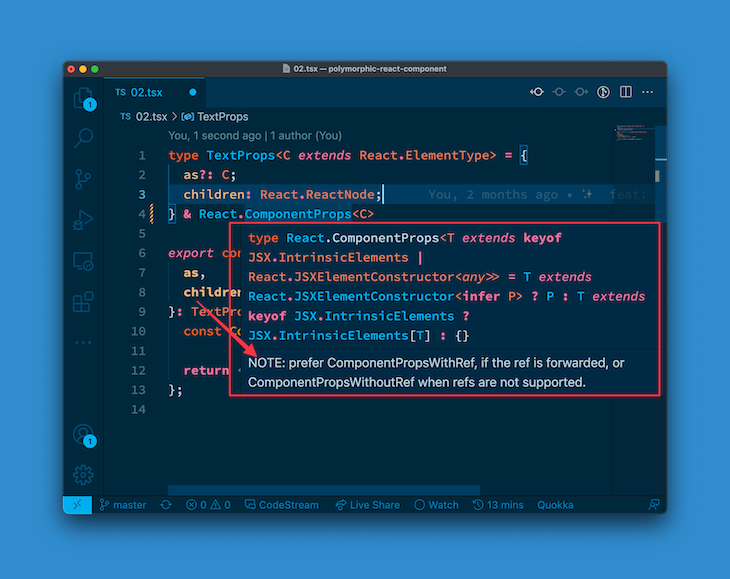
This is precisely what we’ve done. For now, we will ignore the use case for supporting a ref prop and stick to ComponentPropsWithoutRef.
Now, let’s give the solution a try!
If you go ahead and use this component wrongly, e.g., passing a valid as prop with other incompatible props, you’ll get an error.
<Text as="div" href="www.google.com">Hello Text world</Text>
A value of div is perfectly valid for the as prop, but a div should not have an href attribute.
That’s wrong, and rightly caught by TypeScript with the error: Property 'href' does not exist on type ....
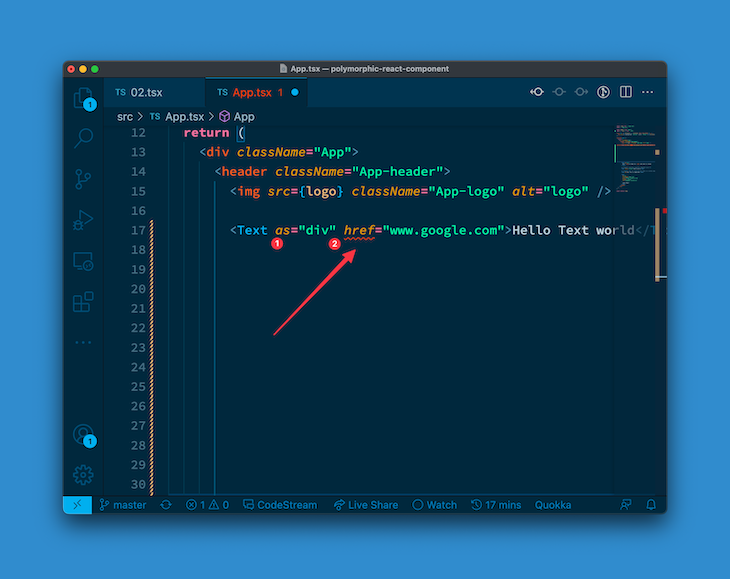
This is great! We’ve got an even better, more robust solution.
Finally, make sure to pass other props down to the rendered element:
type TextProps<C extends React.ElementType> = {
  as?: C;
  children: React.ReactNode;
} & React.ComponentPropsWithoutRef<C>;

export const Text = <C extends React.ElementType>({
  as,
  children,
  ...restProps, // 👈 look here
}: TextProps<C>) => {
  const Component = as || "span";

  // see restProps passed 👇
  return <Component {...restProps}>{children}</Component>;
};
Let’s keep going.
as attributesConsider again our current solution:
export const Text = <C extends React.ElementType>({
  as,
  children,
  ...restProps
}: TextProps<C>) => {
  const Component = as || "span"; // 👈 look here

  return <Component {...restProps}>{children}</Component>;
};
Particularly, pay attention to where a default element is provided if the as prop is omitted.
const Component = as || "span"
This is properly represented in the JavaScript world by implementation: if as is optional, it’ll default to a span.
The question is, how does TypeScript handle this case when as isn’t passed? Are we equally passing a default type?
Well, the answer is no, but below’s a practical example. Let’s say you went ahead to use the Text component as follows:
<Text>Hello Text world</Text>
Note that we’ve passed no as prop here. Will TypeScript be aware of the valid props for this component?
Let’s go ahead and add an href:
<Text href="https://www.google.com">Hello Text world</Text>
If you go ahead and do this, you’ll get no errors. That’s bad.
A span should not receive an href prop / attribute. While we default to a span in the implementation, TypeScript is unaware of this default. Let’s fix this with a simple, generic default assignment:
type TextProps<C extends React.ElementType> = {
  as?: C;
  children: React.ReactNode;
} & React.ComponentPropsWithoutRef<C>;

/**
* See default below. TS will treat the rendered element as a
span and provide typings accordingly
*/
export const Text = <C extends React.ElementType = "span">({
  as,
  children,
  ...restProps
}: TextProps<C>) => {
  const Component = as || "span";
  return <Component {...restProps}>{children}</Component>;
};
The important bit is highlighted below:
<C extends React.ElementType = "span">
Et voilà! The previous example we had should now throw an error when you pass href to the Text component without an as prop.
The error should read: Property 'href' does not exist on type ....
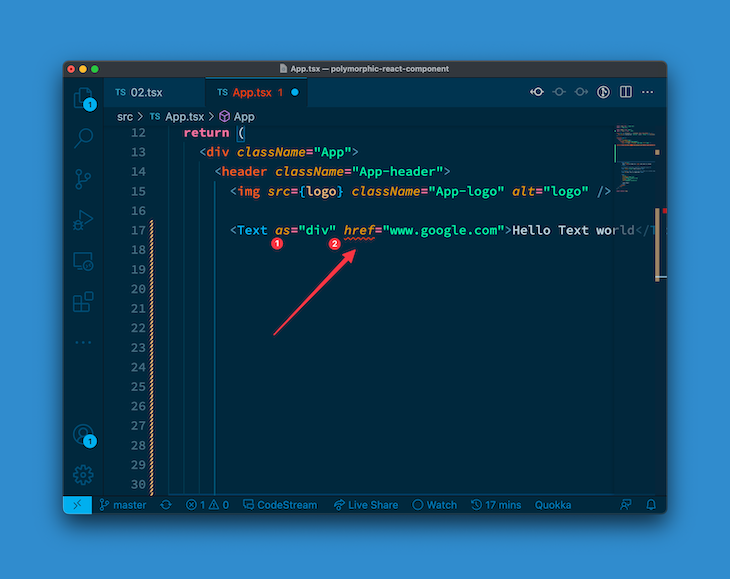
Our current solution is much better than what we started with. Give yourself a pat on the back for making it this far — it only gets more interesting from here.
The use case to cater to in this section is very applicable in the real world. There’s a high chance that if you’re building some sort of component, then that component will also take in some specific props that are unique to the component.
Our current solution takes into consideration the as, children, and the other component props based on the as prop. However, what if we wanted this component to handle its own props?
Let’s make this practical. We will have the Text component receive a color prop. The color here will either be any of the rainbow colors or black.
We will go ahead and represent this as follows:
type Rainbow =
  | "red"
  | "orange"
  | "yellow"
  | "green"
  | "blue"
  | "indigo"
  | "violet";
Next, we must define the color prop in the TextProps object as follows:
type TextProps<C extends React.ElementType> = {
  as?: C;
  color?: Rainbow | "black"; // 👈 look here
  children: React.ReactNode;
} & React.ComponentPropsWithoutRef<C>;
Before we go ahead, let’s have a bit of a refactor. Let’s represent the actual props of the Text component by a Props object, and specifically type only the props specific to our component in the TextProps object.
This will become obvious, as you’ll see below:
// new "Props" type
type Props <C extends React.ElementType> = TextProps<C>

export const Text = <C extends React.ElementType = "span">({
  as,
  children,
  ...restProps,
}: Props<C>) => {
  const Component = as || "span";
  return <Component {...restProps}>{children}</Component>;
};
Now let’s clean up TextProps:
// before
type TextProps<C extends React.ElementType> = {
  as?: C;
  color?: Rainbow | "black"; // 👈 look here
  children: React.ReactNode;
} & React.ComponentPropsWithoutRef<C>;

// after
type TextProps<C extends React.ElementType> = {
  as?: C;
  color?: Rainbow | "black";
};
Now, TextProps should just contain the props that are specific to our Text component: as and color.
We must now update the definition for Props to include the types we’ve removed from TextProps, i.e., children and React.ComponentPropsWithoutRef<C>.
For the children prop, we’ll take advantage of the React.PropsWithChildren prop.

PropsWithChildren is pretty easy to reason out. You pass it your component props, and it’ll inject the children props definition for you:
type Props <C extends React.ElementType> =
React.PropsWithChildren<TextProps<C>>
Note how we use the angle braces; this is the syntax for passing on generics. Essentially, the React.PropsWithChildren accepts your component props as a generic and augments it with the children prop. Sweet!
For React.ComponentPropsWithoutRef<C>, we’ll just go ahead and leverage an intersection type here:
type Props <C extends React.ElementType> =
React.PropsWithChildren<TextProps<C>> &
React.ComponentPropsWithoutRef<C>
And here’s the full current solution:
type Rainbow =
  | "red"
  | "orange"
  | "yellow"
  | "green"
  | "blue"
  | "indigo"
  | "violet";

type TextProps<C extends React.ElementType> = {
  as?: C;
  color?: Rainbow | "black";
};

type Props <C extends React.ElementType> =
React.PropsWithChildren<TextProps<C>> &
React.ComponentPropsWithoutRef<C>

export const Text = <C extends React.ElementType = "span">({
  as,
  children,
}: Props<C>) => {
  const Component = as || "span";
  return <Component> {children} </Component>;
};
I know these can feel like a lot, but when you take a closer look it’ll all make sense. It’s really just putting together everything you’ve learned so far!
Having done this necessary refactor, we can now continue on to our solution. What we have now actually works. We’ve explicitly typed the color prop, and you may use it as follows:
<Text color="violet">Hello world</Text>
There’s just one thing I’m not particularly comfortable with: color turns out to also be a valid attribute for numerous HTML tags, as was the case pre-HTML5. So, if we removed color from our type definition, it’ll be accepted as any valid string.
See below:
type TextProps<C extends React.ElementType> = {
  as?: C;
  // remove color from the definition here
};
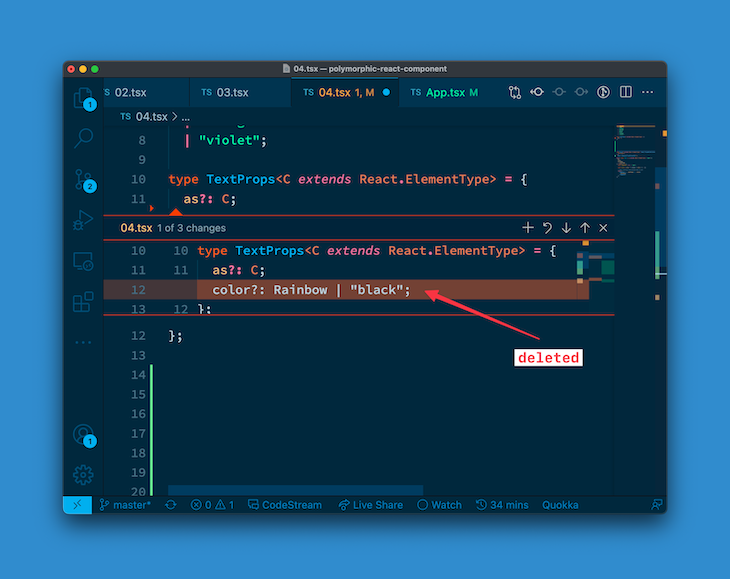
Now, if you go ahead to use Text as before, it’s equally valid:
<Text color="violet">Hello world</Text>
The only difference here is how it is typed. color is now represented by the following definition:
color?: string | undefined
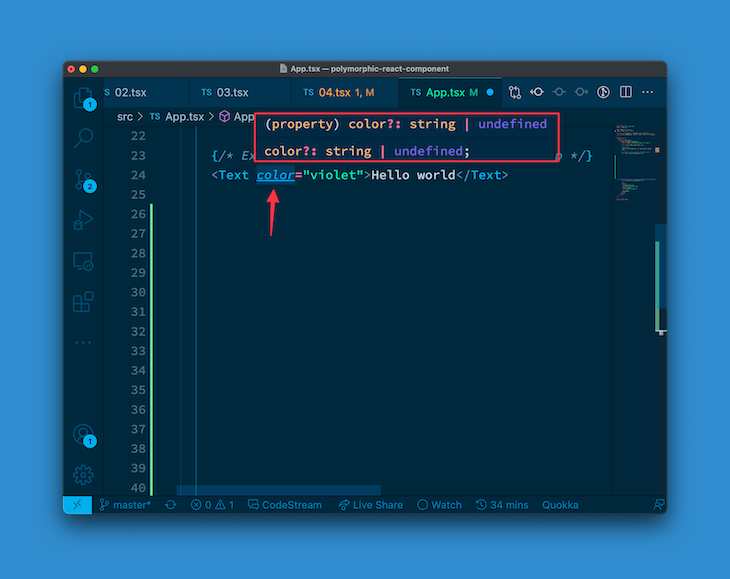
Again, this is NOT a definition we wrote in our types!
This is a default HTML typing, where color is a valid attribute for most HTML elements. See this Stack Overflow question for some more context.
Now, there are two ways to go here. The first one is to keep our initial solution, where we explicitly declared the color prop:
type TextProps<C extends React.ElementType> = {
  as?: C;
  color?: Rainbow | "black"; // 👈 look here
};
The second option arguably provides some more type safety. To achieve this, you must realize where the previous default color definition came from: the React.ComponentPropsWithoutRef<C>. This is what adds other props based on what the type of as is.
So, with this information, we can explicitly remove any definition that exists in our component types from React.ComponentPropsWithoutRef<C>.
This can be tough to understand before you see it in action, so let’s take it step by step.
React.ComponentPropsWithoutRef<C>, as stated earlier, contains every other valid prop based on the type of as, e.g., href, color, etc., where these types have all of their own definitions, e.g., color?: string | undefined, etc.:
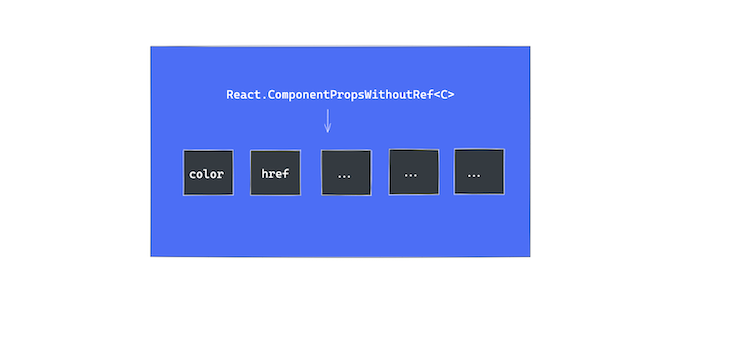
It is possible that some values that exist in React.ComponentPropsWithoutRef<C> also exist in our component props type definition. In our case, color exists in both!
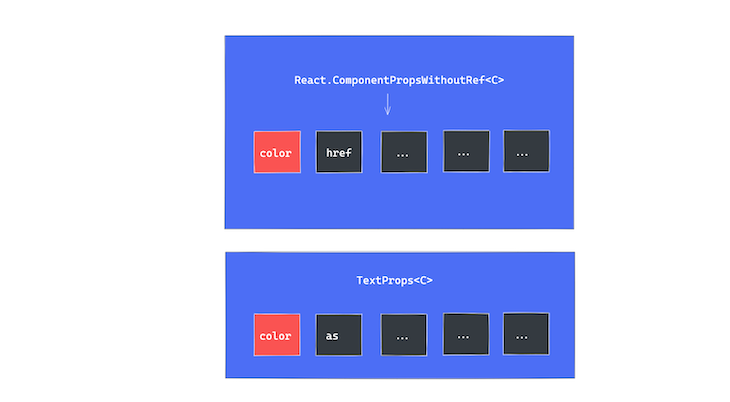
Instead of relying on our color definition to override what’s coming from React.ComponentPropsWithoutRef<C>, we will explicitly remove any type that also exists in our component types definition.
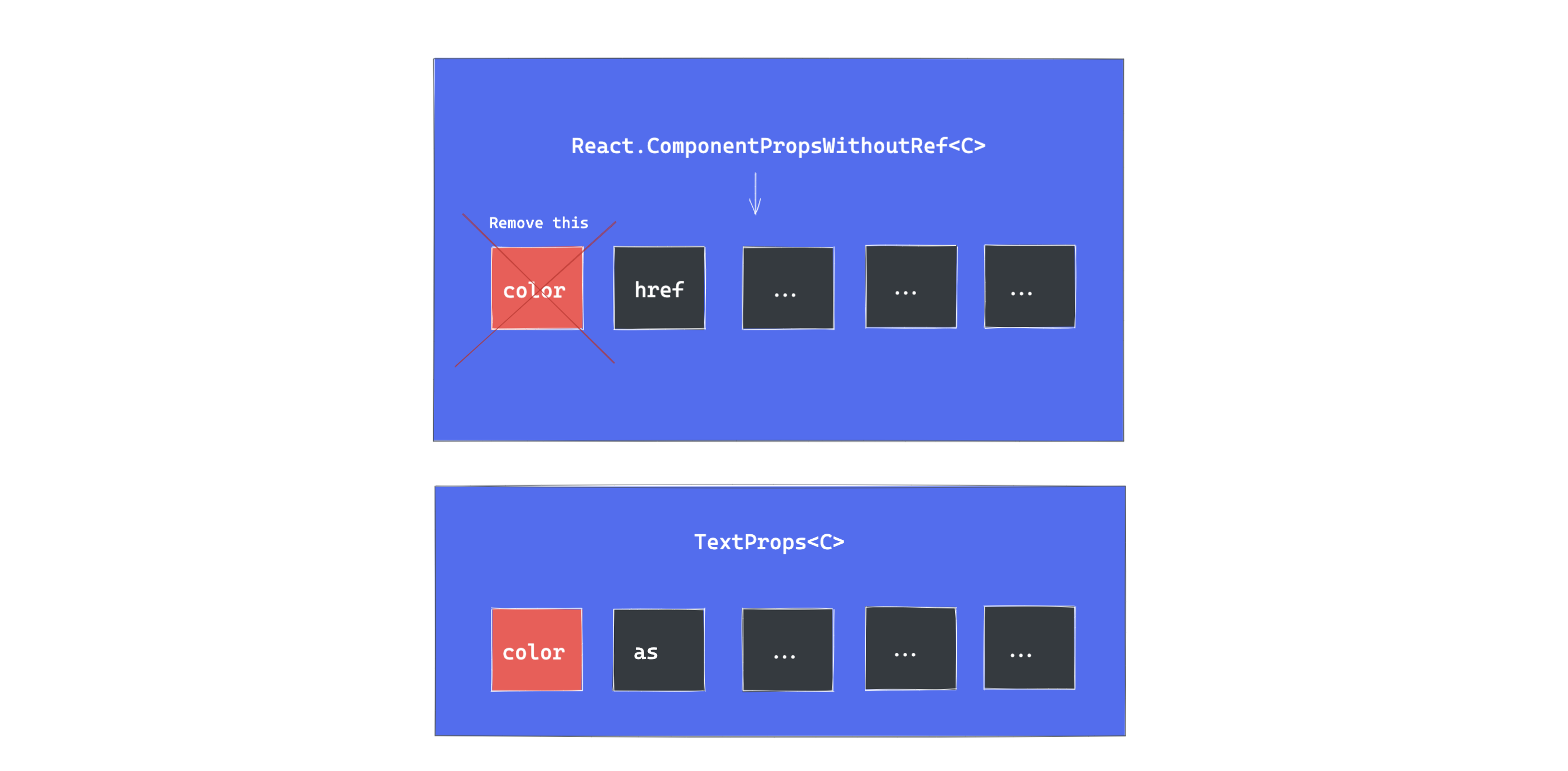
So, if any type exists in our component types definition, we will explicitly remove those types from React.ComponentPropsWithoutRef<C>.
React.ComponentPropsWithoutRef<C>Here’s what we had before:
type Props <C extends React.ElementType> =
React.PropsWithChildren<TextProps<C>> &
React.ComponentPropsWithoutRef<C>
Instead of having an intersection type where we add everything that comes from React.ComponentPropsWithoutRef<C>, we will be more selective. We will use the Omit and keyof TypeScript utility types to perform some TypeScript magic.
Take a look:
// before
type Props <C extends React.ElementType> =
React.PropsWithChildren<TextProps<C>> &
React.ComponentPropsWithoutRef<C>

// after
type Props <C extends React.ElementType> =
React.PropsWithChildren<TextProps<C>> &
Omit<React.ComponentPropsWithoutRef<C>, keyof TextProps<C>>;
This is the important bit:
Omit<React.ComponentPropsWithoutRef<C>, keyof TextProps<C>>;
Omit takes in two generics. The first is an object type, and the second is a union of types you’d like to “omit” from the object type.
Here’s my favorite example. Consider a Vowel object type as follows:
type Vowels = {
  a: 'a',
  e: 'e',
  i: 'i',
  o: 'o',
  u: 'u'
}
This is an object type of key and value. Let’s say that I wanted to derive a new type from Vowels called VowelsInOhans.
Well, I do know that the name Ohans contains two vowels, o and a. Instead of manually declaring these:
type VowelsInOhans = {
  a: 'a',
  o: 'o'
}
I can go ahead to leverage Omit as follows:
type VowelsInOhans = Omit<Vowels, 'e' | 'i' | 'u'>
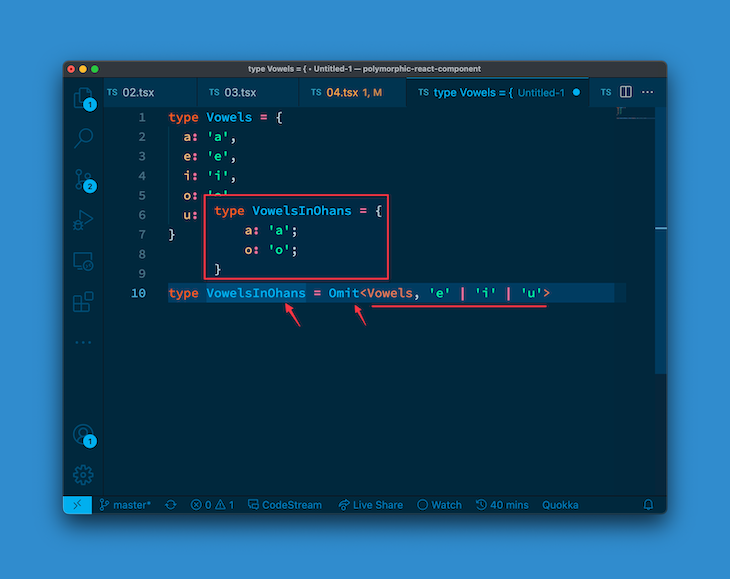
Omit will “omit” the e, i and u keys from the object type Vowels.
On the other hand, TypeScript’s keyof operator works as you would imagine. Think of Object.keys in JavaScript: given an object type, keyof will return a union type of the keys of the object.
Phew! That’s a mouthful. Here’s an example:
type Vowels = {
  a: 'a',
  e: 'e',
  i: 'i',
  o: 'o',
  u: 'u'
}

type Vowel = keyof Vowels
Now, Vowel will be a union type of the keys of Vowels, i.e.:
type Vowel = 'a' | 'e' | 'i' | 'o' | 'u'
If you put these together and take a second look at our solution, it’ll all come together nicely:
Omit<React.ComponentPropsWithoutRef<C>, keyof TextProps<C>>;
keyof TextProps<C> returns a union type of the keys of our component props. This is in turn passed to Omit to omit them from React.ComponentPropsWithoutRef<C>.
Sweet! 🕺
To finish, let’s go ahead and actually pass the color prop down to the rendered element:
export const Text = <C extends React.ElementType = "span">({
  as,
  color, // 👈 look here
  children,
  ...restProps
}: Props<C>) => {
  const Component = as || "span";

  // 👇 compose an inline style object
  const style = color ? { style: { color } } : {};

  // 👇 pass the inline style to the rendered element
  return (
    <Component {...restProps} {...style}>
      {children}
    </Component>
  );
};
We’ve finally got a solution that works well. Now, however, let’s take it one step further.
The solution we have works great for our Text component. However, what if you’d rather have a solution you can reuse on any component of your choosing, so that you can have a reusable solution for every use case?
Let’s get started. First, here’s the current complete solution with no annotations:
type Rainbow =
  | "red"
  | "orange"
  | "yellow"
  | "green"
  | "blue"
  | "indigo"
  | "violet";

type TextProps<C extends React.ElementType> = {
  as?: C;
  color?: Rainbow | "black";
};

type Props<C extends React.ElementType> = React.PropsWithChildren<
  TextProps<C>
> &
  Omit<React.ComponentPropsWithoutRef<C>, keyof TextProps<C>>;

export const Text = <C extends React.ElementType = "span">({
  as,
  color,
  children,
  ...restProps
}: Props<C>) => {
  const Component = as || "span";

  const style = color ? { style: { color } } : {};

  return (
    <Component {...restProps} {...style}>
      {children}
    </Component>
  );
};
Succinct and practical.
If we made this reusable, then it has to work for any component. This means removing the hardcoded TextProps and representing that with a generic — so anyone can pass in whatever component props they need.
Currently, we represent our component props with the definition Props<C>. Where C represents the element type passed for the as prop.
We will now change that to:
// before
Props<C>

// after
PolymorphicProps<C, TextProps>
PolymorphicProps represents the utility type we will write shortly. However, note that this accepts two generic types, the second being the component props in question: TextProps.
Go ahead and define the PolymorphicProps type:
type PolymorphicComponentProp<
  C extends React.ElementType,
  Props = {}
> = {} // 👈 empty object for now
The definition above should be understandable. C represents the element type passed in as, and Props is the actual component props, TextProps.
First, let’s split the TextProps we had before into the following:
type AsProp<C extends React.ElementType> = {
  as?: C;
};

type TextProps = { color?: Rainbow | "black" };
So, we’ve separated the AsProp from the TextProps. To be fair, they represent two different things. This is a nicer representation.
Now, let’s change the PolymorphicComponentProp utility definition to include the as prop, component props, and children prop, as we’ve done in the past:
type AsProp<C extends React.ElementType> = {
  as?: C;
};

type PolymorphicComponentProp<
  C extends React.ElementType,
  Props = {}
> = React.PropsWithChildren<Props & AsProp<C>>
I’m sure by now you understand what’s going on here: we have an intersection type of Props (representing the component props) and AsProp representing the as prop. These are all passed into PropsWithChildren to add the children prop definition. Excellent!
Now, we need to include the bit where we add the React.ComponentPropsWithoutRef<C> definition. However, we must remember to omit props that exist in our component definition.
Let’s come up with a robust solution.
Write out a new type that just comprises the props we’d like to omit. Namely, the keys of the AsProp and the component props as well.
type PropsToOmit<C extends React.ElementType, P> = keyof (AsProp<C> & P);
Remember the keyof utility type?
PropsToOmit will now comprise a union type of the props we want to omit, which is every prop of our component represented by P and the actual polymorphic prop as, represented by AsProps.
Put this all together nicely in the PolymorphicComponentProp definition:
type AsProp<C extends React.ElementType> = {
  as?: C;
};

// before
type PolymorphicComponentProp<
  C extends React.ElementType,
  Props = {}
> = React.PropsWithChildren<Props & AsProp<C>>

// after
type PolymorphicComponentProp<
  C extends React.ElementType,
  Props = {}
> = React.PropsWithChildren<Props & AsProp<C>> &
  Omit<React.ComponentPropsWithoutRef<C>,
   PropsToOmit<C, Props>>;
What’s important here is we’ve added the following definition:
Omit<React.ComponentPropsWithoutRef<C>,
   PropsToOmit<C, Props>>;
This basically omits the right types from React.componentPropsWithoutRef. Do you still remember how omit works?
Simple as it may seem, you now have a solution you can reuse on multiple components across different projects!
Here’s the complete implementation:
type PropsToOmit<C extends React.ElementType, P> = keyof (AsProp<C> & P);

type PolymorphicComponentProp<
  C extends React.ElementType,
  Props = {}
> = React.PropsWithChildren<Props & AsProp<C>> &
  Omit<React.ComponentPropsWithoutRef<C>, PropsToOmit<C, Props>>;
Now we can go ahead and use PolymorphicComponentProp on our Text component as follows:
export const Text = <C extends React.ElementType = "span">({
  as,
  color,
  children,
  // look here 👇
}: PolymorphicComponentProp<C, TextProps>) => {
  const Component = as || "span";
  const style = color ? { style: { color } } : {};
  return <Component {...style}>{children}</Component>;
};
How nice! If you build another component, you can go ahead and type it like this:
PolymorphicComponentProp<C, MyNewComponentProps>
Do you hear that sound? That’s the sound of victory — you’ve come so far!
Do you remember every reference to React.ComponentPropsWithoutRef so far? 😅 Component props … without refs. Well, now’s the time to put the refs in!
This is the final and most complex part of our solution. I’ll need you to be patient here, but I’ll also do my best to explain every step in detail.
First things first, do you remember how refs in React work? The most important concept here is that you just don’t pass ref as a prop and expect it to be passed down into your component like every other prop. The recommended way to handle refs in your functional components is to use the forwardRef function.
Let’s start off on a practical note.
If you go ahead and pass a ref to our Text component now, you’ll get an error that reads Property 'ref' does not exist on type ....
// Create the ref object
const divRef = useRef<HTMLDivElement | null>(null);
...
// Pass the ref to the rendered Text component
<Text as="div" ref={divRef}>
  Hello Text world
</Text>

This is expected.
Our first shot at supporting refs will be to use forwardRef in the Text component as shown below:
// before
export const Text = <C extends React.ElementType = "span">({
  as,
  color,
  children,
}: PolymorphicComponentProp<C, TextProps>) => {
  ...
};


// after
import React from "react";

export const Text = React.forwardRef(
  <C extends React.ElementType = "span">({
    as,
    color,
    children,
  }: PolymorphicComponentProp<C, TextProps>) => {
    ...
  }
);
This is essentially just wrapping the previous code in React.forwardRef, that’s all.
Now, React.forwardRef has the following signature:
React.forwardRef((props, ref) ... )
Essentially, the second argument received is the ref object. Let’s go ahead and handle that:
type PolymorphicRef<C extends React.ElementType> = unknown;

export const Text = React.forwardRef(
  <C extends React.ElementType = "span">(
    { as, color, children }: PolymorphicComponentProp<C, TextProps>,
    // 👇 look here
    ref?: PolymorphicRef<C>
  ) => {
    ...
  }
);
What we’ve done here is added the second argument, ref, and declared its type as PolymorphicRef, which just points to unknown for now.
Note that PolymorphicRef takes in the generic C. This is similar to previous solutions — the ref object for a div differs from that of a span, so we need to take into consideration the element type passed to the as prop.
Point your attention to the PolymorphicRef type. How can we get the ref object type based on the as prop?
Let me give you a clue: React.ComponentPropsWithRef!
Note that this says with ref. Not without ref.
Essentially, if this were a bundle of keys (which, in fact, it is), it’ll include all the relevant component props based on the element type, plus the ref object.
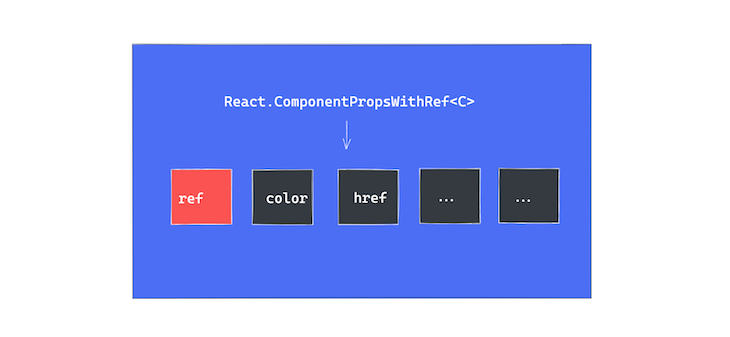
So now, if we know this object type contains the ref key, we may as well get that ref type by doing the following:
// before
type PolymorphicRef<C extends React.ElementType> = unknown;

// after
type PolymorphicRef<C extends React.ElementType> =
  React.ComponentPropsWithRef<C>["ref"];
Essentially, React.ComponentPropsWithRef<C> returns an object type, e.g.,
{
  ref: SomeRefDefinition,
  // ... other keys,
  color: string
  href: string
  // ... etc
}
To pick out just the ref type, we can then do this:
React.ComponentPropsWithRef<C>["ref"];
Note that the syntax is similar to the property accessor syntax in JavaScript, i.e., ["ref"]. Now that we’ve got the ref prop typed, we can go ahead and pass that down to the rendered element:
export const Text = React.forwardRef(
  <C extends React.ElementType = "span">(
    { as, color, children }: PolymorphicComponentProp<C, TextProps>,
    ref?: PolymorphicRef<C>
  ) => {
    //...

    return (
      <Component {...style} ref={ref}> // 👈 look here
        {children}
      </Component>
    );
  }
);
We’ve made decent progress! In fact, if you go ahead and check the usage of Text like we did before, there’ll be no more errors:
// create the ref object
const divRef = useRef<HTMLDivElement | null>(null);
...
// pass ref to the rendered Text component
<Text as="div" ref={divRef}>
  Hello Text world
</Text>
However, our solution still isn’t as strongly typed as I’d like. Let’s go ahead and change the ref passed to the Text as shown below:
// create a "button" ref object
const buttonRef = useRef<HTMLButtonElement | null>(null);
...
// pass a button ref to a "div". NB: as = "div"
<Text as="div" ref={buttonRef}>
  Hello Text world
</Text>
TypeScript should throw an error here, but it doesn’t. We’re creating a button ref, but passing it to a div element. That’s not right.
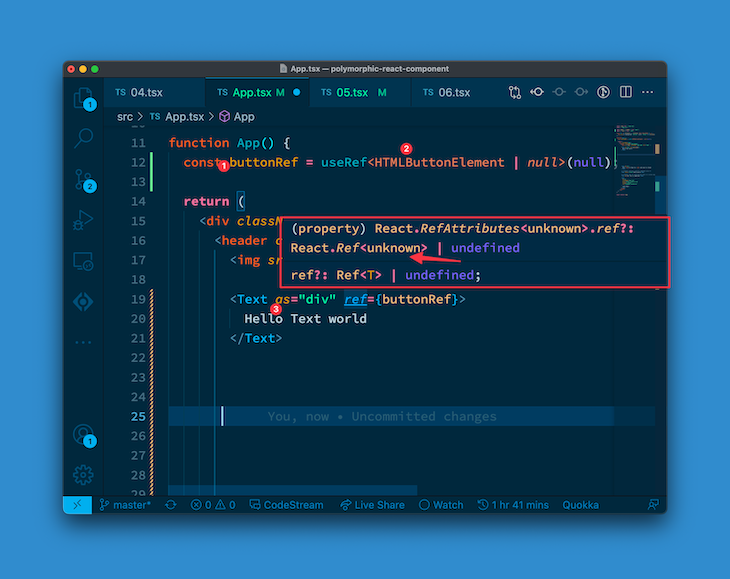
If you take a look at the exact type of ref, it looks like this:
React.RefAttributes<unknown>.ref?: React.Ref<unknown>
Do you see the unknown in there? That’s a sign of weak typing. We should ideally have HTMLDivElement in there to explicitly define the ref object as a div element ref.
We’ve got work to do. Let’s first look at the types for the other props of the Text component, which still reference the PolymorphicComponentProp type. Change this to a new type called PolymorphicComponentPropWithRef. This will just be a union of PolymorphicComponentProp and the ref prop. (You guessed right.)
Here it is:
type PolymorphicComponentPropWithRef<
  C extends React.ElementType,
  Props = {}
> = PolymorphicComponentProp<C, Props> &
{ ref?: PolymorphicRef<C> };
This is just a union of the previous PolymorphicComponentProp and { ref?: PolymorphicRef<C> }.
Now we need to change the props of the component to reference the new PolymorphicComponentPropWithRef type:
// before
type TextProps = { color?: Rainbow | "black" };

export const Text = React.forwardRef(
  <C extends React.ElementType = "span">(
    { as, color, children }: PolymorphicComponentProp<C, TextProps>,
    ref?: PolymorphicRef<C>
  ) => {
    ...
  }
);


// now
type TextProps<C extends React.ElementType> =
PolymorphicComponentPropWithRef<
  C,
  { color?: Rainbow | "black" }
>;

export const Text = React.forwardRef(
  <C extends React.ElementType = "span">(
    { as, color, children }: TextProps<C>, // 👈 look here
    ref?: PolymorphicRef<C>
  ) => {
    ...
  }
);
We’ve updated TextProps to reference PolymorphicComponentPropWithRef and that’s now passed as the props for the Text component. Lovely!
There’s one final thing to do: provide a type annotation for the Text component. It looks similar to:
export const Text : TextComponent = ...
TextComponent is the type annotation we’ll write. Here it is fully written out:
type TextComponent = <C extends React.ElementType = "span">(
  props: TextProps<C>
) => React.ReactElement | null;
This is essentially a functional component that takes in TextProps and returns React.ReactElement | null, where TextProps is as defined earlier:
type TextProps<C extends React.ElementType> =
PolymorphicComponentPropWithRef<
  C,
  { color?: Rainbow | "black" }
>;
With this, we now have a complete solution!
I’m going to share the complete solution now. It may seem daunting at first, but remember we’ve worked line by line through everything you see here. Read it with that confidence.
import React from "react";

type Rainbow =
  | "red"
  | "orange"
  | "yellow"
  | "green"
  | "blue"
  | "indigo"
  | "violet";

type AsProp<C extends React.ElementType> = {
  as?: C;
};

type PropsToOmit<C extends React.ElementType, P> = keyof (AsProp<C> & P);

// This is the first reusable type utility we built
type PolymorphicComponentProp<
  C extends React.ElementType,
  Props = {}
> = React.PropsWithChildren<Props & AsProp<C>> &
  Omit<React.ComponentPropsWithoutRef<C>, PropsToOmit<C, Props>>;

// This is a new type utitlity with ref!
type PolymorphicComponentPropWithRef<
  C extends React.ElementType,
  Props = {}
> = PolymorphicComponentProp<C, Props> & { ref?: PolymorphicRef<C> };

// This is the type for the "ref" only
type PolymorphicRef<C extends React.ElementType> =
  React.ComponentPropsWithRef<C>["ref"];

/**
* This is the updated component props using PolymorphicComponentPropWithRef
*/
type TextProps<C extends React.ElementType> =
PolymorphicComponentPropWithRef<
  C,
  { color?: Rainbow | "black" }
>;

/**
* This is the type used in the type annotation for the component
*/
type TextComponent = <C extends React.ElementType = "span">(
  props: TextProps<C>
) => React.ReactElement | null;

export const Text: TextComponent = React.forwardRef(
  <C extends React.ElementType = "span">(
    { as, color, children }: TextProps<C>,
    ref?: PolymorphicRef<C>
  ) => {
    const Component = as || "span";

    const style = color ? { style: { color } } : {};

    return (
      <Component {...style} ref={ref}>
        {children}
      </Component>
    );
  }
);
And there you go!
You have successfully built a robust solution for handling polymorphic components in React with TypeScript. I know it wasn’t an easy ride, but you did it.
Thanks for following along. Remember to star the official GitHub repository, where you’ll find all the code for this guide. If you want to share your thoughts on this tutorial with me, or simply connect, you can find/follow me on GitHub, LinkedIn, or Twitter.
Install LogRocket via npm or script tag. LogRocket.init() must be called client-side, not
server-side
$ npm i --save logrocket

// Code:

import LogRocket from 'logrocket';
LogRocket.init('app/id');
// Add to your HTML:

<script src="https://cdn.lr-ingest.com/LogRocket.min.js"></script>
<script>window.LogRocket && window.LogRocket.init('app/id');</script>

Learn how to use browser AI APIs for summarization, translation, and language detection with practical examples and implementation tips.

Build a live task board with Topcoat and Rust, using reactive signals, server-rendered search, and WebSocket updates.

Learn how to build and install three Claude Code mods to monitor usage, protect secrets, and track changes.

I tested Jev against popular LLMs to compare speed, cost, and accuracy on real bank support messages.
Hey there, want to help make our blog better?
Join LogRocket’s Content Advisory Board. You’ll help inform the type of content we create and get access to exclusive meetups, social accreditation, and swag.
Sign up now


 Learn more →