Microsoft PowerPoint is the world’s leading presentation software, known for its intuitive interface and powerful tools. From creating simple slideshows and educational materials to designing professional business presentations and interactive decks, it offers advanced features such as:
- Slide layouts and themes
- Seamless insertion of images, charts, tables, and media
- Transitions and animations
- Designer (AI-powered design suggestions) and Copilot integration (in Microsoft 365)
- Collaboration and sharing tools
Microsoft PowerPoint Interface
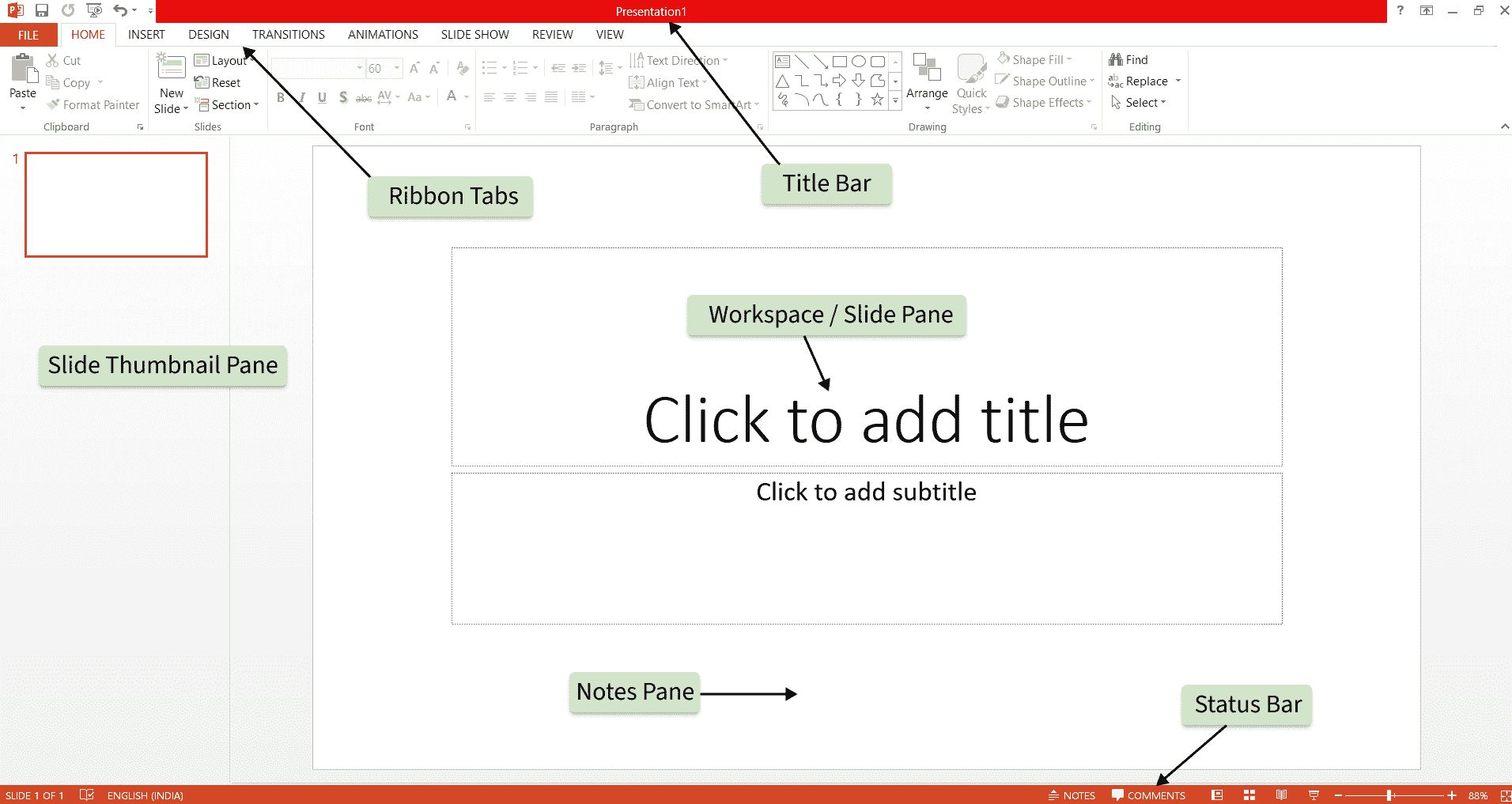
The Microsoft PowerPoint interface is designed for creating and editing slide-based presentations:
- Title Bar: Displays the presentation title and quick access to minimize, maximize, and close options. It also includes the Quick Access Toolbar for frequently used commands.
- Ribbon Tabs: Organized into functional tabs such as Home, Insert, Design, Transitions, Animations, and more, each containing related tools and commands.
- Slide Thumbnail Pane: Shows miniature previews of all slides for easy navigation and reorganization.
- Workspace / Slide Pane: The main central area where you create, edit, and format the current slide.
- Notes Pane: Allows you to add speaker notes for each slide.
- Status Bar: Displays slide number, view options, zoom controls, and other status information.