

The router.param() function is used to register a callback function that is executed when a route contains a specified route parameter. It is commonly used to preprocess route parameters before the corresponding route handler is executed.
Syntax:
router.param(name, callback)Parameters:
- name: The name of the route parameter for which the callback function is registered.
- callback: A callback function that is executed when the specified route parameter is present in a matched route.
Installation of the Express module
You can install this package by using this command.
npm install expressAfter installing the express module, you can check your express version in the command prompt using the command.
npm version expressAfter that, create a folder and add a file named app.js. To run this file, use the following command.
node app.jsProject Structure:
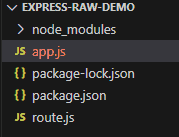
Example: Create a file names app.js and paste the following code into the file.
const express = require('express');
const app = express();
const userRoutes = require('./route');
app.use('/', userRoutes);
const PORT = 8000;
app.listen(PORT, () => {
    console.log(`Server running on port ${PORT}`);
});
We have to create another file named route.js in the same directory
route.js file:
const express = require('express');
const router = express.Router();
router.param('userId', (req, res, next, value) => {
    console.log('Parameter value:', value);
    console.log('router.param() callback executed');
    next();
});
router.get('/user/:userId', (req, res) => {
    console.log('Route handler executed');
    res.send(`User ID: ${req.params.userId}`);
});
module.exports = router;
Steps to run the program:
Start the server by entering the following command
node app.jsOutput:
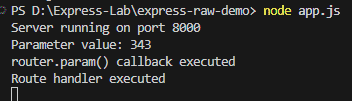
Console Output:
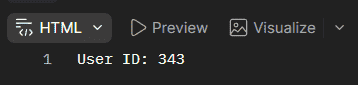
Server running on port 8000Browser Output:
Console Output:
Working of router.param()
- An Express Router instance is created using express.Router().
- A parameter callback is registered using router.param().
- A route containing the specified parameter is defined.
- When a request matches the route, Express extracts the parameter value from the URL.
- The router.param() callback is executed with the parameter value.
- Calling next() passes control to the route handler.
- The route handler processes the request and sends the response.
Use Cases of router.param()
- Validating route parameters before processing a request.
- Loading a resource based on an ID.
- Performing preprocessing on route parameter values.
- Checking whether a requested resource exists.
- Reusing parameter-processing logic across multiple routes.
