

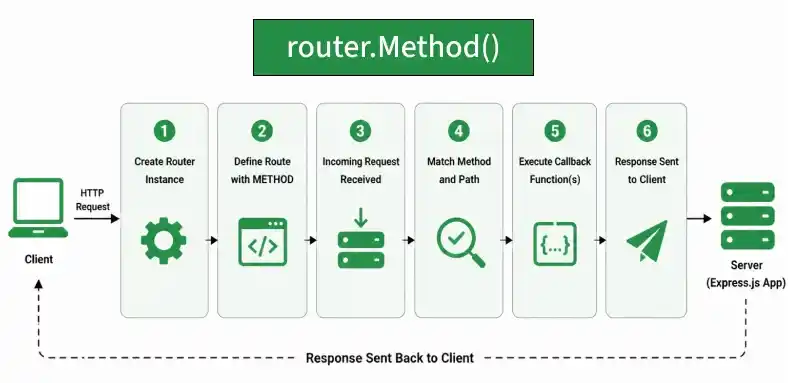
The router.METHOD() method provides routing functionality in Express.js, where METHOD represents an HTTP method such as GET, POST, PUT, or DELETE. It is used to define routes on an Express Router instance for handling requests with a specific HTTP method.
Syntax:
router.METHOD(path, callback [, callback ...])Parameter
- path: The path for which the route is defined.
- callback: A middleware function or multiple callback functions that are executed when the request matches the specified path and HTTP method.
Return Value: Returns the Router instance, allowing routes to be chained.
Installation of the express module:
You can visit the link to Install the express module. You can install this package by using this command.
npm install expressAfter installing the express module, you can check your express version in the command prompt using the command.
npm version expressAfter that, you can just create a folder and add a file, for example, index.js. To run this file you need to run the following command.
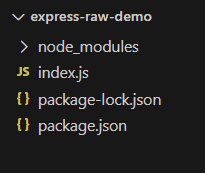
node index.jsProject Structure:
Example 1: Filename: index.js
const express = require('express');
const app = express();
const router = express.Router();
const PORT = 3000;
// Single route
router.get('/user', function (req, res, next) {
    console.log("GET request called");
    res.end();
});
app.use(router);

app.listen(PORT, function (err) {
    if (err) console.log(err);
    console.log("Server listening on PORT", PORT);
});
Steps to run the program:
Run the index.js file using the below command:
node index.jsOutput:
Console Output:
Server listening on PORT 3000Now make a GET request to http://localhost:3000/user, you can see the following output on your screen:

Example 2: Filename: index.js
const express = require('express');
const app = express();
const router = express.Router();
const PORT = 3000;
// Multiple routes
router.get('/user', function (req, res, next) {
    console.log("GET request called");
    res.end();
});
router.post('/user', function (req, res, next) {
    console.log("POST request called");
    res.end();
});
router.delete('/user', function (req, res, next) {
    console.log("DELETE request called");
    res.end();
})
app.use(router);

app.listen(PORT, function (err) {
    if (err) console.log(err);
    console.log("Server listening on PORT", PORT);
});
Steps to run the program:
Run the index.js file using the below command:
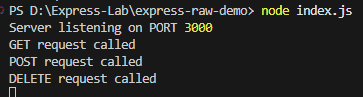
node index.jsOutput:
Now make GET, POST, and DELETE request to http://localhost:3000/user, you can see the following output on your screen:
Working of router.METHOD()
- An Express Router instance is created using express.Router().
- A route is defined using a method such as router.get(), router.post(), or router.delete().
- Express matches the incoming request with the specified HTTP method and path.
- The corresponding callback function is executed when a match is found.
- The router is mounted on the Express application using app.use().
Use Cases of router.METHOD()
- Defining routes for specific HTTP methods.
- Organizing application routes using Express Router.
- Handling GET, POST, PUT, DELETE, and other HTTP requests.
- Separating routes into modular router files.
- Building RESTful APIs.
Reference: https://expressjs.com/en/4x/api.html#router.METHOD
