

The res.clearCookie() function is used to clear a cookie from the client's browser. It sends a Set-Cookie response header that instructs the browser to remove the specified cookie.
Syntax:
res.clearCookie(name, [ options ])Parameters:
- Name: The name of the cookie to be cleared.
- Options (Optional): An object containing cookie options such as domain, path, secure, and sameSite. These options should match the options used when the cookie was originally set.
Return Value: Returns the response object (res), allowing method chaining.
Installation of the express module:
You can visit the link to Install the express module. You can install this package by using this command.
npm install expressAfter installing the express module, you can check your express version in the command prompt using the command.
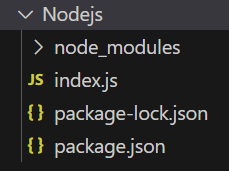
npm version expressAfter that, you can just create a folder and add a file, for example, index.js. To run this file you need to run the following command.
node index.jsProject Structure:
Example 1: Clearing a Cookie
const express = require('express');
const app = express();
const PORT = 3000;
app.get('/set-cookie', (req, res) => {
    res.cookie('title', 'GeeksforGeeks');
    res.send('Cookie set successfully.');
});
app.get('/clear-cookie', (req, res) => {
    res.clearCookie('title');
    res.send('Cookie cleared successfully.');
});
app.listen(PORT, () => {
    console.log(`Server listening on PORT ${PORT}`);
});
Steps to run the program:
Run the index.js file using the below command:
node index.jsOutput:
Console Output:
Server listening on PORT 3000Browser Output:
Now open your browser and go to http://localhost:3000/set-cookie, you can see the following output on your screen:

Note: In Express 5, the expires and maxAge options are ignored by res.clearCookie(). When clearing a cookie, use the same relevant options, such as path and domain, that were used when setting the cookie.
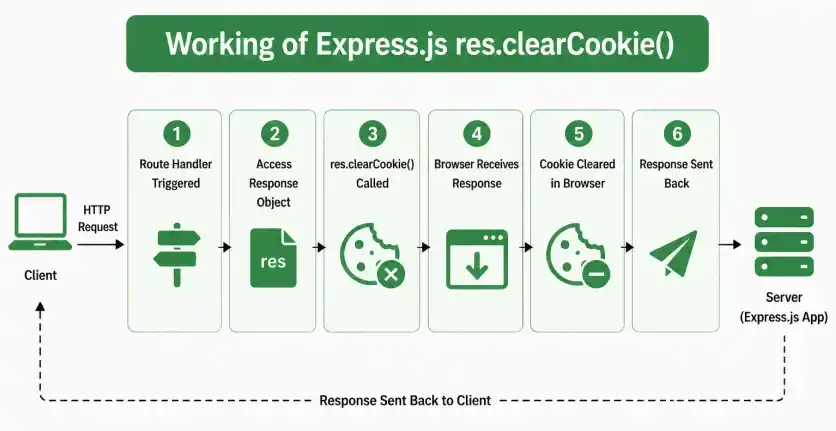
Working of res.clearCookie()
- An Express application receives a client request.
- The route handler gets access to the response object through res.
- res.clearCookie() sends a Set-Cookie response header for the specified cookie.
- The header instructs the browser to expire the cookie.
- The browser clears the cookie when the relevant cookie attributes match those used when the cookie was originally set.
Use Cases of res.clearCookie()
- Clearing authentication or session cookies during logout.
- Removing temporary cookies after they are no longer required.
- Resetting user preferences stored in cookies.
- Removing cookies when a user signs out of an application.
- Managing cookie lifecycle in web applications.
