

The mount event is fired on a sub-app when it is mounted on a parent app. The parent app is passed to the callback function.
Syntax:
app.on('mount', callback)Parameter: callback is a function that is called when the sub-app is mounted. The parent app is passed to the callback as an argument.
Return Value: The mount event does not produce a return value. The callback receives the parent Express application as its argument.
Installation of the Express module
You can install this package by using this command.
npm install expressAfter installing the express module, you can check your express version in the command prompt using the command.
npm version expressAfter that, you can just create a folder and add a file, for example, index.js. To run this file you need to run the following command.
node index.jsProject Structure:
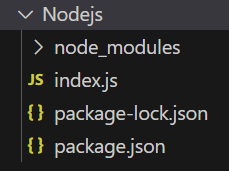
Example 1: Filename: index.js
const express = require('express');
const app = express(); // The main app
const admin = express();
const PORT = 3000;
admin.on('mount', function (parent) {
    console.log('Admin Mounted');
});
admin.get('/', function (req, res) {
    res.send('Admin Homepage');
});
app.use('/admin', admin);
app.listen(PORT, function (err) {
    if (err) console.log(err);
    console.log("Server listening on PORT", PORT);
});
Steps to run the program:
Run the index.js file using the below command:
node index.jsOutput:
Console Output:

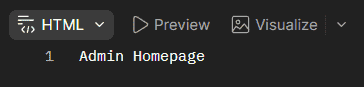
Browser Output:
Now open your browser and go to http://localhost:3000/admin, now you can see the following output on your screen:
Example 2: Filename: index.js
const express = require('express');
const app = express(); // The main app
const student = express();
const teacher = express();
const PORT = 3000;
// Multiple mounting
teacher.on('mount', function (parent) {
    console.log('Teacher Mounted');
});
student.on('mount', function (parent) {
    console.log('Student Mounted');
});
app.use('/student', student);
app.use('/teacher', teacher);
app.listen(PORT, function (err) {
    if (err) console.log(err);
    console.log("Server listening on PORT", PORT);
});
Steps to run the program:
Run the index.js file using the below command:
node index.jsOutput:
Console Output:
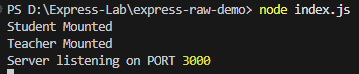
Working of mount Event
- A sub-app is created using express().
- The mount event listener is registered on the sub-app.
- The sub-app is mounted on a parent app using app.use().
- Express fires the mount event and passes the parent app to the callback.
- The sub-app can then perform setup based on its parent application.
Use Cases
- Initializing a sub-app when it is mounted.
- Accessing the parent Express application.
- Configuring reusable sub-applications.
- Managing multiple sub-apps in a larger application.
