

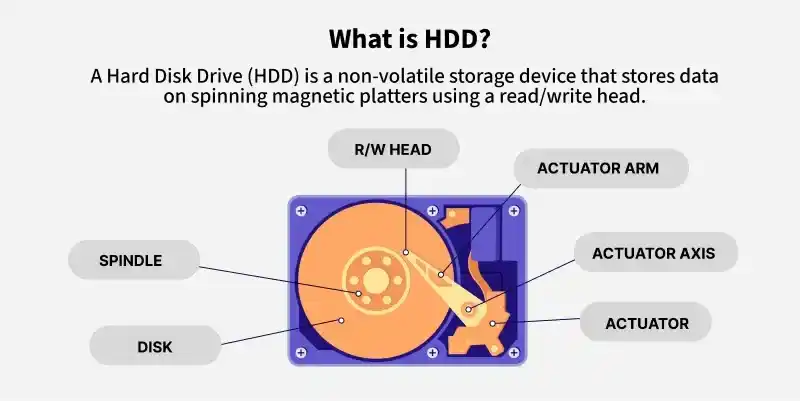
An HDD (Hard Disk Drive) is a storage device that uses magnetic storage to store and retrieve digital data. It is a non-volatile device, meaning it keeps data even when powered off, and is commonly used as the primary storage in computers.
- HDD (Hard Disk Drive) stores data using magnetic storage.
- It is a non-volatile storage device that retains data without power.
- HDDs are widely used as the main storage in computers.
History
In 1953, IBM engineers created HDD so as to provide random access to the high capacity of data at a low cost. Initially, the size of the hard disk is the same as that of the refrigerator and it could store 3.75 Megabytes of data. As the technology advances, the size of hard disk decreases and by mid-1980s it is available in 3.5 inches size. In 2007, Hitachi released 1 TB hard disk while in 2015 HGST launched 10 TB hard drives. Seagate launched hard disks that use SMR (shingled magnetic recording) technology. Further, HGST made the first helium-filled hard disk drive. Helium is used because it is less dense, cooler, and lighter than air thus increase performance and drive density of hard disks.
Hard drives are of 2 type:
- Hard Disk Drive: There have one or more rotating discs and magnetic storage.
- Solid State Drives(SSD): They don't have any moving part and have flash memory type storage.
HDD Interfaces
There are many interfaces that connects HDD to external computer components, some of them are
- SCSI stand for Small Computer System Interface
- SAS stands for Serial Attached SCSI
- ATA stands for Advanced Technology Attachment
- SATA stands for Serial ATA
- Fibre Channel
Characteristics of HDD
- Capacity and Cost: With advancement of technology, capacity of hard disk increases while cost decreases.
- Performance: It depends on the way data is stored and fetched by HDD.
- Reliability: It means user is free to store and fetch data when required without facing any trouble.
- RPM: It is rotation made by hard disk per minute. More is RPM better is performance of hard disk.
- Disk caching: Hard disks improve their access time by using it. Greater is disk cache, faster is the HDD.
- Number of Platter: The capacity of hard disk is determined by the number of platters it contains.
Advantages
- HDD is more affordable as compared to SDD. The cost of SDD (of similar size) is generally twice the cost of HDD.
- HDD also has higher storage capacity in comparison to SDD. The base capacity of HDD is 1 TB while in case of SDD, it is 128 GB.
- The life span of HDD is also longer than SDD.
- Both external and internal hard disks are widely available in markets.
- Major advantage of HDD is that they are non-volatile memory.
Disadvantages
- HDDs are very slow in comparison to SDD. A computer with an HDD storage system will boot slower than SSD.
- Power consumption of HDD is also high. HDDs need more input power to rotate the metallic platter.
- When HDD operates, it produces a lot of noise but SDD runs smoothly.
- HDD is not durable as compared to SDD. It may suffer from data loss or integrity failure.
- Form factor of HDD is very bulky. This make HDD not suitable for computing devices like Mobiles.
- HDDs are more vulnerable to mechanical failures as it contain moving parts
