

SQL syntax is a set of rules and guidelines used to write and execute SQL queries correctly.
- Uses specific keywords, clauses and operators to perform database operations.
- SQL keywords are generally written in uppercase for better readability.
Database Tables
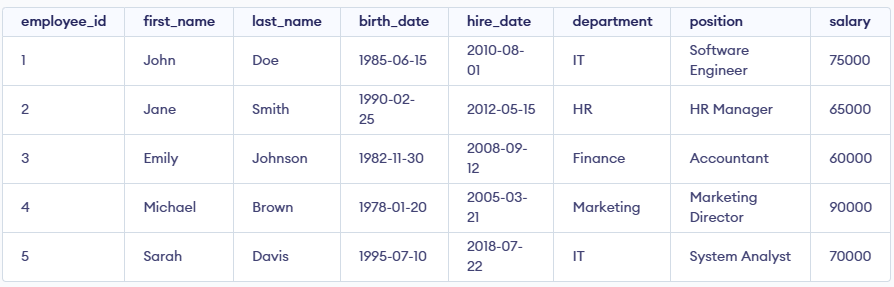
A relational database consists of one or more tables. Each table contains records (rows) and fields (columns). For instance, consider a table named "employee":
SQL Statements
SQL statements are commands that perform specific actions on the database. Below are some of the most fundamental SQL statements:
SELECT Statement
The SELECT statement retrieves data from a database. It is one of the most commonly used SQL commands.
SELECT * FROM employee;INSERT INTO Statement
The INSERT INTO statement adds new rows to a table.
INSERT INTO employee (employee_id, first_name, last_name, birth_date, hire_date, department, position, salary)
VALUES (6, 'David', 'Wilson', '1992-03-18', '2020-09-15', 'Sales', 'Sales Manager', 68000);
UPDATE Statement
The UPDATE statement modifies existing records in a table.
UPDATE employee
SET salary = 80000
WHERE employee_id = 1;
DELETE Statement
The DELETE statement removes existing records from a table.
DELETE FROM employee
WHERE employee_id = 2;
ALTER TABLE Statement
The ALTER TABLE statement modifies an existing table.
ALTER TABLE employee
ADD COLUMN email VARCHAR(255);
DROP TABLE Statement
The DROP TABLE statement deletes an existing table from the database.
DROP TABLE employee;WHERE Clause
The WHERE clause filters records based on specified conditions.
SELECT * FROM employee
WHERE department = 'IT';
ORDER BY Clause
The ORDER BY clause sorts the result set.
SELECT * FROM employee
ORDER BY salary DESC;
GROUP BY Clause
The GROUP BY clause groups rows that have the same values in specified columns.
SELECT department, COUNT(*) AS employee_count
FROM employee
GROUP BY department;
HAVING Clause
The HAVING clause filters groups based on conditions.
SELECT department, AVG(salary) AS avg_salary
FROM employee
GROUP BY department
HAVING AVG(salary) > 70000;
COUNT Function
The COUNT function returns the number of rows that match the criteria.
SELECT COUNT(*) AS total_employees
FROM employee;
SUM Function
The SUM function calculates the total sum of a numeric column.
SELECT SUM(salary) AS total_salary
FROM employee;
AVG Function
The AVG function calculates the average value of a numeric column.
SELECT AVG(salary) AS average_salary
FROM employee;
MIN & MAX Functions
The MIN and MAX functions return the smallest and largest values in a column, respectively.
SELECT MIN(salary) AS minimum_salary, MAX(salary) AS maximum_salary
FROM employee;
