

Indexes in SQL are special database structures that improve query performance by allowing faster access to data instead of scanning the entire table. They help retrieve records efficiently and enhance overall database performance.
Note: Primary Key and Unique constraints automatically create indexes.
Creating an Index
There are three main ways to create an index in SQL, each serving different purposes based on how data is accessed and organized in a table. Indexes help improve query performance by allowing faster data retrieval.
Single Column Indexes
A single-column index is created on just one column. It’s the most basic type of index and helps speed up queries when you frequently search, filter or sort by that column.
Syntax
CREATE INDEX index_name
ON table_name (column);
Example: First, we create a demo SQL database and table, on which we implement the Indexes.
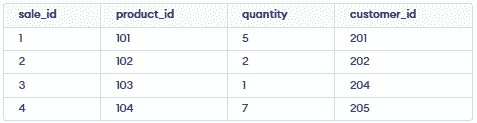
Query:
CREATE INDEX idx_product_id
ON sales (product_id);
Multi Column Indexes
A multi-column index is created on two or more columns. It improves performance when queries filter or join based on multiple columns together.
Syntax:
CREATE INDEX index_name
ON table_name (column1, column2,.....);
Query:
CREATE INDEX idx_product_quantity
ON sales (product_id, quantity);
Unique Indexes
A unique index ensures that all values in a column (or combination of columns) are unique preventing duplicates and maintaining data integrity.
Syntax:
CREATE UNIQUE INDEX index_name
ON table_name (column_name);
Query:
CREATE UNIQUE INDEX idx_unique_employee_id
ON sales (customer_id);
If we try inserting a duplicate:
INSERT INTO sales (sale_id, product_id, quantity, customer_id)
VALUES (6, 105, 4, 201);
It will throw an error because customer_id = 201 already exists.
Confirming & Viewing Indexes
We can view the indexes of a table to confirm their names and structure using the sp_helpindex system procedure.
Syntax:
EXEC sp_helpindex 'table_name';Query:
EXEC sp_helpindex 'sales';Output:

Removing an Index
Indexes take up storage and add overhead on write operations (INSERT, UPDATE, DELETE). If an index is no longer needed, it can be removed.
Syntax:
DROP INDEX index_name
ON table_name;
Query:
DROP INDEX idx_product_quantity
ON sales;
Altering an Index
If an index requires adjustments, such as reorganizing or rebuilding, it can be altered without affecting the data. This is useful for optimizing index performance as tables grow larger.
Syntax:
ALTER INDEX index_name
ON table_name REBUILD;
Query:
ALTER INDEX idx_product_id
ON sales REBUILD;
Renaming an Index
In some cases, renaming an index might be necessary for clarity or consistency. While SQL does not directly support renaming indexes, we can use a combination of commands to achieve this.
Syntax:
EXEC sp_rename 'old_index_name', 'new_index_name', 'INDEX';Query:
EXEC sp_rename 'idx_product_quantity', 'idx_prod_qty', 'INDEX';