

SQL Constraints are rules applied to columns in a table to restrict the type of data that can be stored. They help maintain data accuracy, consistency and integrity in a database.The commonly used SQL Constraints are:
- NOT NULL
- UNIQUE
- PRIMARY KEY
- FOREIGN KEY
- CHECK
- DEFAULT
Types of SQL Constraints
The following are the commonly used SQL constraints:
NOT NULL Constraint
The NOT NULL constraint ensures that a column cannot contain NULL values. It is used when a value is required for every row.
Syntax:
CREATE TABLE employee (employee_id INT NOT NULL,name VARCHAR(50) NOT NULL);
Here, employee_id and name cannot contain NULL values.

UNIQUE Constraint
The UNIQUE constraint ensures that all values in a column are different. It prevents duplicate values from being stored.
Syntax:
CREATE TABLE employee (employee_id INT,email VARCHAR(100) UNIQUE);

- Here, each employee must have a unique email address.
PRIMARY KEY Constraint
The PRIMARY KEY constraint uniquely identifies each row in a table. A primary key cannot contain NULL or duplicate values.
Syntax:
CREATE TABLE employee (employee_id INT PRIMARY KEY,name VARCHAR(50));

- Here, employee_id uniquely identifies each employee.
FOREIGN KEY Constraint
The FOREIGN KEY constraint is used to establish a relationship between two tables. It ensures that the value in one table refers to a valid value in another table.
Syntax:
CREATE TABLE employee (employee_id INT PRIMARY KEY,department_id INT,FOREIGN KEY (department_id)REFERENCES department(department_id));
- Here, department_id in the employee table references department_id in the department table.
CHECK Constraint
The CHECK constraint ensures that the values in a column satisfy a specified condition.
Syntax:
CREATE TABLE employee (employee_id INT,age INT CHECK (age >= 18));

- Here, the age must be greater than or equal to 18.
DEFAULT Constraint
The DEFAULT constraint automatically assigns a specified value to a column when no value is provided.
Syntax:
CREATE TABLE employee (employee_id INT,department VARCHAR(50) DEFAULT 'HR');

- If no value is provided for department, HR is assigned automatically.
Example
The following example demonstrates how multiple constraints can be applied to a table:
CREATE TABLE employee (employee_id INT PRIMARY KEY,name VARCHAR(50) NOT NULL,email VARCHAR(100) UNIQUE,age INT CHECK (age >= 18),department VARCHAR(50) DEFAULT 'HR');
Output:
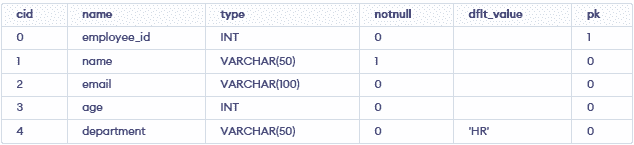
- PRIMARY KEY uniquely identifies each employee.
- NOT NULL ensures that name must have a value.
- UNIQUE prevents duplicate email addresses.
- CHECK ensures that age is at least 18.
- DEFAULT assigns HR when no department is specified.
