

A well-designed relational database is important for storing and managing the data used in real-time reporting.
- Uses MySQL to create and manage the real-time reporting database.
- Uses SQL to store, retrieve and analyze reporting data.
- Uses entities, attributes, primary keys and foreign keys to design the relational database.
- Uses an ER diagram to represent relationships between different entities.
- Analyzes users, reports, transactions, roles, data and permissions.
Creating the Real-Time Reporting Database
Firstly, use MySQL Workbench to create the database for the real-time reporting system.
Query:
CREATE DATABASE real_time_reporting;USE real_time_reporting;
After creating the database, the USE statement selects the real_time_reporting database so that the required tables can be created inside it.
To verify the database setup:
SHOW DATABASES;The SHOW DATABASES statement displays all databases available in the MySQL server and helps verify that the real_time_reporting database has been created successfully.
Real-Time Reporting Features
Real-time reporting provides several features that help organizations monitor and analyze the latest available data.
- Reporting Tools and Visualization: Charts, graphs and dashboards can be used to represent data clearly. Dashboards can be updated with the latest available data, allowing users to monitor KPIs and important metrics.
- Scalability: The database should be able to handle increasing data volumes and user demand. High availability can help maintain access to reporting data during system failures.
- Alert and Notification System: Alerts can be configured based on specific conditions or triggers. This helps users identify important changes and potential issues quickly.
- Data Ingestion and Streaming: Data can be collected from sources such as transactions, applications, sensors and user interactions. Data ingestion and streaming help make updated information available for reporting.
- Improved Decision Making: Access to current data helps organizations understand changing business conditions and make timely decisions.
- Communication and Collaboration: Real-time reports and dashboards can be shared with stakeholders, helping different teams stay informed and collaborate effectively.
Entities & Attributes of Real-Time Reporting
1. User
User represents the users who access and manage the reporting system.
- USER_ID (Primary Key): A unique identifier for each user.
- USER_NAME: Stores the name of the user.
- PASSWORD: Stores the user's password.
- USER_EMAIL: Stores the user's email address.
2. Report
Report represents the different reports generated or accessed in the system.
- REPORT_ID (Primary Key): A unique identifier for each report.
- REPORT_NAME: Stores the name of the report.
- DESCRIPTION: Provides a brief description of the report.
- USER_ID: A foreign key that references
USER_IDin the User entity.
3. Transaction
Transaction represents financial transactions related to business operations.
- TRANSACTION_ID (Primary Key): A unique identifier for each transaction.
- USER_ID: A foreign key that references
USER_IDin the User entity. - AMOUNT: Stores the transaction amount.
- STATUS: Stores the current status of the transaction.
4. Role
Role represents the roles assigned within the reporting system.
- ROLE_ID (Primary Key): A unique identifier for each role.
- ROLE_NAME: Stores the name of the role.
- DESCRIPTION: Provides a brief description of the role.
5. Data
Data represents the information used for reporting.
- DATA_ID (Primary Key): A unique identifier for each data record.
- DATA_TYPE: Describes the type of data.
- VALUE: Stores the actual value of the data.
6. Permission
Permission represents the permissions granted to roles for accessing reports.
- PERMISSION_ID (Primary Key): A unique identifier for each permission.
- REPORT_ID: A foreign key that references
REPORT_IDin the Report entity. - ROLE_ID: A foreign key that references
ROLE_IDin the Role entity.
Relationships Between These Entities
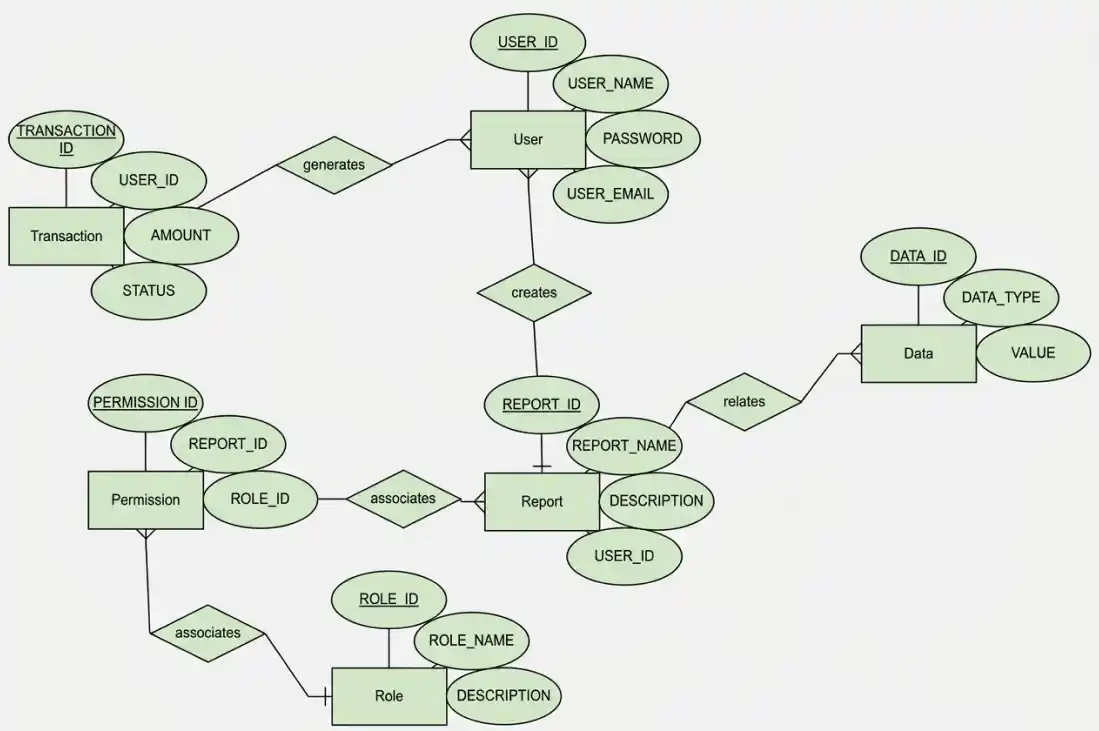
1. User-Report Relationship
- It shows a One-to-Many relationship.
- A User can create multiple Reports.
2. Report-User Relationship
- It shows a Many-to-One relationship.
- Each Report is associated with one User.
3. Data-Report Relationship
- It shows a One-to-Many relationship.
- A Report can contain multiple Data records.
4. User-Transaction Relationship
- It shows a One-to-Many relationship.
- One User can generate multiple Transactions.
5. Permission-Role Relationship
- It shows a Many-to-One relationship.
- Each Permission is associated with one Role.
6. Permission-Report Relationship
- It shows a Many-to-One relationship.
- Each Permission is associated with one Report.
7. Role-Permission Relationship
- It shows a One-to-Many relationship.
- One Role can have multiple Permissions.
ER Diagram for Real-Time Reporting
The ER diagram represents the entities and relationships used in the real-time reporting database.
Entities Structure in SQL format
CREATE TABLE User(
USER_ID INT PRIMARY KEY,
USER_NAME VARCHAR(20),
PASSWORD VARCHAR(20),
USER_EMAIL VARCHAR(20)
);
CREATE TABLE Report(
REPORT_ID INT PRIMARY KEY,
REPORT_NAME VARCHAR(50),
DESCRIPTION VARCHAR(255),
USER_ID INT FOREIGN KEY REFERENCES User(USER_ID)
);
CREATE TABLE Transaction(
TRANSACTION_ID INT PRIMARY KEY,
USER_ID INT FOREIGN KEY REFERENCES User(USER_ID),
AMOUNT INT,
STATUS VARCHAR(20)
);
CREATE TABLE Role(
ROLE_ID INT PRIMARY KEY,
ROLE_NAME VARCHAR(20),
DESCRIPTION VARCHAR(255)
);
CREATE TABLE Data(
DATA_ID INT PRIMARY KEY,
DATA_TYPE VARCHAR(255),
VALUE INT
);
CREATE TABLE Permission(
PERMISSION_ID INT PRIMARY KEY,
REPORT_ID INT FOREIGN KEY REFERENCES Report(REPORT_ID),
ROLE_ID INT FOREIGN KEY REFERENCES Role(ROLE_ID)
);
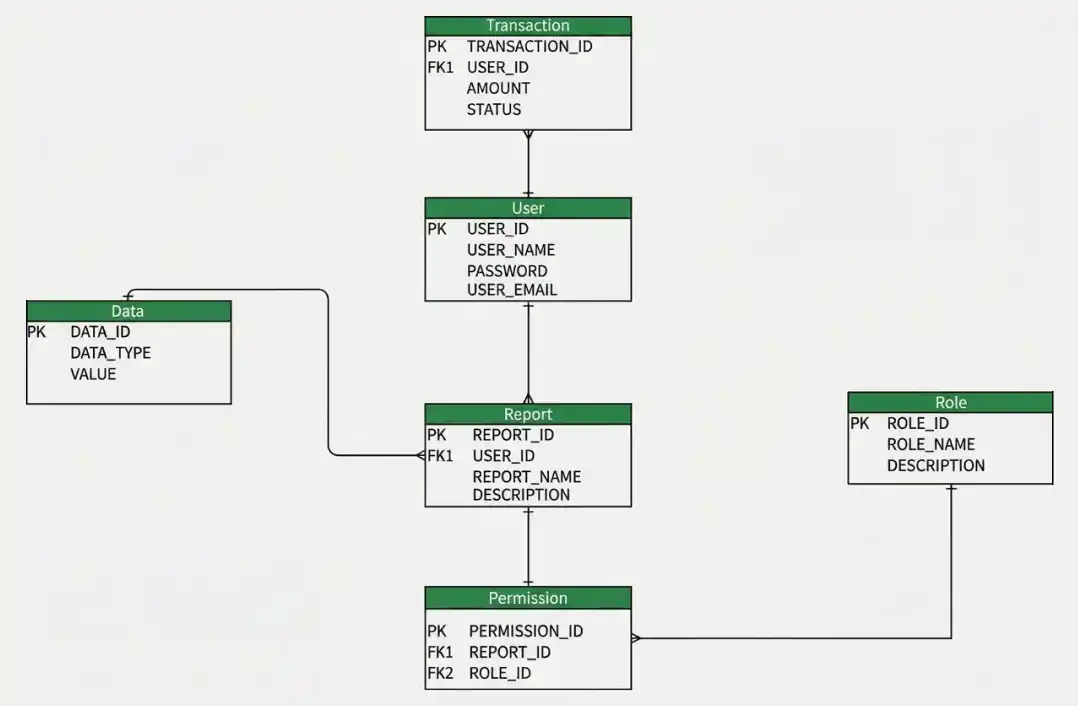
Database Model for Real-Time Reporting
Tips & Tricks to Improve Database Design
Designing an effective database requires careful consideration of several factors:
- Attributes: Define the required attributes for each entity.
- Data Types: Select appropriate data types for each attribute.
- Relationships: Clearly define how entities are related.
- Keys: Use primary and foreign keys to maintain referential integrity.
- Constraints: Apply constraints to maintain data integrity.
- Normalization: Reduce data redundancy and improve consistency.
- Backup: Implement regular database backups to prevent data loss.
- Security: Protect sensitive information and restrict access according to user roles.
- Scalability: Design the database to handle increasing data volume and user demand.
- Performance: Use indexes and optimized SQL queries to improve reporting performance.
