

Reshaping a data frame from wide to long format in R Programming Language is a common operation when dealing with data analysis and visualization. The process involves converting data that is spread across multiple columns (wide format) into a format where each row represents a single observation (long format).
Creating Sample Wide Data Frame
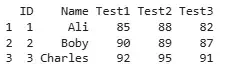
We create a wide-format data frame that stores test scores of students across multiple columns.
- data.frame : creates a data frame by combining all the columns (like ID, Name, Test1, etc.)
wide_df <- data.frame(
  ID = c(1, 2, 3),
  Name = c("Ali", "Boby", "Charles"),
  Test1 = c(85, 90, 92),
  Test2 = c(88, 89, 95),
  Test3 = c(82, 87, 91)
)

print(wide_df)
Output:
Method 1: Using melt from Reshape2 Package
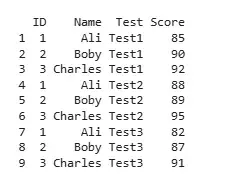
We reshape the data using the melt() function from the reshape2 package. This method transforms the score columns into a single variable.
- melt(): Converts wide data into long format by gathering multiple columns into key-value pairs.
- id.vars: Columns that stay fixed (like ID and Name).
- variable.name: Name of the new column holding original column names (e.g., Test1, Test2).
- value.name: Name of the new column storing actual data values (scores).
install.packages("reshape2")
library(reshape2)

long_df <- melt(wide_df, id.vars = c("ID", "Name"),
                variable.name = "Test",
                value.name = "Score")

print(long_df)
Output:
Method 2: Using pivot_longer from Tidyr Package
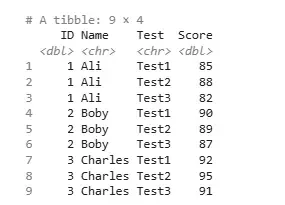
We use pivot_longer() from the tidyr package, a modern and flexible function designed for reshaping tasks.
- pivot_longer(): A tidyverse function to reshape data from wide to long format.
- cols = starts_with("Test"): Selects all columns whose names begin with "Test".
- names_to: Name of the new column that stores the old column names.
- values_to: Name of the new column that holds the values.
install.packages("tidyr")
library(tidyr)

long_df <- pivot_longer(wide_df,
                        cols = starts_with("Test"),
                        names_to = "Test",
                        values_to = "Score")

print(long_df)
Output:
Method 3: Using reshape from Base R
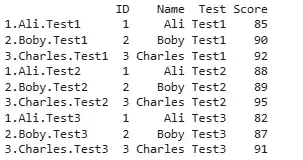
We use the base R reshape() function, which also allows us to convert the data to long format by specifying relevant columns and identifiers.
- reshape(): Built-in R function for converting data between wide and long formats.
- direction = "long": Indicates conversion from wide to long.
- idvar: Columns used to uniquely identify each record (like ID and Name).
- varying: List of columns to be reshaped.
- v.names: Name of the new column for values.
- timevar: Name of the new column to store original column names.
- times: Custom labels to use in the timevar column.
long_df <- reshape(wide_df,
                   direction = "long",
                   idvar = c("ID", "Name"),
                   varying = list(names(wide_df)[3:5]),
                   v.names = "Score",
                   timevar = "Test",
                   times = c("Test1", "Test2", "Test3"))

print(long_df)
Output:
In this article, we explored three methods to reshape data from wide to long format in R programming language.
