

macOS is a Unix-based operating system developed by Apple Inc. that powers Macintosh computers. It is known for its reliability, security, and user-friendly interface. macOS offers seamless integration with other Apple devices and comes with a wide range of built-in applications for productivity, communication, multimedia, and web browsing. Its features are:
- Easy interface with built-in apps like Safari, Mail, and Photos
- Works smoothly with other Apple devices
- Strong privacy and security features
- Regular updates with accessibility tools
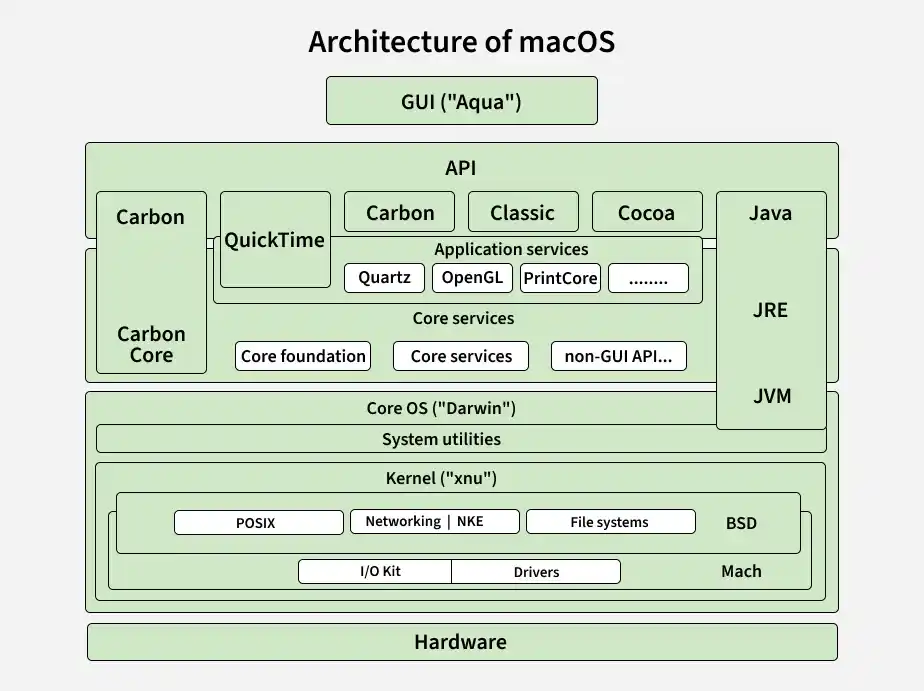
Architecture of macOS
macOS is built on a layered architecture that combines a powerful kernel with advanced frameworks for graphics, interface, and security.
- XNU Kernel: A hybrid, Unix-based kernel combining elements of FreeBSD and the Mach microkernel, forming the core of macOS
- Frameworks (Cocoa & Carbon): Provide the foundation for building and managing the graphical user interface (GUI)
- Window Server: Manages windows, handles input events, and coordinates graphics rendering with hardware
- Metal Framework: Enables high-performance, low-level access to the GPU for efficient graphics processing
- Security Features: Built-in mechanisms to protect system data, privacy, and prevent unauthorized access
Key Interface Elements
- Menu Bar: Located at the top of the screen and provides access to app commands and system controls.
- Dock: Provides quick access to frequently used and currently running applications.
- Finder: Helps users manage and organize files, folders, and storage locations.
- Spotlight Search: Provides fast system-wide search for files, applications, and information.
Applications
- Software Development: Used for programming and app development with tools like Xcode and Terminal.
- Graphic Design: Supports professional design and photo-editing applications.
- Video and Audio Editing: Used for video production, music creation, and audio editing.
- Education: Used for teaching, learning, research, and academic work.
- Business and Productivity: Supports documents, presentations, spreadsheets, communication, and other office tasks.
- Web Browsing and Communication: Provides tools like Safari, Mail, Messages, and FaceTime.
- Content Creation: Popular among writers, photographers, designers, and musicians.
Advantages
- Security: macOS is less vulnerable to malware and security problems than other operating systems.
- Integration with Apple Devices: macOS has good interoperability with other Apple products, such as iPads and iPhones, enabling smooth tasks and data transfer.
- Multitasking: macOS supports multitasking, which enables users to quickly switch between applications and perform multiple tasks efficiently.
- Free Productivity Applications: macOS comes with several useful built-in applications for productivity and everyday tasks.
- Good Performance: Fast boot speeds and seamless operation, even on outdated hardware, characterize Mac OS performance.
Disadvantages
- High Cost: Compared with many Windows-based computers with similar specifications, Mac computers are often more expensive, which can be a barrier for some users.
- Limited Software Availability: Some users may find it aggravating since Mac OS supports fewer games and software programs than Windows.
- Lack of Hardware Customization: Users who want a more customized setup may find that macOS offers fewer hardware customization options.
- Lack of Flexibility for Hardware Upgrades: Upgrading or repairing some Mac systems can be challenging because many components are integrated or difficult for users to replace.
