

Network File System (NFS) is a distributed file system protocol that allows a client to access files and directories stored on a remote server over a network.
- It allows multiple clients to share files stored on a central server.
- It provides access to remote files as if they were available on the local file system.
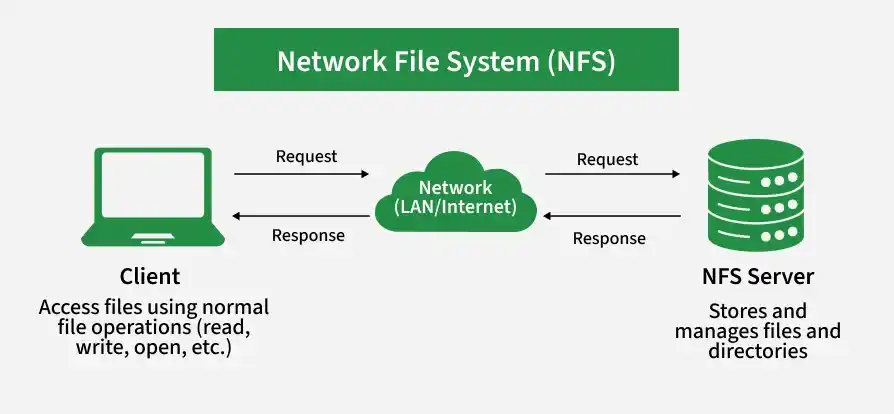
NFS Architecture
NFS follows a client-server architecture in which the client sends file requests to the NFS server, and the server performs the requested operations on its storage.
- NFS Client: Requests access to files and directories stored on the server.
- NFS Server: Stores the files and processes requests received from clients.
Working of NFS
When a client wants to access a remote file, it sends a request to the NFS server. The server processes the request, accesses the required file, and sends the result back to the client.
The basic flow is:
Client → Network → NFS Server → Storage
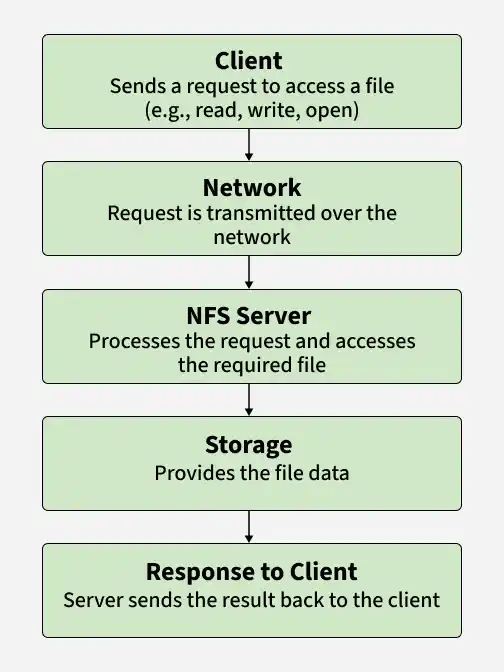
This allows users to perform operations such as reading, writing, creating, and deleting remote files.
NFS Mounting
NFS mounting connects a directory exported by the NFS server to a directory on the client system.
- The server exports a directory that can be accessed by clients.
- The client mounts the exported directory and accesses it through its local file system.
For example, if the server exports /home/shared, the client can mount it at /mnt/shared and access the files through that directory.
NFS File Handle
An NFS file handle is an identifier used by the server to identify a particular file or directory.
- It allows the server to determine which file a client request refers to.
- It remains associated with the file across different NFS operations.
A file handle can contain information such as the file system identifier, inode number, and generation number.
NFS Protocol Operations
NFS provides operations for accessing and managing files and directories on the server.
| Operation | Description |
|---|---|
GETATTR | Retrieves file attributes. |
SETATTR | Updates file attributes. |
LOOKUP | Finds a file and returns its file handle. |
READ | Reads data from a file. |
WRITE | Writes data to a file. |
CREATE | Creates a new file. |
REMOVE | Deletes a file. |
MKDIR | Creates a new directory. |
NFS File Attributes
File attributes contain metadata that describes a file or directory.
- They include information such as file type, size, owner, permissions, and modification time.
- NFS uses operations such as
GETATTRandSETATTRto retrieve and modify these attributes.
NFS Caching
NFS uses caching to reduce the number of requests sent between the client and server.
- Frequently accessed file data can be temporarily stored on the client.
- Caching can improve performance by reducing repeated network communication.
NFS Versions
NFS has evolved through several versions, with later versions providing improvements in functionality, performance, and security.
- NFSv2: Early version providing basic remote file access.
- NFSv3: Added improvements such as support for larger files and better performance.
- NFSv4: Introduced improved state management, security features, and a more integrated protocol design.
Advantages
- File Sharing: Multiple clients can access files stored on a server.
- Centralized Storage: Files can be managed from a central location.
- Transparent Access: Remote files can be accessed using normal file system operations.
- Reduced Storage: Clients do not need separate copies of shared files.
Disadvantages
- Network Dependency: Remote files cannot be accessed if the network connection is unavailable.
- Performance Issues: Network latency can make remote access slower than local storage.
- Server Dependency: Failure of the NFS server can affect access to shared files.
- Security Requirements: Proper authentication and access control are required to protect shared files.
