

Express-session is an Express.js middleware that manages user sessions by storing session data on the server and using a session ID stored in a cookie to identify the session. It is commonly used for maintaining user state across multiple requests, such as login sessions and authentication.
Syntax:
app.use(session(options));options: An object containing configuration options for the session middleware.
Steps to Use Express-session Middleware
Follow these steps to set up and use express-session for managing user sessions in your Express app.
Installation of the Express module
You can install this package by using this command.
npm install expressAfter installing the express module, you can check your express version in the command prompt using the command.
npm version expressAfter that, install the express-session middleware using the following command.
npm install express-sessionAfter installing the required modules, create a folder and add a file named app.js. To run this file, use the following command.
node app.jsProject Structure:
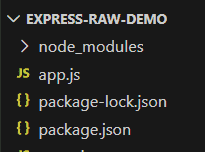
Example: Write the following code in App.js file
//app.js
const express = require('express');
const session = require('express-session');
const app = express();
const port = 3000;
// setting the session middleware
app.use(session({
    secret: 'gfg-key',
    resave: false,
    saveUninitialized: false
}));
// set session in the / route
app.get('/', (req, res) => {
    // session variable
    req.session.gfgUser = 'geeksforgeeks';
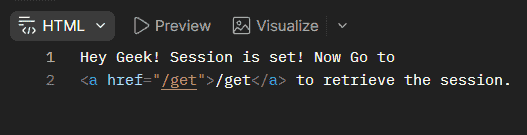
    res.send(`Hey Geek! Session is set! Now Go to
        <a href="/get">/get</a> to retrieve the session.`);
});
// get session in the /get route
app.get('/get', (req, res) => {
    // retrieve the session variable
    const gfgUser = req.session.gfgUser || 'No session set';
    res.send(`Session variable: ${gfgUser}`);
});
app.listen(port, () => {
    console.log(`Server is running on http://localhost:${port}`);
});
To run the application, we need to start the server by using the below command.
node app.jsConsole Output:

Browser Output:
Working of Express-session Middleware
- The express-session middleware is added to the Express application using app.use().
- When a client makes a request, Express creates or retrieves a session for the client.
- A session ID is stored in a cookie and sent to the client.
- The session data is stored on the server and associated with the session ID.
- The client sends the session ID with subsequent requests through the cookie.
- Express uses the session ID to retrieve the corresponding session data.
- Session data can be accessed and modified using req.session.
Use Cases of Express-session Middleware
- Maintaining user login sessions.
- Implementing authentication systems.
- Storing user-specific session data.
- Maintaining state across multiple requests.
- Managing temporary user data during a session.
- Implementing shopping carts and similar session-based features.
