

Express Generator is a command-line tool for quickly creating an Express.js application skeleton with a predefined structure, middleware, and configuration, making it easier to start developing web applications.
- It generates express Applications in one go using only one command.
- The generated site has a modular structure that we can modify according to our needs for our web application.
- The generated file structure is easy to understand.
- We can also configure options while creating our site like which type of view we want to use (For example, ejs, pug, and handlebars).
Steps to Create Project with Express Generator
Step 1: Install express-generator globally from npm
To install this tool on your local machine globally (you can use it anywhere on your Machine), run the below command on your command Line/terminal:
Note: You should have installed Node and Express before using Express-generator on your machine.
npm express-generator --view=pug ExpressWebApp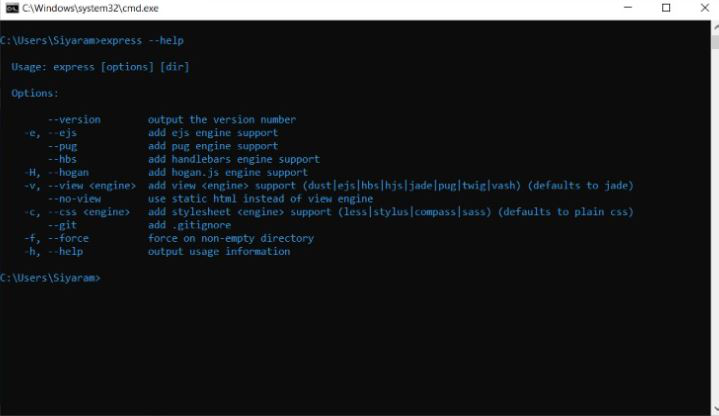
Step 2: Create the application
For Creating a Simple Express.js Web Application, Open command prompt/Terminal in your local fileSystem and execute the below command.
Syntax:
express <Your-ExpressJsApplication-Name>Example:
express ExpressWebAppProject Structure:
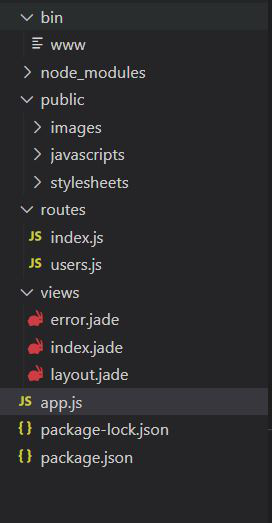
Example: app.js file is the main file in the express-generator where most of the user-defined routes are handled and also provides various default imported modules like cookie-parser, morgan, etc. That helps to create an express server in an efficient manner.
Below is the default app.js file structure that is generated by the express-generator.
// Filename: app.js

const createError = require('http-errors');
const express = require('express');
const path = require('path');
const cookieParser = require('cookie-parser');
const logger = require('morgan');

const indexRouter = require('./routes/index');
const usersRouter = require('./routes/users');

const app = express();

app.set('views', path.join(__dirname, 'views'));
app.set('view engine', 'jade');

app.use(logger('dev'));
app.use(express.json());
app.use(express.urlencoded({ extended: false }));
app.use(cookieParser());
app.use(express.static(path.join(__dirname, 'public')));

app.use('/', indexRouter);
app.use('/users', usersRouter);

app.use(function (req, res, next) {
    next(createError(404));
});

app.use(function (err, req, res, next) {
    res.locals.message = err.message;
    res.locals.error = req.app.get('env') === 'development' ? err : {};
    res.status(err.status || 500);
    res.render('error');
});

module.exports = app;
Step 3: Starting the express server
Use the following command to start the server
npm start
Open http://localhost:3000 in a browser to view the generated application.

We can see there are many modules that are like cookie-parser , morgon, and some other predefined methods are defined already that help to create express server very easily in an efficient manner.
