

BERT (Bidirectional Encoder Representations from Transformers) is a Transformer-based language model developed by Google for natural language processing. It is pre-trained on large amounts of text and can then be fine-tuned for specific tasks using task-specific labeled data. We will fine-tune a pre-trained BERT model for sentiment analysis using the IMDb Dataset of 50K Movie Reviews. The model will learn to classify movie reviews as either positive or negative.
Preparing the Dataset
You can download the dataset from here.
The dataset contains two columns:
- review: Text of the movie review.
- sentiment: Sentiment of the review, either positive or negative.
The dataset contains an equal number of positive and negative reviews. To keep the tutorial fast while still demonstrating the complete fine-tuning process, we will use a smaller stratified subset of the dataset.
Loading Dataset
Install the required libraries:
!pip install -q transformers torch scikit-learn pandas
Import the required libraries:
import pandas as pd
import torch

from torch.utils.data import Dataset, DataLoader
from transformers import (
    BertTokenizerFast,
    BertForSequenceClassification,
    DataCollatorWithPadding
)
from sklearn.model_selection import train_test_split
from sklearn.metrics import classification_report
Load the dataset:
df = pd.read_csv(
    '/content/IMDB Dataset.csv',
    engine='python',
    on_bad_lines='skip'
)

print(df.head())
print(df['sentiment'].value_counts())
Convert the sentiment labels into numerical values. Here, 0 represents negative sentiment and 1 represents positive sentiment.
df['sentiment'] = df['sentiment'].map({
    'negative': 0,
    'positive': 1
})

print(df.head())
print(df['sentiment'].value_counts())
Creating a Smaller Dataset
Fine-tuning BERT on all 50,000 reviews can take considerable time and computational resources. For this tutorial, we use 8,000 reviews while keeping the positive and negative classes balanced. First, split the dataset into training and temporary sets. Then split the temporary set into validation and test sets.
train_text, temp_text, train_labels, temp_labels = train_test_split(
    df['review'],
    df['sentiment'],
    test_size=0.20,
    random_state=2021,
    stratify=df['sentiment']
)

val_text, test_text, val_labels, test_labels = train_test_split(
    temp_text,
    temp_labels,
    test_size=0.50,
    random_state=2021,
    stratify=temp_labels
)

print("Training samples:", len(train_text))
print("Validation samples:", len(val_text))
print("Test samples:", len(test_text))
This creates 6,000 training samples, 1,000 validation samples and 1,000 test samples. Using a smaller subset keeps the example practical while preserving the complete workflow of BERT fine-tuning.
Load BERT Tokenizer & Model
Next, load the pre-trained bert-based-uncased tokenizer and model. The tokenizer converts the review text into token IDs that BERT can process. The classification model adds a classification layer on top of BERT for predicting the sentiment class.
tokenizer = BertTokenizerFast.from_pretrained(
    'bert-base-uncased'
)

model = BertForSequenceClassification.from_pretrained(
    'bert-base-uncased',
    num_labels=2
)
Tokenizing the Data
BERT can process a fixed maximum number of tokens for each input. We use a maximum sequence length of 64 tokens to keep training faster. Longer reviews are truncated, while shorter reviews are padded when batches are created.
max_length = 64
Create a dataset class to tokenize the reviews:
class IMDBDataset(Dataset):

    def __init__(self, texts, labels, tokenizer, max_length):
        self.texts = texts.tolist()
        self.labels = labels.tolist()
        self.tokenizer = tokenizer
        self.max_length = max_length

    def __len__(self):
        return len(self.texts)

    def __getitem__(self, index):
        encoding = self.tokenizer(
            self.texts[index],
            truncation=True,
            max_length=self.max_length
        )

        encoding['labels'] = self.labels[index]

        return encoding
Create datasets for training, validation and testing:
train_dataset = IMDBDataset(
    train_text,
    train_labels,
    tokenizer,
    max_length
)

val_dataset = IMDBDataset(
    val_text,
    val_labels,
    tokenizer,
    max_length
)

test_dataset = IMDBDataset(
    test_text,
    test_labels,
    tokenizer,
    max_length
)
Use a data collator to dynamically pad each batch to the length of its longest sequence.
data_collator = DataCollatorWithPadding(
    tokenizer=tokenizer
)
Create data loaders:
train_dataloader = DataLoader(
    train_dataset,
    batch_size=32,
    shuffle=True,
    collate_fn=data_collator
)

val_dataloader = DataLoader(
    val_dataset,
    batch_size=32,
    collate_fn=data_collator
)

test_dataloader = DataLoader(
    test_dataset,
    batch_size=32,
    collate_fn=data_collator
)
Fine-tuning BERT
Move the model to a GPU if one is available. Otherwise, the model runs on the CPU.
device = torch.device(
    'cuda' if torch.cuda.is_available() else 'cpu'
)

model = model.to(device)

print("Using device:", device)
Create an optimizer for updating the BERT parameters during fine-tuning.
optimizer = torch.optim.AdamW(
    model.parameters(),
    lr=2e-5
)
Training the Model
- We fine-tune BERT for one epoch. During training, the model predicts the sentiment, calculates the loss, computes gradients and updates its parameters.
- Mixed precision is used on CUDA devices to reduce memory usage and speed up training.
epochs = 1

scaler = torch.amp.GradScaler(
    'cuda',
    enabled=(device.type == 'cuda')
)

for epoch in range(epochs):

    model.train()
    total_loss = 0

    for batch in train_dataloader:

        batch = {
            key: value.to(device)
            for key, value in batch.items()
        }

        optimizer.zero_grad()

        with torch.amp.autocast(
            device_type=device.type,
            enabled=(device.type == 'cuda')
        ):
            outputs = model(**batch)
            loss = outputs.loss

        scaler.scale(loss).backward()
        scaler.step(optimizer)
        scaler.update()

        total_loss += loss.item()

    avg_loss = total_loss / len(train_dataloader)

    print(
        f"Epoch {epoch + 1}/{epochs} - "
        f"Training Loss: {avg_loss:.3f}"
    )
Because BERT is not frozen, its pre-trained parameters are updated during this process. This allows the model to adapt its language representations to the sentiment analysis task.
Evaluating the Model
After training, evaluate the model on the validation data. The validation data is not used to update the model parameters.
model.eval()

val_preds = []
val_labels_list = []

with torch.no_grad():

    for batch in val_dataloader:

        labels = batch['labels']

        batch = {
            key: value.to(device)
            for key, value in batch.items()
        }

        outputs = model(**batch)

        predictions = torch.argmax(
            outputs.logits,
            dim=1
        )

        val_preds.extend(
            predictions.cpu().numpy()
        )

        val_labels_list.extend(
            labels.numpy()
        )

print(
    classification_report(
        val_labels_list,
        val_preds,
        target_names=[
            'Negative',
            'Positive'
        ]
    )
)
Output:
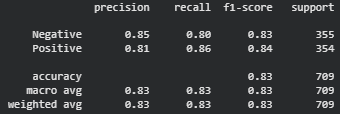
The classification report shows the model's precision, recall, F1-score and accuracy on the validation set.
Testing the Fine-tuned BERT Model
Finally, evaluate the model on the test dataset. The test data has not been used to update the model parameters.
model.eval()

test_preds = []
test_labels_list = []

with torch.no_grad():

    for batch in test_dataloader:

        labels = batch['labels']

        batch = {
            key: value.to(device)
            for key, value in batch.items()
        }

        outputs = model(**batch)

        predictions = torch.argmax(
            outputs.logits,
            dim=1
        )

        test_preds.extend(
            predictions.cpu().numpy()
        )

        test_labels_list.extend(
            labels.numpy()
        )
Generate the final classification report:
print(
    classification_report(
        test_labels_list,
        test_preds,
        target_names=[
            'Negative',
            'Positive'
        ]
    )
)
Output:
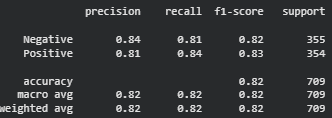
The resulting report shows how well the fine-tuned BERT model classifies unseen movie reviews as positive or negative.
You can download the complete code from here.
