

The tsconfig.json file contains the configuration options used by the TypeScript compiler. It defines how TypeScript files are compiled and which files are included in the project.
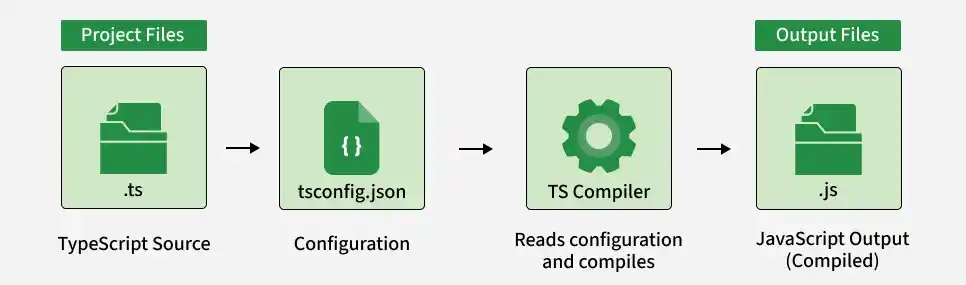
- Configure TypeScript compiler options.
- Specify which files are included or excluded.
- Define the output directory and JavaScript target.
- Enable strict type checking and source maps.
- Customize compilation behavior for a project.
Creating a tsconfig.json File
Create a tsconfig.json file in the root directory of your TypeScript project.
You can generate one automatically using:
tsc --initA basic configuration can look like this:
{
    "compilerOptions": {
        "target": "ES2022",
        "module": "commonjs",
        "rootDir": "./src",
        "outDir": "./dist",
        "strict": true,
        "sourceMap": true
    },
    "include": ["src/**/*"],
    "exclude": ["node_modules", "dist"]
}
Main Properties of tsconfig.json
The commonly used properties include:
- compilerOptions: Configures how TypeScript code is compiled.
- files: Specifies individual TypeScript files to include.
- include: Specifies files or folders to include using patterns.
- exclude: Specifies files or folders to exclude from compilation.
- compileOnSave: Allows supported editors to compile the project when files are saved.
1. CompilerOptions
The compilerOptions property contains settings that control the TypeScript compilation process.
{
    "compilerOptions": {
        "target": "ES2022",
        "module": "commonjs",
        "rootDir": "./src",
        "outDir": "./dist",
        "strict": true,
        "sourceMap": true
    }
}
Commonly used compiler options include:
- target: Specifies the JavaScript version generated by TypeScript.
- module: Specifies the module system used in the generated JavaScript.
- rootDir: Defines the root directory containing the source files.
- outDir: Specifies the directory where compiled JavaScript files are generated.
- strict: Enables strict type-checking options.
- sourceMap: Generates source map files for debugging.
- allowJs: Allows JavaScript files to be included in the project.
- noImplicitAny: Reports errors when a type is implicitly inferred as any.
- strictNullChecks: Requires null and undefined to be handled explicitly.
- removeComments: Removes comments from the generated JavaScript.
2. Files
The files property explicitly specifies the TypeScript files that should be included in the compilation.
{
    "files": [
        "src/main.ts",
        "src/utils.ts"
    ]
}
Only the specified files are included through this property.
Note: For most projects, include is more convenient than manually listing every file with files.
3. Include
The include property specifies files or directories to include using patterns.
{
    "include": [
        "src/**/*"
    ]
}
This includes TypeScript files under the src directory and its subdirectories.
4. Exclude
The exclude property specifies files or directories that should not be included.
{
    "exclude": [
        "node_modules",
        "dist",
        "**/*.spec.ts"
    ]
}
- node_modules excludes installed dependencies.
- dist excludes generated output.
- **/*.spec.ts excludes test files matching the pattern.
Note: exclude mainly affects files found through include and the compiler's default file discovery. A file explicitly listed in files is not excluded simply by adding it to exclude.
5. compileOnSave
The compileOnSave option can be used by supported editors to trigger compilation when a TypeScript file is saved.
{
    "compileOnSave": true
}
Note: compileOnSave depends on editor support and is not the mechanism used by the TypeScript compiler itself to continuously compile files. For continuous compilation from the command line, use tsc --watch.
