

Categorical data represents values grouped into categories, such as gender, blood group, or country. In many machine learning and data analysis tasks, categorical values need to be converted into binary values before they can be processed.
- Stores data as predefined categories instead of numerical values.
- Can contain two or more categories, such as Male/Female or Red/Blue/Green.
- Commonly used in statistics, data analysis, and machine learning.
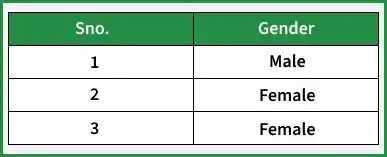
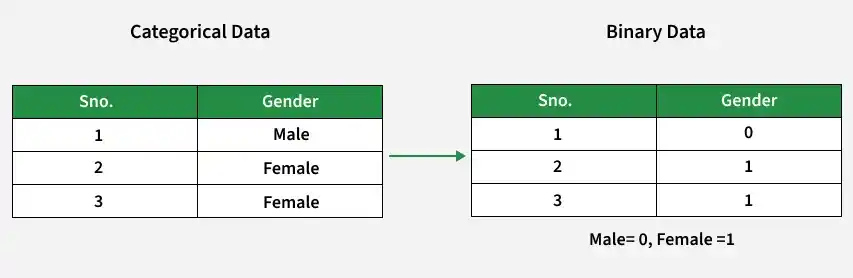
Example: This example shows data stored as categories instead of numerical values.
Binary Data
Binary data represents values using only two possible states: 0 and 1. It is commonly used to represent categorical values in machine learning, data analysis, and statistics.
- Uses only two values, such as 0 and 1.
- Can represent True/False, Yes/No, or Success/Failure.
- Commonly used in statistics, computer science, and machine learning.
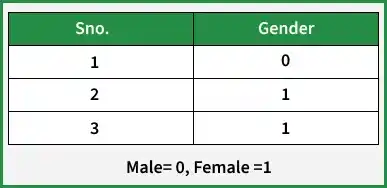
Example: This example shows the same categorical values represented using binary values (0 and 1).
Implementing Categorical Data Conversion
Follow the steps below to convert categorical data into binary data using Pandas.
Step 1: Import the Pandas library to work with tabular data and perform binary encoding.
import pandas as pd
Explanation:
- Imports the Pandas library.
- Provides the get_dummies() function used for binary encoding.
Step2: Create a dataset containing categorical values.
import pandas as pd
data = [["Jagroop", "Male"], ["Praveen", "Male"],
        ["Harjot", "Female"], ["Pooja", "Female"],
        ["Mohit", "Male"]]
Explanation:
- Creates a list containing names and gender values.
- The Gender column contains categorical data.
Step 3: Convert the dataset into a DataFrame and display the categorical data.
import pandas as pd
data = [["Jagroop", "Male"], ["Praveen", "Male"],
        ["Harjot", "Female"], ["Pooja", "Female"],
        ["Mohit", "Male"]]
data_frame = pd.DataFrame(data, columns=["Name", "Gender"])
print(data_frame)
Output:
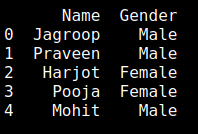
Explanation:
- Creates a DataFrame using pd.DataFrame().
- Assigns Name and Gender as column names.
- Displays the original categorical data.
Step 4: Till step 3 we get Categorical Data now we will convert it into Binary Data. So for that, we have to the inbuilt function of Pandas i.e. get_dummies() as shown:
import pandas as pd
data = [["Jagroop", "Male"], ["Praveen", "Male"],
        ["Harjot", "Female"], ["Pooja", "Female"],
        ["Mohit", "Male"]]
data_frame = pd.DataFrame(data, columns=["Name", "Gender"])
print(data_frame)
df_one = pd.get_dummies(data_frame["Gender"])
print(df_one)
Output:
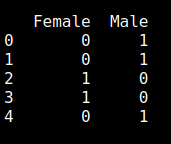
Explanation:
- Uses get_dummies() to convert the Gender column into binary columns.
- Creates separate columns for each category.
- Displays the binary representation of the categorical values.
Note: Keep either the Male or Female column based on the required binary encoding.
