

Low-Rank Adaptation (LoRA) is a parameter-efficient fine-tuning technique used to adapt large pre-trained models for specific tasks without updating all of the model's parameters. Instead, LoRA adds small trainable matrices to selected layers while keeping the original model weights frozen.
LoRA reduces the number of parameters that need to be trained, making fine-tuning large models more memory- and computation-efficient.
Architecture
- Pre-Trained Backbone: We start with a large transformer model like GPT or BERT that has already been trained on a range of data.
- Low-Rank Adaptation Layers: It adds small low-rank matrices to the model’s attention mechanism. These matrices are the only parts of the model that get updated during fine-tuning.
- Frozen Original Parameters: The original weights of the model are kept frozen. This means we don’t modify the entire model, just the added low-rank matrices.
- Task-Specific Fine-Tuning: We fine-tune the low-rank matrices for the specific task such as sentiment analysis or translation while the rest of the model stays the same.
This approach helps us adapt large models to new tasks without changing the entire structure making it more efficient.
Working
LoRA modifies the weight updates of selected layers using two smaller low-rank matrices, A and B.
1. Decomposing the Weight Matrix
Instead of directly updating the entire weight matrix during fine-tuning, LoRA represents the weight update using A and B. The adapted weight matrix (W') is calculated as:
W' = W + A \cdot B
Here W is the original weight matrix and A and B are the low-rank matrices. This decomposition allows the model to make task-specific adjustments without the need to retrain the entire model, drastically reducing the computational load.
2. Training Only the LoRA Parameters
During the fine-tuning process, only the low-rank matrices A and B are updated while the original model weights W remain frozen. This minimizes the number of parameters that need to be adjusted making fine-tuning faster and more memory-efficient compared to traditional methods where all model weights are updated.
3. Inference with Adapted Weights
After fine-tuning, the adapted weights are used to make predictions for the target task. The LoRA weights can also be merged with the original weights when required, allowing the model to be used without separate LoRA layers.
Implementation with BERT on Emotion Detection
Here we will see a practical implementation of LoRA on the Emotion Dataset. Instead of updating the entire BERT model, we fine-tune only small LoRA modules, saving time and resources while still achieving good performance in classifying emotions such as joy, sadness, anger, love, fear and surprise.
1. Installing Required Libraries
We use Hugging Face’s transformers, datasets, peft, accelerate and evaluate libraries for model training, LoRA fine-tuning and evaluation.
!pip install -U transformers datasets peft accelerate evaluate torchao
2. Importing Dependencies
We will be importing BERT, tokenizer, LoRA config, dataset loader, training utilities and PyTorch for this implementation.
from transformers import AutoModelForSequenceClassification, AutoTokenizer, TrainingArguments, Trainer, pipeline
from datasets import load_dataset
from peft import LoraConfig, get_peft_model
import evaluate
import torch
3. Loading the Dataset
We load the Emotion dataset(dair-ai/emotion). For quick implementation, we use only 3,000 training samples and smaller validation/test subsets.
dataset = load_dataset("dair-ai/emotion")
dataset["train"] = dataset["train"].shuffle(seed=42).select(range(3000))
dataset["validation"] = dataset["validation"].shuffle(seed=42).select(range(500))
dataset["test"] = dataset["test"].shuffle(seed=42).select(range(500))
Output:
4. Preprocessing Data
Before training, we tokenize the text so BERT can process it. Each input is padded or truncated to 128 tokens for uniformity. We also rename label to labels and set the dataset format to PyTorch tensors. Then we load BERT-base-uncased for sequence classification with 6 output labels.
model_name = "bert-base-uncased"
tokenizer = AutoTokenizer.from_pretrained(model_name)

def preprocess(batch):
    return tokenizer(batch["text"], truncation=True, padding="max_length", max_length=128)

dataset = dataset.map(preprocess, batched=True).rename_column("label", "labels")
dataset.set_format(type="torch", columns=["input_ids", "attention_mask", "labels"])
model = AutoModelForSequenceClassification.from_pretrained(model_name, num_labels=6)
Output:
5. Applying LoRA Configuration
We apply LoRA to BERT's query and value layers so that only the added LoRA parameters are trained.
lora_config = LoraConfig(
    r=8,
    lora_alpha=16,
    target_modules=["query", "value"],
    lora_dropout=0.1,
    bias="none",
    task_type="SEQ_CLS"
)
model = get_peft_model(model, lora_config)
6. Training the Model
We fine-tune only the LoRA layers using Hugging Face’s Trainer API.
- Batch size = 8
- Learning rate = 2e-4 (slightly higher since only LoRA layers are trained)
- Epochs = 2 (kept short for quick results)
metric = evaluate.load("accuracy")

def compute_metrics(eval_pred):
    logits, labels = eval_pred
    preds = logits.argmax(axis=-1)
    return metric.compute(predictions=preds, references=labels)

args = TrainingArguments(
    output_dir="./lora_emotion",
    per_device_train_batch_size=8,
    per_device_eval_batch_size=8,
    learning_rate=2e-4,
    num_train_epochs=2,
    eval_strategy="epoch",
    logging_steps=10,
    report_to="none"
)

trainer = Trainer(
    model=model,
    args=args,
    train_dataset=dataset["train"],
    eval_dataset=dataset["validation"],
    compute_metrics=compute_metrics
)
trainer.train()
model.save_pretrained("./lora_emotion_adapter")
print("LoRA fine-tuning complete! Adapter saved at ./lora_emotion_adapter")
Output:
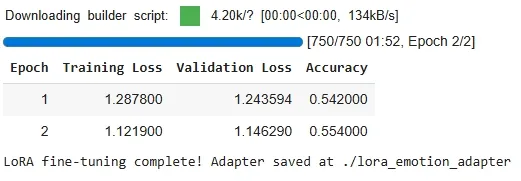
The accuracy here is not very high (~54%) because we trained only for 2 epochs on a small subset of the dataset. This setup is mainly for demonstration and understanding. For better performance, we can train for more epochs and use the full dataset.
7. Testing the Model on Custom Sentences
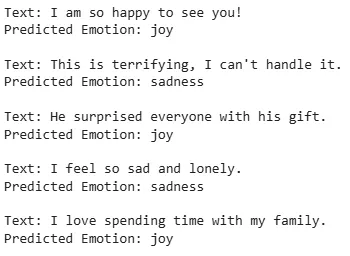
Now let’s test our fine-tuned model on some custom sentences. This helps us confirm that the LoRA adapter works as intended.
device = torch.device("cuda" if torch.cuda.is_available() else "cpu")
model.to(device)

emotion_labels = dataset["train"].features["labels"].names

samples = [
    "I am so happy to see you!",
    "This is terrifying, I can't handle it.",
    "He surprised everyone with his gift.",
    "I feel so sad and lonely.",
    "I love spending time with my family."
]

inputs = tokenizer(samples, truncation=True, padding=True, return_tensors="pt").to(device)

model.eval()
with torch.no_grad():
    logits = model(**inputs).logits
    preds = torch.argmax(logits, dim=-1)

for text, pred in zip(samples, preds):
    print(f"Text: {text}\nPredicted Emotion: {emotion_labels[pred]}\n")
Output:
You can download source code from here.
LoRA vs. Other Fine-Tuning Techniques
| Technique | Parameter Efficiency | Computation Cost | Model Preservation |
|---|---|---|---|
| Full Fine-Tuning | High | High | No |
| Adapter Layers | Moderate | Moderate | Yes |
| LoRA | High | Low | Yes |
| Prefix Tuning | High | Moderate | Yes |
