

Given an array of integers, the task is to arrange its elements in ascending order. This can be done using sorting algorithms such as Bubble Sort and QuickSort.
- Bubble Sort repeatedly compares adjacent elements and swaps them when they are in the wrong order.
- QuickSort uses a pivot to partition the array and recursively sorts the resulting subarrays.
Examples:
Input: arr[] = {3, 4, 5, 8, 1, 10}
Output: 1 3 4 5 8 10Input: arr[] = {11, 34, 6, 20, 40, 3}
Output: 3 6 11 20 34 40
Approaches to Sort an Array in Ascending Order
The following approaches can be used to sort an array:
1. Using std::sort()
C++ provides the std::sort() function in the <algorithm> header to sort elements in a range. By default, it arranges the elements in ascending order.
Steps
- Pass the beginning and ending positions of the array to std::sort().
- The function rearranges the elements in ascending order.
- Traverse the array to print the sorted elements.
#include <iostream>
#include <algorithm>
using namespace std;

int main()
{
    int arr[] = {11, 34, 6, 20, 40, 3};
    int n = sizeof(arr) / sizeof(arr[0]);

    cout << "Before sorting: ";

    for (int i = 0; i < n; i++)
        cout << arr[i] << " ";

    // Sort the array in ascending order
    sort(arr, arr + n);

    cout << "\nAfter sorting: ";

    for (int i = 0; i < n; i++)
        cout << arr[i] << " ";

    return 0;
}
Output
Before sorting: 11 34 6 20 40 3
After sorting: 3 6 11 20 34 40
Explanation: std::sort() takes the range from arr to arr + n and rearranges all elements in ascending order. It is generally preferred in C++ because it provides an efficient, ready-to-use sorting implementation without requiring us to write the sorting algorithm manually.
2. Bubble Sort
Bubble Sort repeatedly compares adjacent elements and swaps them if the left element is greater than the right element. After each pass, the largest unsorted element reaches its correct position at the end of the array.
Steps
- Traverse the array and compare adjacent elements.
- Swap them if they are in the wrong order.
- Repeat the process for the remaining unsorted elements.
- Stop early if no swaps are performed in a pass.
#include <iostream>
using namespace std;

// Function to sort the array using Bubble Sort
void bubbleSort(int arr[], int n)
{
    for (int i = 0; i < n - 1; i++)
    {
        bool swapped = false;

        // Compare adjacent elements
        for (int j = 0; j < n - i - 1; j++)
        {
            // Swap if elements are in the wrong order
            if (arr[j] > arr[j + 1])
            {
                swap(arr[j], arr[j + 1]);
                swapped = true;
            }
        }

        // Stop if the array is already sorted
        if (!swapped)
            break;
    }
}

int main()
{
    int arr[] = {1, 12, 6, 8, 10};
    int n = sizeof(arr) / sizeof(arr[0]);

    cout << "Before sorting: ";

    for (int i = 0; i < n; i++)
        cout << arr[i] << " ";

    // Sort the array
    bubbleSort(arr, n);

    cout << "\nAfter sorting: ";

    for (int i = 0; i < n; i++)
        cout << arr[i] << " ";

    return 0;
}
Output
Before sorting: 1 12 6 8 10
After sorting: 1 6 8 10 12
Explanation: The function compares neighboring elements and moves larger elements toward the end of the array after every pass. The swapped flag avoids unnecessary passes when the array becomes sorted before all iterations are completed.
3. QuickSort
QuickSort is a divide-and-conquer sorting algorithm. It selects a pivot, rearranges the elements so that smaller elements are placed before the pivot and larger elements after it, and then recursively sorts both parts.
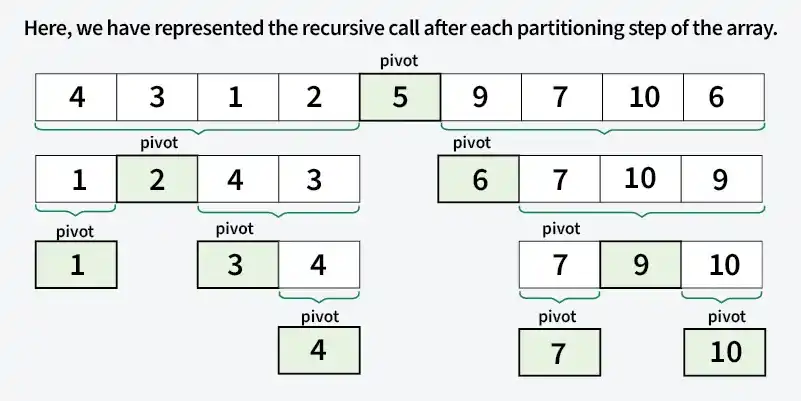
Steps
- Select a pivot element.
- Partition the array around the pivot.
- Recursively sort the left subarray.
- Recursively sort the right subarray.
- Stop when a subarray contains zero or one element.
#include <iostream>
using namespace std;

// Function to perform QuickSort
void quickSort(int arr[], int low, int high)
{
    if (low >= high)
        return;

    int i = low;
    int j = high;

    // Select the middle element as pivot
    int pivot = arr[low + (high - low) / 2];

    // Partition the array
    while (i <= j)
    {
        // Find an element greater than or equal to pivot
        while (arr[i] < pivot)
            i++;

        // Find an element smaller than or equal to pivot
        while (arr[j] > pivot)
            j--;

        // Swap elements if they are on the wrong side
        if (i <= j)
        {
            swap(arr[i], arr[j]);
            i++;
            j--;
        }
    }

    // Recursively sort the left part
    if (low < j)
        quickSort(arr, low, j);

    // Recursively sort the right part
    if (i < high)
        quickSort(arr, i, high);
}

int main()
{
    int arr[] = {1, 6, 3, 10, 50};
    int n = sizeof(arr) / sizeof(arr[0]);

    cout << "Before sorting: ";

    for (int i = 0; i < n; i++)
        cout << arr[i] << " ";

    // Sort the array
    quickSort(arr, 0, n - 1);

    cout << "\nAfter sorting: ";

    for (int i = 0; i < n; i++)
        cout << arr[i] << " ";

    return 0;
}

Output
Before sorting: 1 6 3 10 50
After sorting: 1 3 6 10 50
Explanation: The middle element is selected as the pivot, and two pointers move from both ends to partition the array. Elements on the wrong side of the pivot are swapped, after which QuickSort is recursively applied to the left and right partitions.
