

Getting the list of files in a directory is a common filesystem operation used by applications such as file explorers and file managers. C++ provides multiple ways to access and list files in a directory.
- The system() function can execute operating-system commands to list files.
- The std::filesystem library provides a standard C++ approach for directory traversal.
Approaches to Get the List of Files in a Directory
The following approaches can be used to get the list of files in a directory:
1. Using the system() Function
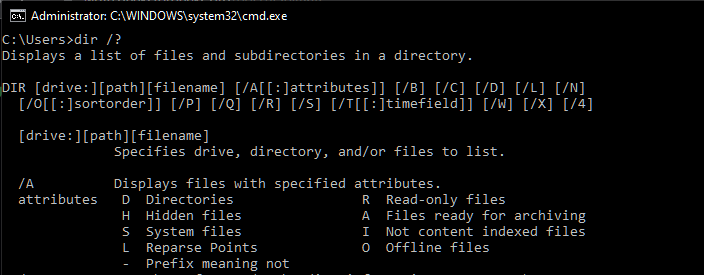
The system() function can execute a command provided by the operating system. On Windows, the dir command can be used to list files, while Linux systems commonly use the ls command.
For example, the following directory is used to demonstrate the program:
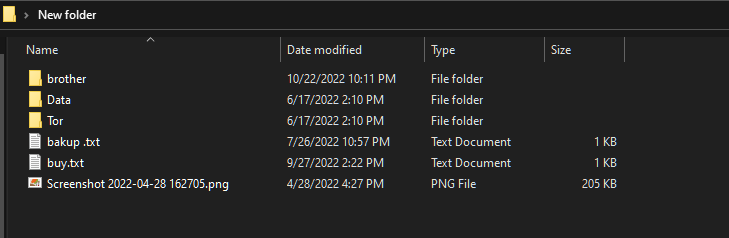
Steps
- Specify the path of the directory.
- Create the operating-system command to list the files.
- Append the directory path to the command.
- Pass the command to system().
#include <bits/stdc++.h>
#include <cstdlib>
#include <iostream>

using namespace std;

int main()
{
    // This variable contains the path to the directory
    // The path should be given inside double quotes
    // Therefore, escaped the enclosing quotes using
    // backslash
    string path(
        "\"C:\\Users\\Sauleyayan\\Desktop\\New folder\"");

    // The command which would do the file listing
    // A space is added at the end of the command
    // intentionally to make space for the path
    string command("dir /a-d ");

    // The path is appended after the command string
    command.append(path);

    // The string is converted to const char * as system
    // function requires
    const char* final_command = command.c_str();

    // Sending the final command as the argument to the
    // system function
    system(final_command);

    return 0;
}
Output
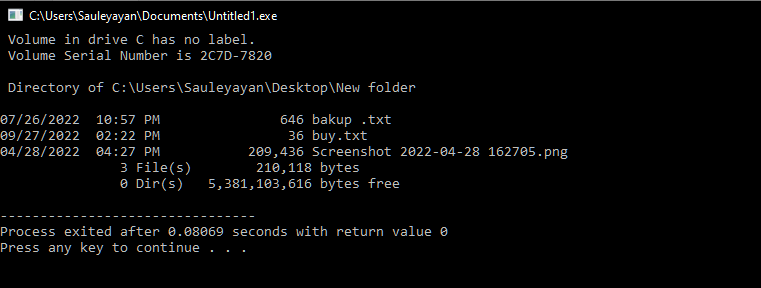
Explanation
- path stores the directory path, while command stores the dir /a-d command.
- command.append(path) creates the complete command.
- c_str() converts the string to const char* for system().
- system() executes the command and displays the files.
2. Using std::filesystem::directory_iterator
C++17 introduced the <filesystem> library, which provides standard functions for working with files and directories. The directory_iterator can be used to traverse the entries of a directory and check whether each entry is a regular file.
Steps
- Include the <filesystem> header.
- Specify the directory path.
- Create a directory_iterator for the directory.
- Check whether each entry is a regular file.
- Display the path of each file.
#include <filesystem>
#include <iostream>
#include <string>
#include <sys/stat.h>

namespace fs = std::filesystem;

int main()
{
    // Path to the directory
    std::string path
        = "C:\\Users\\Sauleyayan\\Desktop\\New folder";

    // This structure would distinguish a file from a
    // directory
    struct stat sb;

    // Looping until all the items of the directory are
    // exhausted
    for (const auto& entry : fs::directory_iterator(path)) {

        // Converting the path to const char * in the
        // subsequent lines
        std::filesystem::path outfilename = entry.path();
        std::string outfilename_str = outfilename.string();
        const char* path = outfilename_str.c_str();

        // Testing whether the path points to a
        // non-directory or not If it does, displays path
        if (stat(path, &sb) == 0 && !(sb.st_mode & S_IFDIR))
            std ::cout << path << std::endl;
    }
}
Output
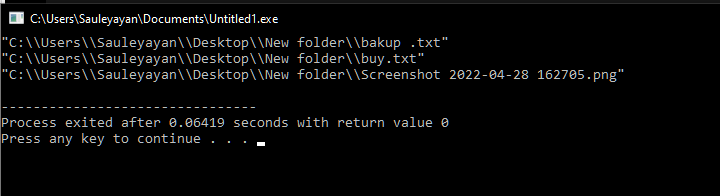
Explanation
- directory_iterator traverses all entries in the specified directory.
- Each entry's path is converted to const char* for use with stat().
- stat() checks whether the entry is a directory or a file.
- If it is a file, its path is displayed using cout.
Header File and C++ Version
The std::filesystem library and directory_iterator are available from C++17 onwards.
| Feature | Description |
|---|---|
| <filesystem> | Provides filesystem operations in C++. |
| directory_iterator | Iterates over entries in a directory. |
| is_regular_file() | Checks whether an entry is a regular file. |
| path() | Returns the path of a filesystem entry. |
| system() | Executes a command using the operating system's command interpreter. |
