

HTTP stands for HyperText Transfer Protocol, and it enables communication between web browsers, such as Google Chrome or Firefox, and web servers.

- HTTP provides a set of rules that allows browsers and web servers to communicate.
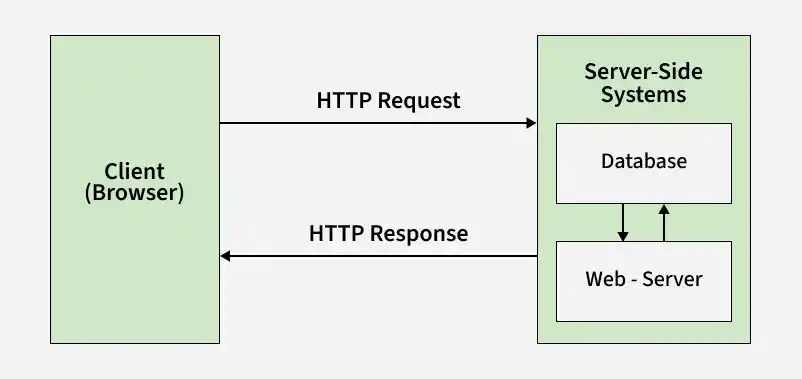
- When you visit a website, the browser sends a request to the server, and the server returns the data required to display the webpage.
Working of HTTP
HTTP Follows a Request-Response Process
When you visit a website, HTTP communication generally follows these steps:
- Open the Website: You enter a website URL, such as www.example.com, in your web browser.
- DNS Lookup: The browser uses the Domain Name System (DNS) to find the IP address associated with the domain name.
- Send an HTTP Request: After locating the server, the browser sends an HTTP request for the required resources.
- Server Processes the Request: The server processes the request and prepares the required resources.
- Server Sends an HTTP Response: The server returns an HTTP response containing resources such as HTML, CSS, JavaScript, images, or other data.
- Browser Renders the Webpage: The browser processes the returned resources and displays the webpage.
Modern HTTP versions can reuse connections for multiple requests, so a new connection is not necessarily created for every request.
HyperText Connects Resources Through Hyperlinks
HyperText is text that contains links, called hyperlinks, to other documents or resources. Clicking a hyperlink can take users to another webpage, document, or resource.
HTML (HyperText Markup Language) is used to structure web content, while HTTP is used to transfer these resources between browsers and servers.
HTTP Requests and Responses Enable Communication
HTTP communication is based on two main components: the HTTP request sent by the client and the HTTP response returned by the server.
HTTP Requests Send Information to Servers
An HTTP request is sent by a browser or another client to request a resource or perform an action on a server.
An HTTP request can include:
- HTTP Version: The version of HTTP being used, such as HTTP/1.1 or HTTP/2.
- URL: The address of the requested resource.
- HTTP Method: The requested action, such as GET for retrieving data or POST for sending data.
- Request Headers: Additional information about the request, such as browser details or accepted content types.
- Request Body: Optional data sent to the server, commonly when submitting forms.
HTTP Responses Return Data to Clients
An HTTP response is the server's reply to an HTTP request.
It can include:
- HTTP Status Code: Indicates whether the request was successful.
- Response Headers: Provide information about the returned data.
- Response Body: Contains the requested resource, such as HTML or other data.
HTTP Status Codes Indicate Request Results
HTTP status codes are three-digit numbers that indicate the result of an HTTP request.
- Informational (1xx): Informational (1xx) provide information about the request.
- Successful (2xx): Successful (2xx) indicate that the request was successfully processed, such as 200 OK.
- Redirection (3xx): Redirection (3xx) indicate that further action is required, such as 301 Moved Permanently.
- Client Error (4xx): Client Error (4xx) indicate a problem with the client's request, such as 404 Not Found.
- Server Error (5xx): Server Error (5xx) indicate a problem on the server, such as 500 Internal Server Error.
HTTP/2 and HTTP/3 Improve Web Communication
HTTP has evolved to improve web performance and communication efficiency.
HTTP/2 Improves Performance
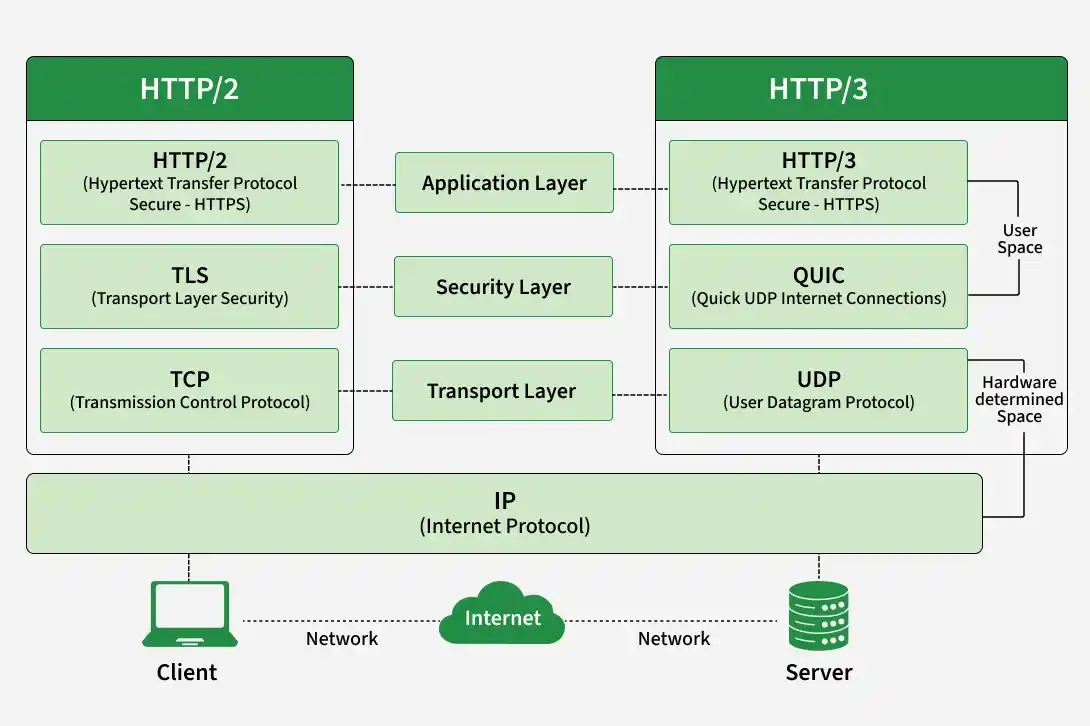
HTTP/2 was introduced in 2015 and improved web communication through:
- Multiplexing: Multiple requests and responses can be handled over a single connection.
- Header Compression: Reduces the size of HTTP headers.
- Binary Framing: Makes communication more efficient than the text-based format used by earlier versions.
HTTP/3 Uses QUIC for Faster Communication
HTTP/3 was standardized in 2022 and uses the QUIC protocol instead of TCP.
HTTP/3 can:
- Reduce connection setup time.
- Handle packet loss more efficiently.
- Improve performance on unreliable networks.
- Integrate secure communication using TLS.
Here’s how HTTP works when you visit a website:
- Open Web Browser: First, you open your web browser and type a website URL (e.g., www.example.com).
- DNS Lookup: Your browser asks a Domain Name System (DNS) server to find out the IP address associated with that URL. Think of this as looking up the phone number of the website.
- Send HTTP Request: Once the browser has the website’s IP address, it sends an HTTP request to the server. The request asks the server for the resources needed to display the page (like text, images, and videos).
- Server Response: The server processes your request and sends back an HTTP response. This response contains the requested resources (like HTML, CSS, JavaScript) needed to load the page.
- Rendering the Web Page: Your browser receives the data from the server and displays the webpage on your screen.
After the page is loaded, the connection between the browser and server is closed. If you request a new page, a new connection will be made.
HTTP Has Evolved Through Multiple Versions
Tim Berners-Lee and his team at CERN developed the original HTTP and related technologies for the World Wide Web.
- HTTP/0.9: Introduced around 1991 as a simple protocol for transferring HTML documents.
- HTTP/1.0: Formally documented in 1996 through RFC 1945.
- HTTP/1.1: Introduced in 1997 and added improvements such as persistent connections.
- HTTP/2: Standardized in 2015 with multiplexing and header compression.
- HTTP/3: Standardized in 2022 and uses QUIC as its transport technology.
HTTP Cookies Maintain State Across Requests
An HTTP cookie, also called a web cookie or browser cookie, is a small piece of data that a server sends to a user's browser.
The browser can store the cookie and send it back with later requests. Cookies are commonly used to:
- Maintain login sessions.
- Remember user preferences.
- Manage shopping carts.
- Identify user sessions.
HTTP is generally stateless, meaning each request is independent. Cookies help websites maintain information across multiple requests.
HTTP Can Be Used in Application-Layer DDoS Attacks
Large volumes of HTTP requests can be used in application-layer DoS or DDoS attacks. These attacks attempt to overload a server or application by sending excessive requests.
Because HTTP operates at the application layer, these attacks are often referred to as Layer 7 attacks.
DoS and DDoS attacks can affect legitimate users by exhausting server resources and making a website unavailable.
Advantages of HTTP
- HTTP is simple and widely supported by browsers and web servers.
- It can transfer different types of resources, including HTML, images, videos, and API data.
- Its stateless nature can simplify communication between clients and servers.
- HTTP supports caching, which can improve webpage performance.
- Modern versions support persistent and efficient connections.
Disadvantages of HTTP
- Plain HTTP does not encrypt transmitted data.
- Sensitive information should generally be transferred using HTTPS, which uses TLS for encryption.
- HTTP/1.1 can be less efficient than HTTP/2 and HTTP/3.
- Stateless communication often requires cookies, sessions, or tokens to maintain user information.
- Network conditions can affect communication speed and webpage performance.
