

Supervised Fine-Tuning (SFT) is a method of adapting a pre-trained language model using a smaller dataset containing labeled examples. The model learns to produce the desired output for a given input, improving its performance on a specific task or type of instruction.
For example:
To build a spam classifier, we can fine-tune a pre-trained model using emails labeled as “spam” or “not spam.” The model learns the relationship between the input email and its corresponding label.
Working
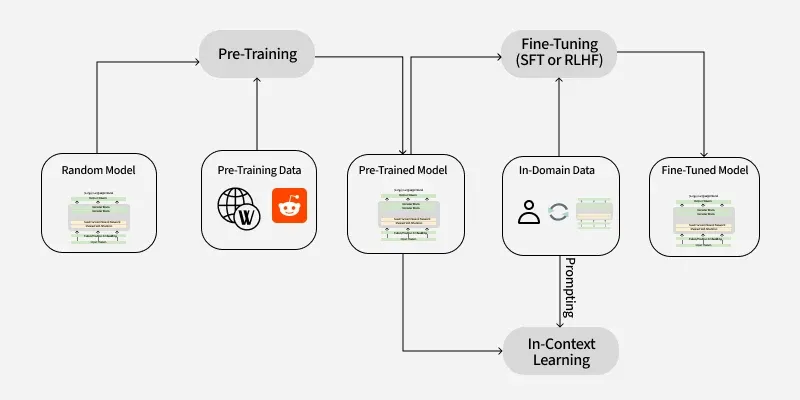
1. Pre-training
The model is first pre-trained on a large amount of text to learn general language patterns, such as syntax, semantics and contextual relationships. Depending on the model architecture, pre-training may use objectives such as next-token prediction or masked-token prediction.
2. Task-Specific Dataset Preparation
A dataset is prepared for the target task using labeled input-output examples. For example, an instruction-following dataset may contain a user prompt and a corresponding high-quality response.
3. Fine-Tuning
The pre-trained model is trained further on the labeled dataset. Its parameters are updated to reduce the difference between the model's predicted output and the target output.
Optimization techniques such as gradient descent are used to update the model parameters.
4. Evaluation
The fine-tuned model is evaluated on a separate validation or test dataset to measure how well it performs on unseen examples. Hyperparameters such as learning rate, batch size and number of training epochs can be adjusted based on the evaluation results.
5. Deployment
After achieving satisfactory performance, the model can be integrated into applications such as customer support, text classification, question answering and content generation.
Meaning of "Supervised" in SFT
The term “supervised” refers to the use of labeled training examples. Each example provides the model with an input and a desired output, allowing the model to learn from the difference between its prediction and the target.
For example: Consider a customer support system. A pre-trained model may generate a general response to a customer query:
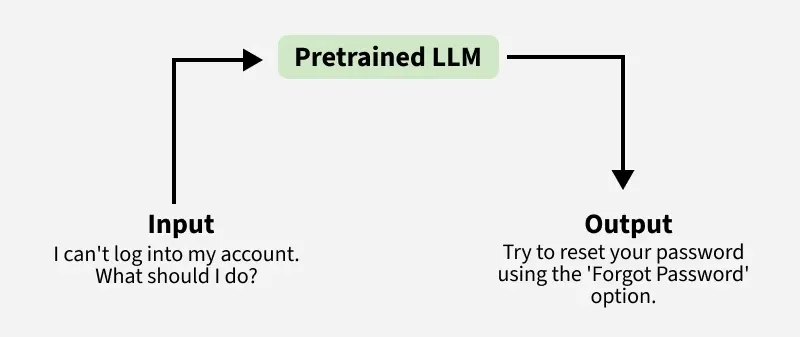
With SFT, the training dataset can contain customer queries paired with appropriate responses. The model learns these examples during fine-tuning and becomes better at generating responses that follow the desired style, format and task requirements.
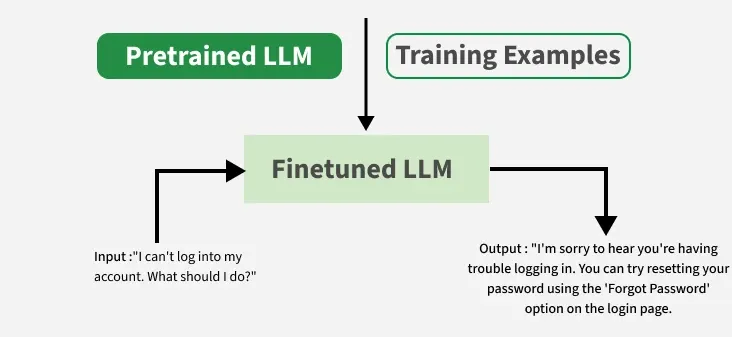
Thus, SFT adapts the model to a specific task or behavior while starting from the general capabilities learned during pre-training.
Implementation in Python
Break down the steps to fine-tune a pre-trained model for sentiment analysis using Python and Hugging Face’s Transformers library.
1. Importing Libraries
- datasets: Provides easy access to datasets from Hugging Face.
- transformers: A library by Hugging Face for working with pre-trained NLP models.
from datasets import load_dataset
import numpy as np
from transformers import (
    AutoTokenizer,
    AutoModelForSequenceClassification,
    Trainer,
    TrainingArguments,
    DataCollatorWithPadding
)
2. Choose a Pre-trained Model
Select a pre-trained model suited to the task. Here, we use DistilBERT for sentiment classification.
- AutoTokenizer.from_pretrained: Loads the tokenizer associated with DistilBERT.
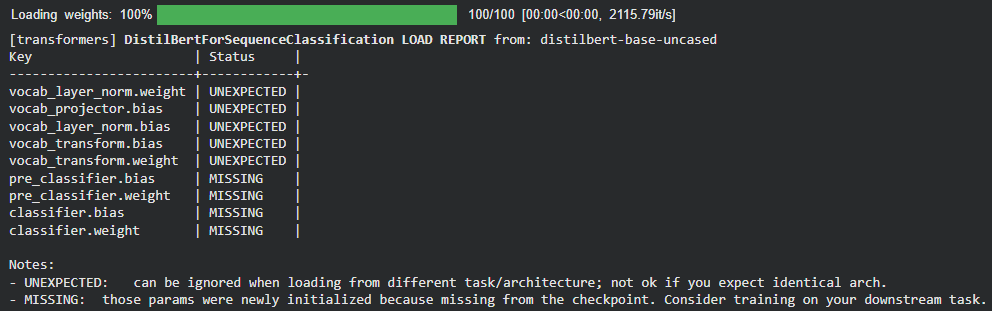
- AutoModelForSequenceClassification.from_pretrained: Loads DistilBERT with a classification head for binary classification (
num_labels=2).
# Load tokenizer
tokenizer = AutoTokenizer.from_pretrained("distilbert-base-uncased")

# Load model
model = AutoModelForSequenceClassification.from_pretrained(
    "distilbert-base-uncased",
    num_labels=2
)
Output:
3. Prepare Your Dataset
Use a labeled dataset for sentiment analysis. Here, we use the IMDb movie reviews dataset.
- load_dataset: Loads the IMDb dataset with positive and negative sentiment labels.
- preprocess_function: Tokenizes the reviews and truncates long sequences.
- dataset.map: Applies the preprocessing function to the dataset in batches.
For this demonstration, we use smaller training and testing subsets and one epoch to reduce execution time. These settings are not mandatory and can be increased based on available resources and desired performance.
# Load the IMDB dataset
dataset = load_dataset("stanfordnlp/imdb")

# Tokenize the dataset
def preprocess_function(examples):
    return tokenizer(examples["text"], truncation=True)

tokenized_dataset = dataset.map(preprocess_function, batched=True)

# Use smaller subsets for faster training
small_train_dataset = (
    tokenized_dataset["train"]
    .shuffle(seed=42)
    .select(range(2000))
)

small_test_dataset = (
    tokenized_dataset["test"]
    .shuffle(seed=42)
    .select(range(500))
)
4. Fine-Tuning the Model
Configure the training process and fine-tune the pre-trained model on the sentiment analysis dataset.
- DataCollatorWithPadding: Dynamically pads sequences within each batch.
- TrainingArguments: Defines the output location, evaluation strategy, learning rate, batch size and number of epochs.
- Trainer: Handles the training and evaluation process.
- compute_metrics: Calculates the model’s accuracy during evaluation.
- trainer.train(): Starts the fine-tuning process.
# Dynamically pad each batch
data_collator = DataCollatorWithPadding(tokenizer=tokenizer)

# Define training arguments
training_args = TrainingArguments(
    output_dir="./results",
    eval_strategy="epoch",
    learning_rate=2e-5,
    per_device_train_batch_size=32,
    num_train_epochs=1,
)

def compute_metrics(eval_pred):
    logits, labels = eval_pred
    predictions = np.argmax(logits, axis=-1)
    accuracy = (predictions == labels).mean()
    return {"accuracy": accuracy}

trainer = Trainer(
    model=model,
    args=training_args,
    train_dataset=small_train_dataset,
    eval_dataset=small_test_dataset,
    data_collator=data_collator,
    compute_metrics=compute_metrics,
)

# Train the model
trainer.train()
Output:

5. Evaluating Model
Evaluate the fine-tuned model on the test subset to measure its accuracy.
results = trainer.evaluate()
print(f"Validation Accuracy: {results['eval_accuracy']}")
Output:
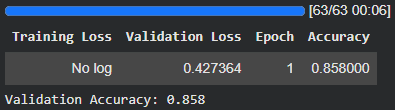
Validation Accuracy: The accuracy may vary depending on the training configuration and dataset subset used.
You can download the complete source code from here.
Use Cases
- Text Classification: Sentiment analysis, spam detection and topic classification.
- Named Entity Recognition (NER): Identifying names, organizations, dates and locations.
- Machine Translation: Improving translation for specific language pairs or domains.
- Question Answering: Generating accurate answers from question-answer pairs.
- Instruction Following: Improving responses to instructions and desired formats.
- Domain Adaptation: Adapting models for specialized fields such as law, finance and healthcare.
Challenges
- Overfitting: Small or narrow datasets can reduce performance on unseen data.
- Catastrophic Forgetting: Fine-tuning may cause the model to lose some pre-trained capabilities.
- Data Quality: Poor or inconsistent labels can lead to undesirable model behavior.
- Computational Requirements: Fine-tuning large models can require significant computing resources. PEFT methods can reduce these requirements.
SFT vs. General Fine-Tuning
| Aspect | Supervised Fine-Tuning (SFT) | General Fine-Tuning |
|---|---|---|
| Data Requirements | Labeled input-output pairs. | May use labeled, unlabeled, preference or other task-specific data. |
| Objective | Improve performance on a specific task or desired behavior. | Adapt or improve the model for a particular task, domain or objective. |
| Techniques | Instruction tuning, classification, translation, summarization. | SFT, domain adaptation, continued pre-training and preference-based methods. |
| Computational Cost | Depends on model size, dataset and whether full fine-tuning or PEFT is used. | Varies widely depending on the fine-tuning method and training setup. |
| Use Case | Tasks with labeled examples and clearly defined desired outputs. | Broader model adaptation across tasks, domains and objectives. |
