

Claude Science is an AI workbench for scientific research that brings models, scientific databases, analysis tools, and computing environments into one workspace. It helps researchers run multi-step analyses and produce traceable results.
- Connects to 60+ scientific databases and domain-specific tools.
- Runs research workflows using Claude models available with the user's plan.
- Produces figures, tables, and notebooks with provenance information.
- Supports local machines, Linux systems, HPC clusters, and cloud compute.
- Combines research, analysis, and computation without requiring a separate scientific model.
Why Use Claude Science?
- Reproducible results: Figures, tables, and notebooks can retain the code, environment, description, and conversation used to create them.
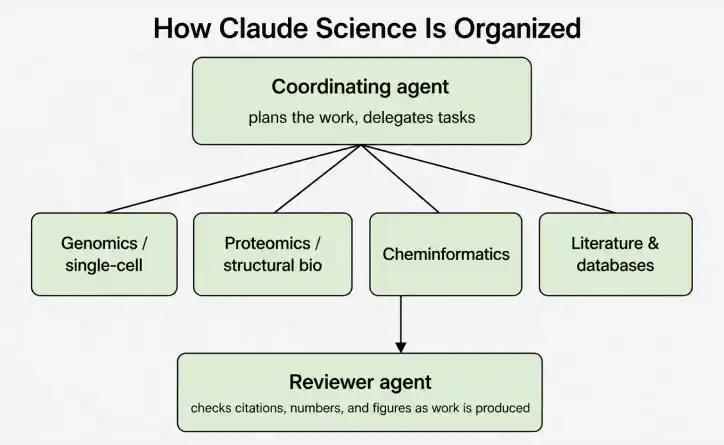
- Native scientific viewers: Proteins, genomic tracks, chemical structures, alignments, and PDFs can be inspected without separate viewer installations.
- Built-in review: A background reviewer can flag incorrect citation, untraceable numbers, or figures that do not match their underlying code.
- Flexible compute: Analyses can run on a laptop or connect to a lab server, HPC cluster, or Modal account for later workloads.
- Domain ready workflow: Claude Science is pre-configured for areas such as genomics, single-cell analysis, proteomics, structural biology, and cheminformatics.
- Reusable workflows: Existing pipelines can be saved as skills or connected through connectors so they can be reused in later sessions.
Install Claude Science
Prerequisites
- A Claude Pro, Max, Team, or Enterprise plan. Team and Enterprise organizations may require an administrator to enable Claude Science.
- Claude Science is currently available in beta for macOS and Linux.
- Access to the machine or infrastructure where the data and compute will be used, such as a laptop, Linux server, HPC login node, or cloud VM.
macOS
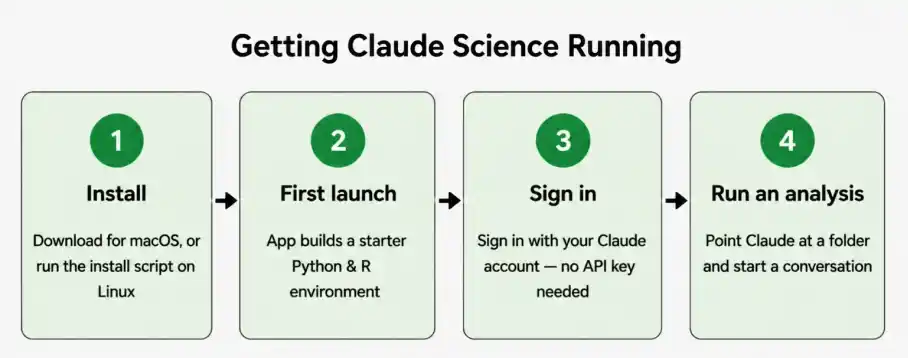
Download Claude Science from Anthropic's Claude Science product page and install the application. On first launch, it prepares the runtime and starter Python and R environments and opens the local interface in a browser.
- The browser interface is local; it is not a public website that hosts the analysis.
- If the browser tab does not open automatically, use the application menu to open the local interface.
Linux
On Linux, install Claude Science using the supplied installation script and start the local service:
curl -fsSL https://claude.ai/install-claude-science.sh | sh
claude-science-serve
The command starts the local application and prints a URL that can be opened in the browser.
- For a remote Linux machine, start the service without opening a browser on the server, forward the port through SSH, and open the resulting URL on your local computer.
- Claude Science currently supports Linux x64 and macOS 13 or later according to Anthropic's current documentation.
Sign In and Complete Setup
- Open the Claude Science interface in your brower.
- Sign in with the Claude account associated with your subscription, a separate API key is not required for the normal sign-in flow.
- If an OAuth redirect cannot return to the local application, use the available code-paste sign-in option.
- Use the setup wizard to enable connectors, skills, and website access required for the research workflow.
- Review these permissions because they can be changed later from Settings.
Claude Science keeps its application data under the local ~/.claude-science directory. The supplied guide notes that removing this directory removes the associated projects, artifacts, and conversation history.
Run Your First Analysis
- Open the Example project or Create a new project.
- Start a conversation and reference the folder containing the research data by entering its path or using the @ picker.
- Review the folder-access permission before allowing Claude Science to read the data.
- When Claude proposes running code, review and approve the code-execution permission.
- Inspect the generated figures, tables, notebooks, and other artifacts from the Files panel.
Where Does Claude Science Run?
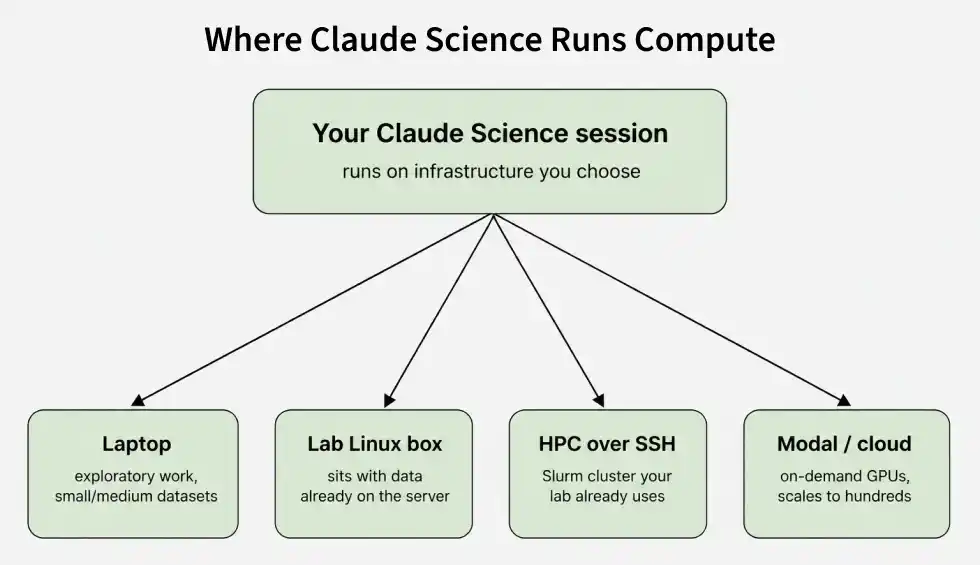
Claude Science is designed to run compute on infrastructure selected by the researcher rather than requiring all datasets to be moved into a shared cloud environment. This allows large or sensitive datasets to remain on the systems where they already live while Claude receives the context needed for each analysis step.
- Laptop : Suitable for exploratory work and smaller datasets.
- Lab Linux box: Useful when data and software environments already reside on a research server.
- HPC over SSH: Suitable for larger workloads, including cluster-based batch jobs.
- Modal or cloud: Provides scalable compute when workloads need more resources.
Additional Features
Forking Sessions
- Claude Science allows users to create a separate branch from an existing analysis session without losing the original conversation or its context.
- This is useful for testing different approaches, parameters, or analysis methods while keeping the original workflow unchanged.
Example:
A researcher can fork an analysis to compare two different normalization methods for the same genomic dataset.
Reusable Skills
- Frequently used laboratory pipelines can be saved as reusable skills and automatically made available in future sessions.
- This helps researchers maintain consistent workflows instead of repeatedly explaining the same analysis procedure to Claude Science.
Example:
A laboratory can save its standard RNA-seq preprocessing pipeline as a skill and reuse it whenever a new dataset is analyzed.
In-line Figure Editing
- Claude Science can modify the code responsible for generating a figure when the researcher requests a visualization change in natural language.
- The updated figure remains connected to its underlying code, making the modification reproducible.
Example:
A researcher can ask Claude Science to "change the x-axis to a logarithmic scale and remove the gridlines," and it updates the figure-generating code accordingly.
BioNeMO Integration
- Claude Science integrates with NVIDIA BioNeMo's life-sciences models and libraries for specialized biological workflows.
- It provides access to models such as Evo 2, Boltz-2, and OpenFold3 within broader research workflows.
Example:
A researcher studying protein structures can incorporate an OpenFold3-based prediction into a larger analysis instead of running the model as a completely separate workflow.
Research-lab pricing
- Anthropic provides a discounted Team plan for eligible scientific laboratories at academic institutions and nonprofit research organizations.
- Eligibility is verified through the laboratory's principal investigator.
Example:
An eligible university research lab can apply for the discounted offering rather than purchasing standard Team access for every researcher.
Persistent Python and R Kernels
- Claude Science provides Python and R environments that can remain active during an analysis session.
- This allows researchers to continue working with previously loaded data, variables, and analysis results without rebuilding the environment for every operation.
Example:
After loading a large dataset into a Python session, a researcher can perform preprocessing, statistical analysis, and visualization in subsequent prompts using the same working environment.
Manuscript Preparation
- Claude Science can help researchers prepare written scientific outputs alongside their computational analysis.
- It supports rendered Markdown and LaTeX, allowing analysis results, figures, and written explanations to be developed together.
Example:
After completing an experiment analysis, a researcher can generate a results section containing the relevant figures and tables and preview the document before incorporating it into a manuscript.
