

Claude Code works on tasks through an iterative agent loop: it gathers context, takes action, verifies the result, and repeats until the task is complete. Understanding this loop helps you choose the right level of automation for a task.
- Uses tools throughout the workflow to search files, inspect code, edit files, run commands, and verify results.
- Adapts the loop to the task: a simple question may need only context gathering, while a bug fix may cycle through all three phases several times.
- Supports different loop patterns, including turn-based, goal-based, time-based, and proactive workflows.
Working
When you give Claude a task, three activities form the core loop: gather context, take action, and verify results. These are not rigid stages; Claude can move between them as tool results change what it should do next.
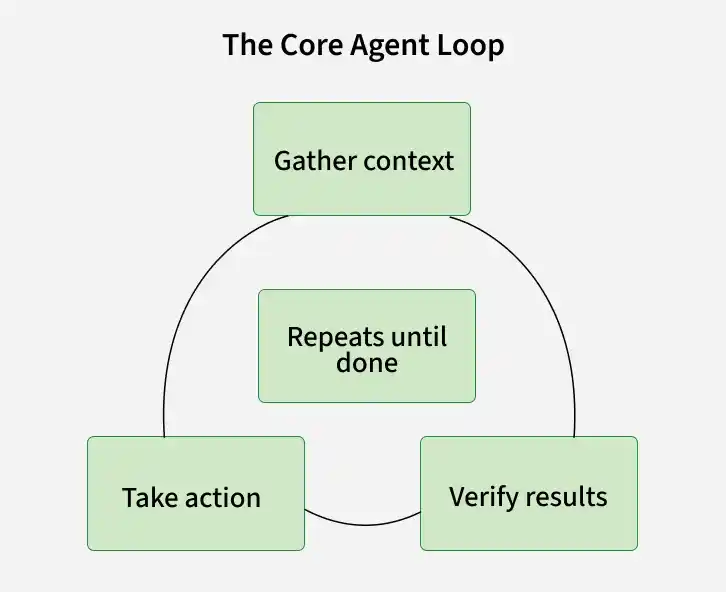
- Claude gathers the context it needs by searching and reading relevant files instead of loading the entire codebase at once.
- Claude then takes the required action by editing files, running commands, creating outputs, or performing another task-specific operation.
- After taking action, Claude verifies the result by running tests, inspecting the output, or using another suitable check before deciding whether more work is needed.
Each tool call returns evidence that informs the next decision. This is why Claude searches for relevant context instead of reading everything up front, especially because the context window acts as finite working memory.
Prompting vs Loop Engineering
- A normal prompt creates a manual loop in which Claude works on the task, checks its progress, and then returns control to you for the next instruction.
- For longer or recurring work, the more useful question is not simply what prompt to write, but what kind of loop the task requires and what should trigger, guide, and stop that loop.
Types of Agent Loops
Claude Code supports several loop patterns, and the most suitable one depends on how often the work runs, how completion can be measured, and how much supervision is required.
Turn Based Loops
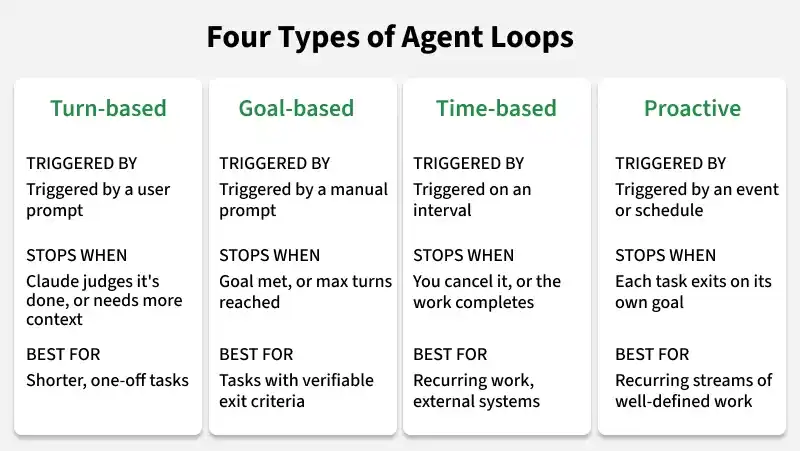
Turn-based looping is the default Claude Code experience. A user prompt starts the work, and Claude decides when the task is complete or when it needs more information. This approach works well for shorter tasks that are performed once rather than as part of a recurring process.
- A useful way to make this loop more reliable is to encode manual review steps in a SKILL.md file so Claude has a repeatable way to check its own work.
- Checks such as passing tests, a clean console, or a target score are especially useful because they give Claude a concrete basis for deciding whether another iteration is necessary.
Goal Based Loops
Complex tasks often require several attempts before they reach an acceptable result. The /goal command lets you define what done means before the work starts, and an evaluator can send Claude back into the loop until the condition is satisfied or the turn limit is reached.
Example:
/goal get the homepage Lighthouse score to 90 or above, stop after 5 tries.
Goal-based loops work best when the completion condition can be stated objectively, because a measurable threshold leaves less room for different interpretations of good enough.
Time Based Loops
Some tasks need to be repeated because the task remains the same while its inputs change, while others depend on external systems that can change without another prompt from the user. The /loop command reruns a prompt at an interval, whereas /schedule moves the recurring work to the cloud so that it can continue without relying on the local machine.
Example:
/loop 5m check my PR, address review comments, and fix failing CI
- A /loop routine runs on the local computer and therefore stops when that computer is turned off.
- A /schedule routine is designed for recurring cloud-based execution, so it is not tied to whether the local machine is running.
Proactive Loops
Proactive loops combine the earlier primitives with auto mode and dynamic workflows to support long-running work that can continue with little real-time human supervision.
- A proactive workflow can use /schedule to look for new reports or other changes at a regular interval.
- The same workflow can use /goal to define the point at which an item should be considered resolved.
- Dynamic workflows can allow different agents to explore possible fixes in parallel and have a separate agent evaluate the results.
- Auto mode can keep the workflow moving without pausing for permission at every step.
Keeping Loop Output Reliable
The quality of an agent loop depends on the system around the model as much as on the model itself. A clean and consistent codebase gives Claude clearer patterns to follow, while reusable skills, accessible documentation, and independent review make verification more dependable.
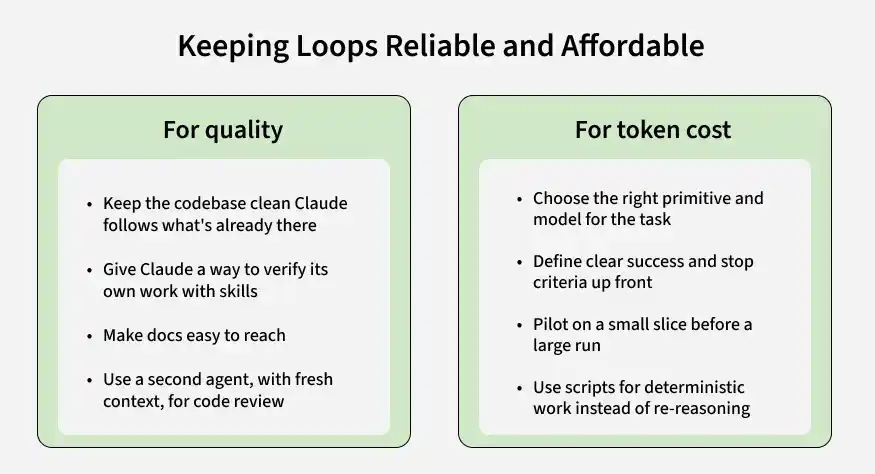
- Keep the codebase clean and consistent so Claude can work from established patterns instead of having to infer conventions repeatedly.
- Describe quality expectations in reusable skills so that Claude can check its work against a known standard rather than an informal idea of what looks correct.
- Keep documentation easy to reach so the loop can use current guidance instead of relying only on information learned during model training.
- Use a second agent for review when the task warrants it, because fresh context can reveal problems that are easy to miss when the same agent reviews decisions it made itself.
When a result repeatedly falls short of the expected standard, improve the reusable skill or rule instead of correcting only the individual output so that later iterations can benefit from the same fix.
Managing Token Usage
Reliability and cost are both influenced by how the loop is designed, not simply by the prompt that starts it. These are few loop design practices which can help with managing Toke usages.
- Choose the primitive and model according to the task, because small tasks often do not need a loop or multiple agents and some workloads can be handled by a cheaper, faster model.
- Set a clear success condition and stopping point so Claude has enough guidance to converge without continuing unnecessarily or stopping before the work is complete.
- Run a small pilot before launching a larger workflow because dynamic workflows can create many agents and the resulting token usage can grow quickly.
- Use scripts for deterministic operations when possible because repeating a fixed procedure through model reasoning can cost more than executing the same procedure directly.
- Avoid running a recurring routine more frequently than the information it monitors actually changes, since extra runs can consume tokens without adding useful work.
- Use the available usage views to understand where tokens are being spent; /usage breaks recent activity down by skill, subagent, and MCP, /goal without arguments shows turns and tokens used so far, and /workflows shows usage for individual agents.
Model selection and effort level remain among the strongest levers for controlling the cost of an agent loop.
Practical Way
A practical way to start is with a task you already perform and where your own time is the bottleneck. From there, choose the simplest loop that matches the task instead of starting with the most autonomous option.
- Begin by identifying which part of the work can be handed off to Claude without making the overall process harder to manage.
- Define a verification check or measurable success condition so the loop has a clear way to judge its progress.
- Decide whether the task actually needs a goal, a recurring schedule, or proactive execution, because many one-off tasks are better handled with the default turn-based loop.
- Start with a small run, watch where the loop stalls or does unnecessary work, and then improve the surrounding skill, rule, or workflow rather than changing the prompt alone.
Not every task needs a complex loop, so commands such as /goal, /loop, and /schedule should be introduced only when the structure of the task benefits from them.
