TL;DR
- Web indexes are pre-built snapshots: search engines and index-backed AI search systems query a structured catalog assembled in advance rather than the live web.
- Indexing is a four-stage pipeline: crawling, parsing, storage, and ranking each introduce distinct failure modes that compound downstream.
- Hybrid retrieval beats either approach alone: BM25 wins on exact matches, dense vectors win on semantics, and hybrid wins in production on mixed workloads.
- Chunking quality sets the RAG ceiling: noisy extraction and bad chunk boundaries silently collapse retrieval before the LLM sees any content.
- AI agents need dedicated indexes for different domains: a general index ranks summaries above primary sources, so papers, code, and law work better from indexes built for each.
- Firecrawl runs four indexes behind one API: /search covers the general web, and the Research, Developer, and Government & Legal indexes cover papers, code, and US law, all inside Firecrawl Alexandria.
With the introduction of Google AI Overviews, 60% of Google searches now end without a click. No page visit. No human reading. The Google search index answers the question directly.
When you type a query into Google, it never fetches any live URLs. It queries a structured snapshot of the web built hours, days, or weeks before your search. That snapshot is the index. The same logic applies to most AI agents that "know" something about the web. Unless an agent fetches a page live, it's reading from an index built in advance.
If you're building AI products, this distinction matters more than it ever did for traditional SEO. The quality, structure, and freshness of the index your agent reads from set the quality ceiling for everything your agent can answer. It is also why one general index is rarely enough: a coding agent, a research agent, and a compliance agent each need a different corpus.
Website indexing isn't just an SEO concern anymore. It's a systems design concern.
What is a web index?
A web index is a structured, queryable catalog of web content built from crawled and processed pages, designed for fast retrieval.
Think of a library catalog versus the books themselves. When you search Google, it never touches the live web. It queries a snapshot assembled hours, days, or weeks earlier. The index points to the content; retrieval is near-instant.
The core data structure is the inverted index: every unique word in the corpus maps to a sorted list of document IDs where it appears, along with term frequency and position data. Instead of asking "what words are in this document?", you ask "which documents contain this word?" That inversion is what makes sub-millisecond lookup possible across billions of pages.
Google's index covers roughly 400 billion documents drawn from over one trillion discovered URLs, not all of which make the cut. The index spans petabytes, distributed across thousands of machines via Bigtable and Colossus. Common Crawl, the open-source alternative, captures over 3 billion pages per crawl stored as WARC files on AWS S3.
Inverted indexes aren't the only kind. For AI systems, there are three types worth knowing:
- Keyword (inverted) indexes map terms to documents: fast, exact, and interpretable. Google, Elasticsearch, and Lucene are built on them.
- Vector (dense) indexes store numeric embeddings and support approximate nearest-neighbor search for semantic matching. Pinecone, Weaviate, and Qdrant are built around them.
- Hybrid indexes combine both: keyword search for precision, semantic search for coverage. As of 2025, dense retrieval leads BM25 by 15–25% NDCG@10 on the BEIR benchmark, but hybrid still wins on most mixed-query workloads.
Indexes also differ by scope. A general web index tries to cover everything a crawler can reach. A domain-specific index covers one body of content, such as scientific papers, code repositories, or government law, and stores the fields that matter in that domain. More on that below.
Is a web index the same as a search index?
Every web index is a search index, but not every search index covers the web. "Search index" means any structure built for fast lookup: a store's product search, a company's document repository, or Elasticsearch over your logs. A web index is the specific case built by crawling public web pages. You will also see "web index" used for a site's homepage file (index.html), which has nothing to do with search.
Who runs web indexes?
Google, Bing, Brave, Yandex, and Mojeek each run their own crawler and maintain their own index, which is why the same query returns different results on each. Many other products license an index instead of building one. DuckDuckGo leans on Bing for most web results, and Bing's index also powers Microsoft Copilot.
Programmatic access to the big indexes is narrowing. Google's Custom Search JSON API, the main way developers queried Google results in code, closed to new customers in January 2026 and shuts down on January 1, 2027. Our Google Custom Search API alternative guide compares the replacements and walks through a migration.
The other option is an index built for agents rather than people, which is where search APIs like Firecrawl's come in.
How does web indexing work?
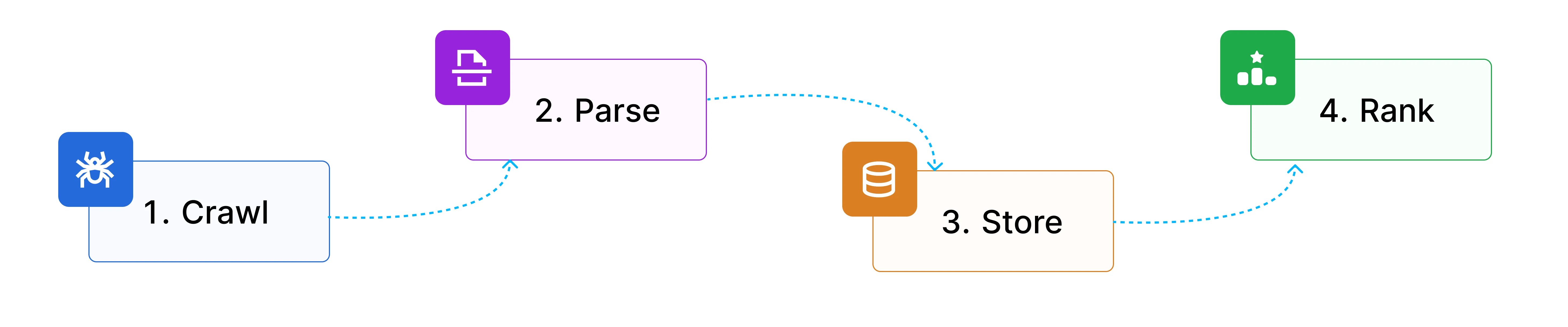
Web indexing is a four-stage pipeline:
| Stage | What it does |
|---|---|
| Crawling | Bots follow links and sitemaps to discover pages and download raw HTML |
| Parsing and normalization | Raw HTML is stripped of noise, deduplicated, and split into clean chunks |
| Storage and indexation | Processed content is stored in inverted and/or vector indexes for fast lookup |
| Ranking and retrieval | Scoring models decide what surfaces for a given query, using keyword, semantic, or hybrid signals |
 How indexing works
Each stage transforms raw URLs into queryable, ranked content. Each stage also has its own failure modes.
Stage 1: crawling
Crawling is discovery. Bots follow links and read sitemaps to find pages, download the raw HTML, and pass it downstream.
A new URL reaches the crawl queue four ways: an internal link from a page the crawler already visits, a backlink from another site, an entry in an XML sitemap, or a manual submission through a tool like Google Search Console. A page with none of these (an orphan page) usually never gets crawled.
Every crawler operates under constraints. Googlebot enforces a 2MB page limit; anything beyond that gets truncated. Crawl budget governs how much of your site gets visited per day, and as Gary Illyes of Google has confirmed, it's not a fixed number. It's the product of how fast a site can be crawled without degrading performance and how much Google wants to crawl based on quality signals. Low-quality pages drain budget; high-quality pages earn more crawl frequency.
Robots.txt controls which paths crawlers can access, but the rules have quirks worth knowing. Googlebot ignores the Crawl-delay directive entirely, while Bingbot and Yandex respect it, a common misconfiguration. Rules are also case-sensitive: Disallow: /Admin/ does not block /admin/.
The crawler landscape has shifted. Cloudflare data from 2025 shows AI crawlers now account for 20% of all verified bot traffic, versus 40% for traditional search crawlers. The assumption of "one crawler per engine" no longer holds.
GPTBot, ClaudeBot, and PerplexityBot each behave differently. Bingbot now serves double duty as the index behind both Bing Search and Microsoft Copilot. Perplexity drew scrutiny in 2025 when Cloudflare documented undeclared crawlers that ignored robots.txt directives.
You can explore the full directory of known bots at bot.fyi, a public registry maintained by Vercel.
Stage 2: parsing and normalization
Crawling fetches raw HTML. Parsing turns it into usable content: stripping boilerplate, extracting main text, detecting language, deduplicating content across URLs, and normalizing encoding. HTML cleaning and boilerplate removal is particularly critical for LLM training pipelines, where noisy input directly degrades model quality.
The boilerplate problem is bigger than it looks. A naive approach to stripping HTML tags yields 40–60% noise on typical web pages: navigation, ads, footers, and cookie banners all mixed with the actual content. For keyword search, this is manageable. For AI retrieval, it's toxic: noisy chunks produce poor embeddings, poor embeddings surface irrelevant results, and the model generates a confident-looking answer from content that was never relevant to begin with.
Open-source extraction tools vary significantly in how well they handle this. Trafilatura reaches approximately 95% precision on news articles, Mozilla Readability hits around 85%, and Newspaper3k comes in at 70–75% with higher error rates on malformed HTML. For production pipelines processing diverse page types, that spread is meaningful.
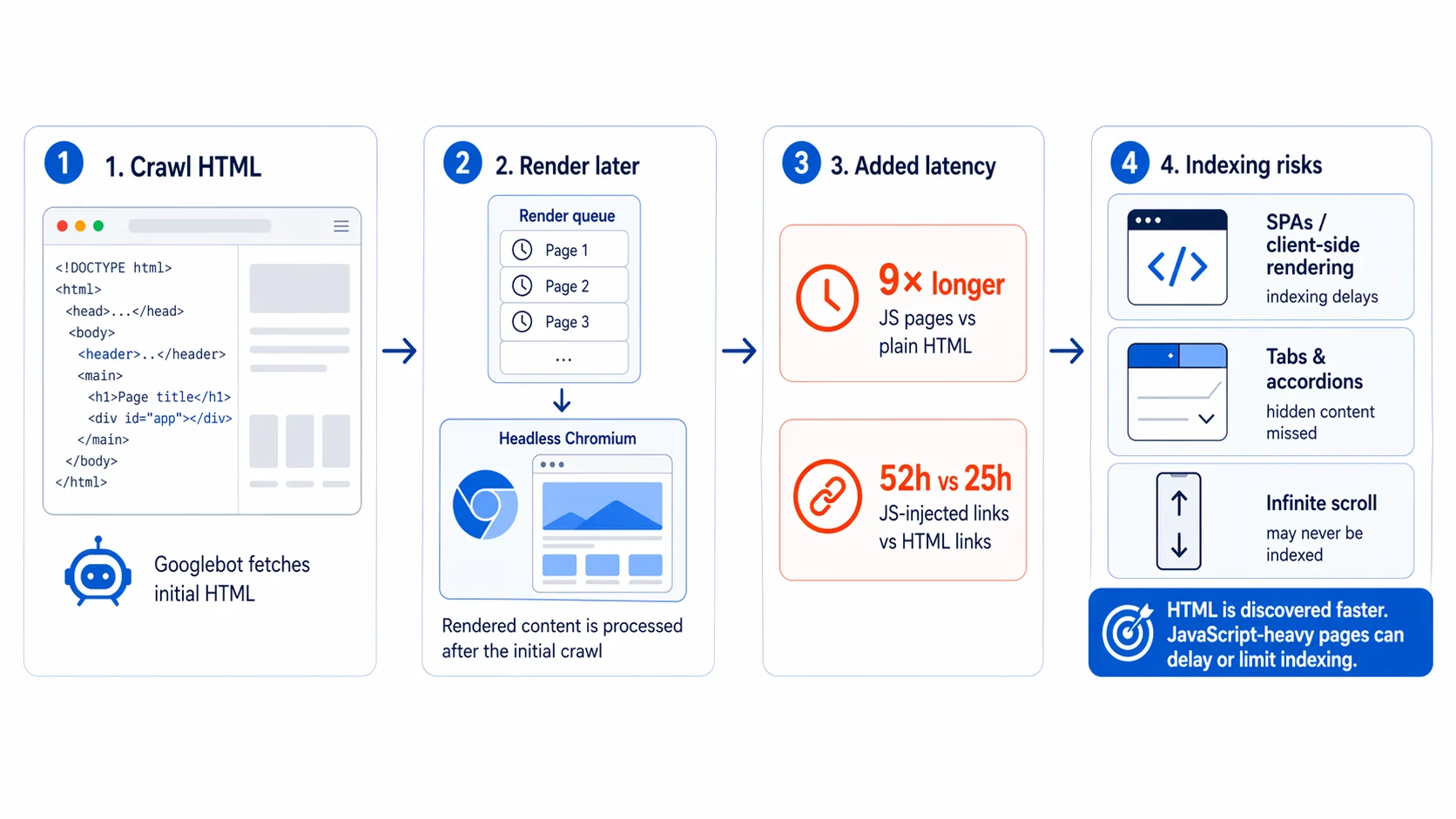
JavaScript rendering adds another layer of complexity. Googlebot processes JS pages through the Web Rendering Service, but rendering is asynchronous: pages enter a separate render queue after the initial HTML crawl, so raw HTML gets indexed first and rendered content follows later.
Research from Onely shows Googlebot needs 9 times longer to process JavaScript pages than plain HTML, and JavaScript-injected links take a median of 52 hours to be followed versus 25 hours for HTML links. SPAs that depend on client-side rendering face real indexing delays, and content behind tabs, accordions, or infinite scroll may never be indexed at all.
For AI-specific pipelines, this is also where chunking happens. Documents get split into retrievable units, and the strategy matters more than most teams realize.
Research from Jina AI showed that naive fixed-size chunking loses inter-chunk context: in one test, a sentence referencing "Berlin" (mentioned only in an earlier chunk) scored 0.7084 for semantic similarity with naive chunking, while late chunking (which preserves surrounding context using pooled token embeddings) raised that score to 0.8249. Across the BEIR benchmark, late chunking improved retrieval by 2–4% with no additional training.
The failure mode with a name is chunking drift: tiny formatting changes in HTML or a PDF silently shift chunk boundaries, overlaps become inconsistent, and semantic units split mid-thought. The Hacker News consensus is blunt: "the single biggest source of retrieval collapse is chunking, and it's usually invisible." Most teams never version their chunking logic.
There's a sharp irony in this. In January 2026, Google's Danny Sullivan warned content creators against pre-fragmenting their pages into bite-sized chunks for LLMs. At the same time, if you're building a RAG pipeline, you have to chunk documents to make retrieval work at all. The right chunk boundaries for Google and the right chunk boundaries for a RAG index are different problems with different answers.
Stage 3: storage and indexation
Once content is parsed and normalized, it gets stored in a structure optimized for fast retrieval. That structure determines both query speed and the kinds of questions the index can answer.
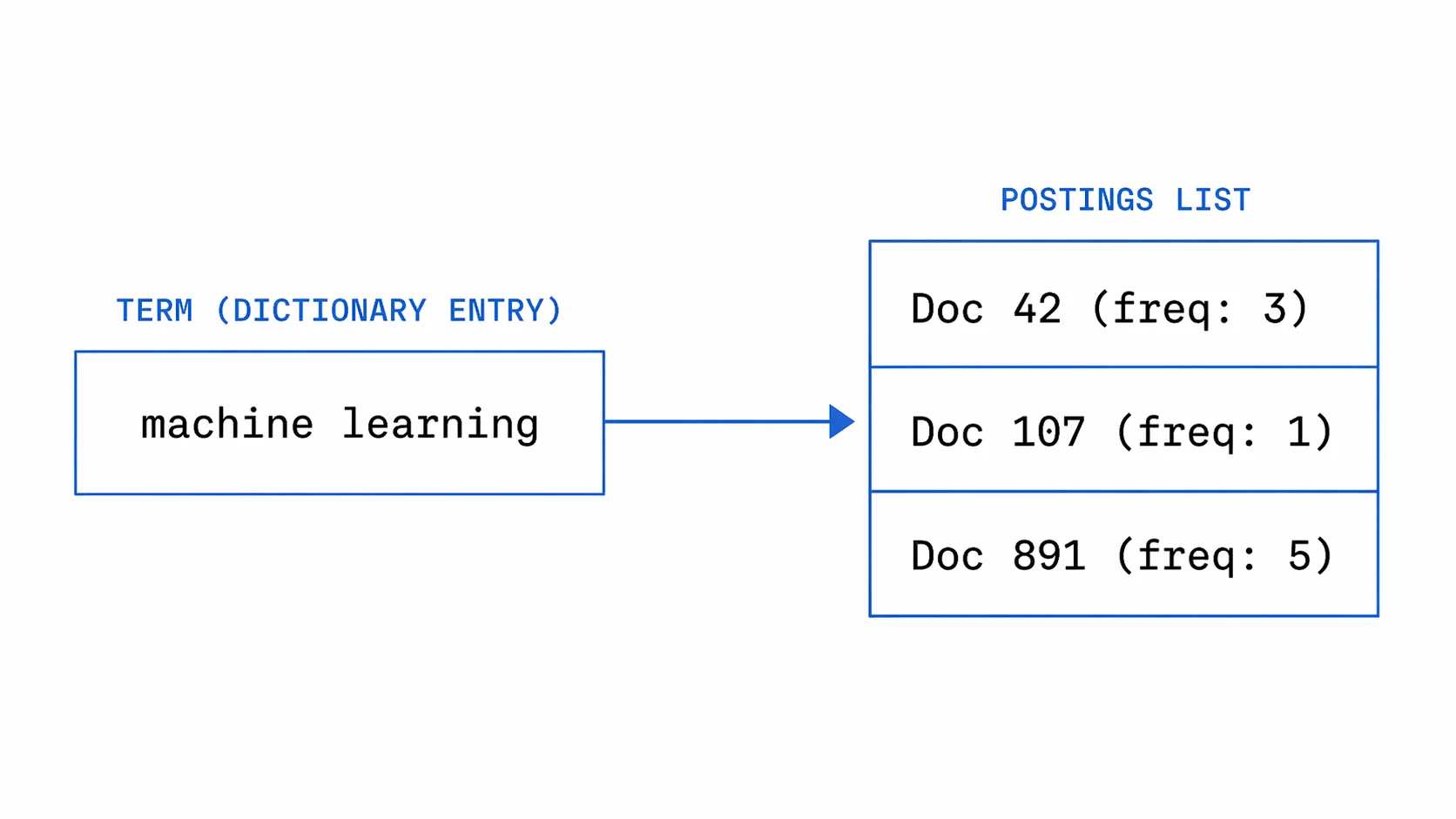
For keyword search, the core structure is the inverted index: each term maps to a postings list, a sorted list of document IDs, term frequencies, and positional data. For a query like "machine learning," the index intersects the postings list for "machine" with the one for "learning." That intersection runs in O(m+n) time, and skip pointers cut it further. As the Stanford IR textbook describes, for a list of 1,000 entries with 32 skip pointers placed at intervals, comparisons drop from 1,000 to roughly 64.
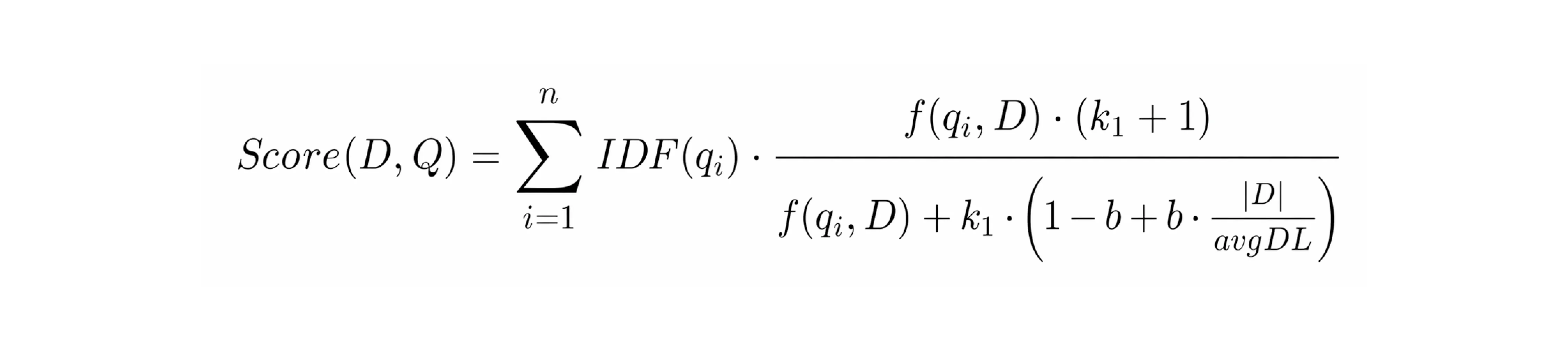
Lucene and Elasticsearch implement this with an immutable segment architecture: new writes create new segments, which merge periodically in the background. The term dictionary uses Finite State Transducers to share character prefixes across millions of terms and fit in minimal RAM. Document IDs are delta-encoded and compressed with FOR (Frame-of-Reference) encoding, which cuts storage and improves disk I/O. Relevance scoring uses BM25, weighting term rarity (IDF), term frequency with saturation (k1=1.2 by default), and document length normalization (b=0.75 by default).
For AI retrieval, content also gets embedded into dense vectors and stored in a vector database. Comparing a query against every vector in the index does not scale at billions of entries, so systems use approximate nearest-neighbor search instead. HNSW handles this by building a layered graph that progressively narrows the search, trading a small amount of recall for dramatically faster lookup. At very large scale, compressed approaches like IVF-PQ cut memory 8-16x at the cost of some accuracy.
Production systems typically run both indexes together. Weaviate, Qdrant, and Pinecone all support hybrid search: keyword matching for precision, semantic vectors for coverage, merged into a single ranked result via Reciprocal Rank Fusion. Keyword search misses synonyms and intent. Semantic search misses exact strings like version numbers or product codes. Hybrid covers both, which is why it dominates in production.
Stage 4: ranking and retrieval
The final stage takes what is stored and decides what gets surfaced for a given query. The signals used to make that decision differ significantly between traditional search and AI retrieval.
For traditional search, ranking layers multiple signals on top of BM25. Since 2015, RankBrain has applied machine learning to handle the 15% of queries that are novel and lack historical signal. Since 2019, BERT has been integrated into Google Search to understand query context beyond keyword matching. The 2024 Google ranking leak confirmed that NavBoost, which tracks user engagement quality across 13 months of data (dwell time, good clicks, bounce rate), is one of the most important signals in production. The ranking stack is deep, and most of it is behavioral.
For AI retrieval, none of that applies. There are no click signals, no dwell time, no authority derived from inbound links. AI search systems have to build relevance from the content itself.
The practical tradeoff between sparse and dense retrieval comes down to what you are searching for. BM25 is unbeatable on exact matches: product codes, version numbers, proper nouns, specific identifiers. Dense retrieval wins on semantic queries where the words in the question do not appear in the answer. Hybrid wins in production where both query types are present. The BEIR benchmark bears this out: by 2025, dense models had pulled ahead of BM25 by 15-25% NDCG@10 on average, but hybrid still wins on mixed workloads, which is why virtually every production retrieval system uses both.
Why website indexing matters for search and AI agents
How web indexing shapes search visibility
If a page isn't indexed, it doesn't exist. That's still the baseline. You submit an XML sitemap, use rel="canonical" to consolidate duplicate URLs, keep important pages within 1-3 clicks of the homepage, and add JSON-LD structured data so parsers don't have to guess what the content means. Get that right and the crawler finds you. Get it wrong and you're invisible regardless of how good the content is.
But being indexed has gotten more complicated. Google integrated the Helpful Content System into core ranking in 2024, and the December 2025 core update pushed this further. The target across seven confirmed 2025 updates was consistent: high-volume, low-originality content that looks thorough but lacks real expertise. SpamBrain doesn't flag AI-written content as a category. It flags quality patterns and manipulation signals. The method of production doesn't matter; the result does.
The harder shift is that being indexed is now a different problem from being cited. AI Overviews pull from pages that don't necessarily rank in the top organic results. The selection signals are different: semantic completeness, entity density, verifiable cross-referenced facts, and self-contained passages that answer a question without requiring context from the surrounding page.
This has measurable traffic consequences. Seer Interactive analyzed 25.1 million impressions across 42 organizations and found organic CTR dropped 61% for queries that trigger AI Overviews. Ahrefs found a 58% lower average CTR for top-ranking pages when AI Overviews appear. The index is still the foundation. But citation is the new visibility layer.
How AI agents depend on index quality
Here the stakes are higher. For a search engine, the index is one component in a system that returns links. For an AI agent, the index is the knowledge base. Everything the agent says is downstream of what the index contains and how it is structured.
The original RAG paper from Lewis et al. framed this clearly. RAG combines parametric memory (knowledge baked into model weights) with non-parametric memory (a dense vector index queried at inference time). The model generates more specific, factual, and diverse outputs when it can retrieve from an up-to-date index. Without retrieval, the model relies on its training data. Training data has a cutoff. The web doesn't.
Three failure modes appear in production systems:
Stale index, wrong answers. A research agent answering "what are the current requirements for X?" from an index that is six months old returns the old requirements. The model has no way to know the information is stale. It answers confidently. For legal, compliance, and pricing use cases, this is a real liability. You.com's architecture uses streaming ingestion for exactly this reason. News that breaks at 2 PM appears in the index by 2:05. Batch crawls would make that impossible.
Noisy index, hallucinations. A chunk containing 40% boilerplate (navigation, ads, cookie banners) produces a poor embedding. Poor embeddings surface irrelevant results. The LLM extrapolates from those results. It produces a confident-sounding answer that is not grounded in any real content. A 20% difference in extraction accuracy compounds to a 30-40% difference in downstream retrieval quality.
For a complete walkthrough of the LLM grounding pipeline (using live web data to anchor model responses in verifiable facts), see the dedicated guide.
Bad chunks, retrieval collapse. The right answer is in the index. But the chunk that contains it was split mid-sentence and its context was lost. The embedding does not match the query. The retrieval step returns something plausible but wrong. The model never surfaces the correct answer. Simon Willison noted in April 2025 that 2023-era AI search had a strong tendency to hallucinate details not present in the retrieved content. The improvement in 2025 came from deeper integration between search and reasoning: o3 and o4-mini now run retrieval as part of chain-of-thought reasoning before producing a final answer, not after.
The structural difference between search indexing and AI indexing isn't subtle. Traditional search engines optimize for click-through on a top-10 list. AI agents need top-k chunks that are complete, accurate, and self-contained enough to answer a question without the model having to read around them. The same page can score excellently for Google and produce poor retrieval for a RAG pipeline.
Indexed for Google doesn't mean indexed for AI.
What are the core components of web indexing?
Document URLs and canonical signals
The same content often lives at multiple URLs: trailing slashes, HTTP vs HTTPS, www vs non-www, query parameters. Without deduplication, crawlers waste budget re-indexing identical content and authority signals get split across versions. A rel="canonical" tag tells crawlers which URL is definitive. Pages that look healthy in content audits can still be invisible in search if canonicalization is misconfigured.
Link graph and authority signals
Hyperlinks form a graph. Search engines use that graph to infer authority: a page linked by many high-quality sources outranks an identical isolated one. This is the core of PageRank and still one of the most significant ranking inputs. For AI indexes, link graph data also surfaces relationships between documents, useful for multi-hop queries that require reasoning across several sources.
Content embeddings and structured metadata
Indexes store representations of meaning, not just text. Semantic embeddings let a query about "affordable laptops" surface pages using "budget notebooks." Schema.org markup tells the index what kind of thing a page is (product, recipe, news article) so it can apply type-specific ranking logic. For AI retrieval, this reduces ambiguity: the model doesn't have to guess whether it's reading a review or a spec sheet.
Provenance and freshness signals
Indexes record where content came from and when it was last updated. For traditional search, this sets recency weighting. For AI agents, it's more critical: a model retrieving a chunk has no native sense of whether it's six hours or six years old. An index that tracks publication timestamps and source authority lets you filter before retrieval, not after.
What stops a page from getting indexed?
A page stays out of a web index when the crawler can't reach it, isn't allowed to fetch it, or fetches it and decides it isn't worth storing. The common causes are robots.txt rules, noindex directives, error status codes, duplicate or thin content, JavaScript-only content, and running out of crawl budget on large sites.
Robots.txt and noindex do different jobs
The most common indexing mistake is treating these two as interchangeable. A Disallow rule in robots.txt stops compliant crawlers from fetching a URL, but it does not remove the URL from the index. If other sites link to it, Google can still list it, usually without a description because it never read the page.
To keep a page out of the index, leave it crawlable and add a noindex directive:
<meta name="robots" content="noindex" />For PDFs and other non-HTML files, send the equivalent X-Robots-Tag: noindex response header. A noindex tag on a URL that robots.txt blocks does nothing, because the crawler never sees it. Google's documentation on blocking indexing spells out the same rule.
How HTTP status codes affect indexing
What the server returns decides what happens next:
| Status code | Effect on crawling and indexing |
|---|---|
| 200 OK | Page is a candidate for indexing |
| 301 Moved Permanently | Signals consolidate on the target URL, which replaces the old one in the index |
| 302 Found | Treated as temporary, so the original URL usually stays indexed |
| 304 Not Modified | Tells the crawler nothing changed since its last visit, saving crawl budget |
| 404 Not Found | URL is rechecked for a while, then dropped |
| 410 Gone | Explicitly permanent removal, dropped slightly faster than a 404 |
| 429 Too Many Requests | Crawler slows down; persistent 429s mean less of the site gets fetched |
| 503 Service Unavailable | Fine for short maintenance windows; pages start dropping if it lasts for days |
Soft 404s (pages that return 200 but show a "not found" message) waste crawl budget and can get indexed as empty pages.
Other common blockers
- Duplicate content. Trailing slashes, tracking parameters, and HTTP or www variants create clusters where only the canonical URL gets indexed.
- Thin pages. Tag archives, near-empty category pages, and templated location pages are often crawled and then skipped. Search Console reports these as "Crawled, currently not indexed," and resubmitting won't change the verdict.
- JavaScript-only content. If the main content appears only after client-side rendering, indexing is delayed or skipped (covered in Stage 2 above).
- Staging directives shipped to production. A stray
Disallow: /or site-wide noindex from a staging environment can remove a whole site from search.
How do you get a page indexed faster?
You can't force a search engine to index a page, but you can remove what slows it down. Submit an accurate XML sitemap, link new pages from pages crawlers already visit, request indexing in Google Search Console, notify other engines through IndexNow, and keep pages fast and server-rendered.
- Keep an accurate XML sitemap. List only canonical URLs that return 200, and update
lastmodonly when content changes. Reference the sitemap in robots.txt and submit it in Search Console and Bing Webmaster Tools. Google retired its sitemap ping endpoint in 2023, so older advice to "ping Google" no longer works. - Link new pages from crawled pages. A link from a frequently crawled hub page gets a URL discovered faster than anything else. Keep important pages within three clicks of the homepage, and find orphan pages by comparing a crawl of your own site against your sitemap.
- Request indexing for urgent pages. In Search Console, the URL Inspection tool runs a live test and lets you request indexing. It adds the URL to a priority queue but doesn't guarantee inclusion.
- Use IndexNow for engines other than Google. IndexNow lets your site push a notification when a URL changes. Bing, Yandex, Seznam, Naver, and Yep support it; Google does not. Because Bing's index also powers Copilot, it is worth adding.
- Make pages cheap to crawl. Fast server responses mean more URLs fetched per visit. Server-render the main content so it exists in the initial HTML.
To check whether a page made it in, run site:yourdomain.com/page in Google as a quick sanity check, then confirm in URL Inspection, which is the source of truth. A Google-selected canonical that differs from the one you declared usually explains a missing page.
What use cases do web indexes enable?
Different agents make different demands on the index. The table below maps the main agent types to what they actually need from the underlying index infrastructure.
| Agent type | What it needs from the index |
|---|---|
| Conversational QA agents | Fast top-k results, short coherent snippets, citation support |
| Research and analyst agents | Deep retrieval, deduplication, structured outputs, multi-hop support |
| Monitoring agents | Streaming or scheduled updates, change detection |
| Extraction agents | Clean page text or markdown, stable parsing, structured field extraction |
| Coding agents | Up-to-date docs, package contents, version-aware content |
| Scientific research agents | Paper records, passage-level reads, citation links |
| Legal and compliance agents | Primary statutes, regulations, and opinions with jurisdiction metadata |
Most RAG failure modes trace back to a mismatch between what the agent needs and what the index actually provides. A monitoring agent querying a batch-crawled index will miss changes between crawls. A conversational QA agent querying a noisy index will hallucinate. A coding agent querying a vector-only index will miss exact version strings that BM25 would have caught.
For monitoring agents, Firecrawl's web-scale /monitor runs saved search queries on a schedule and sends a webhook or email when a new result matches a stated goal, so the agent doesn't have to poll the index itself.
The last three rows are where a general index struggles most, which is the case for domain-specific indexes.
What is a domain-specific web index?
A domain-specific web index covers one body of content, such as scientific papers, code repositories, or government law, instead of the whole web. Narrowing the corpus lets the index store domain identifiers, filters, and tools that a general index has no reason to support, so an agent gets primary sources ranked for its field.
A general index ranks pages with signals built for the open web: links, popularity, and engagement. Those signals work against primary sources in specialized fields. A PubMed abstract, a merged pull request, or a county permit fee schedule earns few links, so it ranks below the blog posts and forum threads that summarize it. The agent then reasons from the summary.
A dedicated index reduces several of the failure modes described earlier, though it still depends on clean extraction, sensible chunking, and timely recrawls:
- Coverage. The corpus is built from the sources themselves (paper repositories, code hosts, government sites) rather than whatever a link graph surfaces.
- Noise. With SEO pages and aggregator copies out of the corpus, the primary source has fewer competitors for the top result.
- Domain metadata. Papers carry DOIs and PubMed IDs, laws carry jurisdictions and citations, code carries repositories and issue numbers. Storing those fields lets an agent filter before ranking: opinions from one state's supreme court, or papers published after a given date.
- Domain tools. Reading the passage inside a paper that answers a question, or following a statute to the cases that cite it, are operations general indexes rarely offer.
- Freshness matched to the domain. Issues and pull requests change daily. Statutes change by legislative session. Each index can refresh on the cadence its sources actually move.
A general index still matters for anything that crosses domains or happened this morning. The practical setup is an agent that can route each question to the right index, which is how Firecrawl's indexes are designed to work together.
Web indexing, search, and extraction: why all three steps matter
Most discussions of "web data for AI" collapse three distinct operations into one. They're not the same thing.
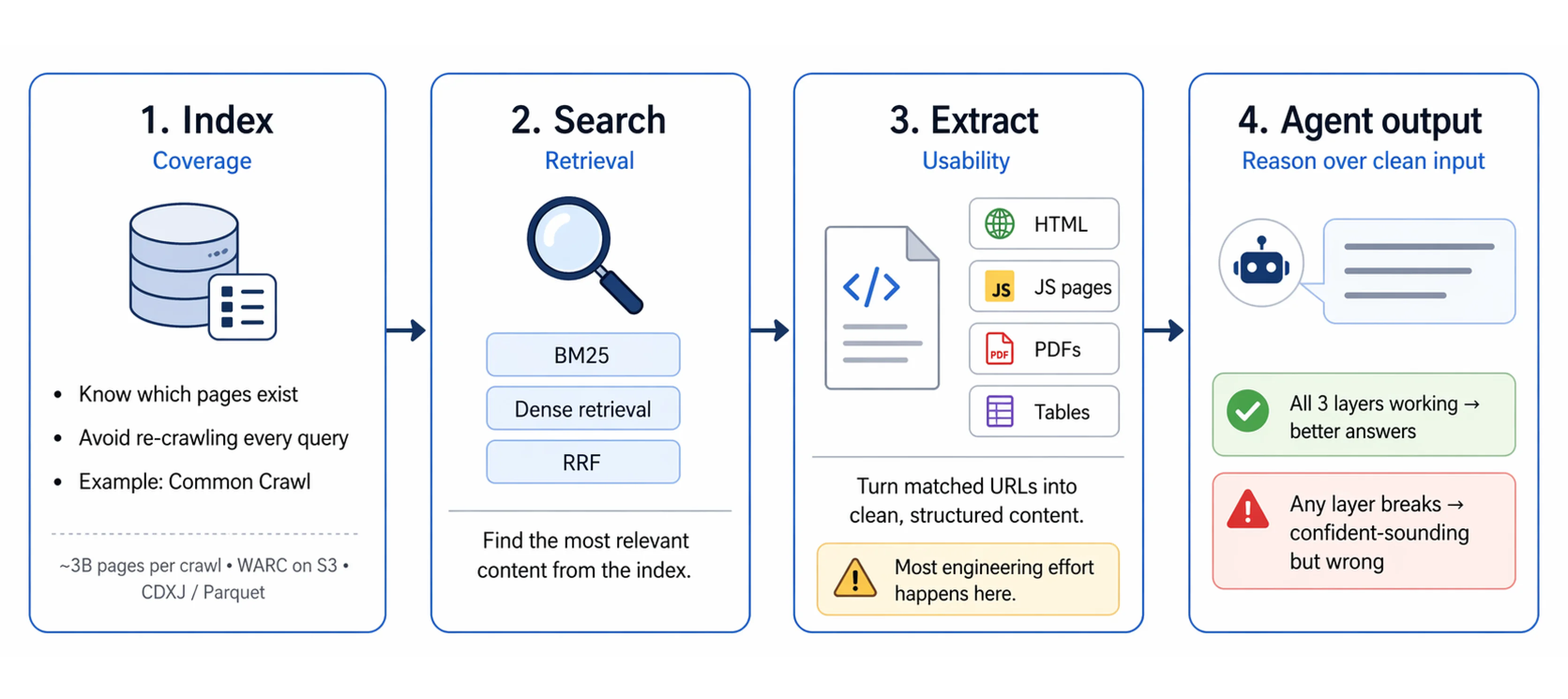
Index is about coverage. Which pages exist? Where are they? An index lets you search without crawling from scratch on every query. Without a good index, you either miss content entirely or waste compute re-crawling the same pages repeatedly. Common Crawl provides an open baseline: 3 billion pages per crawl, stored as WARC files on S3, queryable via CDXJ index files or Apache Parquet for SQL-style analytics.
Search is about retrieval. Given a query, which content in the index is most relevant? This is the step where hybrid scoring matters. BM25 for exact matches. Dense retrieval for semantic queries. RRF to merge both ranked lists cleanly. Getting search right means a well-indexed corpus actually surfaces the right content for each query.
Extract is about usability. A URL isn't the same as usable content. Raw HTML contains noise. JavaScript-rendered pages need a headless browser. PDFs need a parser. Tables and structured data need special handling. The extracted content has to be clean, well-structured, and in a format the model can reason over.
This is where most developer time goes in practice. Crawling and indexing are solvable infrastructure problems. Clean extraction at scale across diverse page types is an ongoing engineering challenge. The quality of your agent's input is determined here. Every step downstream of extraction is constrained by what extraction produced.
Firecrawl handles search, scrape, and interact through one API, giving agents access to a web index built for accurate, verifiable retrieval: current, low-noise, and structured for the kinds of queries production AI systems actually run.
Should you build your own web index or use a search API?
Build your own index only when you need a corpus no provider covers or full control over ranking. For most AI products a search API costs less: crawling, rendering, deduplication, storage, and freshness monitoring are fixed costs that grow with coverage, and a provider spreads them across every customer.
| Factor | Build your own index | Use a search API |
|---|---|---|
| Upfront work | Crawler fleet, JS rendering, parsers, storage, ranking | An API key and a few lines of code |
| Freshness | You schedule and pay for every recrawl | Provider monitors change rates and recrawls |
| Coverage | Limited to what you crawl and can afford to store | Provider's full corpus, including dedicated indexes |
| Ranking control | Full: your signals, your weights | Provider's ranking, tuned through query parameters |
| Best fit | A private or niche corpus, or ranking that is your core product | Agents that need current, broad, or specialized web content |
Many teams end up in between. They start from Common Crawl for a historical corpus, call a search API for anything current, and use /crawl or /map plus /scrape to keep a private index of the specific sites they care about, with clean Markdown going into their own vector store.
Which web indexes does Firecrawl run?
Everything above describes an index in the abstract. Firecrawl runs dedicated indexes for multiple domains: one general web index and three domain-specific indexes for research, code, and government law. All four share one API.
| Index | What it covers | How to query it | Cost |
|---|---|---|---|
| Web index behind /search | The live web, weighted toward news, finance, docs, and research sources | /search | 2 credits per 10 results |
| Research Index | About 43 million paper abstracts from PubMed, bioRxiv, medRxiv, and arXiv | /search/research/papers | Free |
| Developer Index | 70 million+ READMEs, issues, merged pull requests, and docs pages | /search/developer or categories: ["developer"] | 2 credits per 10 results |
| Government & Legal Index | 30 million US federal, state, county, and city government pages | /search/gov or categories: ["gov"] | Free |
You can query every index without an API key to start; adding one raises your rate limits. With the Firecrawl CLI, each index is one command:
# General web index
firecrawl search "EU AI Act enforcement timeline" --limit 5

# Research Index
firecrawl research search-papers "CRISPR base editing off-target effects" --limit 10

# Developer Index
firecrawl developer "next.js middleware redirect loop" --limit 10

# Government & Legal Index
firecrawl gov "Austin mobile food vendor permit requirements" --limit 10
The web index behind /search. A curated index of the live web, weighted toward the sources agents ask about most (news, finance, government, documentation, research) and monitored for how often each page changes. Search returns the excerpts that answer the query by default, which is how agents using /search reach 94.7% on SimpleQA while reading about 10x fewer tokens than full pages. Add scrapeOptions when a result needs its whole page.
The Research Index. Roughly 43 million paper abstracts, most of them biomedical and life sciences papers from PubMed, bioRxiv, and medRxiv, alongside arXiv for physics, math, and computer science. Agents can search abstracts, read the passages inside a paper that answer a question, and expand to related papers and citations. Papers are addressable by arxiv:, pmid:, pmcid:, or doi: ids.
On alphaXiv's arXivQA benchmark it scored 53.3% recall against 45.4% for the next provider at comparable cost. The Life Sciences category, added in August 2026, reached 90% recall@10 on Firecrawl's paper-retrieval eval, and the whole index has been free to search since then. Query it through /search/research/papers. From November 16, 2026, categories: ["research"] on /search will search this index too; until then that category returns ordinary web results from academic sites.
The Developer Index. More than 70 million READMEs, GitHub issues, merged pull requests, and documentation pages, with most sources refreshed daily, so a coding agent gets the pull request that fixed a bug instead of a blog post about it. It leads Firecrawl's open DevDex benchmark at 63.1% Recall@10. Reach it with /search/developer, categories: ["developer"] as the only category on /search, or the firecrawl_developer_search tool in the MCP server.
The Government & Legal Index. Launched in October 2026, it covers 30 million US government pages: statutes, regulations, court opinions, filings, and agency guidance at the federal and state level, plus municipal codes, zoning ordinances, permit requirements, and fee schedules from counties and cities. It also links pages to the laws and cases they cite. On the Legal Retrieval Benchmark, it puts the official document first on 76.2% of 581 legal research requests, ahead of Exa at 59.6% and Parallel at 54.2%.
Searches are free and use no credits. /search/gov takes optional filters for jurisdiction, court, courtType, cites, and domain, and the same index is available as categories: ["gov"] on /search, as firecrawl_gov_search in the MCP server, and in ChatGPT and Claude through the Firecrawl plugin. The index is US-only, and a match is not proof that a rule is current, so agents should check the source's jurisdiction and effective date before relying on it.
All four sit inside Firecrawl Alexandria, which is where the indexes meet everything an index cannot hold.
What is Firecrawl Alexandria?
Firecrawl Alexandria is a library of data providers that AI agents reach through the Firecrawl API, MCP server, and CLI. It brings four kinds of source together with the live web:
- Firecrawl's own indexes, the four described above: the general web index plus the Research, Developer, and Government & Legal indexes.
- Official data providers such as SEC EDGAR, FRED, the World Bank, IMF Data, and Companies House.
- Licensed publishers such as Fiscal.ai for company financials, Benzinga for financial news, Particle for podcast transcripts, and FullEnrich for people and company profiles.
- Site-specific connectors such as the Wayback Machine, Shopify Catalog, and Greenhouse job boards.
Firecrawl Alexandria launched in September 2026, and Firecrawl is still adding providers and building more indexes. It works in ChatGPT, Codex, Claude, and Claude Code through the Firecrawl plugin, and in Gemini and ADK agents through the Firecrawl MCP server.
The reason it belongs in an article about web indexes is that a web index, however good, can only hold what a crawler can fetch and parse. A company's standardized financial statements, a podcast's transcript, the filings behind a ticker, or how a page looked three years ago live with a provider, behind that provider's own API, pricing, and format.
Firecrawl Alexandria turns each of those into a tool with a published contract, so an agent discovers, inspects, and runs it the same way for every provider.
Discovery happens inside the search call. Add alexandria to sources and the response carries a tools array next to the web results, each tool naming its provider and capability, describing when to use it, and listing its price in credits.
results = firecrawl.search(
    "Nvidia quarterly filings and earnings transcripts",
    sources=["web", "alexandria"],
    limit=5,
)

for page in results.web or []:
    print("page:", page.title, page.url)

for tool in results.tools or []:
    print("tool:", tool.provider, tool.capability, tool.description)
Running a tool is a scrape call with an alexandria block (provider, capability, options) in place of a URL, and the record comes back under alexandria[0].data. Firecrawl calls this Universal Scrape: the same /scrape endpoint reads web pages, PDFs, and other files by URL, or runs a supported provider capability, with one key and one credit balance.
Finding tools costs nothing. Running one is billed at the price the tool lists, some licensed publishers require an organization admin to accept their terms once before the first call, and the whole feature needs an API key on a team where it is enabled.
In Firecrawl's evaluation across 845 tasks with the same model and prompts and blind AI judging, agents using Firecrawl Alexandria scored 21% higher on answer quality than agents using built-in web tools.
That is the practical answer to the freshness, coverage, and noise problems this article has described: an agent that can pick the right index or provider for the question instead of hoping the general web holds it.
Your agent is only as smart as your index: build with Firecrawl /search
If you're building AI products, your agent's quality ceiling is the quality of the index it reads from. Freshness, structure, noise level, and chunking strategy all set constraints that no amount of prompt engineering can overcome. The pipeline that matters isn't model selection. It's data quality at the index level.
The easiest way to start is with Firecrawl's Search API: query a web index built for agents, get back clean, structured results your model can actually use, and skip the infrastructure work of crawling, parsing, and chunking yourself. You don't need an API key to try it: run npx firecrawl-cli@latest or connect the keyless MCP server at https://mcp.firecrawl.dev/v2/mcp, free within a daily per-IP limit.
When a question belongs to one domain, send it to the index built for that domain: the Developer Index for code, the Research Index for papers, and the Government & Legal Index for US law. With alexandria in sources, the same search call also returns the official APIs and licensed publishers in Firecrawl Alexandria as tools next to the web results.
Use Firecrawl in your agent
Add Firecrawl to ChatGPT, Claude, Cursor and more in one click.
Frequently Asked Questions
What is the difference between crawling and indexing?
Crawling is the discovery step. A bot follows links, downloads pages, and passes raw content downstream. Indexing is the processing step: content is parsed, normalized, stored in a data structure that supports fast retrieval, and made queryable. They run as separate, asynchronous stages in production systems. You can crawl without indexing (a one-time scrape) and re-index without re-crawling (re-embedding previously downloaded text with a new embedding model).
How long does it take Google to index a new page?
Anywhere from a few hours to several weeks. The main factors are crawl budget, whether the URL is in a sitemap, how many internal links point to it, and the site's historical crawl frequency. You can request indexing via Google Search Console. AI-generated content is indexed at an average of 36 days based on 2025 data, treated on the same timeline as any other content.
Can JavaScript-rendered content be indexed?
Googlebot renders JavaScript, but with a documented delay. Light sites wait minutes to hours. Heavy SPAs can wait days to weeks. Content that only appears after user interaction (clicking tabs, scrolling, expanding accordions) may never be rendered at all because Googlebot does not interact with pages. For AI agent pipelines, headless browser rendering via Playwright or Puppeteer is the reliable solution for JS-heavy content.
What is the difference between a search index and a vector index?
A search index (inverted index) maps terms to documents for fast keyword lookup. A vector index stores dense embeddings and supports approximate nearest-neighbor search: find documents whose meaning is closest to this query. Inverted indexes are faster and more interpretable. Vector indexes handle paraphrase, synonyms, and conceptual similarity. Production AI retrieval systems use both in a hybrid configuration, merging BM25 scores and vector similarity scores via Reciprocal Rank Fusion to get precision from keywords and coverage from semantics.
How do AI agents use web indexes?
AI agents use web indexes through the RAG (Retrieval-Augmented Generation) pattern. Given a query, the agent retrieves the top-k most relevant chunks from the index and injects them into the model's context. The model generates a response grounded in retrieved content. Advanced agents run multiple retrieval passes: 3-6 LLM calls for query decomposition and 2-4 retrieval passes for iterative refinement. Index quality sets the ceiling. Freshness, noise level, chunk quality, and embedding model all determine what the agent can accurately answer.
Does Google penalize AI-generated content?
No. Google evaluates all content on the same criteria: quality, helpfulness, and E-E-A-T, regardless of how it was produced. What Google targets is Scaled Content Abuse: high-volume, low-originality, unedited content created to manipulate rankings. SpamBrain detects quality signals and manipulation intent, not AI origin. Well-crafted AI content with genuine value is treated the same as human-written content.
What does freshness mean for a web index, and why does it matter more for AI?
Freshness is how recently the index reflects the current state of a page. For traditional search, slightly stale content is tolerable. Users see the date and can judge. For AI agents, staleness is invisible. The model produces a confident-sounding answer from six-month-old data with no indication that the data is outdated. For use cases involving pricing, compliance, availability, or recent events, a stale index does not just produce a worse result. It produces a wrong one that looks right.
What causes a page to not get indexed?
The most common causes: blocked by robots.txt, carries a noindex directive, no inbound links and not in any sitemap, content requires sign-in or a subscription to view, duplicate content that was canonicalized away, requires JavaScript that the crawler does not execute, or crawl budget was exhausted before the page was reached. For AI-specific pipelines, rate limiting and dynamic content are additional challenges that headless browsers must handle.
Why does my AI agent give wrong answers even when the right information is online?
Almost always an index quality problem, not a model problem. The three most common causes: the page exists but the crawler never reached it (coverage gap); the page was crawled but extraction left it noisy with boilerplate, which produced a bad embedding that never surfaces in retrieval (noise problem); or the page was chunked at a boundary that split the answer across two chunks, neither of which scores high enough on its own (chunking problem). Prompt engineering does not fix any of these. The answer is earlier in the pipeline.
Which web indexes does Firecrawl run?
Four: one general index and three dedicated to a single domain. The general web index behind the search endpoint covers the live web. The Research Index holds roughly 43 million paper abstracts from PubMed, bioRxiv, medRxiv, and arXiv, with tools to read passages and follow citations. The Developer Index holds more than 70 million READMEs, issues, merged pull requests, and documentation pages. The Government & Legal Index covers 30 million US government pages, from federal statutes and court opinions to city codes and permit fee schedules. Research and Government & Legal searches are free, and you can query all four without an API key to start. All four sit inside Firecrawl Alexandria.
What is a domain-specific web index?
A domain-specific web index covers one body of content, such as scientific papers, code repositories, or government law, instead of the whole web. Narrowing the corpus removes the summaries and SEO pages that compete with primary sources, and it lets the index store fields a general index ignores: DOIs and PubMed IDs for papers, jurisdictions and citations for laws, issues and pull requests for code. Agents can then filter on those fields and get the original source ranked first.
Is a web index the same as a search index?
Every web index is a search index, but not every search index covers the web. A search index is any data structure built for fast lookup, including a site's product search or a company's document store. A web index is a search index built by crawling publicly accessible web pages. The phrase web index is also sometimes used for a site's homepage file, index.html, which is unrelated to search.
What is Firecrawl Alexandria?
Firecrawl Alexandria is a library of data providers that AI agents reach through the Firecrawl API, MCP server, and CLI. It brings official data providers such as SEC EDGAR, FRED, and the World Bank, licensed publishers such as Fiscal.ai, Benzinga, and Particle, site-specific connectors, and Firecrawl's own Research, Developer, and Government indexes together with the live web. Add alexandria to the sources parameter of a search call and the response carries a tools array next to the web results, with each tool naming its provider and capability, describing when to use it, and listing its price in credits.