

PHP 8.5 brings Zend Engine 4.5, the pipe operator, the new uri extension for URL parsing (built on the always-on lexbor library) and OPcache compiled into every build. It’s available on Ubuntu 24.04 through the Ondrej Sury PPA, which tracks PHP releases within days of their official release.
This guide covers installing PHP 8.5 on Ubuntu 24.04 LTS with all common extensions, configuring PHP-FPM with Nginx, tuning OPcache and JIT for production, and checking that the build you run is patched against PHP2Shell. Every install step below was re-run in October 2026 on a fresh Ubuntu 24.04 system against PHP 8.5.12 from the PPA, the build that fixes both PHP2Shell CVEs.
Prerequisites
- Ubuntu 24.04 LTS with sudo access
- At least 512 MB RAM (1 GB+ for PHP-FPM with multiple workers)
The PPA builds for Ubuntu 24.04 and 22.04 only. On Ubuntu 26.04 it has no build at all, so apt update fails with E: The repository 'https://ppa.launchpadcontent.net/ondrej/php/ubuntu resolute Release' does not have a Release file. You don’t need it there anyway, because 26.04 ships PHP 8.5 in its own archive: follow the native PHP 8.5 install on Ubuntu 26.04 instead. Ubuntu 20.04 is worse off: the PPA index for focal is now empty, and the archive’s PHP 7.4 fix for PHP2Shell is only in Ubuntu Pro, so move those apps to 24.04 or 26.04.
Step 1: Add the Ondrej Sury PHP PPA
Ubuntu 24.04 ships PHP 8.3 in its default repos. For PHP 8.5, add the Ondrej Sury PPA which is the de facto standard source for PHP on Ubuntu and Debian:
sudo apt update
sudo apt install -y software-properties-common apt-transport-https
sudo add-apt-repository -y ppa:ondrej/php
sudo apt update
Verify PHP 8.5 packages are available:
apt-cache search php8.5 | head -10The first ten package names from the PPA should all carry the php8.5 prefix.
libapache2-mod-php8.5 - server-side, HTML-embedded scripting language (Apache 2 module)
libphp8.5-embed - HTML-embedded scripting language (Embedded SAPI library)
php8.5 - server-side, HTML-embedded scripting language (metapackage)
php8.5-amqp - AMQP extension for PHP
php8.5-apcu - APC User Cache for PHP
php8.5-ast - AST extension for PHP 7
php8.5-bcmath - Bcmath module for PHP
php8.5-bz2 - bzip2 module for PHP
php8.5-cgi - server-side, HTML-embedded scripting language (CGI binary)
php8.5-cli - command-line interpreter for the PHP scripting language
An empty result means the PPA was not added or apt update did not run after it, so repeat the block above before moving on.
Step 2: Install PHP 8.5 with Common Extensions
Install the FPM build together with the extensions most PHP applications expect. Listing php8.5-fpm explicitly also stops the php8.5 metapackage from pulling in Apache and mod_php:
sudo apt install -y php8.5 php8.5-fpm php8.5-cli php8.5-common \
  php8.5-mysql php8.5-pgsql php8.5-curl php8.5-gd php8.5-mbstring \
  php8.5-xml php8.5-zip php8.5-intl php8.5-redis \
  php8.5-bcmath php8.5-soap php8.5-ldap php8.5-imagick
OPcache is compiled into PHP 8.5 itself, so there’s no separate php8.5-opcache package to add. Asking apt for one only returns E: Couldn't find any package by glob 'php8.5-opcache', which is why it’s missing from the list above.
Here’s what each extension is for:
| Extension | Used By |
|---|---|
| mysql, pgsql | WordPress, Laravel, Drupal (database drivers) |
| curl | API calls, HTTP clients |
| gd, imagick | Image processing (thumbnails, avatars, charts) |
| mbstring | Unicode/UTF-8 string handling |
| xml | RSS feeds, SOAP, SVG processing |
| zip | Plugin/theme uploads, file exports |
| intl | Localization, number/date formatting |
| redis | Session storage, caching (WooCommerce, Magento) |
| bcmath | Financial calculations, cryptocurrency |
| soap | Legacy SOAP web service integrations |
| ldap | Active Directory / LDAP authentication |
Step 3: Verify the Installation
Check the CLI version first, since it also shows the build date we use for the PHP2Shell check further down.
php8.5 --versionThe build date matters as much as the version here. Ours is the 21 October 2026 build from the PPA.
PHP 8.5.12 (cli) (built: Oct 21 2026 14:37:30) (NTS)
Copyright (c) The PHP Group
Built by Ubuntu
Zend Engine v4.5.12, Copyright (c) Zend Technologies
    with Zend OPcache v8.5.12, Copyright (c), by Zend Technologies
Count the loaded modules next.
php8.5 -m | wc -lWith the Step 2 extensions our list ran to 64 lines, headers included.
64Print the start of the list to see the names.
php8.5 -m | head -20The extensions you installed (gd, imagick, intl and the rest) appear alongside the built in ones.
[PHP Modules]
bcmath
calendar
Core
ctype
curl
date
dom
exif
FFI
fileinfo
filter
ftp
gd
gettext
hash
iconv
igbinary
imagick
intl
New in PHP 8.5, the uri extension and the lexbor library behind it are always loaded:
php8.5 -m | grep -E 'uri|lexbor'Both names come back.
lexbor
uri
The CLI side is done at this point. Before any of it serves web traffic, check that the build you just pulled is the patched one.
Confirm the build is patched against PHP2Shell (CVE-2026-109618, CVE-2026-109619)
PHP2Shell is a pair of critical remote code execution bugs in PHP itself, both rated CVSS v4.0 9.2 in PHP’s 20 October pre-announcement, that PHP fixed on 21 October 2026 in 8.5.12, 8.4.27, 8.3.36 and 8.2.35. The Ondrej PPA already ships the fixed 8.5 build for Ubuntu 24.04, so a fresh install from Step 2 is patched, but a server you set up before that date stays vulnerable until you upgrade it. The package changelog is the proof because it names both CVE IDs:
zgrep -E 'CVE-2026-10961[89]' /usr/share/doc/php8.5-common/changelog.Debian.gzA patched build prints the changelog line that carries the fix. No output usually means the installed package predates it, with one exception: minimized cloud and container images strip /usr/share/doc, so the file isn’t there to search. This check needs no docs, only the package database:
dpkg --compare-versions "$(dpkg-query -W -f='${Version}' php8.5-common)" ge 8.5.12 && echo patched || echo VULNERABLEIt prints patched on any build at 8.5.12 or later. On a server with the docs in place, the changelog grep above prints the line that carries the fix:
+ (CVE-2026-109618, CVE-2026-109619): Avoid state corruption viaOn the PPA the version number tells the truth as well, because Ondrej moves to the fixed upstream release instead of backporting into an old one. Ubuntu’s own packages don’t: the stock php8.3 on 24.04 is also fixed, in 8.3.6-0ubuntu0.24.04.13, yet php -v still says 8.3.6, so judge that one by the package version. For the PPA build, anything at 8.5.12 or later is safe:
dpkg-query -W php8.5-common php8.5-fpmBoth packages should show the same fixed version.
php8.5-common	8.5.12-1+ubuntu24.04.1+deb.sury.org+1
php8.5-fpm	8.5.12-1+ubuntu24.04.1+deb.sury.org+1
On a fresh install you can stop here and carry on with Step 4. The rest of this section is for an existing server that has been serving PHP 8.5 for a while. Upgrade every installed 8.5 package from the PPA. The quotes only stop the shell from expanding the pattern; --only-upgrade is what limits apt to packages you already have, so the pattern (which also catches the php8.5 metapackage) and the two separately named libraries, the mod_php module and libphp8.5-embed, never pull in anything new:
sudo apt update
sudo apt install --only-upgrade -y 'php8.5*' libapache2-mod-php8.5 libphp8.5-embed
Our lab server already had the fixed build, so apt had nothing to do and skipped the module it didn’t have:
Skipping libapache2-mod-php8.5, it is not installed and only upgrades are requested.
Skipping libphp8.5-embed, it is not installed and only upgrades are requested.
0 upgraded, 0 newly installed, 0 to remove and 0 not upgraded.
New packages on disk don’t help until the old workers are gone, so restart PHP yourself:
sudo systemctl restart php8.5-fpmIf Apache serves PHP through mod_php (Option B in Step 9), the PHP code lives inside the Apache workers, so restart Apache too. Skip this on a server without Apache. Long-running PHP CLI processes, such as queue workers under supervisor or systemd, keep the old code in memory as well, so restart those too:
sudo systemctl restart apache2To prove the running service is the new one, compare its start time with the time dpkg installed or upgraded the packages. The first command searches the current and rotated dpkg logs for the package times and sorts them, because the shell expands dpkg.log* alphabetically and an old rotated log would otherwise end up last. The second prints the service start:
zgrep -hE ' (install|upgrade) php8.5-(common|fpm):' /var/log/dpkg.log* | sort | tail -2
systemctl show -p ActiveEnterTimestamp php8.5-fpm
On our lab server the packages went in at 15:31 and php8.5-fpm started at 15:32, so the running workers load the fixed build. On a server that took the update, the dpkg lines say upgrade instead of install, and the service start must still come after them. With mod_php, run the same check against apache2:
2026-10-22 15:31:03 install php8.5-common:amd64 <none> 8.5.12-1+ubuntu24.04.1+deb.sury.org+1
2026-10-22 15:31:04 install php8.5-fpm:amd64 <none> 8.5.12-1+ubuntu24.04.1+deb.sury.org+1
ActiveEnterTimestamp=Thu 2026-10-22 15:32:08 UTC
The most direct proof is to ask the web server itself. Because the PPA moves to the fixed upstream version, a probe page that prints PHP_VERSION and PHP_SAPI must report 8.5.12 or later:
echo '<?php echo PHP_VERSION, " ", PHP_SAPI, PHP_EOL;' | sudo tee /var/www/html/ver.php
curl -s http://127.0.0.1/ver.php
sudo rm -f /var/www/html/ver.php
The 127.0.0.1 request reaches the default site. On a server with several sites, put ver.php in the docroot of the site you are checking and request it by that host name instead, since each vhost can point at a different PHP handler. Behind Nginx or Apache with PHP-FPM the page answers 8.5.12 fpm-fcgi; under mod_php it answers 8.5.12 apache2handler. We got both, one per handler, while testing Steps 8 and 9. For other PHP branches, Ubuntu 22.04 and 26.04, and what to do when no patched build exists, see patching PHP2Shell on Ubuntu.
Step 4: Enable and Start PHP-FPM
Enable the FPM service so it starts at boot:
sudo systemctl enable --now php8.5-fpmVerify it’s running:
sudo systemctl status php8.5-fpmLook for active (running) and the pool status line.
● php8.5-fpm.service - The PHP 8.5 FastCGI Process Manager
     Loaded: loaded (/usr/lib/systemd/system/php8.5-fpm.service; enabled; preset: enabled)
     Active: active (running) since Thu 2026-10-22 15:32:08 UTC; 16s ago
       Docs: man:php-fpm8.5(8)
   Main PID: 15185 (php-fpm8.5)
     Status: "Processes active: 0, idle: 2, Requests: 0, slow: 0, Traffic: 0.00req/sec"
Check the FPM socket:
ls -la /run/php/php8.5-fpm.sockThe socket belongs to www-data, which is the user Nginx runs as on Ubuntu.
srw-rw---- 1 www-data www-data 0 Oct 22 15:32 /run/php/php8.5-fpm.sockNginx connects to this path in Step 7, so note it down.
Step 5: Configure php.ini for Production
The default php.ini values are conservative. For web applications, adjust these in /etc/php/8.5/fpm/php.ini:
sudo vim /etc/php/8.5/fpm/php.iniKey settings to change:
; Memory and execution limits
memory_limit = 256M
max_execution_time = 60
max_input_time = 60
max_input_vars = 5000

; File uploads
upload_max_filesize = 64M
post_max_size = 64M

; Error handling (production)
display_errors = Off
log_errors = On

; Timezone
date.timezone = UTC

; OPcache (enabled by default in 8.5)
opcache.enable = 1
opcache.memory_consumption = 256
opcache.interned_strings_buffer = 16
opcache.max_accelerated_files = 20000
opcache.validate_timestamps = 0
opcache.save_comments = 1

; JIT is off by default (opcache.jit = disable); tracing turns it on
opcache.jit = tracing
opcache.jit_buffer_size = 64M
Leave error_log unset. The tempting /var/log/php8.5-fpm.log is the FPM master’s own log, owned by root with mode 600, and our test page’s error_log() call never reached it. With the default, PHP errors go back to the web server instead, and Nginx writes them to /var/log/nginx/error.log as FastCGI sent in stderr: "PHP message: ..." lines.
Setting opcache.validate_timestamps = 0 means PHP won’t check whether files changed on every request, which is a significant performance gain. Restart PHP-FPM after deploying new code instead. Set it to 1 during development.
Restart PHP-FPM to apply:
sudo systemctl restart php8.5-fpmFPM reads php.ini only at start, so none of these values apply until that restart.
Step 6: Configure PHP-FPM Pool
Edit the default pool at /etc/php/8.5/fpm/pool.d/www.conf:
sudo vim /etc/php/8.5/fpm/pool.d/www.confAdjust the process manager settings based on your server RAM:
; For a 2GB RAM server
pm = dynamic
pm.max_children = 20
pm.start_servers = 5
pm.min_spare_servers = 3
pm.max_spare_servers = 10
pm.max_requests = 500

; Enable slow log for debugging
slowlog = /var/log/php8.5-fpm-slow.log
request_slowlog_timeout = 5s

; Status page (useful for monitoring)
pm.status_path = /fpm-status
ping.path = /fpm-ping
Process manager modes explained:
dynamic: spawns workers on demand between min/max. Best for most workloadsstatic: fixed number of workers (setpm.max_childrenonly). Best for predictable high trafficondemand: no idle workers, spawns on request. Best for low-traffic sites sharing a server
Restart php8.5-fpm so the new limits and the status and ping paths take effect:
sudo systemctl restart php8.5-fpmSkip this restart and /fpm-ping keeps returning 404 in Step 8, because the running pool never read the new ping.path. Next, size pm.max_children by dividing the RAM you can give PHP by the average PHP process size. This prints the current average per worker:
ps -eo rss,comm | grep php-fpm | awk '{sum+=$1; n++} END {print sum/n/1024 " MB per process"}'Our idle pool printed 22.8678 MB per process right after the restart, master process included. Measure it again under real traffic, because workers grow as they serve requests, and adjust the pool if the numbers no longer fit your RAM.
Step 7: Integrate with Nginx
Install Nginx from the Ubuntu archive:
sudo apt install -y nginxOpen the default server block so it passes PHP requests to FPM:
sudo vim /etc/nginx/sites-available/defaultReplace its contents with this configuration. The second PHP location exposes the FPM status and ping pages from Step 6 to local requests only; without it those paths return 404, and without the allow/deny pair anyone could read your pool stats:
server {
    listen 80 default_server;
    listen [::]:80 default_server;
    root /var/www/html;
    index index.php index.html;
    server_name _;

    location / {
        try_files $uri $uri/ /index.php?$query_string;
    }

    location ~ \.php$ {
        include snippets/fastcgi-php.conf;
        fastcgi_pass unix:/run/php/php8.5-fpm.sock;
        fastcgi_param SCRIPT_FILENAME $document_root$fastcgi_script_name;
    }

    # FPM status and ping pages, local requests only
    location ~ ^/(fpm-status|fpm-ping)$ {
        allow 127.0.0.1;
        deny all;
        include fastcgi_params;
        fastcgi_param SCRIPT_FILENAME $document_root$fastcgi_script_name;
        fastcgi_pass unix:/run/php/php8.5-fpm.sock;
    }

    # Deny access to hidden files
    location ~ /\. {
        deny all;
    }
}
Test the syntax and restart Nginx only if the test passes:
sudo nginx -t && sudo systemctl restart nginxBoth lines of the test should report success.
nginx: the configuration file /etc/nginx/nginx.conf syntax is ok
nginx: configuration file /etc/nginx/nginx.conf test is successful
A syntax error leaves the running Nginx untouched, because the && skips the restart.
Step 8: Test PHP with Nginx
Create a test page:
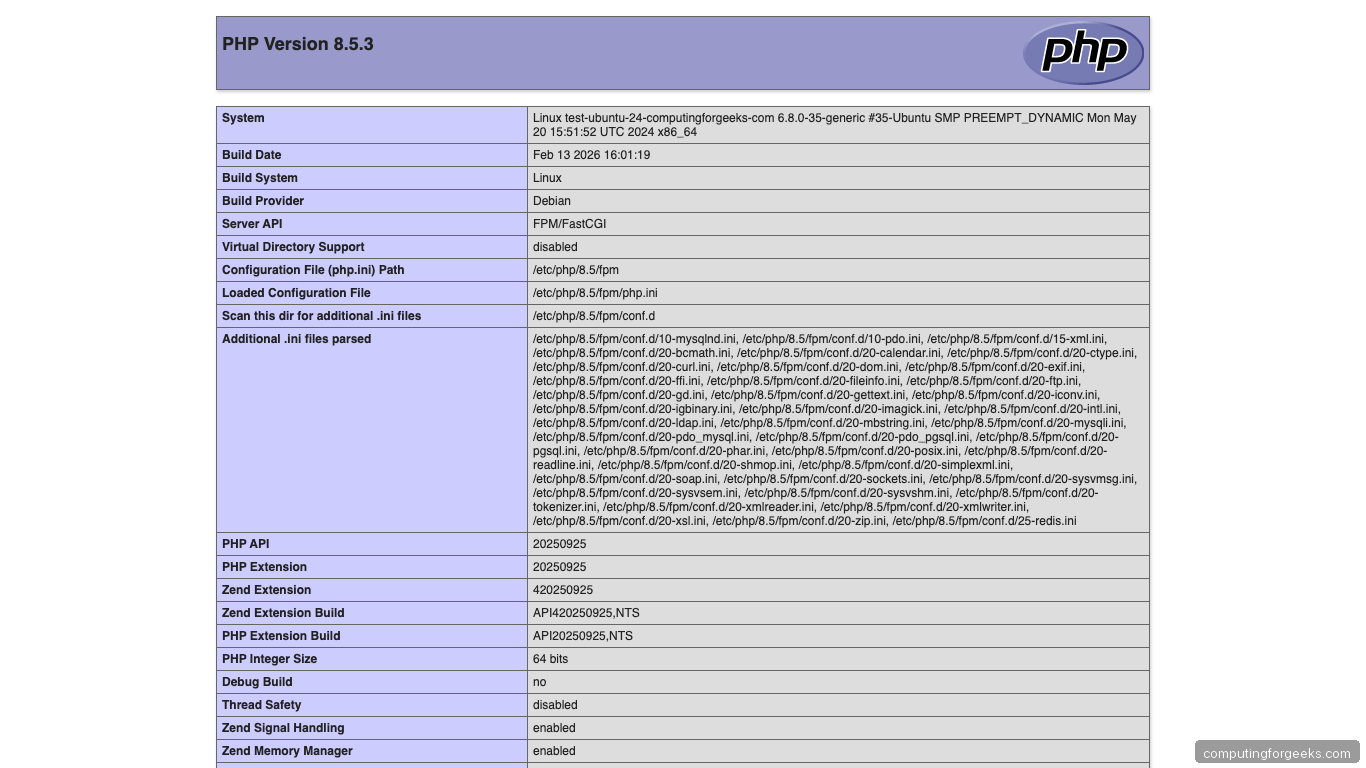
echo '<?php phpinfo(); ?>' | sudo tee /var/www/html/info.phpOpen http://10.0.1.50/info.php in your browser, using your own server’s address. You should see the PHP 8.5 information page with FPM/FastCGI as the Server API. The screenshot below is from our March 2026 run on PHP 8.5.3, a build from before the PHP2Shell fix; on a current install the version line reads 8.5.12 or later, which is what our October 2026 run showed:
The FPM ping page from Step 6 should answer through Nginx from the server itself:
curl -s http://127.0.0.1/fpm-pingIt replies pong, and /fpm-status returns the pool, process manager and start time. From any other address both paths return 403, which is what the deny all line is for.
Remove the test page after verifying:
sudo rm -f /var/www/html/info.phpA phpinfo page left on a public server hands out your PHP version, paths and loaded modules to anyone who asks, so don’t skip this.
Step 9: Integrate with Apache (Alternative)
If you use Apache instead of Nginx, stop Nginx first (sudo systemctl disable --now nginx) because both want port 80. Option A runs PHP through the same FPM pool, and Apache’s proxy_fcgi module is all it needs:
sudo apt install -y apache2
sudo a2enmod proxy_fcgi setenvif
sudo a2enconf php8.5-fpm
sudo systemctl restart apache2
Option B is mod_php, which loads PHP into every Apache worker. It stands on its own, so install Apache and the module together. If you set up Option A on this server earlier, run sudo a2disconf php8.5-fpm first so the two handlers don’t compete for .php files:
sudo apt install -y apache2 libapache2-mod-php8.5
sudo systemctl restart apache2
The package restarts Apache itself while it switches the MPM, so any restart within about 10 seconds of the install can trip systemd’s start limit. If the restart fails with Job for apache2.service failed and the journal shows start-limit-hit, run sudo systemctl reset-failed apache2 && sudo systemctl start apache2 to bring it back.
Going the other way, from mod_php to FPM, set up the FPM side first and disable mod_php last, so a failure part way never leaves Apache without a PHP handler. The first command also installs php8.5-fpm in case the server only ever ran mod_php. Running a2dismod on its own would leave Apache serving PHP source as plain text:
sudo apt install -y php8.5-fpm && sudo a2enmod proxy_fcgi setenvif && sudo a2enconf php8.5-fpm && sudo a2dismod php8.5 mpm_prefork && sudo a2enmod mpm_event && sudo systemctl restart apache2Confirm the MPM afterwards with a2query -M. It should print event, the same MPM Option A runs on from the start, and the probe page from Step 3 should answer 8.5.12 fpm-fcgi.
Installing libapache2-mod-php8.5 switches Apache from the event MPM to prefork on its own, and mod_php reads /etc/php/8.5/apache2/php.ini, not the FPM file you tuned in Step 5. PHP-FPM is the better choice: it separates the PHP process from Apache, allows independent scaling, and keeps the threaded event MPM. It also matters for PHP2Shell: PHP’s advisory for CVE-2026-109618 says complete remote code execution was validated against mod_php with default input and memory limits.
Step 10: Set PHP 8.5 as Default Version
If you have multiple PHP versions installed, set 8.5 as the default CLI version:
sudo update-alternatives --set php /usr/bin/php8.5The phpize and php-config alternatives exist only once php8.5-dev is installed. Without it, update-alternatives stops with error: no alternatives for phpize, so add the dev package first if you build extensions with PECL:
sudo apt install -y php8.5-dev
sudo update-alternatives --set phpize /usr/bin/phpize8.5
sudo update-alternatives --set php-config /usr/bin/php-config8.5
Confirm the default:
php --versionThe unversioned php command now reports 8.5.
PHP 8.5.12 (cli) (built: Oct 21 2026 14:37:30) (NTS)To switch between versions:
sudo update-alternatives --config phpWith PHP 8.4 installed next to 8.5, the menu lists both and marks the current choice with an asterisk:
There are 2 choices for the alternative php (providing /usr/bin/php).

  Selection    Path             Priority   Status
------------------------------------------------------------
  0            /usr/bin/php8.5   85        auto mode
  1            /usr/bin/php8.4   84        manual mode
* 2            /usr/bin/php8.5   85        manual mode

Press <enter> to keep the current choice[*], or type selection number:
This only changes the CLI. Each FPM version keeps its own service and socket, so Nginx keeps using whichever socket its config names.
What’s New in PHP 8.5
Key changes from PHP 8.4:
- uri extension: built-in URL parsing and normalization following RFC 3986 and the WHATWG URL standard, powered by uriparser and lexbor
- Pipe operator:
$result = $value |> strtolower(...) |> trim(...);for left-to-right chaining of callables - Clone with:
clone()clones an object and updates properties in the same call - #[\NoDiscard] attribute: warns when a function’s return value is ignored
- array_first() and array_last(): return the first or last value of an array
- OPcache always compiled in: no longer optional at build time, which is why Ubuntu has no php8.5-opcache package
Troubleshooting
502 Bad Gateway after restarting Nginx:
PHP-FPM isn’t running or the socket path is wrong. Check: sudo systemctl status php8.5-fpm and verify the socket path in your Nginx config matches /run/php/php8.5-fpm.sock.
“Call to undefined function” errors:
A required extension isn’t installed. Check which extensions are loaded with php8.5 -m and install missing ones with sudo apt install php8.5-EXTENSION.
php.ini changes not taking effect:
You edited the CLI php.ini instead of the FPM one. FPM config is at /etc/php/8.5/fpm/php.ini, CLI is at /etc/php/8.5/cli/php.ini. Always restart FPM after changes: sudo systemctl restart php8.5-fpm
OPcache or JIT not active:
The php8.5 CLI is the wrong place to check, because OPcache is disabled for CLI by default and reports nothing useful there. Ask the FPM binary what it loads from its own php.ini instead:
sudo php-fpm8.5 -i | grep -E "^opcache.(enable|jit|jit_buffer_size) "On a stock install the output looks like this. OPcache is on and the 64 MB buffer is reserved, but opcache.jit => disable means the JIT stays off until you set opcache.jit = tracing from Step 5 and restart php8.5-fpm:
opcache.enable => On => On
opcache.jit => disable => disable
opcache.jit_buffer_size => 64M => 64M
If opcache.enable shows Off, set opcache.enable=1 in /etc/php/8.5/fpm/php.ini.
Multiple PHP versions conflicting:
List every PHP version that has packages installed, then stop the FPM services you no longer serve traffic from:
# List all installed PHP versions
dpkg -l | grep php | grep -E '^ii' | awk '{print $2}' | grep -oP 'php\d+\.\d+' | sort -u

# Disable old FPM versions
sudo systemctl disable --now php8.3-fpm
sudo systemctl disable --now php8.4-fpm
Every version left installed still needs its own PHP2Shell update, even when nothing serves traffic from it, so remove the ones you don’t use.
Conclusion
PHP 8.5 on Ubuntu 24.04 gives you the latest performance improvements and language features. For production WordPress, Laravel, or Drupal sites, enable OPcache with JIT tracing, tune pm.max_children based on your RAM, and set opcache.validate_timestamps=0 for maximum throughput. The PHP 8.5 upgrade from 8.4 is backward compatible for most applications, but test in staging first if you’re migrating from 8.3 or earlier.
Related guides:




