If you’re planning to rebuild your desk this Black Friday, a monitor is the purchase you can make today. Dell’s S2725QC 4K screen dropped from $349.99 on October 12 to $299.99 on Amazon, our lowest logged price, while most other picks on our lists sit at their normal prices. So the Black Friday desk setup deals worth waiting for haven’t started yet, and a few of the “deals” you’ll see now are reseller markups wearing a strikethrough.
We track 21 picks here across programming monitors, mice and mechanical keyboards, Thunderbolt docks that work on Linux, monitor light bars and Linux-friendly laptops. Each one comes from one of our buyer guides, such as the programming monitor guide and the Thunderbolt 4 dock guide for Linux, with a target price you can set an alert at. I re-read every Amazon price below on October 31, 2026, and the BenQ monitor pick again on November 4, checking the makers’ own stores both times. I rechecked the links in this post on November 6, 2026, and they still hold.
Buy these desk deals now and wait on the rest
Three picks we’d buy today dropped to the lowest price in our logs, a cheap light bar is holding its low, and one dock bundle costs well above its summer price. On October 31 these verdicts held, so you can act on them without waiting for November:
- You can buy the Dell S2725QC at $299.99 from Amazon, down from $349.99.
- You can buy the Samsung ViewFinity S8 S80HF at $589.99 from Amazon, down from $699.99.
- You can buy the Logitech MX Vertical at $74.99 from Amazon, down from $77.95.
- You can skip the Lenovo Thunderbolt 4 dock bundle at $308.99, about $59 over its summer price.
- You can buy the Yeelight Monitor Light Bar at $26.49, well under its $32.99 list price.
Black Friday falls on November 27 and Cyber Monday on November 30. Amazon hadn’t announced its 2026 Black Friday window on October 31 (its event page still carried the 2025 title), and in 2023 to 2025 its sale started 7 or 8 days before Black Friday, according to a tally of Amazon’s past event dates. That puts a likely start around November 19 or 20, which gives you nearly three weeks to set alerts at the buy-below prices in the table.
Check how these prices were tracked
Every October 31 Amazon price comes from Amazon’s Creators API, the product feed Amazon gives its affiliates, queried for the exact ASIN we link and the US buy box. That matters on desk gear, because the same monitor or mouse often has four or five listings and the cheap one is a different color, an older revision or a renewed unit. When a guide’s link went dead this autumn, we replaced it with the matching variant and logged both, so the history you see follows the product, not just the listing.
The older readings come from the sourcing logs we kept while writing each buyer guide: July and October for the docks, September and October for mice and keyboards, October 12 for monitors, October 25 for laptops and October 29 for light bars. Most are API readings, but the July dock figures are approximate prices seen on the listing, so treat them as a guide. A “lowest we recorded” figure is the lowest in those logs, not an all-time low, and a one-day spread on the light bars tells you less than a three-month spread on the docks. The buy-below column is our own target, a round number near the lowest reading or the maker’s store price, set lower where a list price suggests room to fall. Specs come from the makers’ product pages and Lenovo’s PSREF sheets, the same sources the guides cite.
Compare each deal price with its normal price
Read “normal” as the price most of our readings show and “lowest” as a price someone could already buy at. A Black Friday price is a deal for you only when it lands at or under the buy-below column:
| Pick | Normal price | Lowest we recorded | Oct 31, 2026 | Buy below | Verdict |
|---|---|---|---|---|---|
| Dell S2725QC 27″ 4K | $349.99 | $299.99 | $299.99 | $300 | Buy now |
| Samsung ViewFinity S8 S80HF 5K | $699.99 | $589.99 | $589.99 | $600 | Buy now |
| BenQ RD280U | $549.99 (list $599.99) | $549.99 | $549.99 | $500 | Fair now |
| Dell UltraSharp U2725QE | $638 to $669 (resellers) | $638.15 (Oct 12) | $668.90 | $640 | Wait |
| Dell UltraSharp U4025QW | $1,415 to $1,430 (Woot) | $1,414.99 | $1,414.99 | $1,350 | Wait |
| Logitech MX Master 4 | $119.99 | $118.00 | $118.00 (reseller) | $100 | Wait |
| Logitech MX Vertical | $77.95 (list $119.99) | $74.99 | $74.99 | $75 | Buy now |
| Logitech Lift (graphite) | $64.99 to $66.50 | $62.79 | $62.79 (reseller) | $60 | Fair now |
| Logitech MX Keys S | $119.99 | $119.99 | $119.99 | $100 | Wait |
| Keychron K8 Max | $124.99 | $93.74 (Sept, earlier listing) | $124.99 | $100 | Wait |
| Kinesis Advantage360 Pro | $479 (Amazon), $499 (Kinesis) | $479 | $479 | $479 | Fair now |
| CalDigit TS4 | $379.99 | $379.99 | $379.99, 5 left | $350 | Wait |
| Lenovo ThinkPad Universal TB4 Dock | About $250 (July) | About $250 | $308.99 (reseller bundle) | $260 | Do not pay |
| Kensington SD5700T | $239.97 | $151.99 (July, seller unknown) | $239.97 | $240 | Fair now (discontinued) |
| BenQ ScreenBar Pro | $139 | $139 | $139 | $120 | Wait |
| BenQ ScreenBar Halo 2 | $199 | $199 | $199 | $170 | Wait |
| BenQ ScreenBar | $109 | $109 | $109 | $90 | Wait |
| Yeelight Monitor Light Bar | $32.99 list | $26.49 | $26.49 | $27 | Buy now |
| ThinkPad T14 Gen 6 Intel (32GB) | $1,449.99 (list $1,649.99) | $1,449.99 | $1,449.99 | $1,350 | Wait |
| ThinkPad E14 Gen 7 AMD (16GB) | $1,019.99 | $1,019.99 | $1,019.99 | $1,020 | Fair now |
| Lenovo V15 G4 AMN (16GB) | $699.98 | $699.98 | $699.98 | $600 | Wait |
Two patterns stand out when you read down the table. The two biggest drops are monitors sold by Amazon itself rather than a reseller, worth $50 and $110. Logitech’s MX Vertical and Lift slipped by $3 to $4, which is a small move but enough to put the MX Vertical at its low. Keychron, Kinesis, BenQ’s light bars, the docks and the laptop resellers are flat against our last reading, so those are the ones to put on an alert rather than buy on October 31. The Kensington SD5700T is the odd one: Kensington has discontinued it, so the stock left on Amazon may run out before it gets cheaper.
Pick a programming monitor deal
Pick a monitor by how sharp text looks at the scale your desktop will use, not by the size of the discount. On GNOME, the default scale roughly follows pixel density, so a 27-inch 4K panel lands on a clean 150% and a 27-inch 5K panel on an even 200%. The programming monitor guide works through each panel’s scale and the cable it needs; the deals below are the five that matter this month.
One budget pick fell out of stock. The LG 27US550-W read “Currently unavailable” on Amazon on October 31, but LG’s own store had it at $229.99 against a $299.99 regular price that day, so you can buy it there if you want a plain 4K panel with no USB-C.
Dell S2725QC
Pick the S2725QC if you want a sharp 27-inch 4K screen with one USB-C cable to your laptop and you do not need a hub. It runs at 120 Hz, charges a laptop at 65 W over USB-C and lands on 150% scaling on GNOME. It was $349.99 sold by Amazon on October 12 and $299.99 on October 31.

Skip it if your desktop GPU only has DisplayPort outputs, because the S2725QC has two HDMI 2.1 ports and no DisplayPort. On an AMD card, full HDMI 2.1 bandwidth arrived in Linux 7.2 but stays off by default until Linux 7.4. On 7.2 or 7.3, a 4K 120 Hz signal falls back to YCbCr 4:2:0 and blurs text unless you enable it. At $299.99 this is the clearest buy on the page. Check the Dell S2725QC on Amazon.
Samsung ViewFinity S8 S80HF
Pick the S80HF if you read code all day and want the sharpest text you can get for under $600. It’s a 27-inch 5K panel (5120×2880), so GNOME uses an even 200% scale and older GTK3 and Java Swing apps stay crisp instead of blurring at a fractional scale. It also has 90 W USB-C, a KVM and DisplayPort 1.4.

Bandwidth is the catch. 5K at 60 Hz needs about 22 Gbps, which fits DisplayPort 1.4 but not a laptop USB-C port that only carries two lanes of video, so check your laptop before you buy. It’s also 60 Hz only. Sold by Amazon at $589.99 on October 31, against $699.99 on October 12, this is a real early discount. Check the Samsung S80HF on Amazon.
BenQ RD280U
The RD280U is the best overall pick in our monitor guide for programmers, and you’ll like it most if you want a taller screen. Its 28.2-inch 3:2 panel runs 3840×2560 at 60 Hz, so you see more lines of code than on a 16:9 panel, and it adds 90 W USB-C and a built-in KVM. Amazon had it at $549.99 against a $599.99 list price on October 12, October 31 and November 4, sold by BenQ’s own storefront.

Fans of 150% scaling on GNOME should look elsewhere: 2560 does not divide cleanly by 1.5, so you get 133% or 167%. Want 120 Hz? The RD280UG has the same panel size and resolution, but Amazon listed it as unavailable on November 4. BenQ’s own store had it in stock at $699.99, down from $759.99. That’s still above the $650 we’d wait for. BenQ also sold the RD280U for $549.99, so this is a steady price, not a Black Friday cut. It’s fair if you need a monitor now. If you can wait, set your alert at $500. Check the BenQ RD280U on Amazon.
Dell UltraSharp U2725QE
Choose the U2725QE if you want the monitor to be your laptop dock. It’s a 27-inch 4K IPS Black panel at 120 Hz with Thunderbolt 4 at 140 W, a KVM and 2.5GbE, so one cable carries video, charging and wired network. That hub is what you’re paying for, since the panel is the same 4K resolution as the S2725QC.

Both readings came from third-party sellers: $638.15 on October 12 and $668.90 from ARF Tech on October 31. That is a price going the wrong way, so wait for $640 or less, ideally from Dell or Amazon. Pass on it if you don’t need the hub, because the S2725QC costs less than half as much. Check the Dell U2725QE on Amazon.
Dell UltraSharp U4025QW
The U4025QW suits you if you want two full code windows side by side on one curved 39.7-inch screen. It runs 5120×2160 at 120 Hz with Thunderbolt 4 at 140 W, a KVM and 2.5GbE. Woot held the Amazon buy box at $1,429.99 on October 12 and $1,414.99 on October 31, so the price has barely moved.

Think twice if your GPU or laptop can’t do Display Stream Compression, because 5K2K at 120 Hz over one Thunderbolt cable depends on it, and NVIDIA’s Linux driver still has open flicker reports on single-cable DSC monitors. Wait for $1,350, and check who sells it, since a Woot listing has different return terms from Dell. Check the Dell U4025QW on Amazon.
Choose a mouse and keyboard that work on Linux
The part that trips Linux users up is software, not hardware. Every Logitech pick here works as a plain mouse or keyboard the moment you pair it, but Logi Options+, where you set gestures, haptics, button remaps and Smart Actions, has no Linux build. The community tool Solaar covers pairing, DPI and basic remaps, which is enough for most people. Keychron and Kinesis boards configure in the browser or in firmware, so they behave the same on every OS. Our mouse and keyboard guide for programming covers each one in depth.
Two picks from that guide aren’t broken out below because their prices simply match our last reading: the MX Ergo S trackball at $99.99, down from $109.99 in September, and the Keychron V1 Max at $99.99, flat since September.
Logitech MX Vertical
Get the MX Vertical if your wrist aches after a long day and your hands are on the larger side. It holds your hand at a 57-degree angle, charges over USB-C and pairs over Bluetooth or Logitech’s older Unifying receiver rather than Logi Bolt. Sold by Amazon at $74.99 on October 31, it’s under the $77.95 we logged on September 14 and far under its $119.99 list price.

Skip it if your hands are small or medium, because the MX Vertical is sized for larger ones and the Lift below fits better. If your wrist trouble has as much to do with a laptop screen sitting too low as with the mouse, our laptop stand guide for developers compares desk risers, travel stands and clamshell docks and notes which stand fits which machine. At $74.99 you’re already at our buy-below price, so there’s little to gain by waiting. Check the Logitech MX Vertical on Amazon.
Logitech Lift
Small and medium hands get on better with the Lift. It uses the same 57-degree angle as the MX Vertical, runs up to 24 months on one AA battery and pairs over Bluetooth or Logi Bolt with three devices. The graphite version we link read $64.99 on September 14, $66.50 on October 18 and $62.79 on October 31.

That $62.79 comes from a third-party seller rather than Logitech or Amazon, so check the seller’s return window before you check out. It’s a fair price if you need a mouse now; if you can wait, $60 is the number to set. Pass on it if you’d rather charge over USB-C than swap AA batteries. Check the Logitech Lift on Amazon.
Logitech MX Master 4
The MX Master 4 is our best overall mouse, and it fits you if you live in long files and want the fast metal scroll wheel. It has an 8,000 DPI sensor that tracks on glass and pairs with three devices over Bluetooth or Logi Bolt. Its new haptic thumb panel and Actions Ring depend on Logi Options+, so on Linux you get a very good mouse without the two features that make it new.

Amazon showed $118.00 from a third-party seller on October 31, while Logitech’s own store sold it for $119.99, in stock. Paying $2 more to buy from Logitech gets you the maker’s warranty path, so that’s what we’d do if you need one today. If you can wait, set your alert at $100. Check the Logitech MX Master 4 on Amazon.
Logitech MX Keys S
Pick the MX Keys S if you want a quiet, low-profile full-size keyboard that switches between three machines. It types and backlights on Linux with no setup; the Smart Actions macros and backlight tuning need Options+, which you will not have. It read $119.99 on September 14, October 18 and October 31, against a $129.99 list price.

Logitech’s store matched that $119.99 with a “LogiWork Deal Days” price that ends November 1, so the current price is a sale price that has simply become normal. Wait for $100. Typists who want mechanical feedback won’t like it, because the keys are deliberately shallow. Check the Logitech MX Keys S on Amazon.
Keychron K8 Max
The K8 Max is our mechanical pick for coding, and it suits you if you want a tenkeyless board that works the same on Linux, macOS and Windows. It’s hot-swappable with an aluminum frame, connects over 2.4 GHz, Bluetooth 5.1 or USB-C, and remaps through QMK in the browser with no driver. The aluminum, Brown-switch version we link was $124.99 on October 18 and October 31.

The K8 Max listing we linked in September read $93.74 before it went dead, though our log doesn’t record whether it was the same frame and switch. Watch the variant: the $94.99 to $114.99 K8 Max listings are the white-backlight or plastic-frame versions, not the aluminum one. Keychron’s store had the black aluminum board out of stock in every switch on October 31. Wait for $100, and choose a full-size board instead if you need a number pad. Check the Keychron K8 Max on Amazon.
Kinesis Advantage360 Professional
Buy this one only if a sore wrist or a doctor sent you looking. It’s a fully split, contoured keyboard with thumb clusters and three tenting heights, running ZMK firmware with the browser-based Clique configurator, which makes it the most OS-neutral board on the page. Expect a week or two of slow typing while you learn the layout.

Amazon’s seller had it at $479 on September 14, October 18 and October 31, while Kinesis’s own store listed the board at $499. The ASIN we link is the quiet-switch version. Kinesis’s price sheet gives both switch options a $499 list price and a $479 minimum advertised price. So Amazon is already at the floor Kinesis lets sellers advertise, and a deeper cut depends on a sale Kinesis itself runs. That makes $479 a fair price if you need it before December. Check the Kinesis Advantage360 Pro on Amazon.
Get a Thunderbolt dock that works on Linux
A Thunderbolt 4 dock works on Linux when it drives your monitors over native DisplayPort and the bolt daemon (boltctl) authorizes it. Avoid a dock that relies on DisplayLink for its video outputs, because DisplayLink needs an out-of-tree driver and is a known problem on Wayland. The other thing to check is firmware. Only the Lenovo dock gets current firmware through LVFS and fwupd; the CalDigit TS4 can also update through fwupd, but its LVFS builds lag the ones in CalDigit’s own updater, and the Kensington has no LVFS firmware at all.
CalDigit TS4
The TS4 is the dock to pick if you want every port you could need on one cable. It has 18 ports, including three downstream Thunderbolt 4 ports, 2.5GbE and an SD card reader, and it charges your laptop at 98 W. It was about $400 in July and $379.99 on October 10, October 24 and October 31, and CalDigit’s own store matched that $379.99 on October 31.
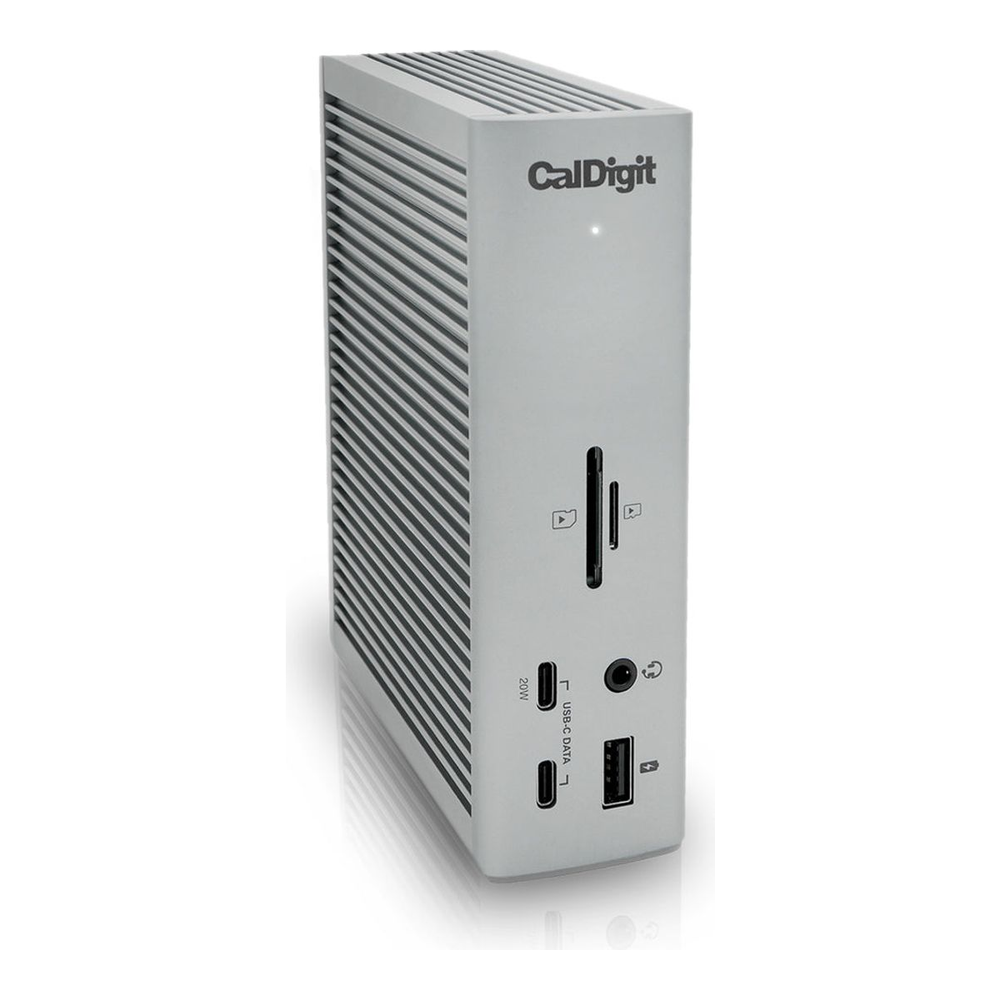
Amazon showed only 5 left on October 31, so the stock may run out before the price drops. If you need a dock this month, $379.99 from CalDigit is a safe buy; otherwise wait for $350. If you want the newest firmware without booting Windows or macOS, the Lenovo dock is the better fit, because CalDigit’s latest builds come through its own updater first. Check the CalDigit TS4 on Amazon.
Lenovo ThinkPad Universal Thunderbolt 4 Dock
Choose the Lenovo dock if you want its current firmware from Linux with fwupd. It charges at up to 100 W, drives up to four displays and has gigabit Ethernet rather than 2.5GbE. Lenovo’s own Amazon listing sold for about $250 in July before going out of stock, and the listing we now link is a reseller bundle.
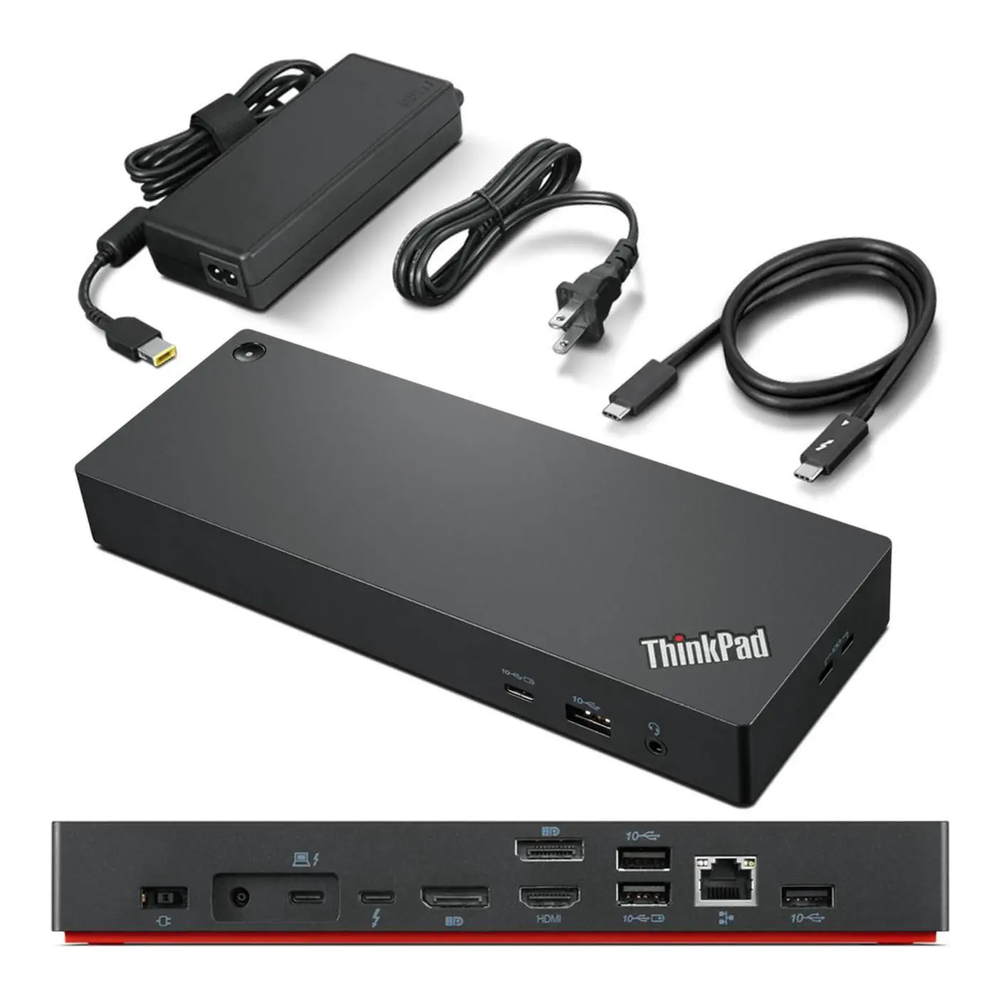
That bundle read $319.99 on October 10 and $308.99 on October 24 and October 31, with extra HDMI and DisplayPort cables on top of the 135 W adapter the dock always ships with, sold new with a seller’s one-year warranty rather than Lenovo’s. We couldn’t confirm a price on Lenovo’s own store that day. Don’t pay $308.99: set an alert at $260 and watch for Lenovo itself to restock. Check the Lenovo Thunderbolt 4 dock on Amazon.
Kensington SD5700T
Pick the SD5700T if you want a plain dock you can mount behind your monitor. It charges at 90 W, has four Thunderbolt 4 ports and drives one 8K display at 30 Hz or two 4K displays at 60 Hz. Its Ethernet port is gigabit only, and its firmware is not on LVFS. Kensington’s product page now lists it as discontinued.
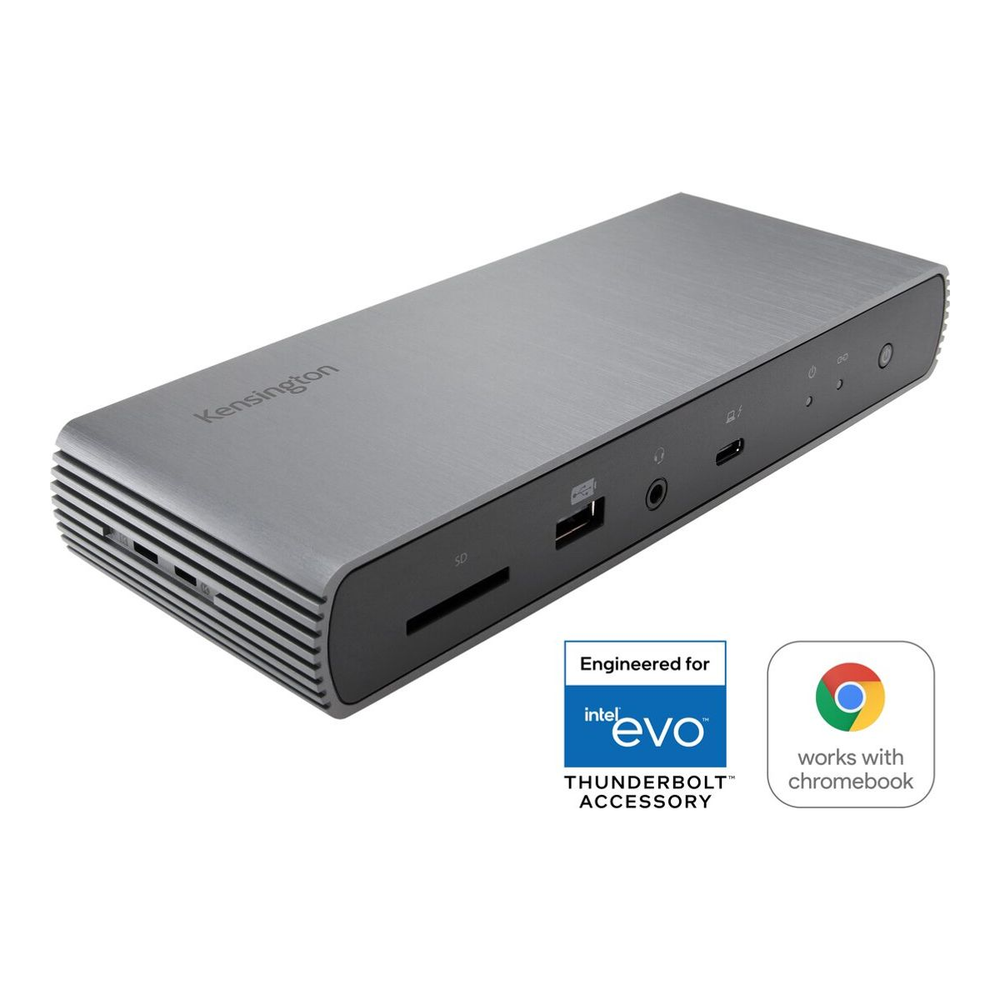
We saw it listed at $151.99 in July, with the seller not logged, and Amazon itself has sold it at $239.97 since October 10. Kensington’s own store listed it at $269.99 and out of stock on October 31. Because it’s discontinued, don’t count on a Black Friday cut. If it’s the dock you want, $239.97 from Amazon is fair. If you can wait, the Lenovo dock above is the one with a future. Check the Kensington SD5700T on Amazon.
Add a monitor light bar to your desk
Before you buy a light bar, check what your monitor’s USB port can supply. A USB-A port on a monitor often gives 500 to 900 mA, and many USB-C ports give 1.5 A, which isn’t enough for every bar here. Our monitor light bar guide lists each port’s default current. All four prices below matched our October 29 readings exactly, so none has moved since then.
BenQ ScreenBar Pro
The ScreenBar Pro is the light bar we’d pick for most developers. It throws more than 1,000 lux at 50 cm with a color rendering index of 95 or higher, adjusts from 2700K to 6500K, and switches itself off when its presence sensor sees you leave. It draws up to 1.7 A at 5 V over USB-C, so plug it into a 3 A port or a wall adapter.

Amazon and BenQ both asked $139 on October 31. It has no backlight, so the Halo 2 below suits you better if you code in a dark room. Wait for $120. Check the BenQ ScreenBar Pro on Amazon.
BenQ ScreenBar Halo 2
Pick the Halo 2 if you work with the room lights off. It adds a backlight behind the monitor and a wireless desk dial to the Pro’s front light, and it clips onto curved monitors from 1000R to 1800R. It needs a full 3 A at 5 V, which rules out most monitor USB ports, so plan on a wall adapter.

Amazon and BenQ’s store both had it at $199 on October 31, $60 over the Pro. If your room is already lit, you would be paying that $60 for a backlight you will not turn on. Wait for $170. Check the BenQ ScreenBar Halo 2 on Amazon.
BenQ ScreenBar
The original ScreenBar is the one to get if your monitor only has a USB-A port. It draws 1 A at 5 V, auto-dims to the room, and puts 930 lux on the desk at 45 cm. Its clip fits monitors 1 to 3 cm thick, so measure a slim panel’s top edge before you order.

At $109 on October 31, it costs only $30 less than the Pro while lighting less than half the area, so the Pro is the better buy if your port can power it. Wait for $90. Check the BenQ ScreenBar on Amazon.
Yeelight Monitor Light Bar
The Yeelight is the cheap way to find out whether you like a light bar at all. It’s a USB-powered metal bar with a color rendering index of 95, stepless 2700K to 6500K and touch controls, but no remote, sensor or auto-dimming. It was $26.49 against a $32.99 list price on both October 29 and October 31.

Clip range is the gamble with this one: Yeelight quotes up to 1.4 inches, and one review based on the Amazon listing puts it closer to 1.1 inches, so check your monitor’s thickness. At this price there is no reason to wait. If you have a curved ultrawide, the Quntis curved bar was $59.99 on October 31, unchanged from October 29. Check the Yeelight Monitor Light Bar on Amazon.
Buy a Linux-friendly laptop for less
A ThinkPad is the safest Linux laptop to buy on a deal because Lenovo publishes every configuration’s parts in its PSREF sheets, so you can check the Wi-Fi card, Ethernet chip and memory type before you pay. Memory is the spec to watch this year. A laptop with SO-DIMM slots lets you add RAM later, while soldered memory locks you to what you buy. These three come from the laptop guide for network engineers, where built-in Ethernet and USB-A ports also mattered.
All three Amazon listings were exactly the price we logged on October 25, and they’re sold by resellers, not Lenovo. That can be good news on price: Lenovo’s own store asked $1,469 for its only E14 Gen 7 AMD listing and $1,620 for its cheapest T14 Gen 6 Intel listing on October 31, both with 16GB. The P14s Gen 6 AMD with 16GB, our pick for big network labs, was also flat at $1,149.99.
Lenovo ThinkPad E14 Gen 7 AMD
The E14 Gen 7 AMD is the value pick for you if you want a ThinkPad you can upgrade. It has two DDR5-5600 SO-DIMM slots, a built-in RJ45 port, USB-A ports and USB4. The configuration we link has a Ryzen 7 250, 16GB and a 512GB SSD, and it read $1,019.99 on October 25 and October 31.

You pay $449 less than the list price on Lenovo’s own listing, which has a slower chip, so it is a fair price today even without a Black Friday cut. Skip it if screen quality matters to you, because the AMD model’s panel reviewed below average. Check the ThinkPad E14 Gen 7 AMD on Amazon.
Lenovo ThinkPad T14 Gen 6 Intel
The T14 Gen 6 is our best overall pick if you want a lighter business ThinkPad with Intel Ethernet. The configuration we link has a Core Ultra 7 255U, 32GB and a 1TB SSD, and that U-series chip means two SO-DIMM slots that take up to 64GB. It read $1,449.99 against a $1,649.99 list price on October 25 and October 31.

Watch out for the Lunar Lake versions (a “V” at the end of the CPU name, such as 226V), which solder 16GB or 32GB to the board. Those can look like the better deal on a sale page while giving you no upgrade path. Wait for $1,350 on the 255U model. Check the ThinkPad T14 Gen 6 on Amazon.
Lenovo V15 G4 AMN
Get the V15 G4 AMN if you need Linux, Ethernet and USB-A for coursework and little else. It has a Ryzen 5 7520U, a gigabit RJ45 port and two USB-A ports. Its 16GB of LPDDR5 is soldered and is also the maximum, so this is the most RAM it will ever have.

At $699.98 on October 31, it’s only about $320 under the E14 Gen 7 AMD, which you can upgrade and which has a faster chip. That gap is too small for a laptop you cannot grow, so wait for $600 or spend the extra on the E14. Check the Lenovo V15 G4 AMN on Amazon.
Skip discounts that hide a worse purchase
Most desk-gear traps this season come from the listing, not the product. A strikethrough tells you what a seller says the price was, and on several picks here the strikethrough is a list price nobody has paid in months. These are the patterns we saw while pulling the October prices:
- A reseller bundle replaces the maker’s listing, as with the Lenovo dock, at about $59 over what the maker’s listing sold for.
- A cheaper variant takes the same product name, as with the plastic-frame K8 Max, so the “deal” is on a different board.
- A third-party seller undercuts the maker by a dollar or two, as with the MX Master 4, and you lose the maker’s return path for almost nothing.
- A laptop discount lands on a soldered-RAM model, as with Lunar Lake T14 Gen 6 configurations, which costs you more later than it saves today.
None of these is a scam. They are ordinary listings that look like Black Friday deals in a search grid, and each one is easy to catch once you check the seller line and the exact model before you add it to your cart.
Run these checks before you pay
You don’t need to watch every listing every day. Set alerts at the buy-below prices above, then run through this list when one of them fires:
- You’ve confirmed the seller is the maker or Amazon, or you’ve read the third-party seller’s return and warranty terms.
- You’ve matched the model number to the exact variant you wanted, including frame, switch type, RAM and storage.
- You’ve checked that your laptop’s USB-C or Thunderbolt port can drive the monitor at its full resolution and refresh rate.
- You’ve checked that your monitor’s USB port, or a wall adapter, can power the light bar you picked.
- You’ve compared the price with the maker’s own store, because LG, Logitech and CalDigit were at or close to Amazon’s price on several picks.
If the price passes and the listing passes, buy it and stop watching. The CalDigit and Lenovo docks and the BenQ light bars have not moved since our last readings, so they’re the alerts most worth keeping open into late November. If you’re shopping for the rest of the homelab too, our Black Friday mini PC deals and GPU deals for local AI track prices the same way.